
Simviation Forums
Flight Simulator and other chat
Flight Simulator and other chat
 by fsxflyer » Fri Feb 15, 2013 12:41 pm

by Fozzer » Fri Feb 15, 2013 12:56 pm


by fsxflyer » Fri Feb 15, 2013 3:26 pm
by fsxflyer » Fri Feb 15, 2013 3:36 pm
by fsxflyer » Fri Feb 15, 2013 9:31 pm
by Boikat » Fri Feb 15, 2013 10:29 pm



by Fozzer » Sat Feb 16, 2013 4:32 am
by Jetranger » Sat Feb 16, 2013 5:57 am


by Hagar » Sat Feb 16, 2013 6:47 am


by fsxflyer » Sat Feb 16, 2013 4:45 pm
by Jetranger » Sat Feb 16, 2013 10:44 pm

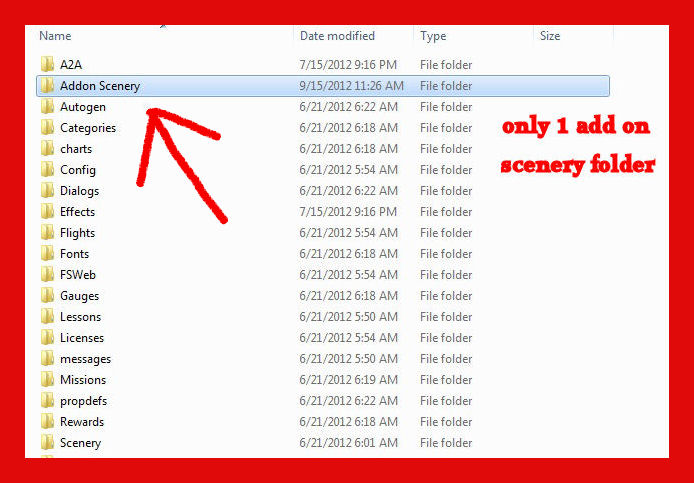
by fsxflyer » Sat Feb 16, 2013 11:09 pm
by Jetranger » Sun Feb 17, 2013 1:48 am

by Hagar » Sun Feb 17, 2013 4:35 am
Thanks, I uninstalled all of FSX and reinstalled in a clean config. This is what I do. Download scenery from simviation to temp file then extract all files to my folder. Access program files( x86) MS GAMES- MSFSX- ADD-ON SCENERY\ SCENERY and copy file from my folder to add-on scenery\scenery folder then open FSX and go to settings. Open scenery library, click add area and the add-on scenery\scenery folder appears. I click on it and then click in the empty space and nothing happens. Where did I screw up? Im really frustrated.
by fsxflyer » Mon Feb 18, 2013 7:42 pm
Return to Flight Simulator X (FSX) and Steam
Users browsing this forum: No registered users and 498 guests