Scenery Add-0n How To

FSX including FSX Steam version.

Scenery Add-0n How To

Postby fsxflyer » Fri Feb 15, 2013 12:41 pm

Hello everyone. New to Windows 7. Have Professional x64 edition. Was just getting the hang of XP and now have to start over. Can someone tell me how to add scenery to FSX. Got acouple of aircraft downloaded and working but tried to get the new Jakarta airport scenery and it didnt work. Downloaded into my folder then copied to add-on scenery/scenery folder in FSX but didnt get it. What did I do wrong or leave out?
fsxflyer
Ground hog
Ground hog
 
Posts: 10
Joined: Fri Feb 15, 2013 1:16 pm
Location: HERE , THERE AND EVERYWERE

Re: Scenery Add-0n How To

Postby Fozzer » Fri Feb 15, 2013 12:56 pm

Tips and Tweaks read-me...>>>>

Adding Scenery: http://205.252.250.26/cgi-bin/yabb25/Ya ... 1197423715

Paul... 8-)...!

If you are familiar with successfully adding scenery using Windows XP, Windows 7 is slightly different.
Once the scenery Folder containing the scenery (and the texture) has been selected in the Flight Sim Add-on scenery list, click with the mouse within the open window, and the scenery will magically appear in the Scenery Library list, otherwise the operation will not have been completed!
Last edited by Fozzer on Fri Feb 15, 2013 1:07 pm, edited 1 time in total.
Win 8.1 64-bit. DX11. Advent Tower. Intel i7-3770 3.9 GHz 8-core. 8 GB System RAM. AMD Radeon HD 7700 1GB RAM. DVD ROM. 2 Terra Byte SATA Hard Drive. Philips 17" LCD Monitor. Saitek Cyborg X Fly-5 Joystick. ...and a Briggs and Stratton Petrol Lawn Mower.
User avatar
Fozzer
Colonel
Colonel
 
Posts: 27369
Joined: Thu Jan 31, 2002 3:11 pm
Location: Hereford. England. EGBS.

Re: Scenery Add-0n How To

Postby fsxflyer » Fri Feb 15, 2013 3:26 pm

Just watched video on how to add scenery. Will give it a go and report back, thanks loads.
fsxflyer
Ground hog
Ground hog
 
Posts: 10
Joined: Fri Feb 15, 2013 1:16 pm
Location: HERE , THERE AND EVERYWERE

Re: Scenery Add-0n How To

Postby fsxflyer » Fri Feb 15, 2013 3:36 pm

Update to last post. SUCCESS!!!!!! Thanks again! Now lets go for 2 in a row.
fsxflyer
Ground hog
Ground hog
 
Posts: 10
Joined: Fri Feb 15, 2013 1:16 pm
Location: HERE , THERE AND EVERYWERE

Re: Scenery Add-0n How To

Postby fsxflyer » Fri Feb 15, 2013 9:31 pm

Still having some problems getting add-on scenery to work. Get error msg. scenery.cfg file error invalid remote scenery path scenery area.115 other times follow the video exactly but still no luck. What am I doing wrong.
fsxflyer
Ground hog
Ground hog
 
Posts: 10
Joined: Fri Feb 15, 2013 1:16 pm
Location: HERE , THERE AND EVERYWERE

Re: Scenery Add-0n How To

Postby Boikat » Fri Feb 15, 2013 10:29 pm

Which scenery addon was it?  It sounds like an area was deleted somehow.
Image
"I reject your reality, and substitute my own" Adam Savage, Mythbusters
User avatar
Boikat
Major
Major
 
Posts: 2974
Joined: Thu Mar 20, 2008 8:23 pm
Location: NW Loueezianner

Re: Scenery Add-0n How To

Postby Fozzer » Sat Feb 16, 2013 4:32 am

[quote]Which scenery addon was it?
Win 8.1 64-bit. DX11. Advent Tower. Intel i7-3770 3.9 GHz 8-core. 8 GB System RAM. AMD Radeon HD 7700 1GB RAM. DVD ROM. 2 Terra Byte SATA Hard Drive. Philips 17" LCD Monitor. Saitek Cyborg X Fly-5 Joystick. ...and a Briggs and Stratton Petrol Lawn Mower.
User avatar
Fozzer
Colonel
Colonel
 
Posts: 27369
Joined: Thu Jan 31, 2002 3:11 pm
Location: Hereford. England. EGBS.

Re: Scenery Add-0n How To

Postby Jetranger » Sat Feb 16, 2013 5:57 am

Also Watch this Scenery Add On' Tutorial - how to add scenery using windows 7 - by Bill Womack.

Video : http://www.youtube.com/watch?v=C8kO1IsJMuE&list=FLKUfmGlyrjJXmZ1eq3E695Q
Last edited by Jetranger on Sat Feb 16, 2013 5:59 am, edited 1 time in total.
Image
User avatar
Jetranger
Major
Major
 
Posts: 3232
Joined: Fri Sep 30, 2011 2:49 am
Location: Kansas City Missouri USA / KMKC

Re: Scenery Add-0n How To

Postby Hagar » Sat Feb 16, 2013 6:47 am

Look in the FSX\Addon Scenery directory for a sub-folder named Scenery. It's possible that you deleted it by mistake. This folder is activated by default, even if it's empty. If it's missing simply create a new folder in the FSX\Addon Scenery directory & rename it Scenery. That should fix the problem.
Last edited by Hagar on Sat Feb 16, 2013 6:48 am, edited 1 time in total.
Image

Founder & Sole Member - Grumpy's Over the Hill Club for Veteran Virtual Aviators
Member of the Fox Four Group
My Google Photos albums
My Flickr albums
User avatar
Hagar
Colonel
Colonel
 
Posts: 30868
Joined: Wed Jun 19, 2002 7:15 am
Location: Costa Geriatrica

Re: Scenery Add-0n How To

Postby fsxflyer » Sat Feb 16, 2013 4:45 pm

OK,now I am really messed up.When I click on scenery library\ add area in FSX I have 2 addon scenery\scenery folders .One has the subfolder scenery with nothing in it while the other has a subfolder with all the scenery library in it.
Last edited by fsxflyer on Sat Feb 16, 2013 4:47 pm, edited 1 time in total.
fsxflyer
Ground hog
Ground hog
 
Posts: 10
Joined: Fri Feb 15, 2013 1:16 pm
Location: HERE , THERE AND EVERYWERE

Re: Scenery Add-0n How To

Postby Jetranger » Sat Feb 16, 2013 10:44 pm

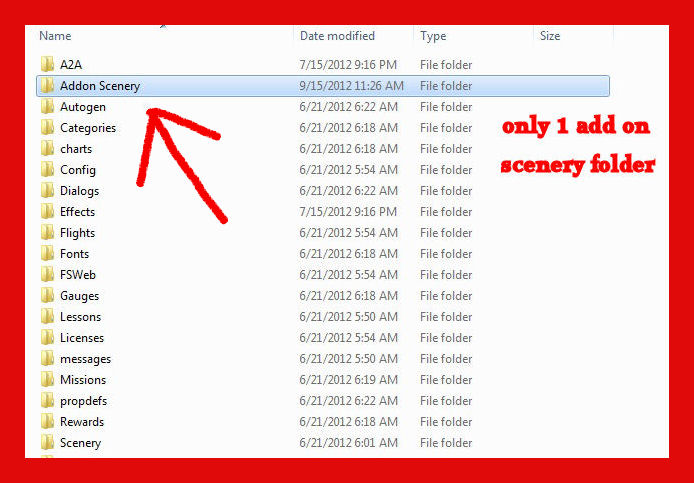
There or YOU should ONLY have 1 Add On' Scenery Folder in the Sim !!!

only 1

Evidently, you've downloaded some scenery, and when you did,, it came with a Folder called Add On' scenery,, and the actual folder / files you really needed were inside that Add On' Scenery folder,, sometimes some of these designers will put the folder / files for the download inside another folder,,

it makes it confusing I know, especially for those who aren't all that familiar with how the process , folder structure works, or if your new and just learning.

Hey, I had the same problems many years ago, till I took the time to study the folder / file structure of the sim,, the I got the hang of it / the Big Picture !!

I now very rarely have any problems Injecting Scenery or Aircraft into my FSX Sim.

Theres a few things to be on the look out for and pay attention when downloading files.

I Alaways before attempting to Inject anything into my Sim,, I completely tear apart all the folders / files that I downloaded, just to check and see how the Creator actually ORGANIZED them, before it was Uploaded.

Sometimes, not often, they include all the folders / files in more folders than whats really needed,, for whatever reason,,, I've found some folders & files buried in 3 or 4 different folders,,  sometimes,, just their way of doing things,,, others I've downloaded have been real good.

So be on the watch for that,,, simply put, look before you Leap !!

save yourself a lotta frustration, headaches and mental anger !!

Sendin ya a  screen shot of how yours should look

again you should only have  1 Add On' scenery Folder in your sim by Factory Default.

the rest of the folders will be  - Sub Folders within that,,, 
SCENERY
TEXTURE

There is another Scenery Folder within whats called the WORLD Folder,, but we won't get into that right now,,, that'll confuse you, and its a weee bit harder to find, unless you know where to look !!

save that for another day !  ;)

Right now, just learn the structure you have,, and try expermenting adding scenery and getting it to show up properly till ya get the hang of it.

Screen shot below 

Jetranger

Image
Image
User avatar
Jetranger
Major
Major
 
Posts: 3232
Joined: Fri Sep 30, 2011 2:49 am
Location: Kansas City Missouri USA / KMKC

Re: Scenery Add-0n How To

Postby fsxflyer » Sat Feb 16, 2013 11:09 pm

Thanks, I uninstalled all of FSX and reinstalled in a clean config. This is what I do. Download scenery from simviation to temp file then extract all files to my folder. Access program files( x86) MS GAMES- MSFSX- ADD-ON SCENERY\ SCENERY and copy file from my folder to add-on scenery\scenery folder then open FSX and go to settings. Open scenery library, click add area and the add-on scenery\scenery folder appears. I click on it and then click in the empty space and nothing happens. Where did I screw up? Im really frustrated.
fsxflyer
Ground hog
Ground hog
 
Posts: 10
Joined: Fri Feb 15, 2013 1:16 pm
Location: HERE , THERE AND EVERYWERE

Re: Scenery Add-0n How To

Postby Jetranger » Sun Feb 17, 2013 1:48 am

Think, I understand ???

once you've added the scenery and you see it show up in the add on' scenery box area,,,

CLICK - OK,,,

then click in the white area or they often refer to it as the chrome area,,,

and you should be good to go ,,,

re-watch this video : http://www.youtube.com/watch?v=C8kO1IsJMuE&list=FLKUfmGlyrjJXmZ1eq3E695Q

Jet.
Last edited by Jetranger on Sun Feb 17, 2013 1:49 am, edited 1 time in total.
Image
User avatar
Jetranger
Major
Major
 
Posts: 3232
Joined: Fri Sep 30, 2011 2:49 am
Location: Kansas City Missouri USA / KMKC

Re: Scenery Add-0n How To

Postby Hagar » Sun Feb 17, 2013 4:35 am

Thanks, I uninstalled all of FSX and reinstalled in a clean config. This is what I do. Download scenery from simviation to temp file then extract all files to my folder. Access program files( x86) MS GAMES- MSFSX- ADD-ON SCENERY\ SCENERY and copy file from my folder to add-on scenery\scenery folder then open FSX and go to settings. Open scenery library, click add area and the add-on scenery\scenery folder appears. I click on it and then click in the empty space and nothing happens. Where did I screw up? Im really frustrated.

It would help if you tell us which scenery you're trying to install. Description & file name or a link to the page it's posted on. Then someone can download it & walk you through it. This isn't difficult once you understand the basic principle.
Image

Founder & Sole Member - Grumpy's Over the Hill Club for Veteran Virtual Aviators
Member of the Fox Four Group
My Google Photos albums
My Flickr albums
User avatar
Hagar
Colonel
Colonel
 
Posts: 30868
Joined: Wed Jun 19, 2002 7:15 am
Location: Costa Geriatrica

Re: Scenery Add-0n How To

Postby fsxflyer » Mon Feb 18, 2013 7:42 pm

Thanks to everyone for your help . Think I got the hang of it as far as the easy ones go. Now how about something like EHAM--Amsterdam Schiphol Intl and those 3 BGL files. How doess that work?EHAM ADEX MR.BGL     EHAM ADEX MR CVX bgl   and     EHAM ADEX MR OBJ.BGL
fsxflyer
Ground hog
Ground hog
 
Posts: 10
Joined: Fri Feb 15, 2013 1:16 pm
Location: HERE , THERE AND EVERYWERE

Next

Return to Flight Simulator X (FSX) and Steam

Who is online

Users browsing this forum: No registered users and 1258 guests