Simviation Forums
Flight Simulator and other chat
Flight Simulator and other chat
 by BJ080 » Tue Jun 28, 2011 9:48 am

by JoBee » Tue Jun 28, 2011 9:51 am

by BJ080 » Thu Jun 30, 2011 8:55 am

by JoBee » Thu Jun 30, 2011 9:31 am
by BJ080 » Thu Jun 30, 2011 1:55 pm
by JoBee » Thu Jun 30, 2011 2:51 pm
[Main]
User Objects=Airplane, Helicopter
SimObjectPaths.0=SimObjects\Airplanes
SimObjectPaths.1=SimObjects\Rotorcraft
SimObjectPaths.2=SimObjects\GroundVehicles
SimObjectPaths.3=SimObjects\Boats
SimObjectPaths.4=SimObjects\Animals
SimObjectPaths.5=SimObjects\Miscby BJ080 » Thu Jun 30, 2011 4:29 pm
by JoBee » Thu Jun 30, 2011 7:57 pm
by Hagar » Fri Jul 01, 2011 3:04 am
the Dornier is from that link you sent..http://www.premaircraft.com/do228_FSX/index.html
Enclosed are two jpeg's of the chose aircraft and the file of the DC10-30 in my `aircraft file FSX.
The red ring is around the `mystery plane that can't be found in `all` the files in my FSX.
http://i200.photobucket.com/albums/aa19 ... aftFSX.jpg
http://i200.photobucket.com/albums/aa19 ... ftfile.jpg



by BJ080 » Fri Jul 01, 2011 3:50 am
by BJ080 » Fri Jul 01, 2011 4:15 am
Not wishing to interfere as my previous attempts to help you weren't successful. I'll have one more try.the Dornier is from that link you sent..http://www.premaircraft.com/do228_FSX/index.html
First of all & this is most important, if you want help or advice you must try to be more specific. There are 9 different files posted on that page. Which one are you having problems with?
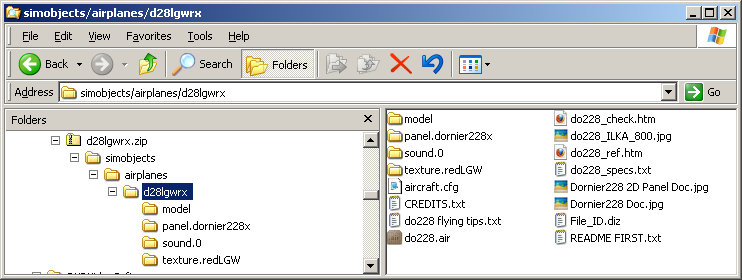
I suspect you're making the same basic mistake when extracting files & installing the aircraft to FSX. I tried the first one on the page (LGW Germany file name d28lgwrx.zip.) It's configured in the usual way & it installed for me with no problem at all. Please ignore the instructions to extract all files to the main FSX folder. Extract the zipfile to a Temp folder & paste the folder named d28lgwrx into FSX\SimObjects\Airplanes.Enclosed are two jpeg's of the chose aircraft and the file of the DC10-30 in my `aircraft file FSX.
The red ring is around the `mystery plane that can't be found in `all` the files in my FSX.
http://i200.photobucket.com/albums/aa19 ... aftFSX.jpg
http://i200.photobucket.com/albums/aa19 ... ftfile.jpg
It might help to figure this out if you post a shot of your FSX\SimObjects\Airplanes folder. How many addon aircraft do you have in there whether they work or not?

by EVVFCX » Fri Jul 01, 2011 7:06 am

by BJ080 » Fri Jul 01, 2011 9:53 am
I've been around flight sims for many years so usually get it right but occasionally wrong.
I'll try this one which is new to me and let you know of anything ' my old' brain doesn't like.
 And someone who has a brain as old as mine too
by Hagar » Fri Jul 01, 2011 10:14 am
It might help to figure this out if you post a shot of your FSX\SimObjects\Airplanes folder. How many addon aircraft do you have in there whether they work or not?
Hi Hagar, Sorry but I wasn't ignoring your past help, I just gave up on the subject after trying all I could to resolve the problem.
As far as `being more specific` I'm not well up in the world of PC's and their codes etc so I can only follow the instructions I receive from you good guys on the forum.
I'm sure you are right in that I'm making the same basic mistakes, but I just don't know what they are so therefore I just repeat the same mistakes over again
I have just done exactly what you suggested with the "paste the folder named d28lgwrx into FSX\SimObjects\Airplanes."
But I'm afraid that the plane still doesn't appear in the FSX `choose aircraft`.
by EVVFCX » Fri Jul 01, 2011 11:16 am
but I'll help anybody who listens/reads carefully.Return to Flight Simulator X (FSX) and Steam
Users browsing this forum: No registered users and 376 guests