Dornier Do 228 instal

FSX including FSX Steam version.

Dornier Do 228 instal

Postby BJ080 » Tue Jun 28, 2011 9:48 am

Is there any way I can download the dornier Do 228 that works in FSX. I have tried a few times but when I instal into aircraft the plane isn't usable :-[
BJ080
Ground hog
Ground hog
 
Posts: 12
Joined: Wed Jun 15, 2011 8:48 am

Re: Dornier Do 228 instal

Postby JoBee » Tue Jun 28, 2011 9:51 am

Have you tried these?- http://www.premaircraft.com/do228_FSX/index.html
cheers,
Joe
Don't argue with idiots, they drag you down to their level and beat you with experience.
User avatar
JoBee
Captain
Captain
 
Posts: 574
Joined: Sat Aug 29, 2009 2:14 am

Re: Dornier Do 228 instal

Postby BJ080 » Thu Jun 30, 2011 8:55 am

Yes Joe, I have tried those on that link, and though I see the files in my `airplanes FSX sim objects they just don't work when I open the flight sim. this is the case with a few other aircraft I've downloaded over the past few weeks. I check that the files are identicle with the `seen` aircraft and there's no difference at all. You may have seen my previous messages regarding the DC 10-30 which is still not resolved even after I deleted all the DC's and tried again. I have one DC `eastern` which I can't get rid of because even after doing searches etc it isn't showing , but it is still in the Airplane icons and can be opened up in the Sim >:(
BJ080
Ground hog
Ground hog
 
Posts: 12
Joined: Wed Jun 15, 2011 8:48 am

Re: Dornier Do 228 instal

Postby JoBee » Thu Jun 30, 2011 9:31 am

RE: the DC 10, have you looked in the other SimObjects folders? An aircraft folder accidentally dropped into another SimObjects folder, say Animals, will still work in the sim.

All due respect, the best way to get help in these forums is to be as specific as possible when asking for help.

You state the
Don't argue with idiots, they drag you down to their level and beat you with experience.
User avatar
JoBee
Captain
Captain
 
Posts: 574
Joined: Sat Aug 29, 2009 2:14 am

Re: Dornier Do 228 instal

Postby BJ080 » Thu Jun 30, 2011 1:55 pm

Thanks Jobee for your help, I have just spent the last few hours, not forgetting the past few weeks, going through every file in the FSX to see if the problem aircraft is there, it isn't anywhere to be found. I don't have the file name because I can't find it but it shows in the `Select Aircraft` as McDonnell Douglas DC10-30, Eastern Airlines. I can fly this craft but I can't seem to re-paint it so I wanted a plane in the DC 10-30 that I could, that is the reason for all this problem.
I have downloaded another DC 10-30, SGA_DC10_30_Jat and also the Fedex one too, but even though they are in the sim objects as instructed, they don't show in the `Select Aircraft in FSX :-/.
The same goes for the Dornier-Do288 too.

"You state the  theDo228 "does not work". What exactly does that mean?

Does it mean the aircraft does not show up in the list when you try to select a plane?" Yes that's the problem, all the files seem fine in the sim object area, but they don't show in the `Select Aircraft.
BJ080
Ground hog
Ground hog
 
Posts: 12
Joined: Wed Jun 15, 2011 8:48 am

Re: Dornier Do 228 instal

Postby JoBee » Thu Jun 30, 2011 2:51 pm

Again, what is the exact filename of the DO228 that you downloaded and where did you get it?

If you cannot give us the exact filename and where you downloaded it there is no way for someone else to try to replicate your problems.

As I asked in my last post, do you have a check in the "Show all Variations" box?

Do the aircraft that don't show up in the airplane selection menu have panel folders? Without a panel folder FSX will think the plane is for AI and not a user plane.

The DC10 is in one of the SimObjects subfolders (unless you edited your FSX.cfg to look elsewhere) or it would not show up in the sim.

This is from a bone stock FSX...

Code: Select all
[Main]
User Objects=Airplane, Helicopter
SimObjectPaths.0=SimObjects\Airplanes
SimObjectPaths.1=SimObjects\Rotorcraft
SimObjectPaths.2=SimObjects\GroundVehicles
SimObjectPaths.3=SimObjects\Boats
SimObjectPaths.4=SimObjects\Animals
SimObjectPaths.5=SimObjects\Misc


Have you added any paths to yours?

Have you looked in all of the above folders, planes do not have to be in only SimObjects\Airplanes to work.

cheers,
Joe
Don't argue with idiots, they drag you down to their level and beat you with experience.
User avatar
JoBee
Captain
Captain
 
Posts: 574
Joined: Sat Aug 29, 2009 2:14 am

Re: Dornier Do 228 instal

Postby BJ080 » Thu Jun 30, 2011 4:29 pm

the Dornier is from that link you sent..http://www.premaircraft.com/do228_FSX/index.html
The DC10-30's all came from Simviation,and as for file names I gave you all I could see previously ( DC 10-30, SGA_DC10_30_Jat) this is one of three. And yes I do have the `Show all variations ticked`.
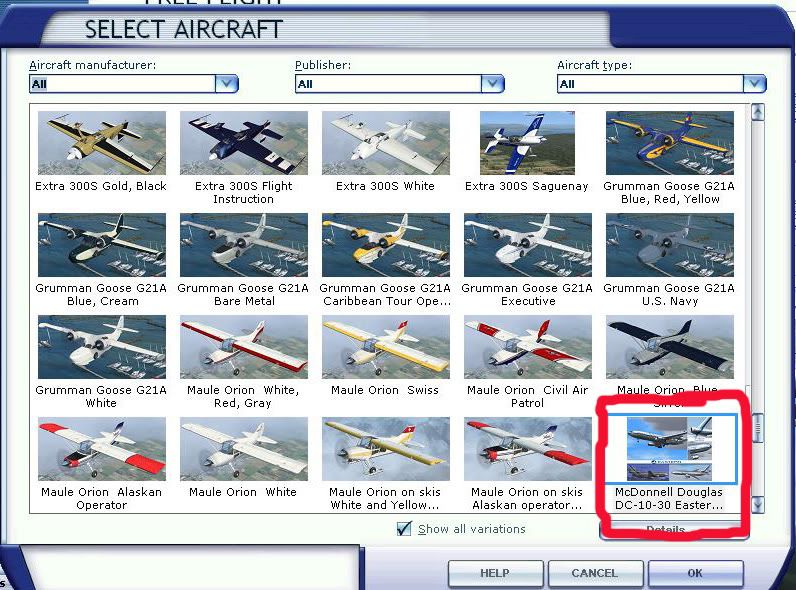
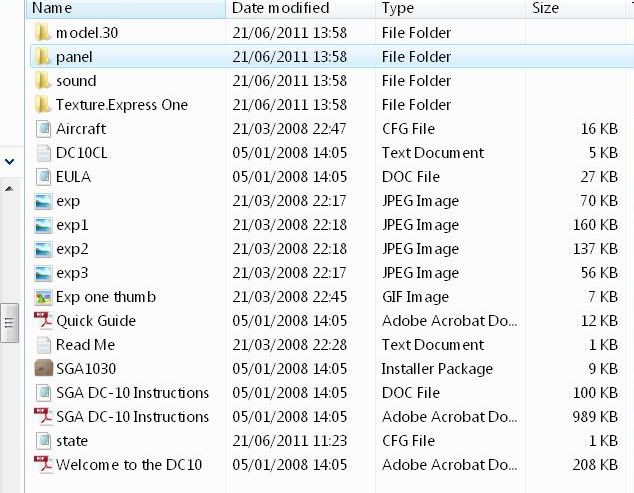
Enclosed are two jpeg's of the chose aircraft and the file of the DC10-30 in my `aircraft file FSX.
The red ring is around the `mystery plane that can't be found in `all` the files in my FSX.
http://i200.photobucket.com/albums/aa19 ... aftFSX.jpg
http://i200.photobucket.com/albums/aa19 ... ftfile.jpg

BJ080
Ground hog
Ground hog
 
Posts: 12
Joined: Wed Jun 15, 2011 8:48 am

Re: Dornier Do 228 instal

Postby JoBee » Thu Jun 30, 2011 7:57 pm

From your other thread...

[quote]
...though I have cleaned all the previous ones out of my FSX Sim Objects, and reinstalled the `Express ONE` DC10-30 but the weird thing is that one of the planes I deleted is still showing, and able to fly
Don't argue with idiots, they drag you down to their level and beat you with experience.
User avatar
JoBee
Captain
Captain
 
Posts: 574
Joined: Sat Aug 29, 2009 2:14 am

Re: Dornier Do 228 instal

Postby Hagar » Fri Jul 01, 2011 3:04 am

Not wishing to interfere as my previous attempts to help you weren't successful. I'll have one more try.

the Dornier is from that link you sent..http://www.premaircraft.com/do228_FSX/index.html

First of all & this is most important, if you want help or advice you must try to be more specific. There are 9 different files posted on that page. Which one are you having problems with?

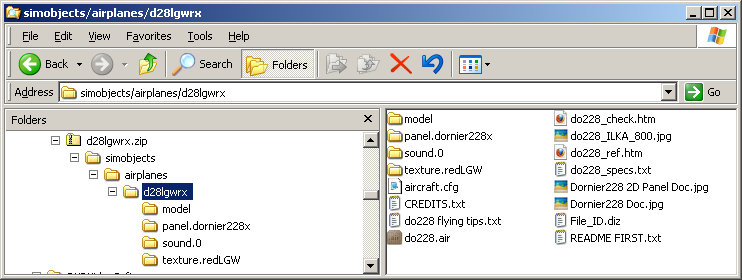
I suspect you're making the same basic mistake when extracting files & installing the aircraft to FSX. I tried the first one on the page (LGW Germany file name d28lgwrx.zip.) It's configured in the usual way & it installed for me with no problem at all. Please ignore the instructions to extract all files to the main FSX folder. Extract the zipfile to a Temp folder & paste the folder named d28lgwrx into FSX\SimObjects\Airplanes.
Image

Enclosed are two jpeg's of the chose aircraft and the file of the DC10-30 in my `aircraft file FSX.
The red ring is around the `mystery plane that can't be found in `all` the files in my FSX.
http://i200.photobucket.com/albums/aa19 ... aftFSX.jpg
http://i200.photobucket.com/albums/aa19 ... ftfile.jpg

It might help to figure this out if you post a shot of your FSX\SimObjects\Airplanes folder. How many addon aircraft do you have in there whether they work or not?
Last edited by Hagar on Fri Jul 01, 2011 3:06 am, edited 1 time in total.
Image

Founder & Sole Member - Grumpy's Over the Hill Club for Veteran Virtual Aviators
Member of the Fox Four Group
My Google Photos albums
My Flickr albums
User avatar
Hagar
Colonel
Colonel
 
Posts: 30868
Joined: Wed Jun 19, 2002 7:15 am
Location: Costa Geriatrica

Re: Dornier Do 228 instal

Postby BJ080 » Fri Jul 01, 2011 3:50 am

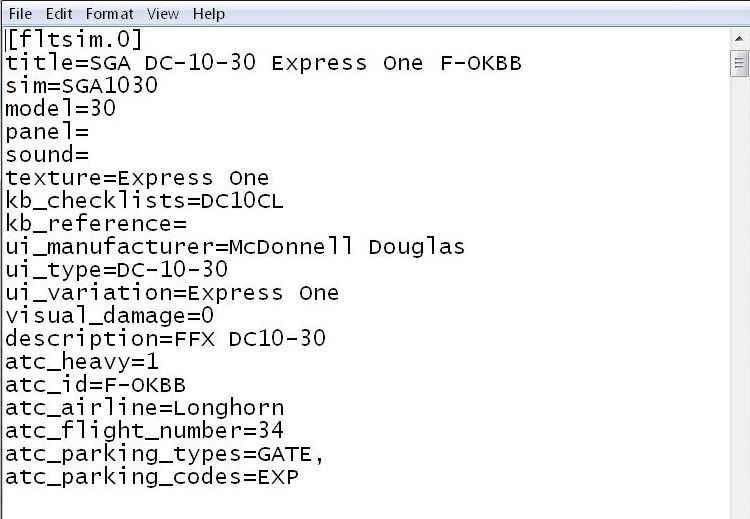
Please open the aircraft.cfg in the Express One folder and check the following lines...

ui_manufacturer=
ui_type=
ui_variation=


cheers,
Joe[/quote]
http://i200.photobucket.com/albums/aa19 ... nprint.jpg
BJ080
Ground hog
Ground hog
 
Posts: 12
Joined: Wed Jun 15, 2011 8:48 am

Re: Dornier Do 228 instal

Postby BJ080 » Fri Jul 01, 2011 4:15 am

Not wishing to interfere as my previous attempts to help you weren't successful. I'll have one more try.

the Dornier is from that link you sent..http://www.premaircraft.com/do228_FSX/index.html

First of all & this is most important, if you want help or advice you must try to be more specific. There are 9 different files posted on that page. Which one are you having problems with?

I suspect you're making the same basic mistake when extracting files & installing the aircraft to FSX. I tried the first one on the page (LGW Germany file name d28lgwrx.zip.) It's configured in the usual way & it installed for me with no problem at all. Please ignore the instructions to extract all files to the main FSX folder. Extract the zipfile to a Temp folder & paste the folder named d28lgwrx into FSX\SimObjects\Airplanes.
Image

Enclosed are two jpeg's of the chose aircraft and the file of the DC10-30 in my `aircraft file FSX.
The red ring is around the `mystery plane that can't be found in `all` the files in my FSX.
http://i200.photobucket.com/albums/aa19 ... aftFSX.jpg
http://i200.photobucket.com/albums/aa19 ... ftfile.jpg

It might help to figure this out if you post a shot of your FSX\SimObjects\Airplanes folder. How many addon aircraft do you have in there whether they work or not?

Hi Hagar, Sorry but I wasn't ignoring your past help, I just gave up on the subject after trying all I could to resolve the problem.
As far as `being more specific` I'm not well up in the world of PC's and their codes etc so I can only follow the instructions I receive from you good guys on the forum.
I'm sure you are right in that I'm making the same basic mistakes, but I just don't know what they are so therefore I just repeat the same mistakes over again :-[
I have just done exactly what you suggested with the "paste the folder named d28lgwrx into FSX\SimObjects\Airplanes."
But I'm afraid that the plane still doesn't appear in the FSX `choose aircraft`. :(
I will have to start afresh later, because I'm a full time carer to my Wife this past 16 years after her brain embolism which left her totally incapable of even the smallest of tasks or even to convers, so you can imagine the stress.
BJ080
Ground hog
Ground hog
 
Posts: 12
Joined: Wed Jun 15, 2011 8:48 am

Re: Dornier Do 228 instal

Postby EVVFCX » Fri Jul 01, 2011 7:06 am

I've been around flight sims for many years so usually get it right but occasionally wrong.

I'll try this one which is new to me and let you know of anything ' my old' brain doesn't like.
May the Mynd be with you.
So far my number of landings either passenger or pilot equal my number of takeoffs.

FSX Gold Acc, P3D V4, FS2020
User avatar
EVVFCX
Captain
Captain
 
Posts: 751
Joined: Tue Nov 27, 2007 8:32 am
Location: Pontefract, West Yorkshire

Re: Dornier Do 228 instal

Postby BJ080 » Fri Jul 01, 2011 9:53 am

I've been around flight sims for many years so usually get it right but occasionally wrong.

I'll try this one which is new to me and let you know of anything ' my old' brain doesn't like.

Oh Yes, the more the merrier :) And someone who has a brain as old as mine too  ::)
BJ080
Ground hog
Ground hog
 
Posts: 12
Joined: Wed Jun 15, 2011 8:48 am

Re: Dornier Do 228 instal

Postby Hagar » Fri Jul 01, 2011 10:14 am

It might help to figure this out if you post a shot of your FSX\SimObjects\Airplanes folder. How many addon aircraft do you have in there whether they work or not?

Hi Hagar, Sorry but I wasn't ignoring your past help, I just gave up on the subject after trying all I could to resolve the problem.
As far as `being more specific` I'm not well up in the world of PC's and their codes etc so I can only follow the instructions I receive from you good guys on the forum.
I'm sure you are right in that I'm making the same basic mistakes, but I just don't know what they are so therefore I just repeat the same mistakes over again :-[

You're still not answering my questions. What I need is the file name of an aircraft you're having problems with so I can download it to check it out. For example: d28lgwrx.zip. That should not be difficult.  I would still like to see a shot of your SimObjects\Airplanes folder.

I have just done exactly what you suggested with the "paste the folder named d28lgwrx into FSX\SimObjects\Airplanes."
But I'm afraid that the plane still doesn't appear in the FSX `choose aircraft`. :(

This might depend on the utility & method you use for extracting zipfiles. Have another look at the shot I posted. Make sure the d28lgwrx folder directly containing the Model, Panel, Sound & Texture subfolders is not hidden inside another one. This is one of the most common causes of installation problems.
Last edited by Hagar on Fri Jul 01, 2011 10:15 am, edited 1 time in total.
Image

Founder & Sole Member - Grumpy's Over the Hill Club for Veteran Virtual Aviators
Member of the Fox Four Group
My Google Photos albums
My Flickr albums
User avatar
Hagar
Colonel
Colonel
 
Posts: 30868
Joined: Wed Jun 19, 2002 7:15 am
Location: Costa Geriatrica

Re: Dornier Do 228 instal

Postby EVVFCX » Fri Jul 01, 2011 11:16 am

Hi BJ080,

If your having trouble with screen shots, there is another way you can get the info onto the screen in txt mode without you having to do much typing, just a little copy and pasting.

Are you happy using command prompt window?

Ideally I need to know where your FSX is installed?

I can tell you what to do without me knowing if needed

You'll need to copy txt from here into the command prompt window(dos), press enter and a txt file will be created
that you can copy and paste from back into this thread, this will give the genius guys here some help in helping you.
However:
There is another way that's maybe easier for you without using command prompt and still create a list of the folders and won't matter if your on win7 or xp.

I realise there is proberly several hours in time zones, I'll log back online this evening Fri.

If your unable then I'm not realy free until Monday.
Theme park day on sat and it's RAF Waddington airshow on sunday  :) but I'll help anybody who listens/reads carefully.

regards

Steve ( UK )
May the Mynd be with you.
So far my number of landings either passenger or pilot equal my number of takeoffs.

FSX Gold Acc, P3D V4, FS2020
User avatar
EVVFCX
Captain
Captain
 
Posts: 751
Joined: Tue Nov 27, 2007 8:32 am
Location: Pontefract, West Yorkshire

Next

Return to Flight Simulator X (FSX) and Steam

Who is online

Users browsing this forum: No registered users and 505 guests