Stupid question...

FSX including FSX Steam version.

Re: Stupid question...

Postby Tomcat5 » Wed Jan 13, 2010 7:42 pm

everything looks good.  can you send one of the problem?  the nonexistent things in the select aircraft menu?
Asus G71GX-RX05 from BestBuy.
User avatar
Tomcat5
2nd Lieutenant
2nd Lieutenant
 
Posts: 181
Joined: Mon Sep 07, 2009 6:45 pm
Location: KGED

Re: Stupid question...

Postby Jisco » Wed Jan 13, 2010 9:29 pm

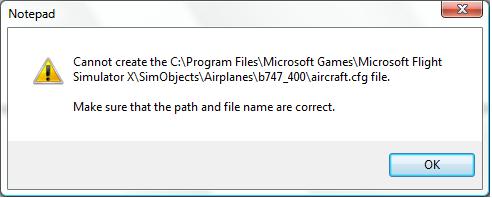
When I go to save the aircraft cfg file (with the AF1 stuff in it) it says

Image

Click ok then save to desktop then move it in folder.
F16!
Image
User avatar
Jisco
1st Lieutenant
1st Lieutenant
 
Posts: 482
Joined: Tue Jul 28, 2009 1:06 pm
Location: KCVG

Re: Stupid question...

Postby Thud » Thu Jan 14, 2010 8:12 am

Thanks Jisco, but I got that one already 8-)
Well I don't think I need a screenshot, Tomcat5, it looks just the same, all the default 747's are there, but the AF1 texture isn't. All other planes (including downloads) are fine.
Image
Windows Vista (32bit)
Thud
1st Lieutenant
1st Lieutenant
 
Posts: 484
Joined: Thu Sep 24, 2009 10:07 pm

Re: Stupid question...

Postby Tomcat5 » Thu Jan 14, 2010 4:02 pm

What is the af1 texture folder's name?
Asus G71GX-RX05 from BestBuy.
User avatar
Tomcat5
2nd Lieutenant
2nd Lieutenant
 
Posts: 181
Joined: Mon Sep 07, 2009 6:45 pm
Location: KGED

Re: Stupid question...

Postby Thud » Thu Jan 14, 2010 4:39 pm

AFI_747.zip (I, India, not #1)
Image
Windows Vista (32bit)
Thud
1st Lieutenant
1st Lieutenant
 
Posts: 484
Joined: Thu Sep 24, 2009 10:07 pm

Re: Stupid question...

Postby Tomcat5 » Thu Jan 14, 2010 4:50 pm

AFI_747.zip (I, India, not #1)

Sorry, no, the texture in the b747 folder.
Asus G71GX-RX05 from BestBuy.
User avatar
Tomcat5
2nd Lieutenant
2nd Lieutenant
 
Posts: 181
Joined: Mon Sep 07, 2009 6:45 pm
Location: KGED

Re: Stupid question...

Postby Thud » Thu Jan 14, 2010 5:07 pm

It's not
:-[
Image
Windows Vista (32bit)
Thud
1st Lieutenant
1st Lieutenant
 
Posts: 484
Joined: Thu Sep 24, 2009 10:07 pm

Re: Stupid question...

Postby Daube » Thu Jan 14, 2010 5:14 pm

Then you have to put it there.
Your edition of the aircraft.cfg is just perfect.
Do you see the line "texture=airforceone" ? It means that FSX will find the corresponding textures for that plane in a folder nammed "texture.airforceone", located in the main folder of the plane.
So, when you install a new repaint for a plane, the steps are as follows:
1 - extract the archive of the repaint somewhere in a temp folder (you did that, I think)
2 - move the [flightsim.x] section from the readme to the aircraft.cfg (you did that on the previous page)
3- move the texture folder "texture.***" (*** = "airforceone" in your case) into the main folder of the plane. (This step is missing in your case).

So you see ? You just need to perform the last step.
User avatar
Daube
Lieutenant Colonel
Lieutenant Colonel
 
Posts: 6611
Joined: Wed Oct 05, 2005 8:34 am
Location: Nice (FR)

Re: Stupid question...

Postby Tomcat5 » Thu Jan 14, 2010 5:48 pm

Then you have to put it there.
Your edition of the aircraft.cfg is just perfect.
Do you see the line "texture=airforceone" ? It means that FSX will find the corresponding textures for that plane in a folder nammed "texture.airforceone", located in the main folder of the plane.
So, when you install a new repaint for a plane, the steps are as follows:
1 - extract the archive of the repaint somewhere in a temp folder (you did that, I think)
2 - move the [flightsim.x] section from the readme to the aircraft.cfg (you did that on the previous page)
3- move the texture folder "texture.***" (*** = "airforceone" in your case) into the main folder of the plane. (This step is missing in your case).

So you see ? You just need to perform the last step.


Beat me to it, lol.
Asus G71GX-RX05 from BestBuy.
User avatar
Tomcat5
2nd Lieutenant
2nd Lieutenant
 
Posts: 181
Joined: Mon Sep 07, 2009 6:45 pm
Location: KGED

Re: Stupid question...

Postby Thud » Thu Jan 14, 2010 5:51 pm

It worked! Thanks Daube and Tomcat5!
8-)
Image
Windows Vista (32bit)
Thud
1st Lieutenant
1st Lieutenant
 
Posts: 484
Joined: Thu Sep 24, 2009 10:07 pm

Re: Stupid question...

Postby Tomcat5 » Thu Jan 14, 2010 6:21 pm

It worked! Thanks Daube and Tomcat5!
8-)

You're welcome.   :)
Asus G71GX-RX05 from BestBuy.
User avatar
Tomcat5
2nd Lieutenant
2nd Lieutenant
 
Posts: 181
Joined: Mon Sep 07, 2009 6:45 pm
Location: KGED

Previous

Return to Flight Simulator X (FSX) and Steam

Who is online

Users browsing this forum: No registered users and 488 guests