Simviation Forums
Flight Simulator and other chat
Flight Simulator and other chat
 by Tomcat5 » Wed Jan 13, 2010 7:42 pm

by Jisco » Wed Jan 13, 2010 9:29 pm
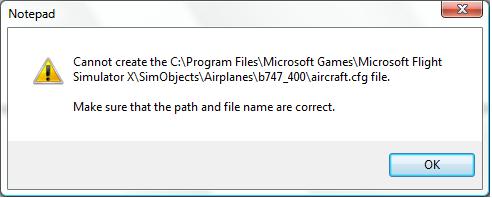
When I go to save the aircraft cfg file (with the AF1 stuff in it) it says


by Thud » Thu Jan 14, 2010 8:12 am

by Tomcat5 » Thu Jan 14, 2010 4:02 pm
by Thud » Thu Jan 14, 2010 4:39 pm
by Tomcat5 » Thu Jan 14, 2010 4:50 pm
AFI_747.zip (I, India, not #1)
by Daube » Thu Jan 14, 2010 5:14 pm


by Tomcat5 » Thu Jan 14, 2010 5:48 pm
Then you have to put it there.
Your edition of the aircraft.cfg is just perfect.
Do you see the line "texture=airforceone" ? It means that FSX will find the corresponding textures for that plane in a folder nammed "texture.airforceone", located in the main folder of the plane.
So, when you install a new repaint for a plane, the steps are as follows:
1 - extract the archive of the repaint somewhere in a temp folder (you did that, I think)
2 - move the [flightsim.x] section from the readme to the aircraft.cfg (you did that on the previous page)
3- move the texture folder "texture.***" (*** = "airforceone" in your case) into the main folder of the plane. (This step is missing in your case).
So you see ? You just need to perform the last step.
by Thud » Thu Jan 14, 2010 5:51 pm
by Tomcat5 » Thu Jan 14, 2010 6:21 pm
It worked! Thanks Daube and Tomcat5!
8-)
Return to Flight Simulator X (FSX) and Steam
Users browsing this forum: No registered users and 358 guests