The dreaded 'FSX Fatal error' message

FSX including FSX Steam version.

The dreaded 'FSX Fatal error' message

Postby gavinprice02 » Thu Dec 24, 2009 3:30 pm

I am receiving this message in nearly everyflight. Are ther any knob fixes? I'm running Windows 7 64bit.
It's becoming annoying going throught startup procedure's and programming fmc's just to get this message halfway through flight.
Any help will be gratefully appreciated.
My specs
I7920 4ghz
Asus P6T Deluxe V2
6gb Corsair DDR3 1600
BFG GTX285OCX
Windows 7 64bit
gavinprice02
2nd Lieutenant
2nd Lieutenant
 
Posts: 209
Joined: Tue Jul 29, 2003 7:34 am
Location: England

Re: The dreaded 'FSX Fatal error' message

Postby Tomcat5 » Thu Dec 24, 2009 5:06 pm

I think defragging entire hdd did the trick for me.
Asus G71GX-RX05 from BestBuy.
User avatar
Tomcat5
2nd Lieutenant
2nd Lieutenant
 
Posts: 181
Joined: Mon Sep 07, 2009 6:45 pm
Location: KGED

Re: The dreaded 'FSX Fatal error' message

Postby gavinprice02 » Thu Dec 24, 2009 6:41 pm

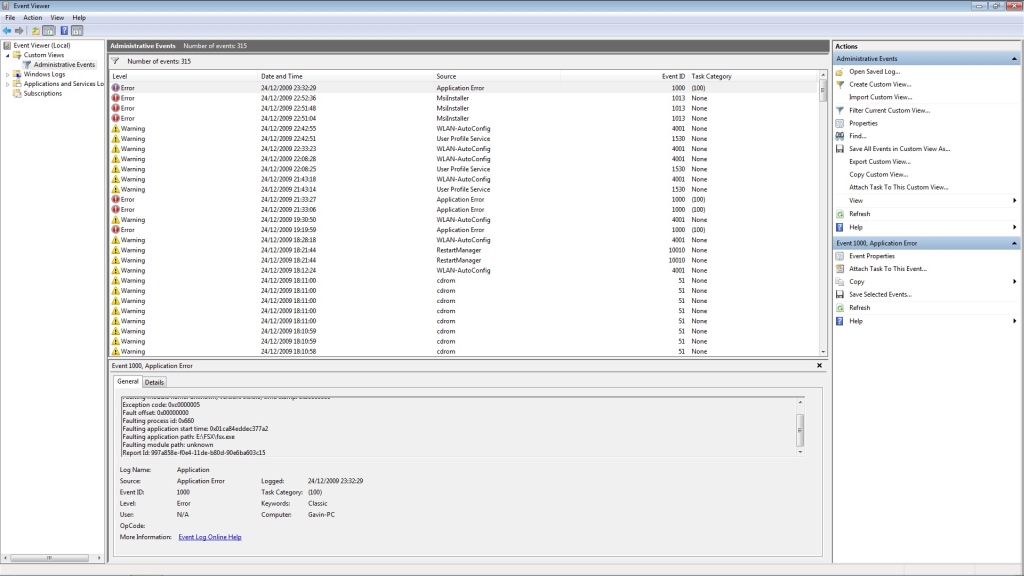
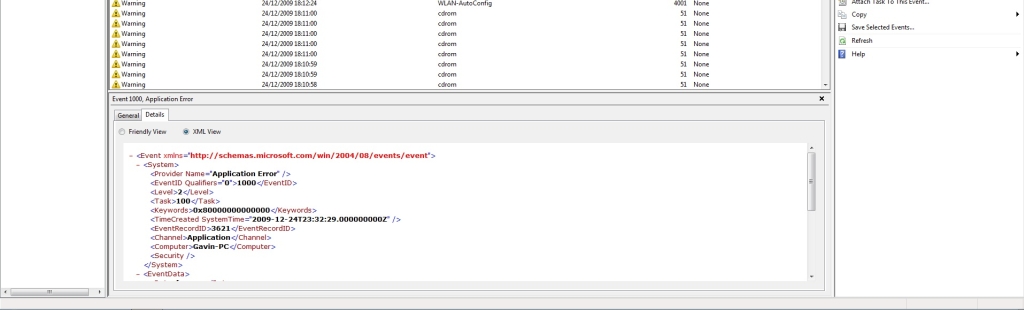
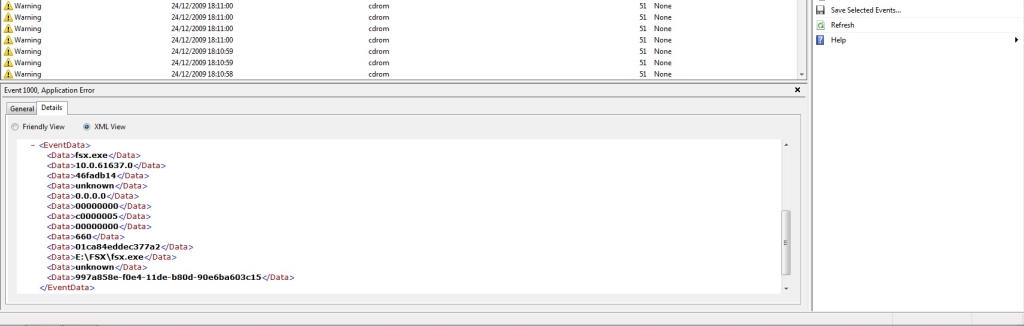
I'll give it a try tomcat.  I have taken some screenshots from the error report

Image

Image

Image

don't know if this is any help.
My specs
I7920 4ghz
Asus P6T Deluxe V2
6gb Corsair DDR3 1600
BFG GTX285OCX
Windows 7 64bit
gavinprice02
2nd Lieutenant
2nd Lieutenant
 
Posts: 209
Joined: Tue Jul 29, 2003 7:34 am
Location: England

Re: The dreaded 'FSX Fatal error' message

Postby Tomcat5 » Thu Dec 24, 2009 7:31 pm

LOL, maybe someone else can interpret this, but I am completely useless with errors.
Last edited by Tomcat5 on Thu Dec 24, 2009 7:35 pm, edited 1 time in total.
Asus G71GX-RX05 from BestBuy.
User avatar
Tomcat5
2nd Lieutenant
2nd Lieutenant
 
Posts: 181
Joined: Mon Sep 07, 2009 6:45 pm
Location: KGED

Re: The dreaded 'FSX Fatal error' message

Postby InfantryNeverDie » Sat Dec 26, 2009 10:58 am

I am a member of flightsimulationforums.com and have been for about a year or two. It's a smalllll forum consisting of maybe 10 active users and although I enjoy spending time there I have also come to this forum seeking help with the same problem. I am running Windows 7 RC 64 bit (due to christmas I havn't had the money to upgrade to the new OS) but I am having fatal errors every single flight. This has grounded me and I was hoping someone such as NickN could help with this issue. I have used the Nhancer guides and tips he posts (found through google searches) and it has made FSX an amazing experience. If anyone else has any information on these crashes or needs some information I will do everything to provide it. Thank you!!!
User avatar
InfantryNeverDie
Ground hog
Ground hog
 
Posts: 2
Joined: Sat Dec 26, 2009 11:45 am
Location: Atlanta, Georgia, USA

Re: The dreaded 'FSX Fatal error' message

Postby gavinprice02 » Sat Dec 26, 2009 12:10 pm

It is such an annoying thing to happen every flight. After being away from simming for two years because when fsx first came out and I loaded it on to my dads computer and it ran dreadfully I just gave up on simming altogether. Now I have my own house and after seeing videos of fsx on YouTube it tempted me to get back into simming. After just forking out on a decent system I couldn't wait to start flying again, now I get this error and I'm on the verge of a breakdown after numerous issues with my rig.

I think I have found a temporary fix for this issue and that is to run in windowed mode instead of fullscreen.

Hopefully it will get fixed permanently though. What is the best line to go down? Emailing Microsoft?
My specs
I7920 4ghz
Asus P6T Deluxe V2
6gb Corsair DDR3 1600
BFG GTX285OCX
Windows 7 64bit
gavinprice02
2nd Lieutenant
2nd Lieutenant
 
Posts: 209
Joined: Tue Jul 29, 2003 7:34 am
Location: England

Re: The dreaded 'FSX Fatal error' message

Postby InfantryNeverDie » Sat Dec 26, 2009 12:16 pm

Thanks for the tip Gavin, I will try running FSX in windowed mode but this is certainly a disapointing fix. I am hoping this issue is not due to me running the RC, that would mean another month or so grounded until I can afford the full win 7 home as I have built 2 out of 3 of my pcs and i'm not eligible for the upgrade.
User avatar
InfantryNeverDie
Ground hog
Ground hog
 
Posts: 2
Joined: Sat Dec 26, 2009 11:45 am
Location: Atlanta, Georgia, USA

Re: The dreaded 'FSX Fatal error' message

Postby gavinprice02 » Sat Dec 26, 2009 12:33 pm

Right. I have found some interesting reads on the fsx uiautomationcore.dll file causing the problem. In my event viewer this file is the cause for many of the crashes in the fault path but not all of them. Try doing a search on it and apparently a fix is to download the windows vista version of this file. I will try this as soon as I get home
My specs
I7920 4ghz
Asus P6T Deluxe V2
6gb Corsair DDR3 1600
BFG GTX285OCX
Windows 7 64bit
gavinprice02
2nd Lieutenant
2nd Lieutenant
 
Posts: 209
Joined: Tue Jul 29, 2003 7:34 am
Location: England

Re: The dreaded 'FSX Fatal error' message

Postby NickN » Sat Dec 26, 2009 2:31 pm

Guys.. I have no idea whats causing this

I dont use Vista W7 for FSX, I use XPx64


When you come across issues like this and you are running Vista or W7, the first thing you do want to be sure of is that FSX is not installed into the PROGRAM FILES or PROGRAM FILES (x86) folders. There is a long list of issues that can be associated with installing FSX into Program Files with or without UAC enabled. Its always best to eliminate any Windows nanny issues by installing FSX into

a. Best: Its own hard drive

b. 2nd Best: If a 2nd HDD is not available a folder on the root of C named FSX or Flight Simulator X (any name is fine) and make sure that folder has been granted full permissions


Past that, unless there is a defined repeat in the same module crashing which is known and a fix has been posted, its a matter of process of elimination starting with confirming the stability of the hardware. Clocking can bring on issues especially if there is a unstable stick of memory in the system be it a defect or clock voltages wrong.

If the hardware is confirmed by removing the clock, making sure voltages and settings are correct for a non-clocked system, and, stress tests like oCCT and memory tests such as MEMTEST have confirmed the components then start the process of elimination for addons by removing them one by one.

Its possible a OS or DX corruption issues has occurred too. Be sure to have all your DX and OS updates installed and when it comes to drivers DONT CHANGE THEM WHEN THEY WORK! One of the worst things I see people do is right away when a driver is released they go right to it and install the damn thing..  the bottom line is, if it aint broke, dont fix it when it comes to drivers!


All of the above is why seasoned MSFS users, especially those who clock, keep partition backups of their installations when they get a system up and running without issues and they keep those backups up to date. When problems like this come up its very easy to confirm hardware or software by restoring their known working backups. If the problem is still present then the issue is likely hardware.


and they do not use system re-gore to do that..
Last edited by NickN on Sat Dec 26, 2009 2:37 pm, edited 1 time in total.

User avatar
NickN
Lieutenant Colonel
Lieutenant Colonel
 
Posts: 6317
Joined: Mon Sep 05, 2005 12:57 pm

Re: The dreaded 'FSX Fatal error' message

Postby gavinprice02 » Sat Dec 26, 2009 4:24 pm

To be honest Nick, I had been having memory issues. On POST my machine was reading 4gb out of 6gb of ram when the speed was set at 1600mhz. I was told to conduct memtest on the sticks and found that one stick came up with a few errors. I have organised an RMA for the memory. Bu I also have been observing a thread on Asus' website with lots of people having the same issues and found that a few of the cases on the forum resolved their problem by finding and straightening a bent pin in the CPU socket on the motherboard. After a close inspection with a magnifying glass in my board I indeed found a bent pin and very carefully restraightened it. That resolved the issue of my machine only reading 4gb of ram. I just assumed that this was also the case for the errors on the memtest but since you mentioned it could be bad memory I will retest it again. I really hope this is the issue.

p.s.  Sorry for the babbling post and also I hope everyones having a merry Christmas.
My specs
I7920 4ghz
Asus P6T Deluxe V2
6gb Corsair DDR3 1600
BFG GTX285OCX
Windows 7 64bit
gavinprice02
2nd Lieutenant
2nd Lieutenant
 
Posts: 209
Joined: Tue Jul 29, 2003 7:34 am
Location: England

Re: The dreaded 'FSX Fatal error' message

Postby gavinprice02 » Sun Dec 27, 2009 12:44 pm

I have fixed this issue by simply downloading a copy of uiautomationcore.dll and then pasting it into the main FSX directory.
My specs
I7920 4ghz
Asus P6T Deluxe V2
6gb Corsair DDR3 1600
BFG GTX285OCX
Windows 7 64bit
gavinprice02
2nd Lieutenant
2nd Lieutenant
 
Posts: 209
Joined: Tue Jul 29, 2003 7:34 am
Location: England


Return to Flight Simulator X (FSX) and Steam

Who is online

Users browsing this forum: No registered users and 475 guests