dual monitors setup..

FSX including FSX Steam version.

dual monitors setup..

Postby Air Canada » Sun Oct 18, 2009 9:31 pm

Anyone can tell me how to setup the gauges on my other monitor.. I now have 2 monitors.
i have setup my GPS, PFD, MFD, Aircraft Monitoring system on the other monitor.

When I exit FSX and re start FSX, the other monitor has a blank screen and I have to drag the GPS,PFD,MFD etc everytime I start up FSX..

isn't there a way to have them set permanently on the other monitor whever I click the Flynow button..

thanks.
Air Canada
Ground hog
Ground hog
 
Posts: 10
Joined: Sat Sep 05, 2009 4:03 pm

Re: dual monitors setup..

Postby flaminghotsauce » Mon Oct 19, 2009 4:50 am

Someone posted this to me on another forum:


[quote]

[*]Load Flight and uncheck fullscreen view.
[*]Open full window (not full screen).
[*]View panels, undock, and then drag over to panel monitor. Resize panels to fit.

[*]Save as "default" or something and do not tinker with it!
Do not save in full screen
[/list]Limitations:
-You can load new locations while flying but to start a new flight you must flight first end flight and then load from fsx page. You can't reset.

-To save a flight you must first select "un-fullscreen" view and save. This is untested so I recommend you do not save over your "default" file with anything...create a new file instead.

IMPORTANT FOR SQUAWKBOX USERS: You cannot load squawkbox in full screen view or it freezes the panels.
Last edited by flaminghotsauce on Mon Oct 19, 2009 4:50 am, edited 1 time in total.
flaminghotsauce
2nd Lieutenant
2nd Lieutenant
 
Posts: 181
Joined: Tue May 04, 2004 6:59 pm

Re: dual monitors setup..

Postby Air Canada » Mon Oct 19, 2009 11:38 am

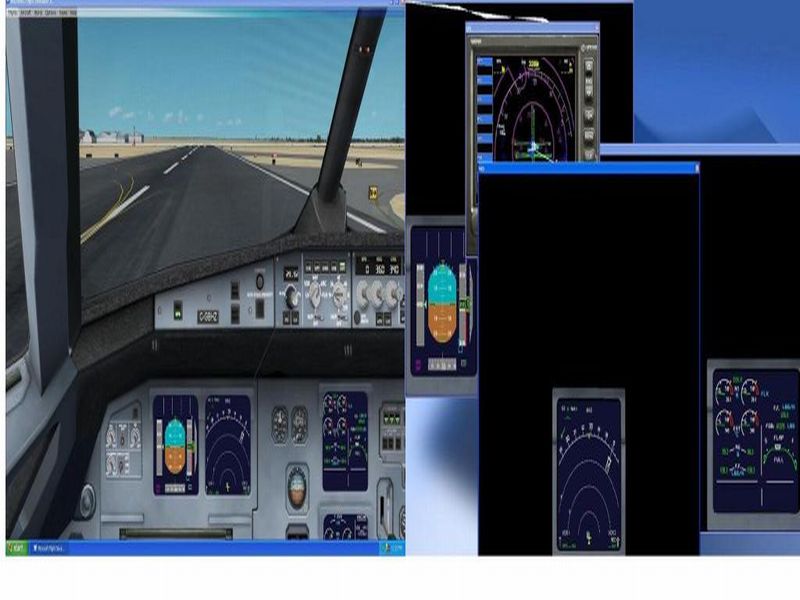
thanks for the reply... I did try that but the gauges, i can't seem to re-size them as there's a black backgound behind the gague and when I drag aother gague it overlaps and can't see the first gauges propely..
As you can see, the GPS Window is fine and I can re-size and place it anywhere... why is that the other gagues don't full size as the GPS window.

When I re-size the PFD gauges, the gauge itself become very small and I can't get rid of that black background around the gauge..

I've taken some pictures maybe some can help on that one..

thanks..

Image
Last edited by Air Canada on Mon Oct 19, 2009 12:35 pm, edited 1 time in total.
Air Canada
Ground hog
Ground hog
 
Posts: 10
Joined: Sat Sep 05, 2009 4:03 pm

Re: dual monitors setup..

Postby Plugpennyshadow » Mon Oct 19, 2009 8:28 pm

What SP of FSX are you using and have you updated your video card drivers?

Not running FSX SP2 caused this for me and it never hurts to ensure ye ole drivers are up to date.
Plugpennyshadow
2nd Lieutenant
2nd Lieutenant
 
Posts: 274
Joined: Sat Mar 15, 2008 1:56 pm

Re: dual monitors setup..

Postby Air Canada » Mon Oct 19, 2009 10:40 pm

hey bro... thanks for the respond...

I have installed the acceleration pack which I believe has SP1 and Sp2 in it... correct ...

And yes, I went to ATI's website and downlaoded the latest drivers for my radeon HD 4650 video card..

I hope someone can figure this out for me case this is very annoying..
Air Canada
Ground hog
Ground hog
 
Posts: 10
Joined: Sat Sep 05, 2009 4:03 pm

Re: dual monitors setup..

Postby Irocx » Tue Oct 20, 2009 9:20 pm

"It is very important than when you save the default flight with your panel settings that your "un fullscreen" window is maximized. If not then when you switch from fullscreen and back your panels will be messed up. "

There is also a nifty freeware tool available that that will store and restore your panel positions for the 2nd monitor.

How it works :
There are two applications, one for saving the position/size and another one to recall it. It saves one panels setup per aircraft.

Download "Panel Position" here :
http://www.casawave.fr/upload/fsx/Panel_Position.zip

- Unzip it in a folder
- Open Fsx in windowed mode
- Open the panels you need, undocked them, and place/resize them the way you want.
- Launch "Panel Store.exe" and wait a few (2 to 5 secondes)

Move, resize the panels or load/create a flight.

- Open the panels you need (undocked)
- Launch "Panel Restore.exe"

The size and the positions of your panels will be recalled.

More details :
When you execute "Panel Store.exe", it scans all the open windows, keep only the panels, and store their name, size and position in a .ini file. The .ini file name should be the aircraft name but I noticed it could be different with some addons.

When you execute "Panel Restore.exe", it search the aircraft name, scan for the .ini file that match and move/resize the panels if they are opened and undocked (otherwise the software can't do anything).

When you launch "Panel Store.exe", and if a corresponding .ini file is already created, it will delete it and create a new one.

Tips :
Create a shortcut for the two .exe, and assign a free keyboard shortcut.
For example : Ctrl+Alt+F11 to save and Ctrl+Alt+F12 to restore.
Last edited by Irocx on Tue Oct 20, 2009 9:21 pm, edited 1 time in total.
Irocx
Ground hog
Ground hog
 
Posts: 5
Joined: Sat Jan 24, 2009 8:28 pm
Location: Minnesota, U.S.A.

Re: dual monitors setup..

Postby Air Canada » Tue Oct 20, 2009 10:53 pm

thanks Irocx...

will check out who that progam works...

Although I did manage to solve that black background somewhat .. seems that it's only happens in the airbus A321. Allthe other default aircrafs don't have this issue.. that is so strange...

anyways, no big deal.. will have to get use to flying a 747 or the 737 ...

but thanks for the suggestion...
Air Canada
Ground hog
Ground hog
 
Posts: 10
Joined: Sat Sep 05, 2009 4:03 pm

Re: dual monitors setup..

Postby westside » Sat Oct 24, 2009 10:48 am

Hey Air Canada

I have been flying with multi monitors for a while and found it to be the only way to go. I have found that I have to set up the aircraft with every flight but it has become routine. I look at it like part of my pre-flight check.
As far as aircraft of choice the 737 has the best panels for this purpose.
I am going to check out that freeware tool for storing the location of moved panels.
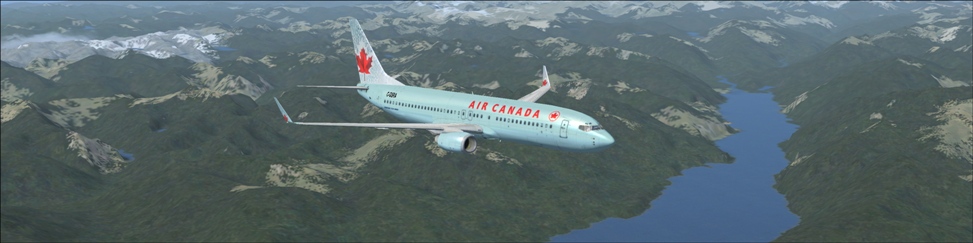
Image
User avatar
westside
2nd Lieutenant
2nd Lieutenant
 
Posts: 165
Joined: Fri Nov 28, 2008 11:53 am
Location: British Columbia Canada


Return to Flight Simulator X (FSX) and Steam

Who is online

Users browsing this forum: No registered users and 377 guests