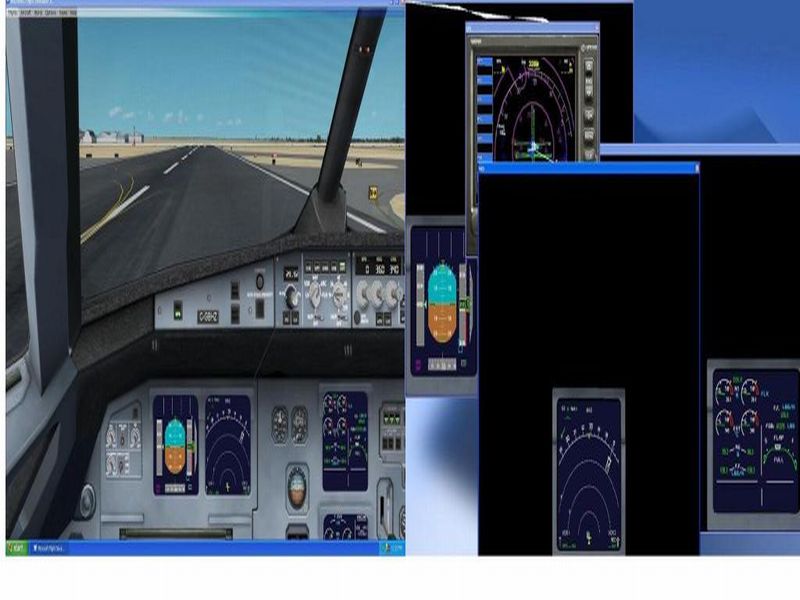
"It is very important than when you save the default flight with your panel settings that your "un fullscreen" window is maximized. If not then when you switch from fullscreen and back your panels will be messed up. "There is also a nifty freeware tool available that that will store and restore your panel positions for the 2nd monitor.
How it works :
There are two applications, one for saving the position/size and another one to recall it. It saves one panels setup per aircraft.
Download "Panel Position" here :
http://www.casawave.fr/upload/fsx/Panel_Position.zip - Unzip it in a folder
- Open Fsx in windowed mode
- Open the panels you need, undocked them, and place/resize them the way you want.
- Launch "Panel Store.exe" and wait a few (2 to 5 secondes)
Move, resize the panels or load/create a flight.
- Open the panels you need (undocked)
- Launch "Panel Restore.exe"
The size and the positions of your panels will be recalled.
More details :
When you execute "Panel Store.exe", it scans all the open windows, keep only the panels, and store their name, size and position in a .ini file. The .ini file name should be the aircraft name but I noticed it could be different with some addons.
When you execute "Panel Restore.exe", it search the aircraft name, scan for the .ini file that match and move/resize the panels if they are opened and undocked (otherwise the software can't do anything).
When you launch "Panel Store.exe", and if a corresponding .ini file is already created, it will delete it and create a new one.
Tips :
Create a shortcut for the two .exe, and assign a free keyboard shortcut.
For example : Ctrl+Alt+F11 to save and Ctrl+Alt+F12 to restore.