New FSXer...

FSX including FSX Steam version.

New FSXer...

Postby hhomebrewer » Sat Sep 05, 2009 6:09 pm

Just put on FSX and the whole USAv2 (excluding AK and HI) from FSGenesis. My water is purple-- like Barney from Barney and Friends. I have set the scenery to 10mt resolution like the DVDs tell me to do. What else can I do to get blue water? I had FSX on this same computer maybe a year ago, but took it off for reasons I cannot now remember. I do distinctly remember the water being blue and very much to my liking in how it appeared. What do I do now? Please be gentle-- I don't know much about history, don't know much about geometry, don't know much about a science book, don't know much about the French I took......
Last edited by hhomebrewer on Sat Sep 05, 2009 6:13 pm, edited 1 time in total.
I am homebrewer. I had 633 posts when for some unknown reason, my account disappeared...
AMD Phenom II X4 940 (Deneb), Asus M3N72-D motherboard, 2 x nVidia 8800GTS @640MB RAM, 1 x Seagate Barracuda 500Gb HDD (storage), 1 x Western Digital Black 250Gb
User avatar
hhomebrewer
Captain
Captain
 
Posts: 600
Joined: Sat Aug 22, 2009 8:44 pm
Location: United States of Good Beer

Re: New FSXer...

Postby SubZer0 » Sat Sep 05, 2009 8:39 pm

Hey there! Welcome to FSX, and I really hope you enjoy your epxerience with the sim like I have ;)

One thing you can do to change the looks of the water DRAMATICALLY (for the good!) is FSWC (Flight Sim Water Configurator), available here:

www.fswaterconfigurator.com

It comes with many preset profiles and you can even make your own new profiles if you don't like any of the ones it already comes with ;)
[center][img]http://www.simviation.com/phpupload/uploads/1369006030.jpg[/img][/center]
User avatar
SubZer0
Major
Major
 
Posts: 3722
Joined: Fri May 04, 2007 9:29 pm
Location: KLNA

Re: New FSXer...

Postby hhomebrewer » Sun Sep 06, 2009 12:43 am

Thanks, Sub. What I see now is the water has black speckles all over it when you look at it from a distance-- like there's 26 bazillion ducks setting on it. Up close it looks OK, but not clear of whatever it is that's causing the speckles. I just want halfways-decent looking water. FSX water with zero enhancements is a quantum leap over FS9 water. I don't need to see the fish just below the surface like some do that (not you, per se) I've read about here. My machine won't run FSX too super-great anyway, so why load it down with super-great water?
I am homebrewer. I had 633 posts when for some unknown reason, my account disappeared...
AMD Phenom II X4 940 (Deneb), Asus M3N72-D motherboard, 2 x nVidia 8800GTS @640MB RAM, 1 x Seagate Barracuda 500Gb HDD (storage), 1 x Western Digital Black 250Gb
User avatar
hhomebrewer
Captain
Captain
 
Posts: 600
Joined: Sat Aug 22, 2009 8:44 pm
Location: United States of Good Beer

Re: New FSXer...

Postby Layne. » Sun Sep 06, 2009 12:49 am

What are your water settings at in the FSX settings?
Windows 7 Ultimate x64 | 22" LED Monitor (1920x1080) | AMD Phenom II x4 970 Black Edition~3.5Ghz | 4gb RAM | ATI Radeon 6850 1gb | 1Tb HDD

[img]http://www.simviation.com/phpupload/uploads/1302666610.
User avatar
Layne.
Major
Major
 
Posts: 2646
Joined: Sun Jun 10, 2007 9:17 pm
Location: Australia, Victoria, Melbourne

Re: New FSXer...

Postby hhomebrewer » Sun Sep 06, 2009 12:55 am

What are your water settings at in the FSX settings?

I couldn't tell you. I know so little about the whole package. The Settings page seems different than that same page in FS9. I have things turned up pretty high, thinking my machine can run it. Most things are at High or Ultra-high. It will play, but with some herkies and jerkies. I have the "target frame rate" set at about 35 or so. I have no idea what that does. It was set at 20 under default, so I thought I'd up it to where my eye could not see each frame. I think that's right, correct? Let me take a look and I'll report back as to what I see. Thanks for the help...


OK; I'm back. Water resolution is at Max 2.x-- whatever that means...

Last edited by hhomebrewer on Sun Sep 06, 2009 1:02 am, edited 1 time in total.
I am homebrewer. I had 633 posts when for some unknown reason, my account disappeared...
AMD Phenom II X4 940 (Deneb), Asus M3N72-D motherboard, 2 x nVidia 8800GTS @640MB RAM, 1 x Seagate Barracuda 500Gb HDD (storage), 1 x Western Digital Black 250Gb
User avatar
hhomebrewer
Captain
Captain
 
Posts: 600
Joined: Sat Aug 22, 2009 8:44 pm
Location: United States of Good Beer

Re: New FSXer...

Postby Boikat » Sun Sep 06, 2009 1:34 am

What are your water settings at in the FSX settings?

I couldn't tell you. I know so little about the whole package. The Settings page seems different than that same page in FS9. I have things turned up pretty high, thinking my machine can run it. Most things are at High or Ultra-high. It will play, but with some herkies and jerkies. I have the "target frame rate" set at about 35 or so. I have no idea what that does. It was set at 20 under default, so I thought I'd up it to where my eye could not see each frame. I think that's right, correct? Let me take a look and I'll report back as to what I see. Thanks for the help...


OK; I'm back. Water resolution is at Max 2.x-- whatever that means...


Speckly water in the distance may be your anti aliasing.  Try diffeent settings for that.
Image
"I reject your reality, and substitute my own" Adam Savage, Mythbusters
User avatar
Boikat
Major
Major
 
Posts: 2974
Joined: Thu Mar 20, 2008 8:23 pm
Location: NW Loueezianner

Re: New FSXer...

Postby hhomebrewer » Sun Sep 06, 2009 1:46 am

Boikat sayeth:
Speckly water in the distance may be your anti-aliasing. Try different settings for that.
OK; I have found my way there once or twice. I have some sort of filtering set on trilinear, thinking that's better than bilinear...

Just installed my first FSX add-on airplane: The F-22 with the VC. So e-e-e-asy compared to FS9. Are they all like that?
.
.
.
.
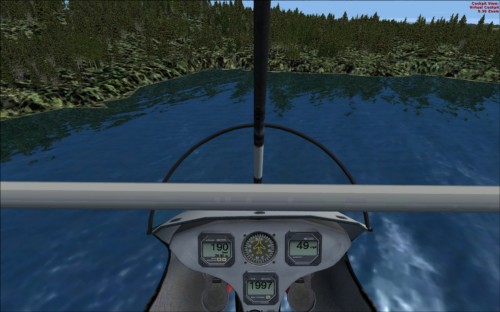
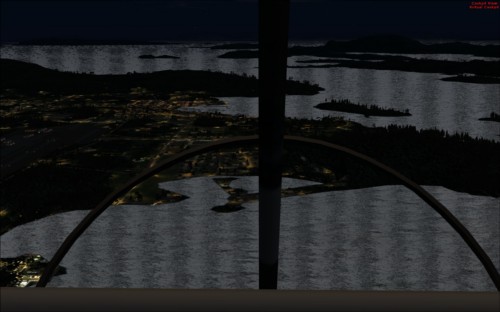
Well, I've tried it with anti-aliasing checked, unchecked, bi and tri and anistropsical filtering checked and unchecked-- and it just looks like crap any way I slice it. Maybe that's why I took it off. I have None for filtering checked now and anti-aliasing is unchecked. When I get the ultra-light close to the shoreline, I see what looks like massive floats of green algae right there. I took a screenie. Here it is:
ImageImage
I don't think this is reflection because the trees have a shimmery, "flocked" look to them-- very much unlike the trees in FS9. I will keep experimenting. The water looks better, if just for that improvement. The very black picture was taken at night, but look at the speckles all over the water (Darn! Picture is too small to see 'em), and those dark, vertical bands. This was with the filtering on and anti-aliasing on, et cetera. All that is off now, but I still don't like what I'm seeing. Any ideas, gents?
Last edited by hhomebrewer on Sun Sep 06, 2009 2:34 am, edited 1 time in total.
I am homebrewer. I had 633 posts when for some unknown reason, my account disappeared...
AMD Phenom II X4 940 (Deneb), Asus M3N72-D motherboard, 2 x nVidia 8800GTS @640MB RAM, 1 x Seagate Barracuda 500Gb HDD (storage), 1 x Western Digital Black 250Gb
User avatar
hhomebrewer
Captain
Captain
 
Posts: 600
Joined: Sat Aug 22, 2009 8:44 pm
Location: United States of Good Beer

Re: New FSXer...

Postby hhomebrewer » Sun Sep 06, 2009 4:43 am

I've now tried every form of filtering with anti-aliasing both on and off. I just don't like what I'm seeing. I guess this is why I took FSX off about a year ago. i wonder if NickN's tweaks would help. They are way above my paygrade in complexity, though. Good thing I have Acronis to cover my screw-ups if I dare to try the tweaks...

Just not happy with FSX...
I am homebrewer. I had 633 posts when for some unknown reason, my account disappeared...
AMD Phenom II X4 940 (Deneb), Asus M3N72-D motherboard, 2 x nVidia 8800GTS @640MB RAM, 1 x Seagate Barracuda 500Gb HDD (storage), 1 x Western Digital Black 250Gb
User avatar
hhomebrewer
Captain
Captain
 
Posts: 600
Joined: Sat Aug 22, 2009 8:44 pm
Location: United States of Good Beer

Re: New FSXer...

Postby laurits » Sun Sep 06, 2009 7:20 am

Hi there.

If Nick's tweaks are too complicated for you, try the Nhancer set-up:

http://www.simforums.com/forums/forum_p ... 769#156769
laurits
Ground hog
Ground hog
 
Posts: 38
Joined: Tue Sep 01, 2009 2:00 pm

Re: New FSXer...

Postby idahosurge » Sun Sep 06, 2009 9:27 am

Boikat sayeth:
Speckly water in the distance may be your anti-aliasing. Try different settings for that.
OK; I have found my way there once or twice. I have some sort of filtering set on trilinear, thinking that's better than bilinear...

Just installed my first FSX add-on airplane: The F-22 with the VC. So e-e-e-asy compared to FS9. Are they all like that?
.
.
.
.
Well, I've tried it with anti-aliasing checked, unchecked, bi and tri and anistropsical filtering checked and unchecked-- and it just looks like crap any way I slice it. Maybe that's why I took it off. I have None for filtering checked now and anti-aliasing is unchecked. When I get the ultra-light close to the shoreline, I see what looks like massive floats of green algae right there. I took a screenie. Here it is:
ImageImage
I don't think this is reflection because the trees have a shimmery, "flocked" look to them-- very much unlike the trees in FS9. I will keep experimenting. The water looks better, if just for that improvement. The very black picture was taken at night, but look at the speckles all over the water (Darn! Picture is too small to see 'em), and those dark, vertical bands. This was with the filtering on and anti-aliasing on, et cetera. All that is off now, but I still don't like what I'm seeing. Any ideas, gents?


The day time shot looks exactly like reflections on the water to me, I see nothing wrong with it.

If you are using a Nvidia graphics card then go to the top of this forum and look at Nick N's tweak tread.
Last edited by idahosurge on Sun Sep 06, 2009 9:29 am, edited 1 time in total.
Asus R3E_i7 980X @ 4.44GHz_TR Silver Arrow_Mushkin Redline 6GB 1,644MHz @ 6-7-6-18_Zotac AMP GTX 480_OS - Windows 7 Ult 64b_OS SSD - Crucial C300 128GB_FSX HD - WD VR 600GB*2 w/3ware 9750-4i 6Gb/s Controller_Corsair AX850_CM HAF-X_FSX Gold, UTX, GEX, FSG,
idahosurge
Captain
Captain
 
Posts: 687
Joined: Wed Sep 12, 2007 9:48 pm
Location: Anna, Texas, USA

Re: New FSXer...

Postby Steve M » Sun Sep 06, 2009 12:48 pm

I have read things on the forum before about running dual graphics cards on FSX. Also the proper drivers are important as mentioned above.
Last edited by Steve M on Sun Sep 06, 2009 12:50 pm, edited 1 time in total.
Image
User avatar
Steve M
Major
Major
 
Posts: 4765
Joined: Sun Aug 31, 2008 1:02 pm
Location: Cambridge On.

Re: New FSXer...

Postby RickG » Sun Sep 06, 2009 12:52 pm

As I understand it, FSX automatically adjusts all settings to be the best for a persons particular computer. You may want to set everything to the defaults, then slowly play with the settings after that.
Win7 Home Premium X64, Sabertooth Z77 mobo, i7 3770K@3.5 ghz, 8gb ram, Samsung 840PRO SSD,& WD hdd's
RickG
2nd Lieutenant
2nd Lieutenant
 
Posts: 246
Joined: Sun Jun 10, 2007 11:42 am

Re: New FSXer...

Postby SubZer0 » Sun Sep 06, 2009 1:23 pm

hhomebrewer,

go to www.nhancer.com and downoad it

then go to the link mentioned above to set it up. that should really help with the looks of the sim.


the first picture with the 'fields of algae' is just the reflection of the shoreline on FSX. that's how it's supposed to look. However, the bands on the second picture shouldn't be there, and may have something to do with your settings. set up nhancer and that might take care of a lot of problems you are having.
[center][img]http://www.simviation.com/phpupload/uploads/1369006030.jpg[/img][/center]
User avatar
SubZer0
Major
Major
 
Posts: 3722
Joined: Fri May 04, 2007 9:29 pm
Location: KLNA

Re: New FSXer...

Postby jwenham » Sun Sep 06, 2009 1:36 pm

Boikat sayeth:
Speckly water in the distance may be your anti-aliasing. Try different settings for that.

OK; I have found my way there once or twice. I have some sort of filtering set on trilinear, thinking that's better than bilinear...

Just installed my first FSX add-on airplane: The F-22 with the VC. So e-e-e-asy compared to FS9. Are they all like that?
.
.
.
.
Well, I've tried it with anti-aliasing checked, unchecked, bi and tri and anistropsical filtering checked and unchecked-- and it just looks like crap any way I slice it. Maybe that's why I took it off. I have None for filtering checked now and anti-aliasing is unchecked. When I get the ultra-light close to the shoreline, I see what looks like massive floats of green algae right there. I took a screenie. Here it is:
ImageImage
I don't think this is reflection because the trees have a shimmery, "flocked" look to them-- very much unlike the trees in FS9. I will keep experimenting. The water looks better, if just for that improvement. The very black picture was taken at night, but look at the speckles all over the water (Darn! Picture is too small to see 'em), and those dark, vertical bands. This was with the filtering on and anti-aliasing on, et cetera. All that is off now, but I still don't like what I'm seeing. Any ideas, gents?
You need to check at least bi-linear for filtering or funny things happen. Set-up n-hancer and I bet that will fix it.
Intel i7 940 2.93 clocked to 4.0ghz Asus P6T Deluxe 6gb OCZ 1600 8-8-8-24 EVGA GTX 260 Superclocked Edition Thermalright 120 CPU Cooler Power PC & Cooling 750w PSU 1 tb Seagate Barracuda HD 500 gb Seagate Barracude HD 22" Viewsonic Widescreen Tra
User avatar
jwenham
2nd Lieutenant
2nd Lieutenant
 
Posts: 266
Joined: Sat Jan 03, 2009 12:40 pm

Re: New FSXer...

Postby hhomebrewer » Sun Sep 06, 2009 3:54 pm

You need to check at least bi-linear for filtering or funny things happen. Set-up n-hancer and I bet that will fix it.

I ain't never heared of n-hancer. Worth a shot. Ain't nothin' else worked...

I thought about checking the boxes in FSX just as I have them checked in FS9 for these same parameters. Haven't got around to it, yet-- lots of posting to do on another Forum far, far removed in subject from this one...
Last edited by hhomebrewer on Sun Sep 06, 2009 3:56 pm, edited 1 time in total.
I am homebrewer. I had 633 posts when for some unknown reason, my account disappeared...
AMD Phenom II X4 940 (Deneb), Asus M3N72-D motherboard, 2 x nVidia 8800GTS @640MB RAM, 1 x Seagate Barracuda 500Gb HDD (storage), 1 x Western Digital Black 250Gb
User avatar
hhomebrewer
Captain
Captain
 
Posts: 600
Joined: Sat Aug 22, 2009 8:44 pm
Location: United States of Good Beer

Next

Return to Flight Simulator X (FSX) and Steam

Who is online

Users browsing this forum: No registered users and 360 guests