
Simviation Forums
Flight Simulator and other chat
Flight Simulator and other chat
 by hhomebrewer » Sat Sep 05, 2009 6:09 pm


by SubZer0 » Sat Sep 05, 2009 8:39 pm


by hhomebrewer » Sun Sep 06, 2009 12:43 am
by Layne. » Sun Sep 06, 2009 12:49 am

by hhomebrewer » Sun Sep 06, 2009 12:55 am
What are your water settings at in the FSX settings?
by Boikat » Sun Sep 06, 2009 1:34 am
What are your water settings at in the FSX settings?
I couldn't tell you. I know so little about the whole package. The Settings page seems different than that same page in FS9. I have things turned up pretty high, thinking my machine can run it. Most things are at High or Ultra-high. It will play, but with some herkies and jerkies. I have the "target frame rate" set at about 35 or so. I have no idea what that does. It was set at 20 under default, so I thought I'd up it to where my eye could not see each frame. I think that's right, correct? Let me take a look and I'll report back as to what I see. Thanks for the help...
OK; I'm back. Water resolution is at Max 2.x-- whatever that means...


by hhomebrewer » Sun Sep 06, 2009 1:46 am
Speckly water in the distance may be your anti-aliasing. Try different settings for that.
by hhomebrewer » Sun Sep 06, 2009 4:43 am
by laurits » Sun Sep 06, 2009 7:20 am

by idahosurge » Sun Sep 06, 2009 9:27 am
Boikat sayeth:Speckly water in the distance may be your anti-aliasing. Try different settings for that.
OK; I have found my way there once or twice. I have some sort of filtering set on trilinear, thinking that's better than bilinear...
Just installed my first FSX add-on airplane: The F-22 with the VC. So e-e-e-asy compared to FS9. Are they all like that?
.
.
.
.
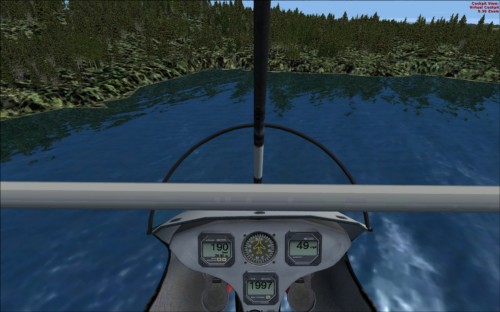
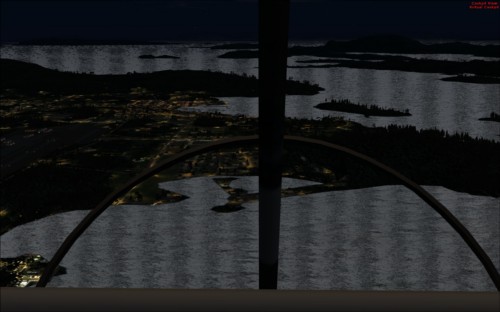
Well, I've tried it with anti-aliasing checked, unchecked, bi and tri and anistropsical filtering checked and unchecked-- and it just looks like crap any way I slice it. Maybe that's why I took it off. I have None for filtering checked now and anti-aliasing is unchecked. When I get the ultra-light close to the shoreline, I see what looks like massive floats of green algae right there. I took a screenie. Here it is:
I don't think this is reflection because the trees have a shimmery, "flocked" look to them-- very much unlike the trees in FS9. I will keep experimenting. The water looks better, if just for that improvement. The very black picture was taken at night, but look at the speckles all over the water (Darn! Picture is too small to see 'em), and those dark, vertical bands. This was with the filtering on and anti-aliasing on, et cetera. All that is off now, but I still don't like what I'm seeing. Any ideas, gents?
by Steve M » Sun Sep 06, 2009 12:48 pm


by RickG » Sun Sep 06, 2009 12:52 pm

by SubZer0 » Sun Sep 06, 2009 1:23 pm
by jwenham » Sun Sep 06, 2009 1:36 pm
Boikat sayeth:Speckly water in the distance may be your anti-aliasing. Try different settings for that.
OK; I have found my way there once or twice. I have some sort of filtering set on trilinear, thinking that's better than bilinear...
Just installed my first FSX add-on airplane: The F-22 with the VC. So e-e-e-asy compared to FS9. Are they all like that?
.
.
.
.
Well, I've tried it with anti-aliasing checked, unchecked, bi and tri and anistropsical filtering checked and unchecked-- and it just looks like crap any way I slice it. Maybe that's why I took it off. I have None for filtering checked now and anti-aliasing is unchecked. When I get the ultra-light close to the shoreline, I see what looks like massive floats of green algae right there. I took a screenie. Here it is:
I don't think this is reflection because the trees have a shimmery, "flocked" look to them-- very much unlike the trees in FS9. I will keep experimenting. The water looks better, if just for that improvement. The very black picture was taken at night, but look at the speckles all over the water (Darn! Picture is too small to see 'em), and those dark, vertical bands. This was with the filtering on and anti-aliasing on, et cetera. All that is off now, but I still don't like what I'm seeing. Any ideas, gents?
by hhomebrewer » Sun Sep 06, 2009 3:54 pm
You need to check at least bi-linear for filtering or funny things happen. Set-up n-hancer and I bet that will fix it.
Return to Flight Simulator X (FSX) and Steam
Users browsing this forum: No registered users and 274 guests