Question In Regards to POSKY 777 Models...

FSX including FSX Steam version.

Question In Regards to POSKY 777 Models...

Postby b108 » Sun Jul 19, 2009 10:40 am

I am aware that most POSKY 777 models were first for FS2004. Most of them have been tinkered with to get them to at least fly in FSX. But here's my confusion, aggitation, curiosity, and bewilderment in regard to the POSKY 777 Models:

Why is it so difficult to get them to work in FSX? Why is there always trouble getting their VCs to work? Why do some of them have a VC and some of them don't? And why are the only good/cool ones made for SP2?! Do THOSE even work?! I don't even know which ones will!

I have seen that there are 3 different versions of the 777-200 Delta new colors, for example, and I have tried one of them so far, and it just makes FSX say it "Encountered a Fatal Error."I'll select the aircraft, click fly now, and the instant it loads to 100%, It gives me that message. What happened?!

I don't even know which one of the 3 on this site it is, so I can't even tell what to do, or what to look for , or, or... I... I'm just at a total loss!!! I don't want to be offensive, but I am just not understanding why POSKY-made aircraft are such a pain in the butt!

Please, don't get angry, or offensive in your reply, I know someone probably will or would have had I not tried to explain myself this completely. Can someone, or, better yet, several people explain (POLITELY) to me why POSKY aircraft are so difficult to work with?

I really admire these aircraft, there the coolest things to have in my opinion, but I can't get very many of them to work properly. I currently have ONE that works with a VC and a 2d panel, and everything runs the way it's supposed to. But why is this case not the same for other models?

And then people will make downloads titled "VC for POSKY777's" and it's supposed give you a wroking VC with the right gauges and stuff, and that never works either (Except for the 2d panel)!!!

I just don't know what to do. I need support. I need information, I need enlightenment. Please people, PLEASE, I love these things but they just don't work, and it makes no sense!

Thanks!
b108
2nd Lieutenant
2nd Lieutenant
 
Posts: 93
Joined: Wed Feb 13, 2008 5:36 pm

Re: Question In Regards to POSKY 777 Models...

Postby garymbuska » Sun Jul 19, 2009 1:05 pm

I am aware that most POSKY 777 models were first for FS2004. Most of them have been tinkered with to get them to at least fly in FSX. But here's my confusion, aggitation, curiosity, and bewilderment in regard to the POSKY 777 Models:

Why is it so difficult to get them to work in FSX? Why is there always trouble getting their VCs to work? Why do some of them have a VC and some of them don't? And why are the only good/cool ones made for SP2?! Do THOSE even work?! I don't even know which ones will!

I have seen that there are 3 different versions of the 777-200 Delta new colors, for example, and I have tried one of them so far, and it just makes FSX say it "Encountered a Fatal Error."I'll select the aircraft, click fly now, and the instant it loads to 100%, It gives me that message. What happened?!

I don't even know which one of the 3 on this site it is, so I can't even tell what to do, or what to look for , or, or... I... I'm just at a total loss!!! I don't want to be offensive, but I am just not understanding why POSKY-made aircraft are such a pain in the butt!

Please, don't get angry, or offensive in your reply, I know someone probably will or would have had I not tried to explain myself this completely. Can someone, or, better yet, several people explain (POLITELY) to me why POSKY aircraft are so difficult to work with?

I really admire these aircraft, there the coolest things to have in my opinion, but I can't get very many of them to work properly. I currently have ONE that works with a VC and a 2d panel, and everything runs the way it's supposed to. But why is this case not the same for other models?

And then people will make downloads titled "VC for POSKY777's" and it's supposed give you a wroking VC with the right gauges and stuff, and that never works either (Except for the 2d panel)!!!

I just don't know what to do. I need support. I need information, I need enlightenment. Please people, PLEASE, I love these things but they just don't work, and it makes no sense!

Thanks!

While I am no expert at this what I do know is there is a difference between the two sims when it comes to virtual cockpits because of the way FSX cockpits are modeled. We had the same problem between FS8 and FS9. You have to remember as a rule of thumb it is easier to go back a version then it is to go up a version.
And the problem you are running into is people think they have the problem solved but do not. That is the price we pay for using freeware some designers just do not test there product before putting it out in the public. Which is why I stick to known freeware designers and stay away from others. Now mind you I am not blasting designers here by no means I am just stating what I have seen .  8-)
Gary M Buska
SYSTEM Specs ASUS P8Z68 V/GEN 3 mother board: INTELL I7 2600k 3.48 ghz Quad core CPU with Sandy bridge: 12 Gigs of 1800hz ram:
GTX 950 OVER CLOCKED: 2 Gigs Ram Windows 10 Home 64 bit Operating system. 750W Dedicated modular power supply. Two Internal 1TB hard drives 1 External 1TB 3.2 USB hard drive. SAITEK Cessna flight Yoke with throttles.
CH Rudder Peddles 27 inch Wide screen Monitor
User avatar
garymbuska
Major
Major
 
Posts: 4415
Joined: Tue Dec 30, 2003 11:10 am
Location: Jacksonville, Florida

Re: Question In Regards to POSKY 777 Models...

Postby F18 » Sun Jul 19, 2009 4:26 pm

Here's a thread that might help you:

http://www.simviation.com/cgi-bin/yabb2 ... 1218341439

Good luck...
F18
Ground hog
Ground hog
 
Posts: 3
Joined: Wed Jul 15, 2009 7:43 am

Re: Question In Regards to POSKY 777 Models...

Postby gtirob01 » Sun Jul 19, 2009 8:07 pm

Well, the Posky 777 was, is, and always has been exclusively made for FS9. The guys at Posky are very talented at making aircraft for FS9, but unfortunately have no respect for, or desire to make anything for FSX. That being said, many people have indeed made the adjustments and modifications necessary to make it work in FSX. My advice would be to get the necessary vc files from the Posky website, then refer to the link in my signature on how to set everything up. Most of the time the problem people have is just installing the files in the wrong place, or forgetting to download a necessary file. As you will find in the link, there are detailed instructions that have worked for most FSX users. Sure, it takes a bit of work tweaking everything, but this 777 is worth the work involved.
Last edited by gtirob01 on Sun Jul 19, 2009 8:08 pm, edited 1 time in total.
My specs... A hard drive, motherboard, graphics card, some memory, a keyboard, mouse, and monitor - in other words, nothing special.

Image

My Posky
User avatar
gtirob01
Major
Major
 
Posts: 3605
Joined: Fri Jul 20, 2007 11:10 pm
Location: Ft. Walton Beach, FL

Re: Question In Regards to POSKY 777 Models...

Postby b108 » Tue Jul 21, 2009 11:58 am

Hey, you seem to know a lot about this. Can you do me a favor?
Please get the VC and 2d panel to work on the following aircraft:

Page 74:
United New Colors 777-200POSKY

I really want to see this work, so you can possibly explain to me what you did and how you did it. Is this ok? I would really like it to work on this one, most of all. If I just had an example like that, I think it might be easier for me to try it. You don't have to upload it if you get it to work, just post pictures and explanations, so I can see how you did it.
Can you do this, PLEASE?!?!?! :'(
Last edited by b108 on Tue Jul 21, 2009 11:59 am, edited 1 time in total.
b108
2nd Lieutenant
2nd Lieutenant
 
Posts: 93
Joined: Wed Feb 13, 2008 5:36 pm

Re: Question In Regards to POSKY 777 Models...

Postby gtirob01 » Wed Jul 22, 2009 7:54 am

Hey, you seem to know a lot about this. Can you do me a favor?
Please get the VC and 2d panel to work on the following aircraft:

Page 74:
United New Colors 777-200POSKY

I really want to see this work, so you can possibly explain to me what you did and how you did it. Is this ok? I would really like it to work on this one, most of all. If I just had an example like that, I think it might be easier for me to try it. You don't have to upload it if you get it to work, just post pictures and explanations, so I can see how you did it.
Can you do this, PLEASE?!?!?! :'(


Unfortunately I have very little time this week to mess around with the sim, let alone download and setup a new 777. But I must say, as long as the plane is modeled to have a vc, it will work if you follow the instructions in the link from my signature. (the link had so many hits, it looks like the views counter started over!)

What are the exact problems you are having? I see that you have one 777 vc that works. I would say compare the cfg settings in that one, to the other one that does not work. If you see an inconsistancy... make changes to the one that does not work to match the one that does. Go ahead and ask questions, but I would encourage you to give it a try yourself. Plus, I just dont have the time to do it myself. Sorry.
My specs... A hard drive, motherboard, graphics card, some memory, a keyboard, mouse, and monitor - in other words, nothing special.

Image

My Posky
User avatar
gtirob01
Major
Major
 
Posts: 3605
Joined: Fri Jul 20, 2007 11:10 pm
Location: Ft. Walton Beach, FL

Re: Question In Regards to POSKY 777 Models...

Postby b108 » Wed Jul 22, 2009 2:12 pm

Well, the download did have the panel with all files in it that should have created the VC, that's what it looked like so I thought it Should have worked, and was somewhat suprised when it didn't.

The 2d panel did function as the custom 777 2d panel, but the VC was not there at all. I just get the sort of "blank" viewpoint when I press F9; it's a simple panoramic view where all I can see of the aircraft is the wings and engines behind me. It's not like the panel is there but it's flat black and with nothing on it, the panel simply didn't show up at all.

But I have an Air France 777 that does that. The 2d panel works, and the VC is there, but the gauges won't light up with the panel lights and the actually panel itself in the VC (the background that all the gauges are on) won't work. It's all flat black, it's not that brown color with 3d effects on it, it's a completely flat black; I would call it being at the very base of Existance. It's there allright, but just barely.
b108
2nd Lieutenant
2nd Lieutenant
 
Posts: 93
Joined: Wed Feb 13, 2008 5:36 pm

Re: Question In Regards to POSKY 777 Models...

Postby gtirob01 » Wed Jul 22, 2009 2:27 pm

It sounds to me that the textures and such are missing. Can you take a screenshot and post it? As they say... a picture is worth a thousand words.
My specs... A hard drive, motherboard, graphics card, some memory, a keyboard, mouse, and monitor - in other words, nothing special.

Image

My Posky
User avatar
gtirob01
Major
Major
 
Posts: 3605
Joined: Fri Jul 20, 2007 11:10 pm
Location: Ft. Walton Beach, FL

Re: Question In Regards to POSKY 777 Models...

Postby b108 » Fri Jul 31, 2009 1:38 pm

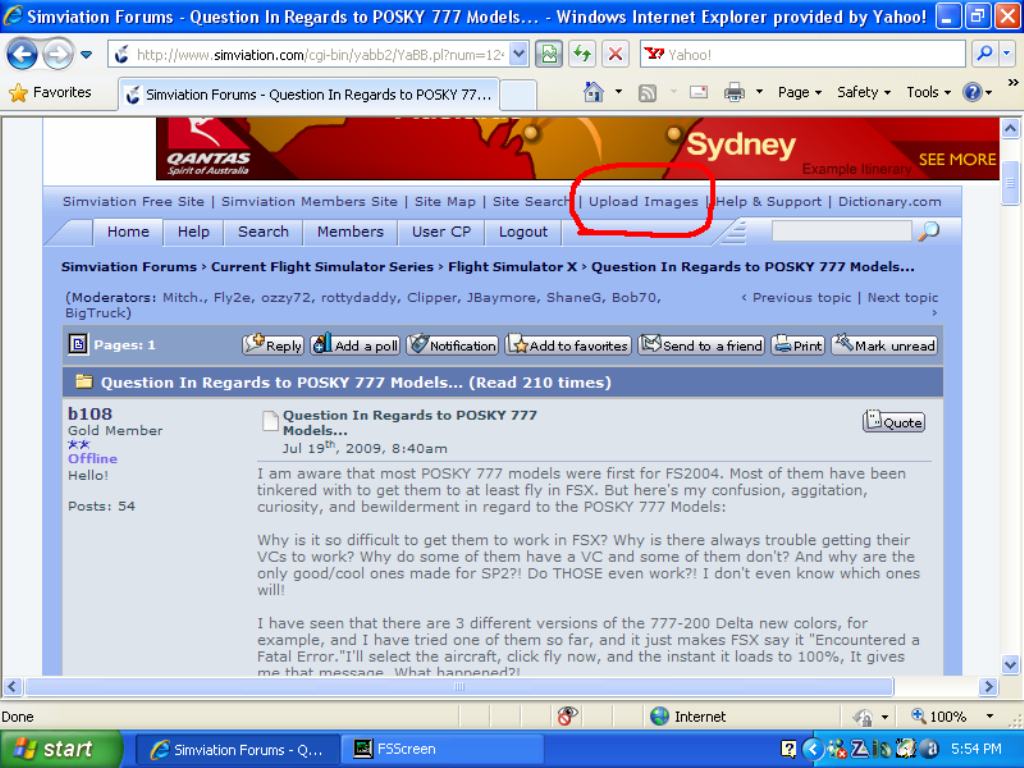
Please explain exactly how to do that. I know how to take pics in the sim. I just need to know how to get them on the site and in this topic.
b108
2nd Lieutenant
2nd Lieutenant
 
Posts: 93
Joined: Wed Feb 13, 2008 5:36 pm

Re: Question In Regards to POSKY 777 Models...

Postby RickG » Fri Jul 31, 2009 8:04 pm

sorry about the size--

Image
Last edited by RickG on Fri Jul 31, 2009 8:05 pm, edited 1 time in total.
Win7 Home Premium X64, Sabertooth Z77 mobo, i7 3770K@3.5 ghz, 8gb ram, Samsung 840PRO SSD,& WD hdd's
RickG
2nd Lieutenant
2nd Lieutenant
 
Posts: 246
Joined: Sun Jun 10, 2007 11:42 am

Re: Question In Regards to POSKY 777 Models...

Postby fabiane » Sat Aug 01, 2009 7:51 am

gtirob01's post explains everything very well.

Also you could read:
http://forum.projectopensky.com/index.p ... opic=33301

Cheers,
Fabian

**ADDITIONAL NOTE**
Look in your FSX root directory folder for a module named msvcr70.dll. You might need it for some FS9 default gauges to display properly. A quick search on Google should find it if you need it. - Courtesy of Hagar

**NOTE**
The Posky 777 if downloaded from SimV, not all of them include the files necessary to get the VC working. While it does include the entire aircraft package, you will still need to go to the Posky website to get all the necessary VC files. Once you have those, then follow the instructions below.

Also note, I have tested these instructions over and over again with FSX SP2/Acceleration on an XP based machine and a DX9 graphics card.

**UPDATE AGAIN**

Got an easier way to set this all up to get your vc gauges working. Quite simple actually. First, go here;

http://www.simviation.com/simviation/st ... 60&page=24

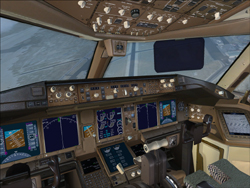
Download the 777 package (2nd from the top). This is the default FS9 777. Once downloaded, open the panel folder. You will see a single gauge file titled, "Boeing 777-300.gau". Take that and put it in your main FSX gauge folder. And thats it! Your vc should have all the gauges and buttons working. You wont need anything else from the download, so do what you'd like with it. You can then modify the config if you'd like to... but keep in mind, its not at all necessary. I just made my own changes to spice things up a bit. Only real necessity is the "//" in front of "gauge00=Pky_glassdirt!Pky_glassdirt" below the Vcockpit03 section of the panel.cfg

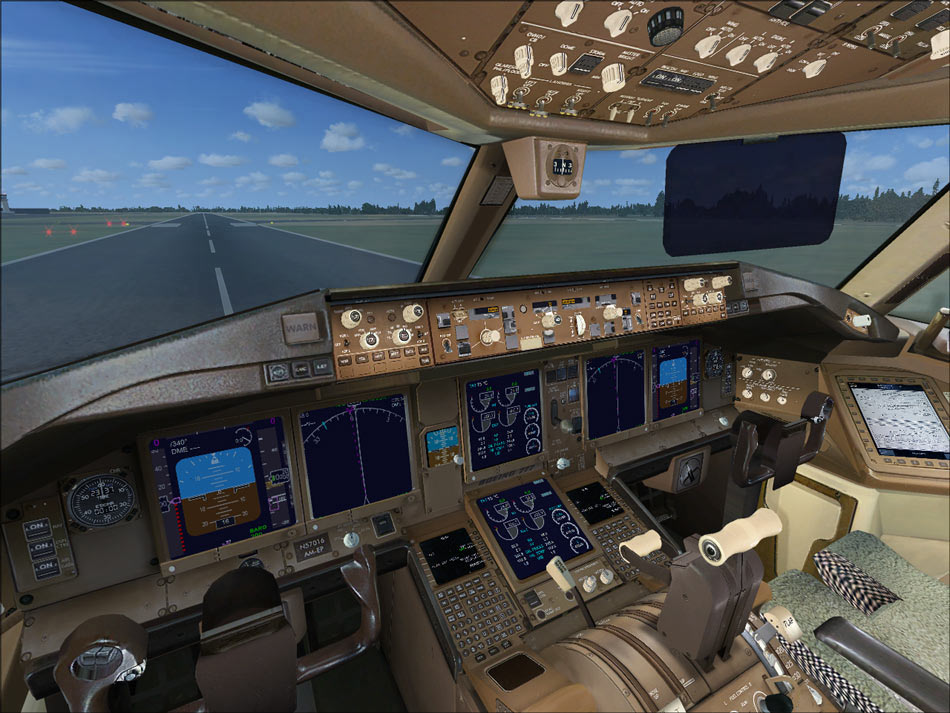
This is what you will get
Image

Only real change I made in the config from before is to keep one of the eicas panels as the default 777, and had the other one from the 737-800, as well as changed back the pfd screen to the 777.

I have posted my latest panel.cfg below. This reflects the latest panel on Posky's site, and a few changes I have made. All changes are in red text.

--------------------------------------------------------------------------------


Alot of people have the Posky 777, but cant get their gauges for the vc working. This is how I got mine to work.

Click on pictures for larger view;
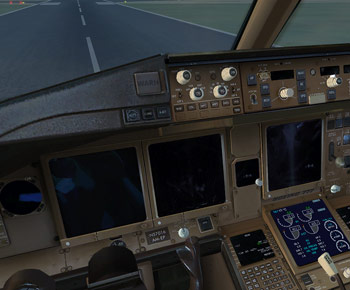
Image Image

Basically I just used the gauges from the default 737-800. Much of the credit goes to Daube for figuring that out. I just chose a few different gauges to look more realistic. And looking at an actual 777 cockpit, this is pretty close. Here is the panel.cfg that I use. You can either make any changes accordingly, or just copy mine. Make sure to have a backup of the original just in case! Keep in mind, this is only for the vc, and not the 2d panel view.

//Project Opensky 777v2 Virtual Cockpit Panel cfg
//Built Friday, June 27, 2008 at 16:09 Jacob Kubique
//Fix by H.Igami 16AUG 2008

[Window Titles]
Window00=Main Panel
Window01=Radio Stack
Window02=GPS
Window03=Throttle Quadrant
Window04=Compass
Window05=Mini Panel
Window06=Posky_Debug
Window07=Posky_Util


//--------------------------------------------------------
[Window00]
file=Forward_640.bmp
file_1024=Forward_1024.bmp
size_mm=640
position=7
visible=1
ident=MAIN_PANEL

gauge00=Boeing777-300!Anti_Ice_Switch,  406,15,28
gauge01=Boeing777-300!Ignition_Left,  459,15,28
gauge02=Boeing777-300!Ignition_Right,  537,15,28
gauge03=Boeing777-300!Fuel_Selector,  588,15,28
gauge04=Boeing777-300!Autobrake,  554,404,46
gauge05=Boeing777-300!Gear_Lever,  602,380,37
gauge06=Boeing777-300!Pitch_Trim_Ind,  554,248,27
gauge07=Boeing777-300!Pitch_Trim_Knob,  558,345,18
gauge08=Boeing777-300!Rudder_Trim_Ind,  584,308,55
gauge09=Boeing777-300!Rudder_Trim_Knob,  597,339,31
gauge10=Boeing777-300!Aileron_Trim_Ind,  583,247,57
gauge11=Boeing777-300!Aileron_Trim_Switch,  595,276,31
gauge12=Boeing777-300!Beacon_Nav_Light_Switch,  9,380,58
gauge13=Boeing777-300!Nose_Light_Switch,  1,431,26
gauge14=Boeing777-300!Strobe_Light_Switch,  29,  431 ,21
gauge15=Boeing777-300!Taxi_Light_Switch,  49,431,21
gauge16=Boeing777-300!Clock,  0,282,72
gauge17=Boeing777-300!Autopilot,  255,182,385
gauge18=Boeing777-300!Backup_Attitude,  476,246,77
gauge19=Boeing777-300!Backup_Altimeter,  476,323,77
gauge20=Boeing777-300!PFD,  75,255,197
gauge22=B737_800!MFD,  274,255,197
gauge23=Boeing777-300!Avionics_Switch,  21,244,21
gauge24=Boeing777-300!Master_Caution,  225,186,20
gauge25=Boeing777-300!Autostart,  500,17,25
gauge26=SimIcons!Kneeboard Icon,  156,457,12,12
gauge27=SimIcons!ATC Icon,  169,457,12,12
gauge28=SimIcons!Map Icon,  182,457,12,12
gauge29=SimIcons!Avionics Icon,  195,457,12,12
gauge30=SimIcons!GPS Icon,  208,457,12,12
gauge31=SimIcons!ECU Icon,  221,457,12,12
gauge32=SimIcons!Compass Icon,  234,457,12,12


//--------------------------------------------------------
[Window01]
Background_color=2,2,2
size_mm=127,347
position=8
visible=0
ident=RADIO_STACK_PANEL

gauge00=Boeing777-300!Comm 1,  0,0
gauge01=Boeing777-300!Comm 2,  0,54
gauge02=Boeing777-300!Nav 1,  0,108
gauge03=Boeing777-300!Nav 2,  0,162
gauge04=Boeing777-300!Transponder,  0,216
gauge05=Boeing777-300!ADF,  0,265
gauge06=Boeing777-300!Audio,  0,319


//--------------------------------------------------------
[Window02]
Background_color=0,0,0
size_mm=456,378
position=8
visible=0
ident=GPS_PANEL
window_size= 0.500, 1.000
window_pos= 0.000, 0.000

gauge00=fs9gps!gps_500,  0,0,456,378


//--------------------------------------------------------
[Window03]
Background_color=16,16,16
size_mm=201
position=0
visible=0
ident=THROTTLE_PANEL

gauge00=Boeing777-300!Throttle Quadrant,  0,0


//--------------------------------------------------------
[Window04]
Background_color=138,118,106
size_mm=70
position=2
visible=0
ident=COMPASS_PANEL

gauge00=Magnetic_Compass!Magnetic-Compass,  0,0


//--------------------------------------------------------
[Window05]
Background_color=0,0,0
size_mm=398,224
position=7
visible=1
ident=MINIPANEL
child_3d=1

gauge00=Boeing777-300!pfd,  0,0
gauge01=B737_800!MFD,  201,1

//--------------------------------------------------------
[Window06]
VISIBLE=0
position=2
size_mm=350,200
child_3d=0
background_color=0,0,0
ident=POSKYDEBUG
gauge00=Posky777!POSKYDEBUG,   0, 0
gauge01=Posky777!POSKYDEBUG2,   0, 100

//--------------------------------------------------------
[Window07]
VISIBLE=0
position=2
size_mm=204,80
child_3d=0
background_color=0,0,0
ident=Posky Utility
gauge00=Pky_Util!Pky_Init, 0, 0
gauge01=Pky_Util!Pky_Timer, 0, 0
gauge02=Pky_util!Pky_Util, 0, 0


//--------------------------------------------------------
[Vcockpit01]
file=$vc_01.bmp
Background_color=0,0,0
size_mm=1024,1024
visible=0
pixel_size=1024,1024
texture=$vc_01

gauge00=Boeing777-300!PFD,  -1,5,432,482
gauge01=B737_800!MFD,  431,3,428,483
gauge02=Boeing777-300!MFD,  431,488,428,483
gauge03=B737_800!eicas,  2,488,428,483
gauge04=Boeing777-300!Pitch_Trim_Ind,  886,4,100,374
gauge05=Boeing777-300!Beacon_Nav_Light_Switch,  861,466,163,102
gauge06=Boeing777-300!Master_Caution,  883,909,117,112
gauge07=Boeing777-300!Autostart,  862,376,80,91
gauge08=Magnetic_Compass!Magnetic-Compass,  869,756,148,150


//--------------------------------------------------------
[Vcockpit02]
file=$vc_02.bmp
Background_color=0,0,0
size_mm=1024,1024
visible=0
pixel_size=1024,1024
texture=$vc_02

gauge00=Boeing777-300!Backup_Attitude,  441,848,174,174
gauge01=B737_800!Clock,  619,854,170,168
gauge02=Boeing777-300!Autopilot,  332,528,689,78
gauge03=Boeing777-300!Rudder_Trim_Ind,  845,611,179,75
gauge04=fs9gps!gps_500,  386,-1,637,527
gauge05=Boeing777-300!Comm 1,  2,494,202,84
gauge06=Boeing777-300!Comm 2,  2,583,200,83
gauge07=Boeing777-300!Transponder,  1,841,200,76
gauge08=Boeing777-300!Nav 1,  3,670,200,82


//--------------------------------------------------------
[Vcockpit03]
file=$vc_03.bmp
Background_color=0,0,0
size_mm=1024,1024
visible=0
pixel_size=1024,1024
texture=$vc_03

//gauge00=Pky_glassdirt!Pky_glassdirt,  0,0,1024,1024


[VCockpit04]
size_mm=512,512
pixel_size=512,512
texture=$Posky_ACU
background_color=0,0,0


gauge00=Posky777!Pky_AdvInit, 140,80,140,80
gauge01=Posky777!PkyNosegearheight, 140,80,140,80
gauge02=Posky777!PkyLeftgearheight, 140,80,140,80
gauge03=Posky777!PkyLeftgearboggie, 140,80,140,80
gauge04=Posky777!PkyRightgearheight, 140,80,140,80
gauge05=Posky777!PkyRightgearboggie, 140,80,140,80
gauge06=Posky777!PkyCALC, 140,80,140,80
gauge07=Posky777!PkyWINGROOTFLEX, 140,80,140,80
gauge08=Posky777!PkyRWINGMIDFLEX, 140,80,140,80
gauge09=Posky777!PkyLWINGMIDFLEX, 140,80,140,80
gauge10=Posky777!PkyRWINGTIPFLEX, 140,80,140,80
gauge11=Posky777!PkyLWINGTIPFLEX, 140,80,140,80
gauge12=Posky777!PkyNosegearsteerling, 140,80,140,80
gauge13=Posky777!PkyRudder, 140,80,140,80
gauge14=Posky777!Pky2Rudder, 140,80,140,80
gauge15=Posky777!PkyflaperonL, 140,80,140,80
gauge16=Posky777!PkyflaperonR, 140,80,140,80
gauge17=Posky777!PkyLSAileronL, 140,80,140,80
gauge18=Posky777!PkyLSAileronR, 140,80,140,80
gauge19=Posky777!PkySpoiler, 140,80,140,80
gauge20=Posky777!PkyElev, 140,80,140,80
gauge21=Posky777!PkyAPUDoor, 140,80,140,80
gauge22=Posky777!PkyEngRev, 140,80,140,80


[Color]
Day=255,255,255
Night=16,10,10
Luminous=255,231,164

[Default View]
X=0
Y=0
SIZE_X=8192
SIZE_Y=3300


fabiane
 

Re: Question In Regards to POSKY 777 Models...

Postby b108 » Fri Aug 07, 2009 5:41 pm

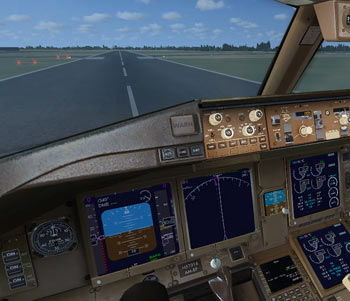
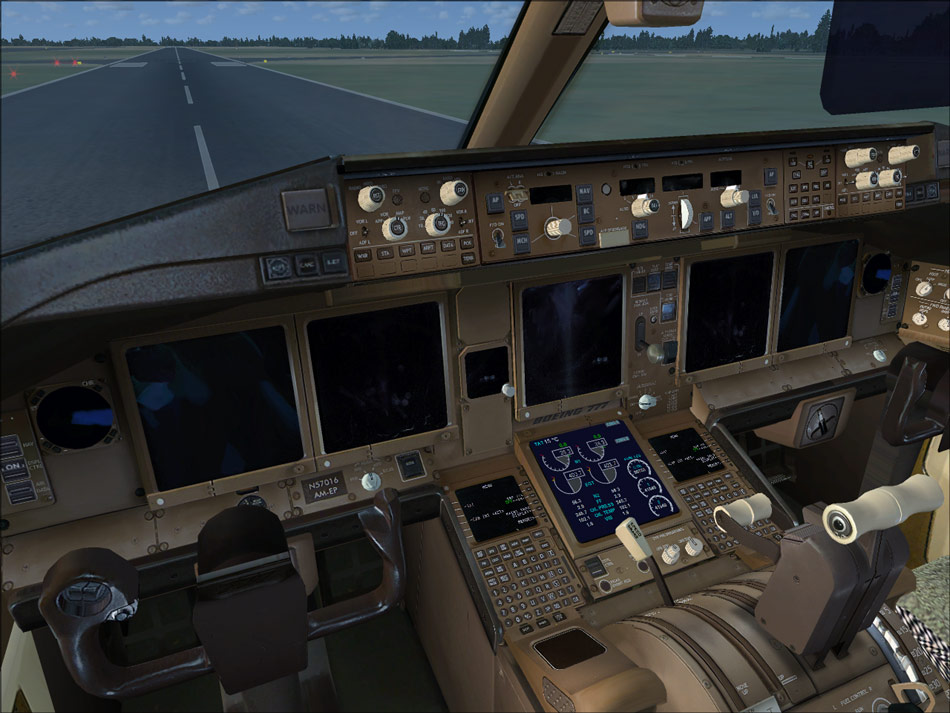
This is the result I keep getting from some of the VC's:
As you can see, the panel is there only in the very essence and meaning of the word "There." It just ONLY exists.
I will try that link to the posky website now and get back to you guys if that does/n't work.
Image
Last edited by b108 on Fri Aug 07, 2009 5:44 pm, edited 1 time in total.
b108
2nd Lieutenant
2nd Lieutenant
 
Posts: 93
Joined: Wed Feb 13, 2008 5:36 pm

Re: Question In Regards to POSKY 777 Models...

Postby gtirob01 » Fri Aug 07, 2009 6:16 pm

Yea, that looks to me like there are no textures, or the textures are in the wrong place. Make sure that all your vc textures go into the main aircraft texture folder, and not in the panel folder. Check that, and then we can go on from there...

Also, make sure to resize your pictures to 1024x768
Last edited by gtirob01 on Fri Aug 07, 2009 6:16 pm, edited 1 time in total.
My specs... A hard drive, motherboard, graphics card, some memory, a keyboard, mouse, and monitor - in other words, nothing special.

Image

My Posky
User avatar
gtirob01
Major
Major
 
Posts: 3605
Joined: Fri Jul 20, 2007 11:10 pm
Location: Ft. Walton Beach, FL

Re: Question In Regards to POSKY 777 Models...

Postby usapatriot » Sat Aug 08, 2009 8:25 am

Is there any way that someone can make a simple guide as to how to get the 777 working in FSX? I appreciate gtirob01's guide but it's a bit to messy and I can never get POSKY's 777 to work in FSX using it.

Also, is there ANY way to get the gauges to be the proper size in FSX?
Antec 902 - i7 920 @ 4.0GHz - G.Skill 6GB DDR3 - Radeon 5870 1GB - Win 7 x64
usapatriot
2nd Lieutenant
2nd Lieutenant
 
Posts: 270
Joined: Sat Feb 16, 2008 10:53 am
Location: Miami, FL

Re: Question In Regards to POSKY 777 Models...

Postby gtirob01 » Sat Aug 08, 2009 10:09 am

Is there any way that someone can make a simple guide as to how to get the 777 working in FSX? I appreciate gtirob01's guide but it's a bit to messy and I can never get POSKY's 777 to work in FSX using it.

Also, is there ANY way to get the gauges to be the proper size in FSX?


How is it "messy"? those instructions have
Last edited by gtirob01 on Sat Aug 08, 2009 10:24 am, edited 1 time in total.
My specs... A hard drive, motherboard, graphics card, some memory, a keyboard, mouse, and monitor - in other words, nothing special.

Image

My Posky
User avatar
gtirob01
Major
Major
 
Posts: 3605
Joined: Fri Jul 20, 2007 11:10 pm
Location: Ft. Walton Beach, FL

Next

Return to Flight Simulator X (FSX) and Steam

Who is online

Users browsing this forum: No registered users and 421 guests