Simviation Forums
Flight Simulator and other chat
Flight Simulator and other chat
 by fulanito_uk » Sun Jan 13, 2008 8:23 am

by ozzy72 » Sun Jan 13, 2008 8:31 am


by pepper_airborne » Sun Jan 13, 2008 9:21 am


by pepper_airborne » Sun Jan 13, 2008 11:07 am
by TSC. » Sun Jan 13, 2008 11:12 am


by pepper_airborne » Sun Jan 13, 2008 11:52 am
by TSC. » Sun Jan 13, 2008 12:49 pm
interesting, im going to give that a go. How did you program it?
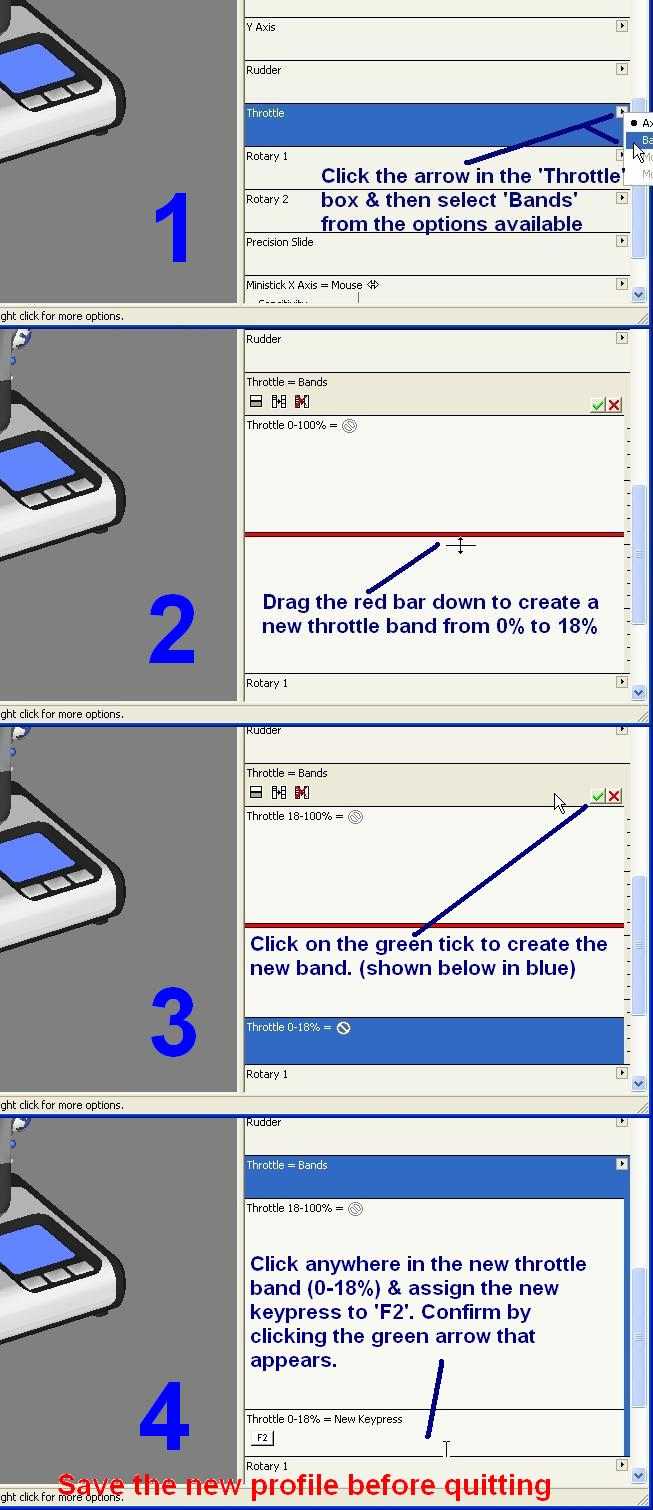
by pepper_airborne » Sun Jan 13, 2008 1:00 pm
by TSC. » Sun Jan 13, 2008 1:07 pm
I inserted a smaller 5% zone above the 18/20 one, and put it on constantly F1, constantly idling the throttles, so i would have a small deadzone for the engines.
by pepper_airborne » Sun Jan 13, 2008 1:41 pm
Return to FS 2004 - A Century of Flight
Users browsing this forum: No registered users and 229 guests