Scenery Problem

Forum dedicated to Microsoft FS2004 - "A Century of Flight".

Scenery Problem

Postby a1 » Fri Apr 27, 2007 10:11 pm

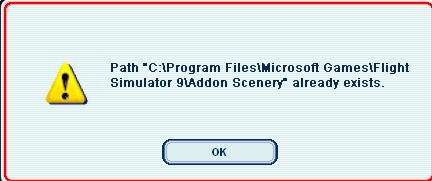
Every time when i try to add scenery it doesn't work. i click the add area or in the scenery library and it says that the add on scenery already exists. What happened? :-?

This is what i get
Image
Last edited by a1 on Fri Apr 27, 2007 10:22 pm, edited 1 time in total.
Image
790i : QX9650 : 4Gb DDR3 : GeForce 8800 GTX : 1 WD Raptor : 1 WD VelociRaptor 150
User avatar
a1
Lieutenant Colonel
Lieutenant Colonel
 
Posts: 7608
Joined: Thu Jan 04, 2007 9:16 pm

Re: Scenery Problem

Postby Sir_Crashalot » Fri Apr 27, 2007 10:28 pm

OK. First of all make sure that the scenery you want to install consists of a folder containing a Scenery and a Texture folder. Put that folder in the Addon Scenery folder of FS9. So far so good. Now start up FS9 and go to Settings ---> Scenery Library. Add your scenery by selecting Addon Scenery ---> your folder. Restart FS9. It should work.

Don't add scenery by putting it directly in the Main Scenery folder or in any other Scenery folder. It's asking for trouble........

Crash ;)

Edit: You are trying to add the Addon Scenery folder if you get that message. You have to add the specific scenery not a folder of FS9.......
Last edited by Sir_Crashalot on Fri Apr 27, 2007 10:31 pm, edited 1 time in total.
Sir_Crashalot
 

Re: Scenery Problem

Postby a1 » Fri Apr 27, 2007 10:38 pm

i know but in the scenery library there is a scenery that says Addon Scenery. is that normal? and still can't get the file to open up. :-?
Image
790i : QX9650 : 4Gb DDR3 : GeForce 8800 GTX : 1 WD Raptor : 1 WD VelociRaptor 150
User avatar
a1
Lieutenant Colonel
Lieutenant Colonel
 
Posts: 7608
Joined: Thu Jan 04, 2007 9:16 pm

Re: Scenery Problem

Postby Sir_Crashalot » Sat Apr 28, 2007 9:13 am

When correct you should have this:

C:/Program Files/Microsoft Games/FS9/Addon Scenery. That is where you have to put your scenery. Nowhere else.

Start FS9. Go to Settings ---> Scenery Library ---> Add Area. Open the Addon Scenery folder. Select the scenery you want to install (remember not to open it, just select it). Click OK. Restart the sim and it should work.

Like I wrote before, a scenery has to have a folder containing a scenery folder and a texture folder.

If everything still fails there is a second option. Not recommended but it will work. Copy the Scenery and Texture folders of the scenery you downloaded directly into the Addon Scenery folder and answer yes on overwrite. Next time you start your sim it will automatically update the database. Problem is that the scenery is very hard to remove again if you don't like it.

I hope this helped a bit,

Crash ;)
Sir_Crashalot
 

Re: Scenery Problem

Postby Hagar » Sat Apr 28, 2007 9:43 am

See if my Scenery Clinic helps. http://www.simviation.com/lair/fs2004sc.htm
Last edited by Hagar on Sat Apr 28, 2007 9:44 am, edited 1 time in total.
Image

Founder & Sole Member - Grumpy's Over the Hill Club for Veteran Virtual Aviators
Member of the Fox Four Group
My Google Photos albums
My Flickr albums
User avatar
Hagar
Colonel
Colonel
 
Posts: 30868
Joined: Wed Jun 19, 2002 7:15 am
Location: Costa Geriatrica


Return to FS 2004 - A Century of Flight

Who is online

Users browsing this forum: No registered users and 424 guests