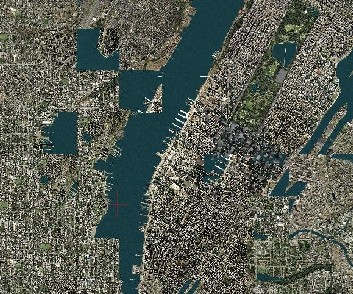
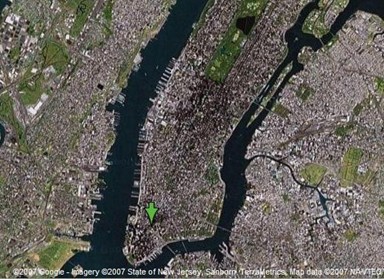
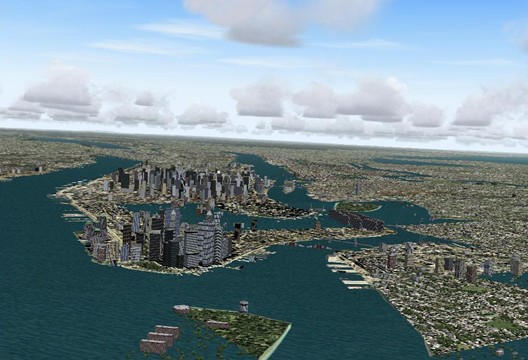
Now, this is one
WEIRD problem... Having read the thread so far, some things come to my mind:
1.) What do you mean by "upgrading your system". Have you bought a completely new, premanufactured PC, or did you buy new components and built them in yourself?
2.) Do New York/Manhattan always look wrong
in the same way? I mean, are the errors permanent or does FS2004 "shuffle" them randomly every time it loads the scenery?
3.) Is it just North America or does all your FS world look like that? What about London, Hong Kong, or Sidney?
4.) Have you tried to disconnect internet, shut down your virus scanner and any background applications and run FS
exclusively?
5.) Are there any other games you can run on your PC to see if they have similar graphic errors? Is there another PC (of relatives or a friend) where you can check if your FS2004 discs install and runs correctly? Especially on a PC with another operating system, like Windows 2000, XP Home or XP Professional. I've got no experience with the Media Center Edition, but it might very well be the cause for the mixed-up tiles.
The two following things are general considerations, but anyway.
6.) Judging from your latest screenshot, everything looks fine except the erroneous tiles. The clouds and buildings (misplaced or not) look alright. From more than 10 year of experience with PCs, I'd rather say it's not a graphics card / driver problem. (On the other hand, 10 years of PC experience keep you from ruling something out
completely.) But if it was a problem with your RAM, your system should freeze, or show more severe graphic errors. I
tend to suppose that it's a software problem and not a hardware problem.
However, and especially if your system is new, you can test your memory to see how reliable and stable your system runs (to rule out memory errors). A good program for this is memtest86+ (
http://www.memtest.org/). Look for
Pre-Compiled Bootable Binary (.zip) to make a boot disk (or boot from a USB stick) and let memtest86+ make one complete pass, which might take quite a while (2 hours are nothing unusual). You will find more information on the webpage above.
7.) If you have a second hard drive, try installing FS2004 there. It probably won't make a difference, but, as they say, "the proof of the pudding is in the eating". When you run FS, are you logged in as a user with administrator priviledges? (Many games won't run or give you trouble if not...) If you have two hard drives in your system (two physical hard drives, NOT two partitions), it is generally recommended that you move the Windows Swap File from the system drive (usually C:, where Windows and all your programs are installed) to the other hard disk, to share the load. Also, if you can afford the HD space, give it a fixed size; 1.5x system RAM is the recommended size, which would be (don't get mad

) 3GB in your case. (See
http://en.wikipedia.org/wiki/Virtual_memory for more information on that issue.)
Oh... this post has become a little extensive... enough for now. I hope this was any useful to you. So long.




 *lol*
*lol* ).
).