Shoreline graphics problem

Forum dedicated to Microsoft FS2004 - "A Century of Flight".

Shoreline graphics problem

Postby JLCGull » Wed Feb 07, 2007 10:44 am

I have recently upgraded my computer (bought a new system) and also stepped up to FS04.

After several days of messing about with various settings I still can't get shorelines to display accurately. Bodies of water appear in the middle of cities. Pieces of land appear in the middle of the ocean. Bridges that should span rivers only span dry land, and sometimes end in the river instead.

And it all changes to a crazy quilt patchwork in the ctl-S view. The shoreline features are there in sort of big blocks, but all mixed up and in different sizes and in incorrect locations.

I have installed the MS patch for FS04.

I am running a Gateway PC with XP media center sp 2
AMD Athlon 64 X 2 at 2.21 ghtz
2 gig RAM
Nvidia GeForce 6100 graphics.

Ive tried the various available slider settings from both their minimums to their maximums, but always the program "paints" big blocks of scenery where they don't belong.

Anyone have any ideas?

Thanks
JLCGull
Ground hog
Ground hog
 
Posts: 47
Joined: Wed Feb 07, 2007 11:22 am
Location: North Eastern US

Re: Shoreline graphics problem

Postby garymbuska » Wed Feb 07, 2007 1:25 pm

From what you describe it sounds like a huge mess. If you did a fresh install of FS on the new system did you update you Direct X to the latest version I think it is 9.0c

How and where did you install the Patch. If you did not install within FS9 the patch will not work correctly. You have to put the patch exe file within the main root folder of fs9 before running it.
Other than that I would check your video drivers.
Also in my opinion XP MEDIA CENTER is not the best operating system for FS9 or FSX but just my opinion 8-)
Gary M Buska
SYSTEM Specs ASUS P8Z68 V/GEN 3 mother board: INTELL I7 2600k 3.48 ghz Quad core CPU with Sandy bridge: 12 Gigs of 1800hz ram:
GTX 950 OVER CLOCKED: 2 Gigs Ram Windows 10 Home 64 bit Operating system. 750W Dedicated modular power supply. Two Internal 1TB hard drives 1 External 1TB 3.2 USB hard drive. SAITEK Cessna flight Yoke with throttles.
CH Rudder Peddles 27 inch Wide screen Monitor
User avatar
garymbuska
Major
Major
 
Posts: 4415
Joined: Tue Dec 30, 2003 11:10 am
Location: Jacksonville, Florida

Re: Shoreline graphics problem

Postby JLCGull » Wed Feb 07, 2007 3:16 pm

I've got DirectX 9.0C
Last edited by JLCGull on Wed Feb 07, 2007 3:17 pm, edited 1 time in total.
JLCGull
Ground hog
Ground hog
 
Posts: 47
Joined: Wed Feb 07, 2007 11:22 am
Location: North Eastern US

Re: Shoreline graphics problem

Postby JLCGull » Wed Feb 07, 2007 3:26 pm

I also just checked to see if there were any newer drivers for the graphics. Nope.

BTW the graphics problem is ONLY with the scenery. All panels, aircraft, airports etc. are just fine.
JLCGull
Ground hog
Ground hog
 
Posts: 47
Joined: Wed Feb 07, 2007 11:22 am
Location: North Eastern US

Re: Shoreline graphics problem

Postby Conan Edogawa » Wed Feb 07, 2007 3:56 pm

Could you please post a screenshot? I'd love to see that... ;D *lol*

Never mind.

And garymbuska is right, the media center isn't as good as xp prof. Like the name says, it's for media. And (in my opinion) mediameans TV and that stuff, but not FS9 :).

Another of my opinions: I'm against vista. Uses way toooo much RAM (1GB only for the design :o).
Image

Specs: Intel Core2Quad Q6600 2,4GHz; 3,25GB RAM; nVidia EN8800GTS 512MB; Flight Simulator 9.1.
User avatar
Conan Edogawa
1st Lieutenant
1st Lieutenant
 
Posts: 488
Joined: Tue Dec 26, 2006 5:14 pm
Location: Hamburg, Germany

Re: Shoreline graphics problem

Postby beaky » Thu Feb 08, 2007 10:37 am

This is probably a silly question, but:
Are you absolutely certain you have no add-on scenery or textures? Anything at all? Any downloads that include flights or "adventures" (these often include scenery objects or even mesh)?
A suggestion:go to the Add-on Scenery library and disable everything (even the default stuff),see if it helps, then restore each item one by one until you find the culprit (a corrupt file?).

Another silly question: you say you upgraded to FS9... are you 100% sure you uninstalled the old version? Including any and all add-ons?
Image
User avatar
beaky
Global Moderator
Global Moderator
 
Posts: 12877
Joined: Thu Dec 16, 2004 8:00 am
Location: Shenandoah, PA USA

Re: Shoreline graphics problem

Postby JLCGull » Wed Feb 14, 2007 7:44 am

I was away for a bit so it took me awhile to get these shots up.

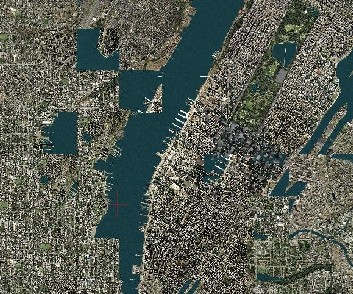
Here is a screen shot of New York City in the satellite view:

Image

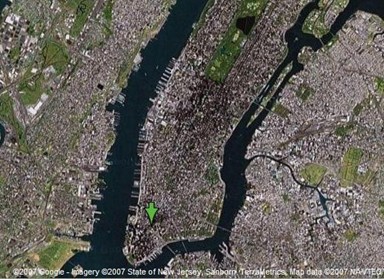
That is the Hudson River diagonally across the shot with Manhatten to the right. Note that theEast River doesn't make it all the way to the south of Manhatten where it should join with the Hudson at the Battery in New York Harbor.

Here is a real satellite image of the same general area from Google.

Image


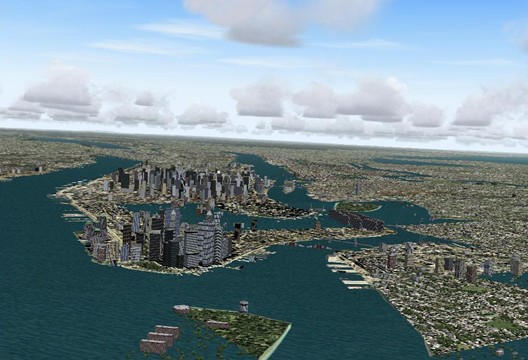
The interesting thing is that the errors in the scenery are also visible in other views, such as cockpit or chase plane, and they are changing constantly, Blocks of land or water appear and dissapear in strange places as I fly along.

I have also tried disabling all my security software...no help.

RE. Add On's:
JLCGull
Ground hog
Ground hog
 
Posts: 47
Joined: Wed Feb 07, 2007 11:22 am
Location: North Eastern US

Re: Shoreline graphics problem

Postby beaky » Wed Feb 14, 2007 8:18 am

OK, my mistake: add-on scenery goes in the Scenery Library, which you access by clicking Settings on the main menu page. There is no separate add-on library page, although if you open FS9 with your browser there is a folder for add-on stuff.

Not sure what you're seeing there, but it's pretty nasty-looking.  You might still want to look at that Scenery Library page- you'll see that you can disable or change the priority of even the default scenery files. I'm not sure if experimenting with switching things off there will help much, if you see this problem all over the FS globe...
Image
User avatar
beaky
Global Moderator
Global Moderator
 
Posts: 12877
Joined: Thu Dec 16, 2004 8:00 am
Location: Shenandoah, PA USA

Re: Shoreline graphics problem

Postby JLCGull » Wed Feb 14, 2007 9:57 am

I found my way to the scenery library and disabled everything it would let me except the stuff relevant to New York City. i.e.
JLCGull
Ground hog
Ground hog
 
Posts: 47
Joined: Wed Feb 07, 2007 11:22 am
Location: North Eastern US

Re: Shoreline graphics problem

Postby JLCGull » Wed Feb 14, 2007 10:23 am

OK...I just couldn't resist this one.

title it: Effects of Global Warming

or maybe:
JLCGull
Ground hog
Ground hog
 
Posts: 47
Joined: Wed Feb 07, 2007 11:22 am
Location: North Eastern US

Re: Shoreline graphics problem

Postby pepper_airborne » Wed Feb 14, 2007 10:58 am

I think you need new graphic card drivers, there special ones for the media center on the nvidia website(www.nvidia.com).

Dont forget to first remove the old drivers
User avatar
pepper_airborne
Major
Major
 
Posts: 2268
Joined: Thu Mar 23, 2006 6:42 am

Re: Shoreline graphics problem

Postby Conan Edogawa » Thu Feb 15, 2007 1:23 am

OK...I just couldn't resist this one.

title it: Effects of Global Warming

or maybe:  It Could Happen Tomorrow

Image


But somehow it would be a lot funnier if it hadn't happened in New Oleans in RL.


No, the day after tomorrow... ;D ;D
Image

Specs: Intel Core2Quad Q6600 2,4GHz; 3,25GB RAM; nVidia EN8800GTS 512MB; Flight Simulator 9.1.
User avatar
Conan Edogawa
1st Lieutenant
1st Lieutenant
 
Posts: 488
Joined: Tue Dec 26, 2006 5:14 pm
Location: Hamburg, Germany

Re: Shoreline graphics problem

Postby MadWings » Thu Feb 15, 2007 5:33 pm

Now, this is one WEIRD problem... Having read the thread so far, some things come to my mind:

1.) What do you mean by "upgrading your system". Have you bought a completely new, premanufactured PC, or did you buy new components and built them in yourself?

2.) Do New York/Manhattan always look wrong in the same way? I mean, are the errors permanent or does FS2004 "shuffle" them randomly every time it loads the scenery?

3.) Is it just North America or does all your FS world look like that? What about London, Hong Kong, or Sidney?

4.) Have you tried to disconnect internet, shut down your virus scanner and any background applications and run FS exclusively?

5.) Are there any other games you can run on your PC to see if they have similar graphic errors? Is there another PC (of relatives or a friend) where you can check if your FS2004 discs install and runs correctly? Especially on a PC with another operating system, like Windows 2000, XP Home or XP Professional. I've got no experience with the Media Center Edition, but it might very well be the cause for the mixed-up tiles.

The two following things are general considerations, but anyway.

6.) Judging from your latest screenshot, everything looks fine except the erroneous tiles. The clouds and buildings (misplaced or not) look alright. From more than 10 year of experience with PCs, I'd rather say it's not a graphics card / driver problem. (On the other hand, 10 years of PC experience keep you from ruling something out completely.) But if it was a problem with your RAM, your system should freeze, or show more severe graphic errors. I tend to suppose that it's a software problem and not a hardware problem.
However, and especially if your system is new, you can test your memory to see how reliable and stable your system runs (to rule out memory errors). A good program for this is memtest86+ (http://www.memtest.org/). Look for Pre-Compiled Bootable Binary (.zip) to make a boot disk (or boot from a USB stick) and let memtest86+ make one complete pass, which might take quite a while (2 hours are nothing unusual). You will find more information on the webpage above.

7.) If you have a second hard drive, try installing FS2004 there. It probably won't make a difference, but, as they say, "the proof of the pudding is in the eating". When you run FS, are you logged in as a user with administrator priviledges? (Many games won't run or give you trouble if not...) If you have two hard drives in your system (two physical hard drives, NOT two partitions), it is generally recommended that you move the Windows Swap File from the system drive (usually C:, where Windows and all your programs are installed) to the other hard disk, to share the load. Also, if you can afford the HD space, give it a fixed size; 1.5x system RAM is the recommended size, which would be (don't get mad :) ) 3GB in your case. (See http://en.wikipedia.org/wiki/Virtual_memory for more information on that issue.)

Oh... this post has become a little extensive... enough for now. I hope this was any useful to you. So long.
Last edited by MadWings on Thu Feb 15, 2007 5:38 pm, edited 1 time in total.
I am serious, and don't call me Shirley!
User avatar
MadWings
Ground hog
Ground hog
 
Posts: 36
Joined: Thu Feb 15, 2007 11:55 am
Location: South Germany

Re: Shoreline graphics problem

Postby JLCGull » Fri Feb 16, 2007 11:18 am

MadWings;

Thanks for the thoughtful reply. I appreciate it.

My "upgrade" is a completely new Gateway pre-built PC....not a home made system nor an add on to an old system.

The OS is XP Media Edition which (as I am told by the most unreliabe source of all, Microsoft...) is actually XP Professional with extended media capabilities. I am using it in the XP Pro mode, not using the media center mode at the moment.

No the misplaced scenery is not always precisely the same, but usually VERY similar. As I mentioned in my previous post it also changes regularly as I fly along...so maybe it is affected by exact position, altitude, and airspeed of the aircraft.

The problem is, as far as I can tell, "World wide". Definitely all over the coastlines, and harder to tell but also likely a problem with inland locations as well. The buidings and airports all are where they ought to be, but big tiles of scenery are out of place and out of proportion. It is harder to make out, say over the desert, that one piece of desert is not where it ought to be, but I think that is what is going on.

I too have spent a little time around personal computers, my very first being an Apple II + back in 1978 and never have been without one since....but I'm not a Super-Geek or anything. I just use 'em for what I want to get done. My experience tells me that when something like a graphics card incompatibility problem shows up it affects all the graphics for that program...not just a part of them. What I didn't know is if the FS software uses a different algorithm for painting the scenery than it does for the planes, airports, buildings, etc. I was hoping there would be some input to my thread on that issue. It clearly must, but why is it confused re: scenery tiles and not the other stuff?

 Here is another piece of the puzzle...if I go into slew mode and move to a location quickly and then freeze the motion of the aircraft, but DO NOT pause the game.....the scenery continues to change for awhile, as if it is "catching up" to the rapid change of location.... Eventually it stops changing, but it is still not correct.  It puts me of the mind of a system with too little ram or too little processor power. I've got lots of both for this game's requierments, so something is affecting it.
I'll look into the memory testing software that you listed..thanks

 I only have one physical disk, partitioned into two logical drives, but the D: partition is system backup information and is a relatively small part of the whole.  My C: drive is huge with plenty of free space, so upping the Swap File to something like 3 GB is no big deal.


Yes, I have disconnected from the internet and tried to run the game with all of the protection software disabled, no help.

No, I don't have a lot of games, nothing as graphics intensive as FS, but no other program has one whit of a problem with the graphics on my PC.

Yes I am logged on as the administrator...the only user for that machine as it is my own personal PC and no one else has physical access to it, and it is not networked.

I see when I bring up the task manager there are all sorts of things running on my machine that I don't know exactly what they are doing or if they are necessary. I'd love to find out how to shut most of them down, but doing so by trial and error would take days to figure out what is necessary and what is just junk. I could use some help there determining what to get rid of and what I need to keep.

I believe the most useful bit of information I have gleened so far is that my problem is unusual....  That suggests to me that it is an artifact of my particular set up, not a chronic software issue in FS9 or even a known hardware incompatibility problem. Do you remember setting stuff up in the old DOS? It matters what order you load drivers and stuff when the system boots. (One thing I've always hated about Win-anything is that it is constantly altering its own configuration, often screwing things up!) So maybe it is something like that.

I wonder if the dual core processor is the issue? I believe I can set the software to run on only one or the other...maybe worth a try.

Anyway Mad Wings, thanks for the intelligent and helpful input.

JLCGull
JLCGull
Ground hog
Ground hog
 
Posts: 47
Joined: Wed Feb 07, 2007 11:22 am
Location: North Eastern US

Re: Shoreline graphics problem

Postby JLCGull » Wed Feb 21, 2007 11:52 am

Just a folow up for anyone who might have similar problems:

I discovered that that Nvidia was running some "Helpful utilities" at boot up that were supposed to allow easy tweaking ogf the video card. These really were not necesssary as one can get to all that stuff via the Control Panel.  After disabling these start up items the floods have receded and the shape of the shoreline has returned to normal.

 Since I have played with just about every setting in the "Display" part of FS9 I will now be slowly working my way back to my personal preference in scenery display, but for now the FS level of "Very detailed" is working well.

I am happy to have it finally working. I was about to give up on the game entierly as it wasn't much fun flying around with the world all Picasso'd. It was reading some of the great posts here that convinced me it would be worth my time to press on to find a solution.

Thanks to all who replied and tried to help or humor me with this problem.

JLCGull.
JLCGull
Ground hog
Ground hog
 
Posts: 47
Joined: Wed Feb 07, 2007 11:22 am
Location: North Eastern US

Next

Return to FS 2004 - A Century of Flight

Who is online

Users browsing this forum: No registered users and 134 guests