
Texture abnormalities with IFDG models?

Forum dedicated to Microsoft FS2004 - "A Century of Flight".

Texture abnormalities with IFDG models?

Postby DeepSpace » Wed Feb 01, 2006 6:27 am

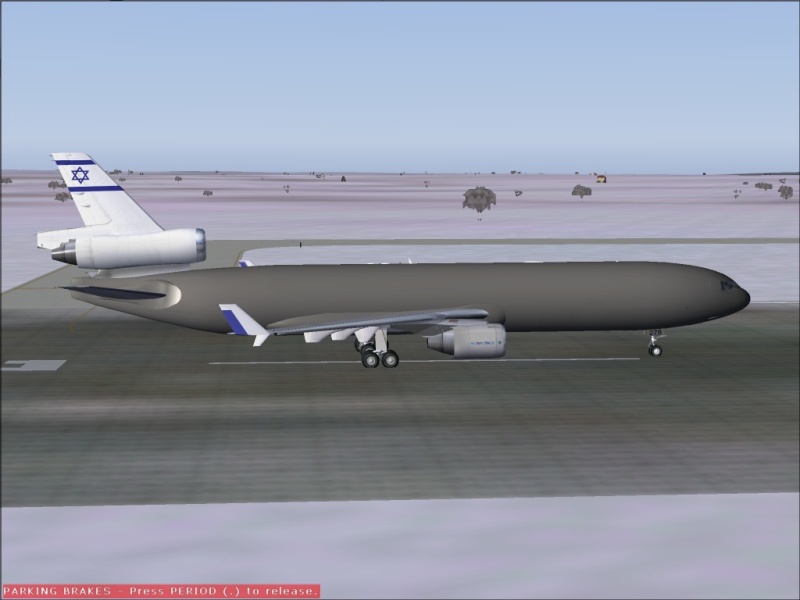
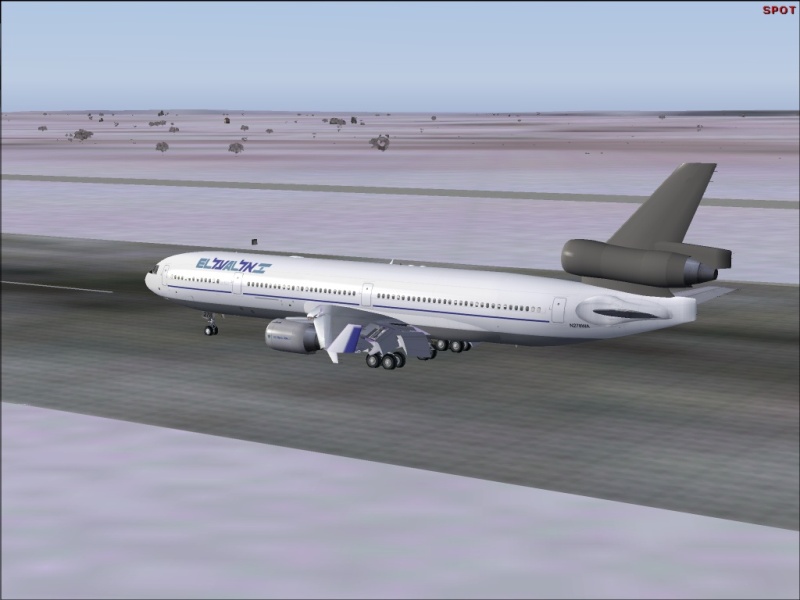
Hi. I'm having some texture abnormalities with the IFDG MD-11 and A321. Both the aircraft's and the sim's textures seem to randomaly disappear and reappearing. Has anyone ever faced it, and how can it be solved?

Image

Image

Thanks.
DeepSpace
1st Lieutenant
1st Lieutenant
 
Posts: 428
Joined: Sat Jun 08, 2002 11:55 am
Location: Israel

Re: Texture abnormalities with IFDG models?

Postby highfive » Wed Feb 01, 2006 11:12 am

I guess you could call this a shoot in the dark (texture) :D. I had a distorted texture (not missing) issue :P. It was resolved by downloading the latest ATI driver from Jan. 16. The new driver seems to apply to the entire ATI line.

As I mentioned with my posting Download.com listed an out-of-date driver from Dec. 2005 so if you have an ATI board make sure you get the ATI driver directly from their homepage. As a matter of fact I think the Dec. 23 driver update caused my problem >:(. If you do update your driver make sure you remove the old one first.

I have been paying attention to other post with similar problems. A loose video board connection or non-functional video board fan could also be the culprit ???. The next question from someone who really know what they are doing is to ask your systems parameters (CPU, Vid board, RAM, etc.). My 2 cents has been deposited ;).

Highfive
Last edited by highfive on Wed Feb 01, 2006 11:15 am, edited 1 time in total.
Our doubts are traitors and make us lose the good we oft might win by failing to attempt. -
William Shakespeare

Have patience - everything is difficult before it is easy. - Saadi

The world is a dangerous place, not because of
highfive
Ground hog
Ground hog
 
Posts: 45
Joined: Thu Dec 15, 2005 12:31 am
Location: Cherry Hill, NJ

Re: Texture abnormalities with IFDG models?

Postby ashaman » Wed Feb 01, 2006 11:20 am

As Highfive can tell you about ATI card, I can pretty much say the same thing about Nvidia cards. The kind of problems you're experiencing, I had too back in the past, and resolved installing a newer version of the drivers.

Just install the latest drivers availble for your card and 8 times out of 10 that kind of problems are no more.
Last edited by ashaman on Wed Feb 01, 2006 11:20 am, edited 1 time in total.
There's but one real cure for human stupidity. It's called DEATH.

At the moment mourning the assassination of sarcasm and irony for the good of the "higher".

Proud FSIX user. Active user of FS98, X-plane and novic
User avatar
ashaman
Major
Major
 
Posts: 1741
Joined: Thu Nov 27, 2003 9:08 am
Location: LIRN

Re: Texture abnormalities with IFDG models?

Postby DeepSpace » Wed Feb 01, 2006 11:23 am

I guess you could call this a shoot in the dark (texture) :D. I had a distorted texture (not missing) issue :P. It was resolved by downloading the latest ATI driver from Jan. 16. The new driver seems to apply to the entire ATI line.

As I mentioned with my posting Download.com listed an out-of-date driver from Dec. 2005 so if you have an ATI board make sure you get the ATI driver directly from their homepage. As a matter of fact I think the Dec. 23 driver update caused my problem >:(. If you do update your driver make sure you remove the old one first.

I have been paying attention to other post with similar problems. A loose video board connection or non-functional video board fan could also be the culprit ???. The next question from someone who really know what they are doing is to ask your systems parameters (CPU, Vid board, RAM, etc.). My 2 cents has been deposited ;).

Highfive


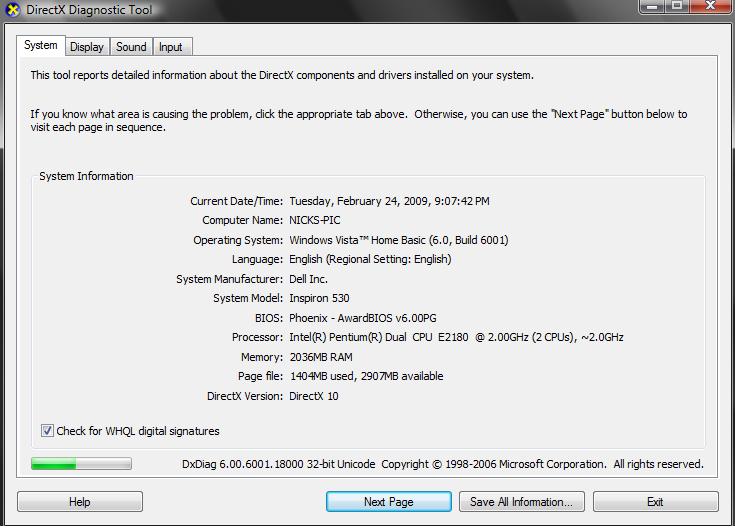
Thanks for your reply :). Here are the specs:

Image

I know my vid. card is "a bit" out-dated, but I don't think it's the problem because it happens only with two models, the IFDG MD-11 and A321.


As Highfive can tell you about ATI card, I can pretty much say the same thing about Nvidia cards. The kind of problems you're experiencing, I had too back in the past, and resolved installing a newer version of the drivers.

Just install the latest drivers availble for your card and 8 times out of 10 that kind of problems are no more.


Yeah, I know about these kind of problems. My problem is that if I'm installing the new drivers my PC tends to crash a lot while running games (sometimes it doesn't even start at all), that's at least what happened in the last few times that I tried to install a new driver.
Last edited by DeepSpace on Wed Feb 01, 2006 11:26 am, edited 1 time in total.
DeepSpace
1st Lieutenant
1st Lieutenant
 
Posts: 428
Joined: Sat Jun 08, 2002 11:55 am
Location: Israel

Re: Texture abnormalities with IFDG models?

Postby Cobra » Wed Feb 01, 2006 12:02 pm

Not sure if this is the same 'problem', but i had similar problems with my old rig. All it is is the textures loading, with slower machines it obviously takes longer, leading to momentary, and sometimes longer :( lacks of textures
JAA/FAA PPL + Night Rating!


Quad Core 6600 2.4GHz ~ nVidia 8800GTX ~ 4GB DDR2 RAM 800MHz ~ Sound Blaster X-Fi 7.1 ~ Samsung Pebble 20" ~ Logitech 5.1 Surround Sound


[center][img]http://www.simvi
User avatar
Cobra
Major
Major
 
Posts: 1751
Joined: Sun Jan 01, 2006 5:16 pm
Location: Bournemouth, England

Re: Texture abnormalities with IFDG models?

Postby wji » Wed Feb 01, 2006 12:34 pm

By default, IFDG textures are 32bit Extended. May I suggest converting the main textures to DXT3 which can be up to eight times smaller filesize.

Reference cited: Martin Wright's DXTbmp page(s)
Image PhotoShop 7 user
User avatar
wji
Major
Major
 
Posts: 1644
Joined: Tue May 04, 2004 11:27 am

Re: Texture abnormalities with IFDG models?

Postby VOHY_VO0I » Wed Feb 01, 2006 12:49 pm

Yes, i used to encounter the same issue......the only solution i found was to quickly press ALT (to bring up the menu bar) and press it again (to turn it off). In doing so the textures used to load or else i was left with a weird looking livery (like in your pic ;)). It happened everytime i changed the view (i'm sure it's the same with your case too). This was with 256 mb RAM and 32 mb graphics card.

Anyway, i put in some more RAM (768 mb :P) and got a 256 mb ATI Radeon 9250 (although a bit old), but since then i have seen a considerable difference in the time it takes to display the texture. There is never an issue of the texture not getting loaded now, but on hard frame-hit-areas it takes about a second to refresh and then loads the texture.
So, the problem in my case was the RAM and the video card (atleast).

Seeing your specs i'm not sure why you still have the problem (as my specs are pretty similar to yours). You may want to try (one by one) what everybody has suggested.


P.S - Can't think of any other suggestions. ::)
Watch the 7-minute flash video --- Sign up for the free trial --- Start earning online
http://www.freedom.ws/daneshk
User avatar
VOHY_VO0I
2nd Lieutenant
2nd Lieutenant
 
Posts: 175
Joined: Sat Nov 13, 2004 2:19 am

Re: Texture abnormalities with IFDG models?

Postby DeepSpace » Wed Feb 01, 2006 1:24 pm

Thanks for all of yours insightful replies :). I'll try to convert these textures to DXT3 format, and see what happens.
DeepSpace
1st Lieutenant
1st Lieutenant
 
Posts: 428
Joined: Sat Jun 08, 2002 11:55 am
Location: Israel

Re: Texture abnormalities with IFDG models?

Postby DeepSpace » Thu Feb 02, 2006 9:23 am

Works like a charm. Thanks :)
DeepSpace
1st Lieutenant
1st Lieutenant
 
Posts: 428
Joined: Sat Jun 08, 2002 11:55 am
Location: Israel


Return to FS 2004 - A Century of Flight

Who is online

Users browsing this forum: No registered users and 252 guests