Terminology

Forum dedicated to Microsoft FS2004 - "A Century of Flight".

Terminology

Postby TheBod1357 » Tue Dec 20, 2005 1:40 pm

Hey everyone,

       I bought FS9 as my first flight simulator game, I have always been a fan of airplanes, so I thought it would be cool to "fly". But the first time I tried flying, talk about being overwhelmed, I understand basic controlls of the rudder, ailerons, elevators and such, but when it comes to pretty much anything else, eg. radios, GPS, VORs, and everything along that line, I just dont understand what is everything means. So I am asking the veterans of the game to basically explain to me what everything is and does, (I know, not asking much). I have taken the lessons, done the learning center, but it just isnt getting through my thick skin. So I thought if I heard it from people who play the game often and experience it will be able to explain it better. Please consider. Thanks
TheBod1357
2nd Lieutenant
2nd Lieutenant
 
Posts: 162
Joined: Tue Dec 20, 2005 2:27 pm
Location: Omaha, NE

Re: Terminology

Postby EGNX » Tue Dec 20, 2005 2:20 pm

What specific areas are you having most trouble with?
Image
User avatar
EGNX
Major
Major
 
Posts: 1431
Joined: Thu Jul 14, 2005 3:49 pm
Location: Leicester, England

Re: Terminology

Postby TSC. » Tue Dec 20, 2005 2:32 pm

Hi TheBod,

Welcome to SimV.

Without specific areas to comment on, it can be quite tricky to answer questions.

But to get you started with a bit of help have a look HERE for a useful glossary of aviation abreviations.

Don't be afraid to post any question regardless of how silly you think it may be - we're all here to try & help.

Cheers,

TSC.
Image

'Only two things are infinite.......The Universe and Human stupidity........and I'm not too sure about the Universe' - Einstein
User avatar
TSC.
Major
Major
 
Posts: 4273
Joined: Wed Nov 03, 2004 11:11 am
Location: Torquay, Devon, England.

Re: Terminology

Postby TheBod1357 » Tue Dec 20, 2005 2:34 pm

ILS landing, I have no idea what the autopilot tools are used for, or what they are. and then when ATC says "Expect Vectors", no idea what vectors do or when I recieve them. And then back to autopilot, what do the NAV, BC(backcourse I think), APP(approach), and Y/D switches do? And I read the ILS landing thread, the only problem is I dont know where to find all of the information he talks about. What are the abbreviations that are on the flight display and what do they mean?
And then, what do all of the things on the radio stack do?
Last edited by TheBod1357 on Tue Dec 20, 2005 2:37 pm, edited 1 time in total.
TheBod1357
2nd Lieutenant
2nd Lieutenant
 
Posts: 162
Joined: Tue Dec 20, 2005 2:27 pm
Location: Omaha, NE

Re: Terminology

Postby Travis » Tue Dec 20, 2005 2:51 pm

First off, fly only the single-engine props for the first few days.  It gets easier as you go along.

Second, don't try to figure everything out all at once.  That's what the tutorials are for.  If you don't understand something in the tutorial, look it up on the internet, read about it and then go back to that same tutorial and try it again.  Do this until you understand exactly what that piece of equipment in the cockpit does.

Third, never underestimate the power of intuition in an aircraft.  If you think it might help, press it.  Remember, nothing in FS is real, so you don't have to worry about blowing yourself or any passengers to Kingdom Come.  Press buttons.  Pull levers.  If it moves, move it.  Also, scan over the instruments with the mouse cursor and note what the little boxes that pop up say.  Those taught me more about how to find specific instruments in certain aircraft than anything else.

Fourth, remember that not everything in the cockpit will be used in every flight.  Some instruments are specifically for flying hard approaches or flying in inclement weather.  For starters, don't fly in bad weather until you get the hang of floating around.  A person with a little understanding of instrumentation can literrally fly an aircraft from startup to shutdown without ever looking out the window.  But also, a person who has NO IDEA how to read an ILS approach plate can fly around and have loads of fun without ever even glancing at the instruments.

And lastly, it isn't a game, its a simulator.  Games have objectives, simulators have class . . .

Happy Flying (however you do it),

Locke
Image
User avatar
Travis
Major
Major
 
Posts: 4381
Joined: Thu Feb 06, 2003 3:17 am
Location: KAUS - 30 MI NW

Re: Terminology

Postby Fozzer » Tue Dec 20, 2005 3:17 pm

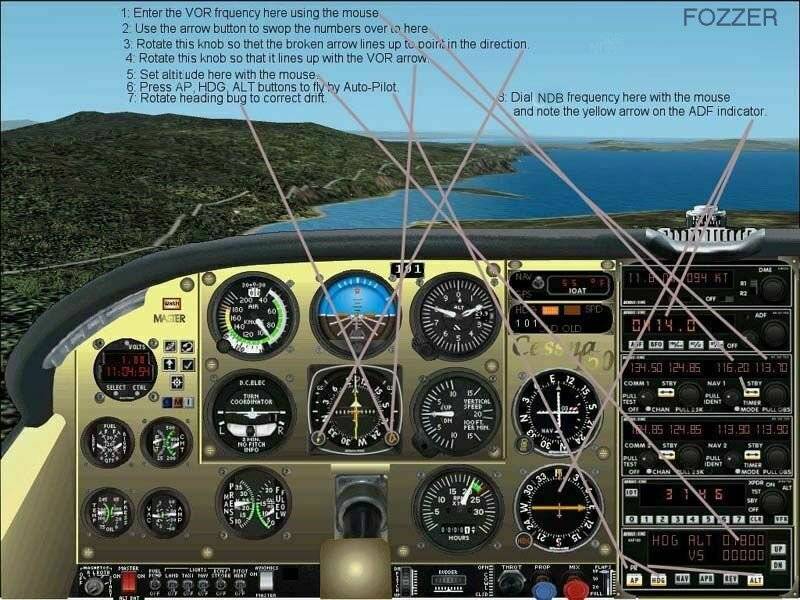
....And then, what do all of the things on the radio stack do?


Try this for starters...>>>

Image

Paul The Radio Man... 8)...!

P.S.... Fozzers tip:
Forget all the "Heavies", concentrate on mastering the default General Aviation Cessna 172... ;)...!
Win 8.1 64-bit. DX11. Advent Tower. Intel i7-3770 3.9 GHz 8-core. 8 GB System RAM. AMD Radeon HD 7700 1GB RAM. DVD ROM. 2 Terra Byte SATA Hard Drive. Philips 17" LCD Monitor. Saitek Cyborg X Fly-5 Joystick. ...and a Briggs and Stratton Petrol Lawn Mower.
User avatar
Fozzer
Colonel
Colonel
 
Posts: 27370
Joined: Thu Jan 31, 2002 3:11 pm
Location: Hereford. England. EGBS.

Re: Terminology

Postby beaky » Tue Dec 20, 2005 3:56 pm

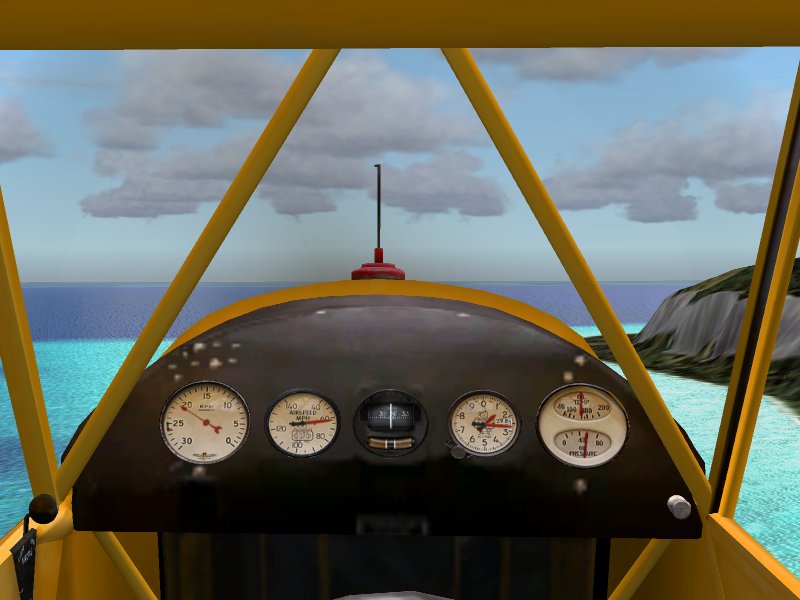
Or better yet, try flying the pattern a few times in this :
Image

The default Piper J3 "Cub".  Get the hang of flying this, then you'll be ready for all the complicated stuff. It is a sim, after all, not really a game: not quite as real as the real thing, but it's pretty darn close. It helps to know how to fly properly.

 
Just kidding (sort of); I gather that you are ready to fly airline-style... if you haven't got the info you need from the FS9 Learning Center and Lessons, I can only suggest you try it again... or pick up an IFR training video, or one on using autopilot, etc.  There may be a definitive, complete "how-to" relating directly to FS9 available somewhere, but I have no idea where.
I have found a few manuals for various FS9 models (there are some available here in the downloads section); one of those might make things clearer. For example, Maltby's wonderful freeware VC10 comes with a very thorough explanation of the (admittedly antiquated) panel... there has to be something like that out there for the default airliners.
 BTW, "vectors" are changes in direction issued by ATC when you are under their control...on an ILS approach, ATC will guide you to some point on the ILS approach, then it's up to you to land the plane. Not all planes have "Autoland"; the AP will keep you lined up, but you have to control descent rate and airspeed down to the runway. This is the only flying airline pilots get to do... ;D
"Back course" etc: that's stuff related to instrument approaches; it'd be easier to understand if you'd learned to fly an approach manually first, and I'm new at IFR stuff myself, so I won't get into that here. I can't overstress the importance of actually flying with these tools: the definitions don't make much ense, sometimes, until you experience how it all functions.
 Getting back to the "basics first" argument: Fozzer's idea might be best: start small and slow (C172 is an excellent primary trainer); learn the basic radio nav stuff in VFR weather, learn to use its autopilot (very similar to the ones in the heavies, but everything happens slower, so it's easier), then move up to the fancy-dancy IFR stuff. It's very hard to just jump in at the advanced level... that's why all airline jockeys start off in something like a 172.


 
Image
User avatar
beaky
Global Moderator
Global Moderator
 
Posts: 12877
Joined: Thu Dec 16, 2004 8:00 am
Location: Shenandoah, PA USA

Re: Terminology

Postby Jakemaster » Tue Dec 20, 2005 4:06 pm

This is all asuming you want to fly the big heavies.  Ive been playing fs ever since the day FS9 came out, and I still dont know what a VOR, NDB, or any of that stuff is, nor do I know how to use it.  To me, the best part of flightsim is flying.  I usually fly GA stuff, and I fly it well, but I dont bother with radios.  For Autopilot, I just use the GPS.
Jakemaster
 

Re: Terminology

Postby garymbuska » Tue Dec 20, 2005 4:19 pm

I would suggest you take the lessons and make use of the learning center in FS it has a wealth of knowledge
But like others have said stick to the small single engine prop plane at first and take it one step at a time.
The screen shot Fozzer took is great and explains everything but it is a whole lot of stuff all at once and might over whelm you. Take one gauge at a time an learn what it does and how to use it.
There really is a lot to learn so take it slow repeat a lesson if needed until you know what to do and when to do it. 8)
The check rides at the end of the lessons are verry hard to pass as the instructer is not very forgiving.
Gary M Buska
SYSTEM Specs ASUS P8Z68 V/GEN 3 mother board: INTELL I7 2600k 3.48 ghz Quad core CPU with Sandy bridge: 12 Gigs of 1800hz ram:
GTX 950 OVER CLOCKED: 2 Gigs Ram Windows 10 Home 64 bit Operating system. 750W Dedicated modular power supply. Two Internal 1TB hard drives 1 External 1TB 3.2 USB hard drive. SAITEK Cessna flight Yoke with throttles.
CH Rudder Peddles 27 inch Wide screen Monitor
User avatar
garymbuska
Major
Major
 
Posts: 4415
Joined: Tue Dec 30, 2003 11:10 am
Location: Jacksonville, Florida

Re: Terminology

Postby gryshnak » Tue Dec 20, 2005 6:36 pm

Go down to your local library and see what they have on the shelf about learning to fly and getting your pilot's licence.  With any luck they'll have a video as well.  Most of the information there will apply to FS2004.

I learned how do to ILS flying waaay back when these new things called Pentiums were just appearing, but I've forgotten most of it by now!  ;D

The C172 has an autopilot?  :o  Guess I've just never looked for it...

Gryshnak
Who needs instruments when you can look out the window?
User avatar
gryshnak
Major
Major
 
Posts: 1027
Joined: Sun Oct 30, 2005 8:32 am
Location: Hull. Yorkshire, UK

Re: Terminology

Postby Marlin » Wed Dec 21, 2005 2:33 am

Check this out, info, info, info
http://stoenworks.com/Tutorials/

OK, how about some lessons that are on your own, not the ones that come with FS9. Better, worse ?? You'll have to decide
http://www.navfltsm.addr.com/index.htm

Don't like something about the sim? Make it better, tips and tricks. Check this out
http://www.fs2004.com/forums/index.php?showtopic=28865

Want your skies filled with more traffic, waiting lines to take off...
http://www.projectai.com/
Last edited by Marlin on Wed Dec 21, 2005 3:15 am, edited 1 time in total.
Marlin
1st Lieutenant
1st Lieutenant
 
Posts: 486
Joined: Thu Dec 30, 2004 1:14 am
Location: NEW Mexico


Return to FS 2004 - A Century of Flight

Who is online

Users browsing this forum: No registered users and 388 guests