by frank_carbon » Tue Mar 01, 2005 2:05 pm
OK. I now have my modem immersed in liquid nitrogen to cool it. Since I have the file open maybe we can all take a crack at this.
Following the toots instructions (you did read them right?), extract all to a temp folder. Once ALL files have been extracted, it seems pretty straightforward as written in the toots. You should have four folders. One titled aircraft, one titled effects, one titled gauges, and one titled sound. Open the aircraft folder and put those nine(!) folders in the FS9 aircraft folder(they have a separate folder (containing model, texture, sound, etc.) for each version of the airplane along with separate panel and sound folders containing two different panels and sounds that each version is aliased to.)
Then open the gauges folder in the temp folder and put all the gauge files in the main FS9 Gauges folder. Do not try and open the .cab files. They must go in the main FS9 folder as is.
Then open the sound folder in the temp folder and put those two sound files in the main FS9 Sound folder.
Then open the effects folder in the temp folder and put those three effects files in the main FS9 Effects folder.
Take deep breath. Try it out.






 "In theory, there is no difference between theory and practice. But, in practice, there is."


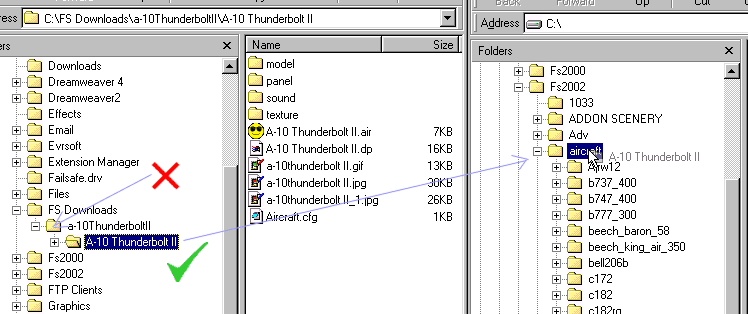
 Sounds like you have two folders in one. Click on the Maule folder and see if you see another maule folder if you do then install the second maule to your fs9 aircraft then it will show up. What happen to me before.