Downloaded Embraer 135 Delta Con. no gauges

FSX including FSX Steam version.

Downloaded Embraer 135 Delta Con. no gauges

Postby Modlerbob » Sat Aug 09, 2014 9:54 pm

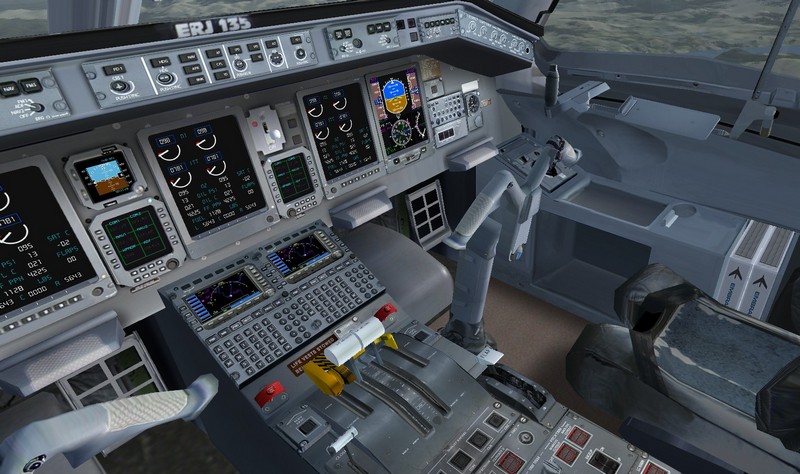
By now I have gotten pretty good about following directions and 9 out of 10 planes I download work perfectly. I just downloaded FSX Embraer 135 Chautauqua Delta Connection N842RP package which claims to have fixed a gauge problem. After precisely following the instructions I started FSX, loaded the plane and there are no gauges at all. Did the author leave out a directory as there were no gauges in the package.
User avatar
Modlerbob
2nd Lieutenant
2nd Lieutenant
 
Posts: 288
Joined: Tue May 27, 2014 12:06 am
Location: Central Florida

Re: Downloaded Embraer 135 Delta Con. no gauges

Postby Hagar » Sun Aug 10, 2014 4:52 am

Not sure why you're having problems. I just downloaded this file to check it out. http://simviation.com/1/search?submit=1&keywords=ERJ135LRDeltaConnectionN842RP-1.zip&categoryId=

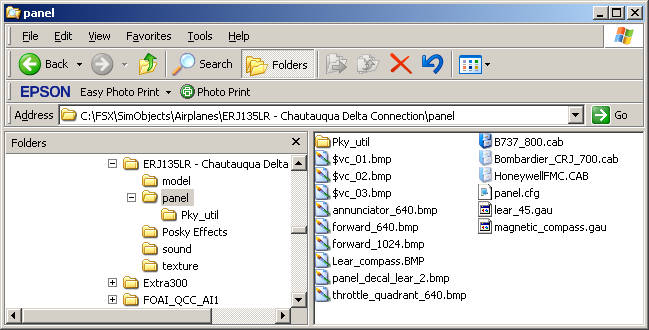
The gauges are in the Panel folder of the aircraft & will be recognised from there. No need to move them.
There are 3 x CAB files + 2 x GAU files plus one yellow folder named Pky_util. These are all gauges.
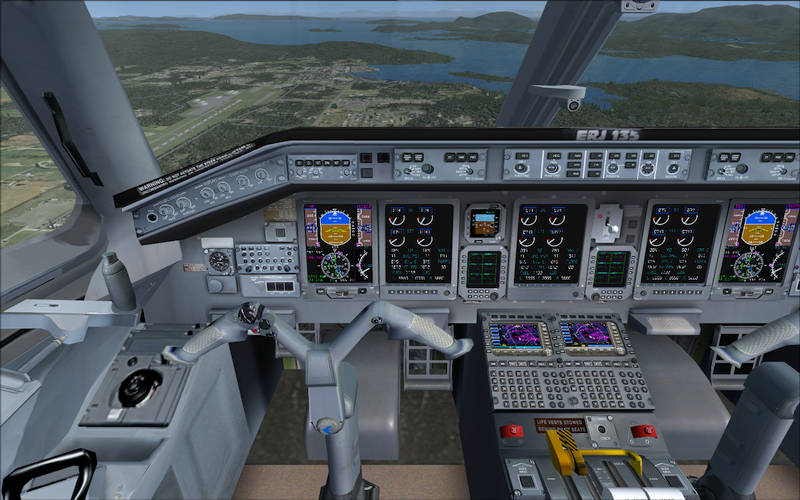
Image

VC
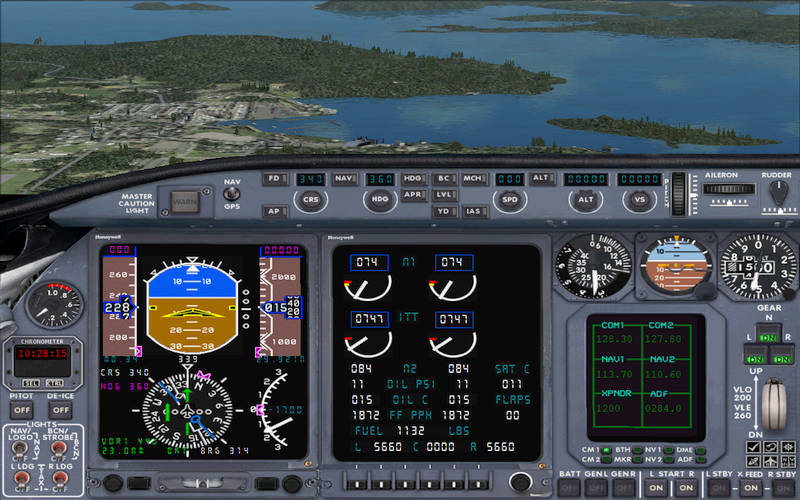
Image

2D panel
Image

PS. I just noticed that 2 of the CAB files are configured as Hidden files. This shouldn't affect them working in FSX but depending on the Folder Properties on your PC you might not be able to see them in the folder.
Image

Founder & Sole Member - Grumpy's Over the Hill Club for Veteran Virtual Aviators
Member of the Fox Four Group
My Google Photos albums
My Flickr albums
User avatar
Hagar
Colonel
Colonel
 
Posts: 30868
Joined: Wed Jun 19, 2002 7:15 am
Location: Costa Geriatrica

Re: Downloaded Embraer 135 Delta Con. no gauges

Postby Modlerbob » Sun Aug 10, 2014 7:13 am

Those are the screens I expected to see somewhat like the Gulfstream IIIs I have. I will unload the files and try again. But I did follow the instructions to the letter. It's not really that important to me as I have several different modern twin jet commuter airliners to play with. It's just frustrating when things don't work the way they should.
User avatar
Modlerbob
2nd Lieutenant
2nd Lieutenant
 
Posts: 288
Joined: Tue May 27, 2014 12:06 am
Location: Central Florida

Re: Downloaded Embraer 135 Delta Con. no gauges

Postby Hagar » Sun Aug 10, 2014 7:30 am

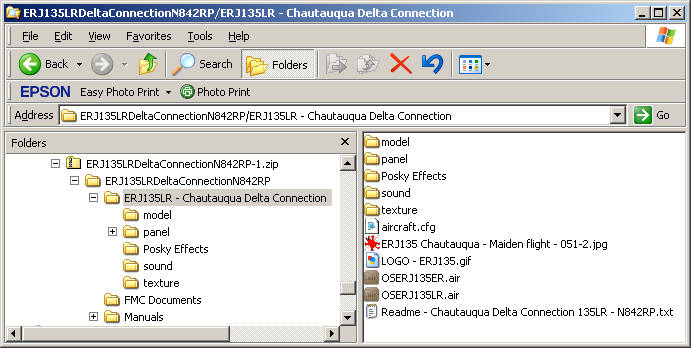
This file is configured ready to install. There should be no need for instructions.
Extract the zipfile, open it & paste the folder named ERJ135LR - Chautauqua Delta Connection into your FSX\SimObjects\Airplanes folder.

Image

You can then move the contents of the Posky Effects sub-folder into FSX\Effects
Image

Founder & Sole Member - Grumpy's Over the Hill Club for Veteran Virtual Aviators
Member of the Fox Four Group
My Google Photos albums
My Flickr albums
User avatar
Hagar
Colonel
Colonel
 
Posts: 30868
Joined: Wed Jun 19, 2002 7:15 am
Location: Costa Geriatrica

Re: Downloaded Embraer 135 Delta Con. no gauges

Postby Modlerbob » Sun Aug 10, 2014 2:16 pm

Well I removed the files including the zip file, rebooted my machine and came back and downloaded the zip file again. Followed the instructions again and got the same result. Now I am completely baffled and frustrated but like I said it ain't the end of the world and I will move on. It probably flies just like the Gulfstream III.
User avatar
Modlerbob
2nd Lieutenant
2nd Lieutenant
 
Posts: 288
Joined: Tue May 27, 2014 12:06 am
Location: Central Florida

Re: Downloaded Embraer 135 Delta Con. no gauges

Postby Hawkeye07 » Sun Aug 10, 2014 10:46 pm

Hagar, I have to agree with Modlerbob on this one. It must have something to do with system configuration or some other FSX VooDoo quirk. I've downloaded both the U.S. Air force and the Cityline versions and I've got the same problem with both of them. @#No instruments except the Standby Attitude Ind. I even tranferred the files to the standard "Airplanes" folder and no joy. Besides no instruments in the VC view when you select the minipanel you get the usual "No panel is mapped to the panel 6 key combination" and when you select the throttle quad you get the panel but no levers for the spoiler, throttles or the flaps. Too bad because the exterior model is very nice. The T/R's pop a little too quiickly but that's NBD. Oh well, I'm tired of screwing with it.

Hawkeye

P.S. Hagar you're right about the install, pretty straight forward affair just like most of the addons.
Image

An Aircraft Mechanic only needs two tools, Duct Tape and WD40.
If it moves and it's not supposed to - use the Duct Tape.
If it doesn't move and it's supposed to - use the WD40.

Intel(R) i5 CPU 750 @ 2.67GHz, P55M-UD4, GeForce GTX960 8.00 GB RAM, Windows 7 Ultimate (32 bit & 64 bit on separate HDs)
User avatar
Hawkeye07
Major
Major
 
Posts: 1275
Joined: Sun Dec 02, 2012 7:10 pm
Location: Landlocked in the Midwest USA at KAXN

Re: Downloaded Embraer 135 Delta Con. no gauges

Postby pete » Mon Aug 11, 2014 2:16 am

Followed the instructions again


Works fine for me too - simple install with all gauges included in the panel folder.

Wjhat 'instructions' are you following?

In the file Readme it says this:

Install FSX:

1. Unzip to a Temp folder.
2. Move the folders 'ERJ135LR - Chautauqua Delta Connection' to the 'FSX\SimObjects\Airplanes' directory.
3. Move the GPWS folder inside the Sounds folder into the main Sound folder in FSX

4. Start FSX and select aircraft under Embraer ERJ-135LR Delta Chautauqua

(ignore the GPWS part - I don't know what that is but it's not in the file - but makes no difference)

Again for me it's all OK and works out of the box

Image
Simplicity is the ultimate sophistication. – Leonardo da Vinci
User avatar
pete
Administrator
Administrator
 
Posts: 10243
Joined: Mon Jan 01, 2001 2:01 am
Location: Cloud Cuckoo Land

Re: Downloaded Embraer 135 Delta Con. no gauges

Postby Hawkeye07 » Mon Aug 11, 2014 2:30 am

Really weird to say the least. I usually don't have any problems with downloads and I've done tons of them over the years. This one's starting to tick me off! I'll give it another go later today. Right now it's 0225 and my crib is calling me. I'll get back with you all after I try the install again.

Hawkeye
Image

An Aircraft Mechanic only needs two tools, Duct Tape and WD40.
If it moves and it's not supposed to - use the Duct Tape.
If it doesn't move and it's supposed to - use the WD40.

Intel(R) i5 CPU 750 @ 2.67GHz, P55M-UD4, GeForce GTX960 8.00 GB RAM, Windows 7 Ultimate (32 bit & 64 bit on separate HDs)
User avatar
Hawkeye07
Major
Major
 
Posts: 1275
Joined: Sun Dec 02, 2012 7:10 pm
Location: Landlocked in the Midwest USA at KAXN

Re: Downloaded Embraer 135 Delta Con. no gauges

Postby Hagar » Mon Aug 11, 2014 3:24 am

Hawkeye07 wrote:Hagar, I have to agree with Modlerbob on this one. It must have something to do with system configuration or some other FSX VooDoo quirk. I've downloaded both the U.S. Air force and the Cityline versions and I've got the same problem with both of them. @#No instruments except the Standby Attitude Ind. I even tranferred the files to the standard "Airplanes" folder and no joy. Besides no instruments in the VC view when you select the minipanel you get the usual "No panel is mapped to the panel 6 key combination" and when you select the throttle quad you get the panel but no levers for the spoiler, throttles or the flaps. Too bad because the exterior model is very nice. The T/R's pop a little too quiickly but that's NBD. Oh well, I'm tired of screwing with it.

Hawkeye

P.S. Hagar you're right about the install, pretty straight forward affair just like most of the addons.

Thanks Hawkeye. Something odd here. Pete has confirmed that it works fine for him. You might be correct that it depends on your setup. Everyone's system is different & there are so many possible variations nowadays which makes it difficult to give specific advice.

when you select the throttle quad you get the panel but no levers for the spoiler, throttles or the flaps.

This gives us a clue. The panel uses the throttle quadrant from the FS9 default lear_45.gau which is included with the aircraft. I can only suggest that FSX cannot read the gauges installed to the Panel folder on some systems for some reason. You could try moving the gauges I listed earlier to your main FSX\Gauges folder.

There are some minor problems with the panel CFG (for example no minipanel) but the main 2D panel & VC should work well enough.
Image

Founder & Sole Member - Grumpy's Over the Hill Club for Veteran Virtual Aviators
Member of the Fox Four Group
My Google Photos albums
My Flickr albums
User avatar
Hagar
Colonel
Colonel
 
Posts: 30868
Joined: Wed Jun 19, 2002 7:15 am
Location: Costa Geriatrica

Re: Downloaded Embraer 135 Delta Con. no gauges

Postby PhantomTweak » Mon Aug 11, 2014 3:49 am

FYI: GPWS=Ground Proximity Warning System

It's a little set of lights lined up on a small "gauge" in the Panel.cfg, and you can either have them all ON (enabled) or select the ones you want. I can't recall all the "warnings" available, but it's mostly for low-level ops...it can tell you to pull up for being too low, it will tell you to not sink during T/O, it will tell you if you are fast, or slow on the glideslope...as in vertical speeed...I believe there are 6 or 7 of them, all spoken warnings, and, to me, annoying as heck, especially in carrier ops or just doing T&G's in any plane...
I always yank it from any panel it's in when I get it...
Hope this helps a little bit...

Pat☺
Have fun, fly high, far, and free!
Pat
2S7, Chiloquin OR Image
User avatar
PhantomTweak
Captain
Captain
 
Posts: 599
Joined: Mon Oct 14, 2013 11:10 pm
Location: Chiloquin OR

Re: Downloaded Embraer 135 Delta Con. no gauges

Postby pete » Mon Aug 11, 2014 6:10 am

Just a thought - do you guys who don't see gauges have FSX Acceleration? Quite a few things don't work in the basic FSX until you either upgrade to FSXA or install SP1 & SP2
Simplicity is the ultimate sophistication. – Leonardo da Vinci
User avatar
pete
Administrator
Administrator
 
Posts: 10243
Joined: Mon Jan 01, 2001 2:01 am
Location: Cloud Cuckoo Land

Re: Downloaded Embraer 135 Delta Con. no gauges

Postby whizard » Mon Aug 11, 2014 6:20 am

I run FSX Gold which includes Acceleration pack on Win 7 Home Premium 64 Bit

Unfortunately I have to agree with the original post - the main glass panels of the cockpit are all dead on my system also.

And I also followed the instructions correctly. Bar this .... 3. Move the GPWS folder inside the Sounds folder into the main Sound folder in FSX... as it does not exist.

Install FSX:

1. Unzip to a Temp folder.
2. Move the folders 'ERJ135LR - Chautauqua Delta Connection' to the 'FSX\SimObjects\Airplanes' directory.
3. Move the GPWS folder inside the Sounds folder into the main Sound folder in FSX

4. Start FSX and select aircraft under Embraer ERJ-135LR Delta Chautauqua


I've tried it with the Airlink version also - no luck.
whizard
Ground hog
Ground hog
 
Posts: 7
Joined: Mon Aug 11, 2014 6:14 am

Re: Downloaded Embraer 135 Delta Con. no gauges

Postby whizard » Mon Aug 11, 2014 6:27 am

Here is a screen shot.

Image
whizard
Ground hog
Ground hog
 
Posts: 7
Joined: Mon Aug 11, 2014 6:14 am

Re: Downloaded Embraer 135 Delta Con. no gauges

Postby Hagar » Mon Aug 11, 2014 7:36 am

whizard wrote:Here is a screen shot.

Image

whizard. Did you try my suggestion to move the 6 gauges from the ERJ145 Panel folder to your FSX\Gauges directory?
Image

Founder & Sole Member - Grumpy's Over the Hill Club for Veteran Virtual Aviators
Member of the Fox Four Group
My Google Photos albums
My Flickr albums
User avatar
Hagar
Colonel
Colonel
 
Posts: 30868
Joined: Wed Jun 19, 2002 7:15 am
Location: Costa Geriatrica

Re: Downloaded Embraer 135 Delta Con. no gauges

Postby pete » Mon Aug 11, 2014 7:39 am

I think Doug is right about the Lear 45 gauge.

I will have a look into updating / fixing this when I get the chance (daughter in hospital right now so bit short of time)
Simplicity is the ultimate sophistication. – Leonardo da Vinci
User avatar
pete
Administrator
Administrator
 
Posts: 10243
Joined: Mon Jan 01, 2001 2:01 am
Location: Cloud Cuckoo Land

Next

Return to Flight Simulator X (FSX) and Steam

Who is online

Users browsing this forum: No registered users and 1001 guests