whats up with firebird 737-home-1

FSX including FSX Steam version.

whats up with firebird 737-home-1

Postby bombardier » Sun Mar 02, 2014 10:10 am

after dl 26 textures for the 737-800 I came aross a fire bird 737-home-1. I download it and it download the full mbs. but it is missing a bunch of folders like to the [flightsim XX] and read me folder and a preview folder and so on. but on the good side it downloaded the textures folder and thats it.

textures will do me no good it I do not have the complete folder and all the sub folders that suppose to come with it.

some creators need to check out their own planes and or jets before they post them on the download station and make sure all the folders are suppose to be there.

bombardier
User avatar
bombardier
2nd Lieutenant
2nd Lieutenant
 
Posts: 288
Joined: Sat Sep 04, 2010 2:58 pm
Location: united states

Re: whats up with firebird 737-home-1

Postby bombardier » Sun Mar 02, 2014 12:59 pm

this is nor a reply or an extension to the above topic but a continuation of this:

I download a cyprus/turkish airlines and this time there is no texture folder but all the other folders are there and also flightsim[xx]. I just wasted my time to download this just to find out that the creator of this folder did not check to see if all the folders are there. so once again this time no textures the above post no flightsim[xx]; and read me folders and them some is still missing. I just do not get it. how tough is it to check to see all the needed folders are in place before put them on the download station.

bombardier
User avatar
bombardier
2nd Lieutenant
2nd Lieutenant
 
Posts: 288
Joined: Sat Sep 04, 2010 2:58 pm
Location: united states

Re: whats up with firebird 737-home-1

Postby 1olehippy » Sun Mar 02, 2014 7:31 pm

bombardier

Copy & paste this to your B737-800 aircraft file:

[fltsim.XX]
title=Boeing 737-800 Firebird Air
sim=Boeing737-800
model=
panel=
sound=
texture=firebird
kb_checklists=Boeing737-800_check
kb_reference=Boeing737-800_ref
atc_id=N737Z
atc_id_color=0xffffffff
atc_airline=Firebird Air
atc_flight_number=737Z
ui_manufacturer="Boeing"
ui_type="737-800"
ui_variation="Firebird Air"
ui_typerole="Commercial Airliner"
ui_createdby="Microsoft Corporation"
description=Firebird Air- Fictional Airliner

I also noted that the texture file is in a texture file? Be sure to move the texture folder with the textures in it.

Dave 8-)
User avatar
1olehippy
2nd Lieutenant
2nd Lieutenant
 
Posts: 257
Joined: Wed Jan 06, 2010 6:31 pm
Location: Beautiful Colorado KBJC

Re: whats up with firebird 737-home-1

Postby Hagar » Mon Mar 03, 2014 3:32 am

bombardier wrote:this is nor a reply or an extension to the above topic but a continuation of this:

I download a cyprus/turkish airlines and this time there is no texture folder but all the other folders are there and also flightsim[xx]. I just wasted my time to download this just to find out that the creator of this folder did not check to see if all the folders are there. so once again this time no textures

I checked this one out for you. http://simviation.com/1/search?submit=1&keywords=fsx_boeing-737_kthy.zip&categoryId=
The repaint is configured as an auto-installer for some reason. Double-click on the file named fsx_boeing-737_kthy.exe to run the installer.

You can always check the contents of a file before downloading it by clicking on the Zip file preview link.
Image

Founder & Sole Member - Grumpy's Over the Hill Club for Veteran Virtual Aviators
Member of the Fox Four Group
My Google Photos albums
My Flickr albums
User avatar
Hagar
Colonel
Colonel
 
Posts: 30868
Joined: Wed Jun 19, 2002 7:15 am
Location: Costa Geriatrica

Re: whats up with firebird 737-home-1

Postby bombardier » Mon Mar 03, 2014 6:49 am

hello 1olehippy and hagar:

olehippy:

the plane fire bird come up on the plane list in fsx but it has a blue question mark it needs picture or thumbnail to show up in the planes list.

hagar:

i did what you said but the plane is white as a ghost in the plane list. thats what I do not get, it downloaded the full mbs and it should have all the folders with it. should not have to play a game of treasure hunt to look for the folders.

this is a prime example why creators should check to make sure all folders are there and works properly. so us who download the planes do not need to waste time asking where are the folders and what not. its like playing a game of hide and seek.

bombardier
User avatar
bombardier
2nd Lieutenant
2nd Lieutenant
 
Posts: 288
Joined: Sat Sep 04, 2010 2:58 pm
Location: united states

Re: whats up with firebird 737-home-1

Postby Hagar » Mon Mar 03, 2014 9:26 am

bombardier wrote:hello 1olehippy and hagar:

olehippy:

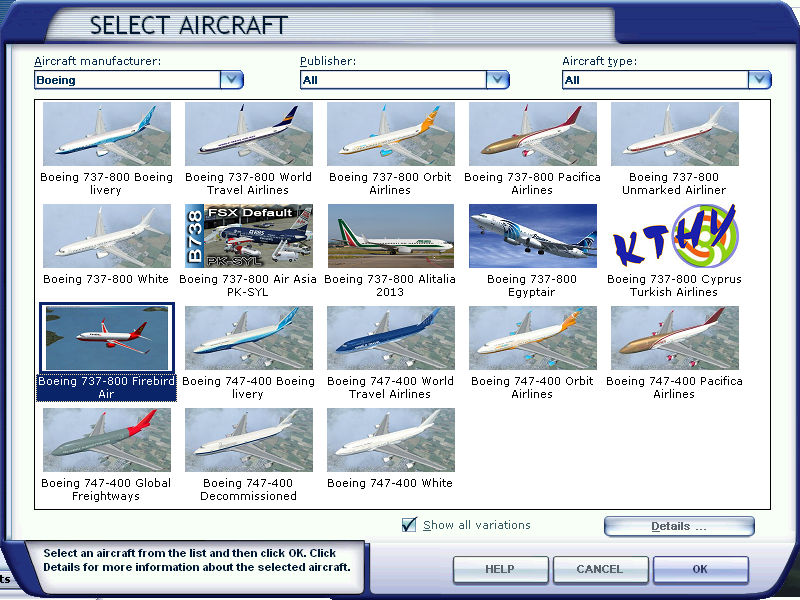
the plane fire bird come up on the plane list in fsx but it has a blue question mark it needs picture or thumbnail to show up in the planes list.

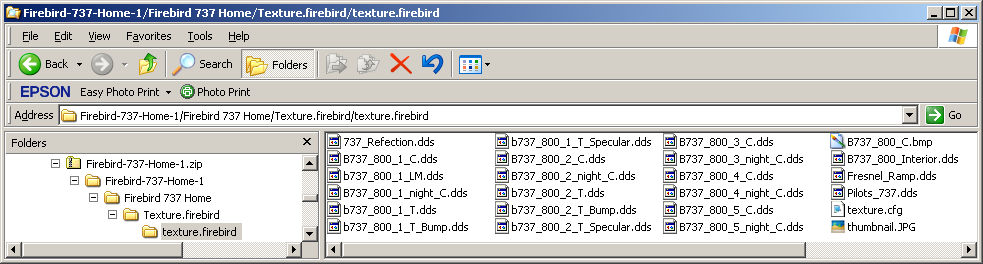
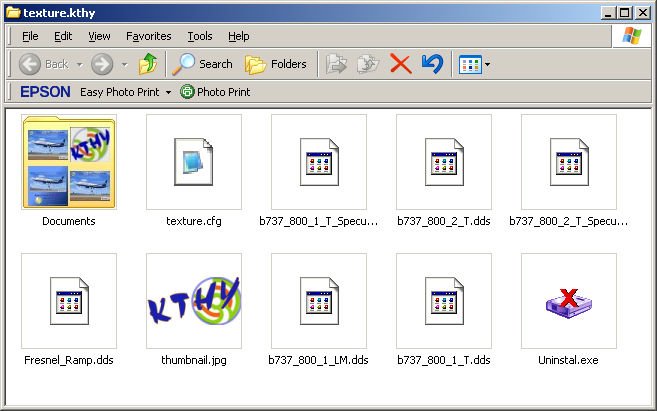
We've been here before. You haven't gone far enough in. This is the folder you need.
Image
(Note that it includes a file named thumbnail.JPG. This is the image that displays on the FSX aircraft selection menu.)

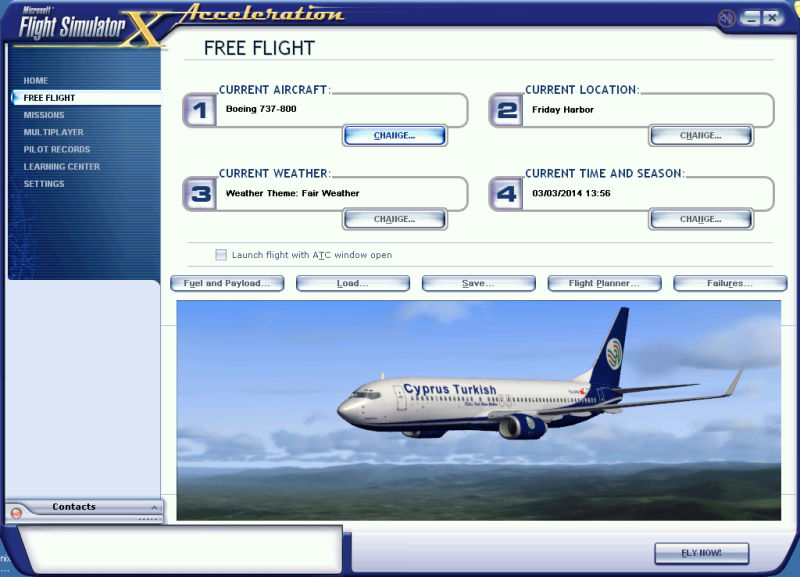
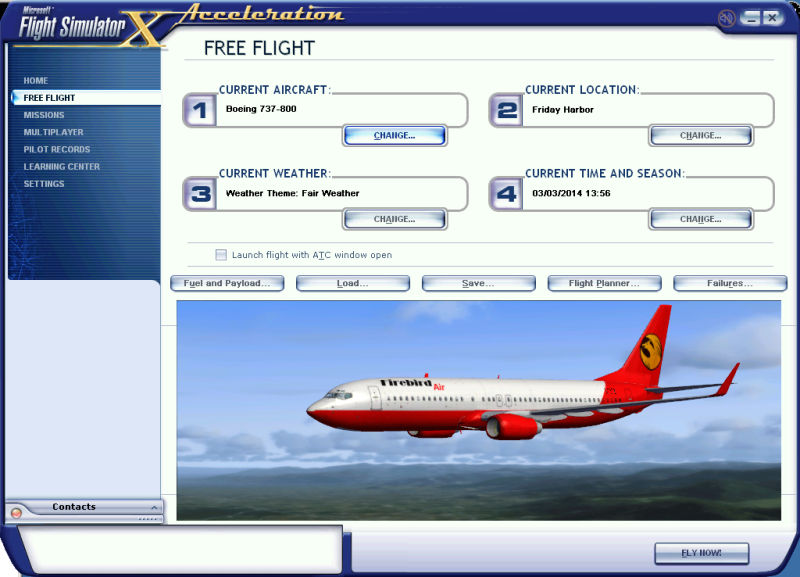
I used 1olehippy's Aircraft.cfg entry & this is what I got.
Image

Image
Image

Founder & Sole Member - Grumpy's Over the Hill Club for Veteran Virtual Aviators
Member of the Fox Four Group
My Google Photos albums
My Flickr albums
User avatar
Hagar
Colonel
Colonel
 
Posts: 30868
Joined: Wed Jun 19, 2002 7:15 am
Location: Costa Geriatrica

Re: whats up with firebird 737-home-1

Postby Hagar » Mon Mar 03, 2014 9:56 am

bombardier wrote:hagar:

i did what you said but the plane is white as a ghost in the plane list. thats what I do not get, it downloaded the full mbs and it should have all the folders with it. should not have to play a game of treasure hunt to look for the folders.

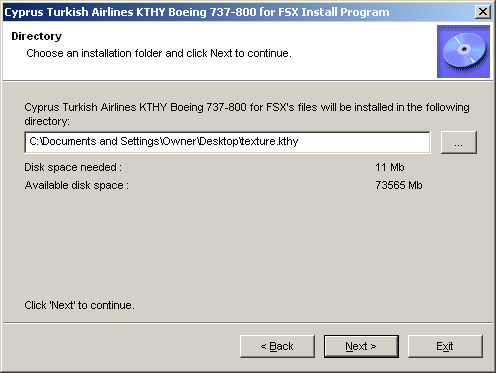
The auto-installer makes this one slightly more complicated. I always direct the install path to a folder outside the FSX directory, for example the Desktop. I can then check the files out before manually installing them in the usual way.

This is how I installed this one. Use the Browse button on the right to direct the install path to a new folder on the Desktop. Note that I named the new folder texture.kthy (The path to your Desktop will be slightly different to mine.)
Image

This is what it contains. Note the file named texture.cfg & also the image named thumbnail.jpg
Image

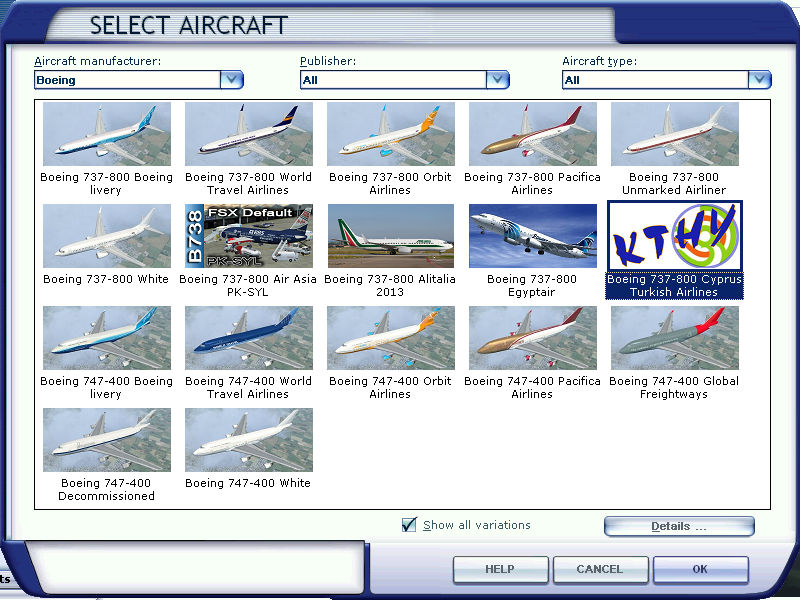
Paste the complete texture.kthy folder into your FSX B737_800 folder in the usual way.
This is what you get.
Image

Image

this is a prime example why creators should check to make sure all folders are there and works properly. so us who download the planes do not need to waste time asking where are the folders and what not. its like playing a game of hide and seek.

I understand what you're saying but please remember this is Freeware. It costs nothing except a few minutes of your time to download a file & if you don't like it or it doesn't work for you then you can simply delete it. Nothing lost. Most repainters are ordinary people like you & me, not professionals, & this is possibly the author's first attempt at uploading files for public download. Many of today's respected FS developers made their first hesitant steps into this interesting hobby in this way. Look on it as an enjoyable learning curve & you should get years of pleasure from it, just like I have.
Image

Founder & Sole Member - Grumpy's Over the Hill Club for Veteran Virtual Aviators
Member of the Fox Four Group
My Google Photos albums
My Flickr albums
User avatar
Hagar
Colonel
Colonel
 
Posts: 30868
Joined: Wed Jun 19, 2002 7:15 am
Location: Costa Geriatrica

Re: whats up with firebird 737-home-1

Postby bombardier » Mon Mar 03, 2014 10:49 am

hello hagar:

I see the thumbnail in the texture.firebird, so it should have gave me a plane. why it does not, I do not know. but anyway most thumbnail I see does not belong in the texture file. when I open the file to another plane any plane that matter I see all separate folders listed as: listed file-id, read me, textures. , thumbnail or preview file. thats what I do not see in this firebird plane all separate folders.

cyprus/turkish airlines: all the steps that you take for this airline I did also but the only thing I did different is there is a blue box and I open that and download that what ever was inside it I could not tell you.

I got the textures of the plane in 737-800 folder ok and I got all the pictures/ icons that you have also. in the planes list I even have the kathy icon but when I click on it the plane shows up like a ghost plane all white in free flight. that plane that you have in free flight is not what I got.

I got to give them credit for making airplanes. if Iwant to do one I would not even know where to begin. thats my sorry appoligy


bombardier
User avatar
bombardier
2nd Lieutenant
2nd Lieutenant
 
Posts: 288
Joined: Sat Sep 04, 2010 2:58 pm
Location: united states

Re: whats up with firebird 737-home-1

Postby Hagar » Mon Mar 03, 2014 11:01 am

bombardier wrote:hello hagar:

I see the thumbnail in the texture.firebird, so it should have gave me a plane. why it does not, I do not know. but anyway most thumbnail I see does not belong in the texture file. when I open the file to another plane any plane that matter I see all separate folders listed as: listed file-id, read me, textures. , thumbnail or preview file. thats what I do not see in this firebird plane all separate folders.

All that's missing from the Firebird download is the Readme.txt file with the new Aircraft.cfg [fltsim.xx] entry. Use 1olehippy's example in this topic to fix that. The texture.firebird folder contains all the necessary files including the thumbnail.jpg image. This is the normal location for this file. Make sure the texture.firebird folder isn't hidden inside another folder of the same name. The other files you mention are for information only & not necessary.

cyprus/turkish airlines: all the steps that you take for this airline I did also but the only thing I did different is there is a blue box and I open that and download that what ever was inside it I could not tell you.

I got the textures of the plane in 737-800 folder ok and I got all the pictures/ icons that you have also. in the planes list I even have the kathy icon but when I click on it the plane shows up like a ghost plane all white in free flight. that plane that you have in free flight is not what I got.

Not sure what you mean about the blue box. Which version of FSX are you using? Have you installed either FSX Service Packs 1 & 2 or Acceleration? If not that might explain the problem.
Image

Founder & Sole Member - Grumpy's Over the Hill Club for Veteran Virtual Aviators
Member of the Fox Four Group
My Google Photos albums
My Flickr albums
User avatar
Hagar
Colonel
Colonel
 
Posts: 30868
Joined: Wed Jun 19, 2002 7:15 am
Location: Costa Geriatrica

Re: whats up with firebird 737-home-1

Postby 1olehippy » Mon Mar 03, 2014 1:56 pm

May I suggest trying here for an answer.

viewtopic.php?t=66907

If you don't find it there , may I suggest that you search your other previous posts where you asked the same or similar questions.

I (and I'm sure others) enjoy helping out a member in need. However, part of that process is learning something on your part so you can help others when they are in need of help.

Just a thought :idea:
Dave :)
User avatar
1olehippy
2nd Lieutenant
2nd Lieutenant
 
Posts: 257
Joined: Wed Jan 06, 2010 6:31 pm
Location: Beautiful Colorado KBJC

Re: whats up with firebird 737-home-1

Postby bombardier » Mon Mar 03, 2014 5:39 pm

hello olehippy and hagar:

I got the firebird flying now. you see I moved the wrong folder in the wrong place. I do not know how I did that. what I did was to do everything over again starting from the main unzipping the folder and take it from there. so good for me.

for the cyprus and turkish air line I also got that flying and again I moved the wrong folder into the 737-800 folder. flightsim[xx] for both planes were good. for the cyprus and turkish plane I just had to redo everything from to unzippiong the zip folder and take it from there and again I must put a wrong folder in the wrong place. for got to tell you one thing my destination folder was wrong also so thats why the plane was a ghost plane,. I labeled the destination folder wrong in the cyprus turkish airline

how many more times I'm I going to make that same mistake. main thing is I got the plane flying now

both planes are flying now thanks

bombardier
User avatar
bombardier
2nd Lieutenant
2nd Lieutenant
 
Posts: 288
Joined: Sat Sep 04, 2010 2:58 pm
Location: united states

Re: whats up with firebird 737-home-1

Postby Hagar » Mon Mar 03, 2014 6:58 pm

Glad you fixed it.
Image

Founder & Sole Member - Grumpy's Over the Hill Club for Veteran Virtual Aviators
Member of the Fox Four Group
My Google Photos albums
My Flickr albums
User avatar
Hagar
Colonel
Colonel
 
Posts: 30868
Joined: Wed Jun 19, 2002 7:15 am
Location: Costa Geriatrica


Return to Flight Simulator X (FSX) and Steam

Who is online

Users browsing this forum: No registered users and 837 guests