


The upper window contains the scenery, and the lower window contains the control panel.
In the 2D panel configuration, on certain aircraft, these two windows can be manually re-sized by dragging the windows with the Mouse, eg:
Drag the top of the panel window down to reduce the height (for a better forward view), and drag the bottom of the upper window down to match the top of the panel window (for an increase in the scenery view).
All those familiar with FS 2004 and FS 2002 will be aware that once selected, this view arrangement will then remain fixed for the duration of the flight, even though various other views are selected during the flight, (top hat views, W and S keys, etc).
But....
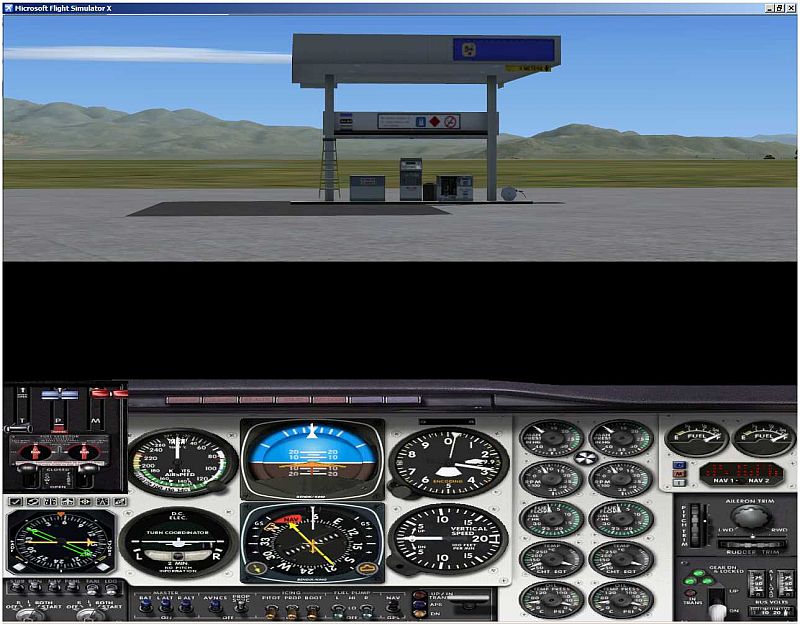
Although the same arrangement can also be used in "FSX" for resizing the 2D windows and matching them up; the difference is, after changing a view and then returning back, the window will then revert back to the default split screen arrangement, with a gap in between, as shown in the pic below....
The preferred window size selection doesn't remain fixed, as it does in FS 2004!
Does anyone know how to retain the preferred 2D window(s) size settings in FSX, once set, for the duration of the flight, even though various other views are changed during the flight?
The example below is using the default FS 2004/FSX Beech Baron 58.
(I often/mostly use the 2D panel arrangement for the complete instrument panel, and a better forward view).
Many thanks Chums!
Paul.
(It has been suggested that FSX was mainly designed around using the fixed Virtual 3D panel as default, and the 2D panel arrangement was a non-preferred alternative!).....
 ...!
...!




 ...!
...! ...I find the increased forward view to suit my daily scenery exploration in my flights!
 ....!
....!

 ...!
...!


 ...!
...!

 ...!
...!