Resizing screen windows in FSX....

FSX including FSX Steam version.

Resizing screen windows in FSX....

Postby Fozzer » Fri Sep 20, 2013 5:14 am

In the flight sims, the screen consists of two split screen windows.
The upper window contains the scenery, and the lower window contains the control panel.

In the 2D panel configuration, on certain aircraft, these two windows can be manually re-sized by dragging the windows with the Mouse, eg:
Drag the top of the panel window down to reduce the height (for a better forward view), and drag the bottom of the upper window down to match the top of the panel window (for an increase in the scenery view).

All those familiar with FS 2004 and FS 2002 will be aware that once selected, this view arrangement will then remain fixed for the duration of the flight, even though various other views are selected during the flight, (top hat views, W and S keys, etc).

But....

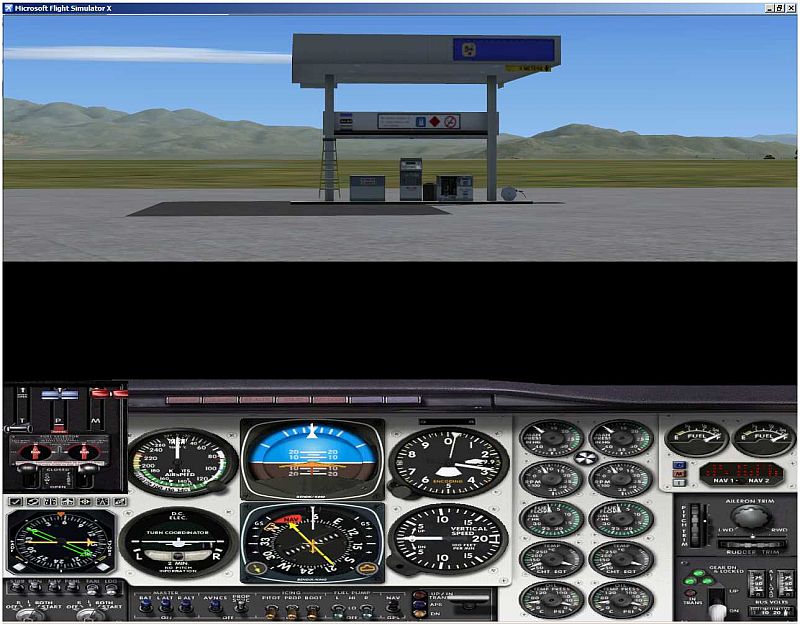
Although the same arrangement can also be used in "FSX" for resizing the 2D windows and matching them up; the difference is, after changing a view and then returning back, the window will then revert back to the default split screen arrangement, with a gap in between, as shown in the pic below....
The preferred window size selection doesn't remain fixed, as it does in FS 2004!

Does anyone know how to retain the preferred 2D window(s) size settings in FSX, once set, for the duration of the flight, even though various other views are changed during the flight?

The example below is using the default FS 2004/FSX Beech Baron 58.

(I often/mostly use the 2D panel arrangement for the complete instrument panel, and a better forward view).

Many thanks Chums!

Paul.

(It has been suggested that FSX was mainly designed around using the fixed Virtual 3D panel as default, and the 2D panel arrangement was a non-preferred alternative!)..... :( ...!


Image
Win 8.1 64-bit. DX11. Advent Tower. Intel i7-3770 3.9 GHz 8-core. 8 GB System RAM. AMD Radeon HD 7700 1GB RAM. DVD ROM. 2 Terra Byte SATA Hard Drive. Philips 17" LCD Monitor. Saitek Cyborg X Fly-5 Joystick. ...and a Briggs and Stratton Petrol Lawn Mower.
User avatar
Fozzer
Colonel
Colonel
 
Posts: 27369
Joined: Thu Jan 31, 2002 3:11 pm
Location: Hereford. England. EGBS.

Re: Resizing screen windows in FSX....

Postby Bass » Fri Sep 20, 2013 9:09 am

I've played around with that problem in the "old days" with cfs and fs9, but never in fsx.
As far as i remember, i could get some fixed by opening the panel .bmp in paint, then select black, move mouse pointer to upper left corner till 0/0 and save it.
"Long time no see", i use VC now, but i surely know what you're talking about.
"Just try to be YOU"!............ Kurt 

System. GA-X58A-UD3R, i7-950QC, Corsair XMS3 18GB 2000, GTX 780 tf 3GB, Corsair CMPSU-850, 24 BenQ 120, TM Hotas cougar, win7 pro.
User avatar
Bass
Major
Major
 
Posts: 3043
Joined: Wed Feb 15, 2012 9:32 am
Location: Scandinavia

Re: Resizing screen windows in FSX....

Postby Fozzer » Fri Sep 20, 2013 10:02 am

Bass wrote:I've played around with that problem in the "old days" with cfs and fs9, but never in fsx.
As far as i remember, i could get some fixed by opening the panel .bmp in paint, then select black, move mouse pointer to upper left corner till 0/0 and save it.
"Long time no see", i use VC now, but i surely know what you're talking about.


Many thanks for the reply Kurt. I see you know exactly what I am talking about!.. ;) ...!

When the resize is done manually in FS 2004 using the Mouse to drag the window size, with the Sim running, the changes in the two window sizes is written into the configuration immediately, and remains there for the remainder of the session.

In FSX. the change only seem to affect the lower of the two windows permanently, as can be seen in the above pic, and and after a change of views, and returning back again to the forward view, the upper window reverts to the default size again, leaving the gap between the upper and lower window!

This is different to FS 2004.

I am wondering if there is an entry(s) in either the panel.cfg file, or the aircraft.cfg file, in FSX, which determines the individual the size of each window, upper and lower, and therefore can be re-programmed to suit the individual 2D display?

As a 2D Panel Enthusiast.... :D ...I find the increased forward view to suit my daily scenery exploration in my flights!

Paul......its only ME who appears in 3D... ;) .... :lol: ....!
Win 8.1 64-bit. DX11. Advent Tower. Intel i7-3770 3.9 GHz 8-core. 8 GB System RAM. AMD Radeon HD 7700 1GB RAM. DVD ROM. 2 Terra Byte SATA Hard Drive. Philips 17" LCD Monitor. Saitek Cyborg X Fly-5 Joystick. ...and a Briggs and Stratton Petrol Lawn Mower.
User avatar
Fozzer
Colonel
Colonel
 
Posts: 27369
Joined: Thu Jan 31, 2002 3:11 pm
Location: Hereford. England. EGBS.

Re: Resizing screen windows in FSX....

Postby Bass » Fri Sep 20, 2013 10:33 am

You look good i 3D :lol:

I've never saved a flight after changing that 2D look! Have you?
"Just try to be YOU"!............ Kurt 

System. GA-X58A-UD3R, i7-950QC, Corsair XMS3 18GB 2000, GTX 780 tf 3GB, Corsair CMPSU-850, 24 BenQ 120, TM Hotas cougar, win7 pro.
User avatar
Bass
Major
Major
 
Posts: 3043
Joined: Wed Feb 15, 2012 9:32 am
Location: Scandinavia

Re: Resizing screen windows in FSX....

Postby garymbuska » Mon Sep 23, 2013 9:47 am

If you want a way to control any window or any panel you really need to obtain a program called FSPanel Studio.
This program makes editing windows panels or gauges kids play. The best part of this program is one does not need a PHD in order to use it,
It is truly the best tool money can buy. I hate to keep bragging about this program but I can not help it as this program is so easy to use and it works with both FSX and FS9. Rather than me rant on about this program just check out the link.
http://www.fspanelstudio.com/
Trust me it is worth every penny you will spend. I used it to put a Auto Throttle in a Captain Sim B727-200 that did not have one.

<<r
Gary M Buska
SYSTEM Specs ASUS P8Z68 V/GEN 3 mother board: INTELL I7 2600k 3.48 ghz Quad core CPU with Sandy bridge: 12 Gigs of 1800hz ram:
GTX 950 OVER CLOCKED: 2 Gigs Ram Windows 10 Home 64 bit Operating system. 750W Dedicated modular power supply. Two Internal 1TB hard drives 1 External 1TB 3.2 USB hard drive. SAITEK Cessna flight Yoke with throttles.
CH Rudder Peddles 27 inch Wide screen Monitor
User avatar
garymbuska
Major
Major
 
Posts: 4415
Joined: Tue Dec 30, 2003 11:10 am
Location: Jacksonville, Florida

Re: Resizing screen windows in FSX....

Postby Fozzer » Mon Sep 23, 2013 10:40 am

garymbuska wrote:If you want a way to control any window or any panel you really need to obtain a program called FSPanel Studio.
This program makes editing windows panels or gauges kids play. The best part of this program is one does not need a PHD in order to use it,
It is truly the best tool money can buy. I hate to keep bragging about this program but I can not help it as this program is so easy to use and it works with both FSX and FS9. Rather than me rant on about this program just check out the link.
http://www.fspanelstudio.com/
Trust me it is worth every penny you will spend. I used it to put a Auto Throttle in a Captain Sim B727-200 that did not have one.

<<r


I use "FS Panel Studio" since it was first invented, Garry!.... :D ...!

But this particular "problem" with resizing the Screen Windows in FSX is different to the same operation in FS 2004 (which is easy).
The internal program in FSX discourages its use!
I think that FSX was probably intended to use the "Virtual Cockpit" mode with its fixed size windows...rather than the 2D panel with user-resizeable windows!

Paul.....Gauge Enthusiast Extraordinaire!... :mrgreen: ...!
Win 8.1 64-bit. DX11. Advent Tower. Intel i7-3770 3.9 GHz 8-core. 8 GB System RAM. AMD Radeon HD 7700 1GB RAM. DVD ROM. 2 Terra Byte SATA Hard Drive. Philips 17" LCD Monitor. Saitek Cyborg X Fly-5 Joystick. ...and a Briggs and Stratton Petrol Lawn Mower.
User avatar
Fozzer
Colonel
Colonel
 
Posts: 27369
Joined: Thu Jan 31, 2002 3:11 pm
Location: Hereford. England. EGBS.

Re: Resizing screen windows in FSX....

Postby vuk1 » Mon Sep 23, 2013 11:18 am

ok Gentlemen In your FSX INSIDER INFORMATIM BOOK page 10 ?? INSTRUCTION "Haw to Raise/Lower your seat; This is what I did...OPEN FSX GO TO SETINGS
CLICK ON " BUTONS AND CONTROLS " LOOK DOWN THE LIST..... VC PANEL "shift+enter"...lover the seat ..."shift+backspace" UP SEAT
2D PENAL.....LOWER SEAT DOWN ....CTRL+Q.......RAISE SEAT.......CTRL+SHIFT+Q. Go and look for those assignments in the menu and you reassigned them to the your choice of buttons/keys and is always there .During flight in VC ore 2D at any time you want to see better just use those assigned buttons/keys .This is it.
<<v
vuk1
Ground hog
Ground hog
 
Posts: 15
Joined: Tue Sep 03, 2013 9:51 am

Re: Resizing screen windows in FSX....

Postby Fozzer » Mon Sep 23, 2013 11:31 am

vuk1 wrote:ok Gentlemen In your FSX INSIDER INFORMATIM BOOK page 10 ?? INSTRUCTION "Haw to Raise/Lower your seat; This is what I did...OPEN FSX GO TO SETINGS
CLICK ON " BUTONS AND CONTROLS " LOOK DOWN THE LIST..... VC PANEL "shift+enter"...lover the seat ..."shift+backspace" UP SEAT
2D PENAL.....LOWER SEAT DOWN ....CTRL+Q.......RAISE SEAT.......CTRL+SHIFT+Q. Go and look for those assignments in the menu and you reassigned them to the your choice of buttons/keys and is always there .During flight in VC ore 2D at any time you want to see better just use those assigned buttons/keys .This is it.
<<v


Raising and lowering the seat has a different effect than resizing the upper and lower screen windows.

All those familiar with FS 2004/FS 2002 will be aware of the difference in FSX.

Re-sized windows in FS 2004 prevents the gap appearing between the two windows when changing views in the 2D panel mode.

Paul...FS 2002+FS 2004+FSX.. :D ...!
Win 8.1 64-bit. DX11. Advent Tower. Intel i7-3770 3.9 GHz 8-core. 8 GB System RAM. AMD Radeon HD 7700 1GB RAM. DVD ROM. 2 Terra Byte SATA Hard Drive. Philips 17" LCD Monitor. Saitek Cyborg X Fly-5 Joystick. ...and a Briggs and Stratton Petrol Lawn Mower.
User avatar
Fozzer
Colonel
Colonel
 
Posts: 27369
Joined: Thu Jan 31, 2002 3:11 pm
Location: Hereford. England. EGBS.

Re: Resizing screen windows in FSX....

Postby vuk1 » Mon Sep 23, 2013 12:10 pm

Yup! It is the mater of preference I LIKE THE SYNPLICETY
<<s
vuk1
Ground hog
Ground hog
 
Posts: 15
Joined: Tue Sep 03, 2013 9:51 am

Re: Resizing screen windows in FSX....

Postby papituwall » Mon Sep 23, 2013 12:26 pm

Open the panel folder of the Baron, make a backup of the panel.cfg file and in the [Window00], add this line:

view_window_rect=0,0,8192,6100

[Window00]
file_1024=Baron_background_1024.bmp
size_mm=640
position=7
visible=1
ident=MAIN_PANEL
view_window_rect=0,0,8192,6100

Then you can drag the 2d panel and see the entire scenery.

The key is the value "6100", this changes the size of the "scenery" layer. I've found this line in the default Cessna 172 and the value is 4000, so after two attempts 6100 looks fine.
User avatar
papituwall
Captain
Captain
 
Posts: 833
Joined: Thu Sep 19, 2013 1:42 pm
Location: LEZG

Re: Resizing screen windows in FSX....

Postby Fozzer » Mon Sep 23, 2013 1:08 pm

papituwall wrote:Open the panel folder of the Baron, make a backup of the panel.cfg file and in the [Window00], add this line:

view_window_rect=0,0,8192,6100

[Window00]
file_1024=Baron_background_1024.bmp
size_mm=640
position=7
visible=1
ident=MAIN_PANEL
view_window_rect=0,0,8192,6100

Then you can drag the 2d panel and see the entire scenery.

The key is the value "6100", this changes the size of the "scenery" layer. I've found this line in the default Cessna 172 and the value is 4000, so after two attempts 6100 looks fine.


The Man with the MAGIC ANSWER!..... :dance: ...!

A big thank-you, and a massive bag of Chocolate Cookies on the way!... :D ...!

The top window (scenery) is made full, size, and the bottom window (2D panel) can be sized to suit, dragging with the Mouse.....Just what I was after all along!

...Wonderful!...Well done!
Problem solved!

Paul... :D ... :D ... :D ... :D ...!
Win 8.1 64-bit. DX11. Advent Tower. Intel i7-3770 3.9 GHz 8-core. 8 GB System RAM. AMD Radeon HD 7700 1GB RAM. DVD ROM. 2 Terra Byte SATA Hard Drive. Philips 17" LCD Monitor. Saitek Cyborg X Fly-5 Joystick. ...and a Briggs and Stratton Petrol Lawn Mower.
User avatar
Fozzer
Colonel
Colonel
 
Posts: 27369
Joined: Thu Jan 31, 2002 3:11 pm
Location: Hereford. England. EGBS.

Re: Resizing screen windows in FSX....

Postby papituwall » Mon Sep 23, 2013 2:19 pm

Glad to have helped.

I like chocolate cookies <<u

Best regards from Spain

José Mª
User avatar
papituwall
Captain
Captain
 
Posts: 833
Joined: Thu Sep 19, 2013 1:42 pm
Location: LEZG

Re: Resizing screen windows in FSX....

Postby Bass » Tue Sep 24, 2013 5:44 am

That man is a "spanish knocker" :clap: :clap:
"Just try to be YOU"!............ Kurt 

System. GA-X58A-UD3R, i7-950QC, Corsair XMS3 18GB 2000, GTX 780 tf 3GB, Corsair CMPSU-850, 24 BenQ 120, TM Hotas cougar, win7 pro.
User avatar
Bass
Major
Major
 
Posts: 3043
Joined: Wed Feb 15, 2012 9:32 am
Location: Scandinavia

Re: Resizing screen windows in FSX....

Postby Fozzer » Tue Sep 24, 2013 6:24 am

Bass wrote:That man is a "spanish knocker" :clap: :clap:


....lost in translation?... :? ...!

I've applied José's suggestions to some of my FSX favourite aircraft fitted with 2D cockpits, and it works fine!....Wonderful!

Paul... :mrgreen: ...!
Win 8.1 64-bit. DX11. Advent Tower. Intel i7-3770 3.9 GHz 8-core. 8 GB System RAM. AMD Radeon HD 7700 1GB RAM. DVD ROM. 2 Terra Byte SATA Hard Drive. Philips 17" LCD Monitor. Saitek Cyborg X Fly-5 Joystick. ...and a Briggs and Stratton Petrol Lawn Mower.
User avatar
Fozzer
Colonel
Colonel
 
Posts: 27369
Joined: Thu Jan 31, 2002 3:11 pm
Location: Hereford. England. EGBS.

Re: Resizing screen windows in FSX....

Postby Bass » Tue Sep 24, 2013 6:45 am

Fozzer wrote:
Bass wrote:That man is a "spanish knocker" :clap: :clap:


....lost in translation?... :? ...!
..........

Paul... :mrgreen: ...!


In my dictionary, it can be used as a work around to the word "impressive" <<t
"Just try to be YOU"!............ Kurt 

System. GA-X58A-UD3R, i7-950QC, Corsair XMS3 18GB 2000, GTX 780 tf 3GB, Corsair CMPSU-850, 24 BenQ 120, TM Hotas cougar, win7 pro.
User avatar
Bass
Major
Major
 
Posts: 3043
Joined: Wed Feb 15, 2012 9:32 am
Location: Scandinavia

Next

Return to Flight Simulator X (FSX) and Steam

Who is online

Users browsing this forum: No registered users and 823 guests