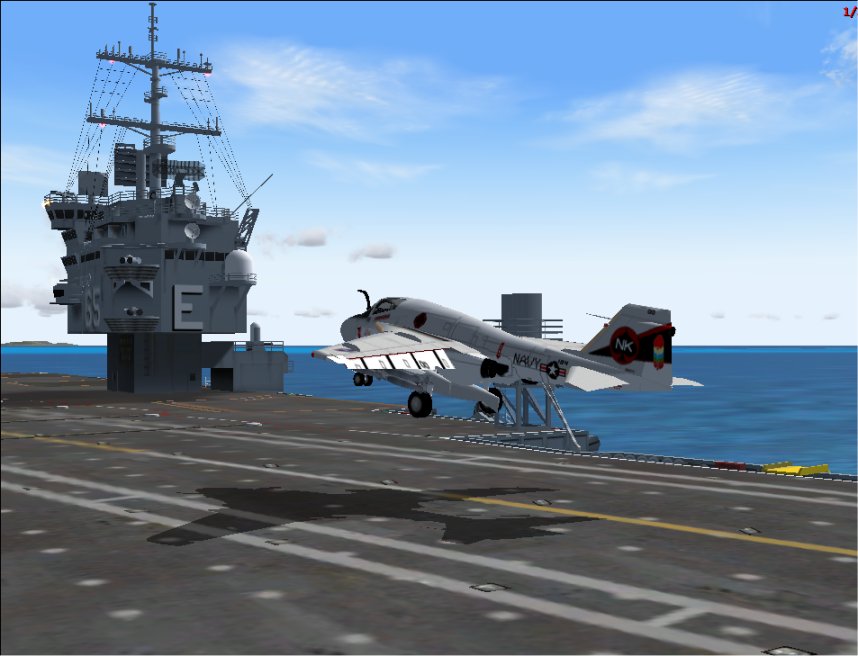

The Big "E", welcome back.

Flight Simulation Screenshots displaying your Flight Simulation Experience. MSFS, FSX, Prepar3D, XPlane and other Flight Simulators. Focus is your Flight Simulator Experience. Please upload to Simviation (Button at top right)

The Big "E", welcome back.

Postby patchz » Thu Mar 12, 2009 11:19 pm

Image
Image
If God intended aircraft engines to have horizontally opposed engines, Pratt and Whitney would have made them that way.
User avatar
patchz
Colonel
Colonel
 
Posts: 10424
Joined: Wed Mar 11, 2009 7:33 pm
Location: IN THE FUNNY PAPERS

Re: The Big "E", welcome back.

Postby skoker » Fri Mar 13, 2009 2:35 pm

Some AA would be nice. ;)
Image
User avatar
skoker
Major
Major
 
Posts: 4260
Joined: Wed Feb 27, 2008 8:19 pm
Location: 1G3

Re: The Big "E", welcome back.

Postby patchz » Sat Mar 14, 2009 3:45 am

Some AA would be nice. ;)


??? :-?
Image
If God intended aircraft engines to have horizontally opposed engines, Pratt and Whitney would have made them that way.
User avatar
patchz
Colonel
Colonel
 
Posts: 10424
Joined: Wed Mar 11, 2009 7:33 pm
Location: IN THE FUNNY PAPERS

Re: The Big "E", welcome back.

Postby machineman9 » Sat Mar 14, 2009 6:18 am

AA = Anti-Aliasing.

It removes those pixelated 'jaggy' edges around 3D objects by replacing it with a sort of blend between the object and the background. Wikipedia page

To do this, in the graphics settings you will have to enable Anti Aliasing... Or sometimes you have to do this through your graphic device's software.


Anywhoo..... I think it is a pretty nice shot, it's a good position and I think it is something a little bit different.

But, there is red text on the right of the screen... Is that from a recording or something? And the actual image quality is a bit low so you might want to try to take the settings up a bit within Flight Simulator.


But I like it. I think it makes a bit of a change.
User avatar
machineman9
Major
Major
 
Posts: 4816
Joined: Fri Sep 17, 2004 9:05 am

Re: The Big "E", welcome back.

Postby patchz » Sat Mar 14, 2009 7:09 am

AA = Anti-Aliasing.

It removes those pixelated 'jaggy' edges around 3D objects by replacing it with a sort of blend between the object and the background. Wikipedia page

To do this, in the graphics settings you will have to enable Anti Aliasing... Or sometimes you have to do this through your graphic device's software.


Anywhoo..... I think it is a pretty nice shot, it's a good position and I think it is something a little bit different.

But, there is red text on the right of the screen... Is that from a recording or something? And the actual image quality is a bit low so you might want to try to take the settings up a bit within Flight Simulator.


But I like it. I think it makes a bit of a change.


Yeah, I know what anti-aliasing is. I use it. But this was simply an old screen capture I had on hand and I did not tweak it in any way. And I have increased the settings in FS since that shot. And I just missed the text in the corner. I'm having a difficult time on shots I edit, keeping them under the file size limit and still keep the image at 1024. Like I said somewhere else, I am very rusty on graphics. But the last two I uploaded are an improvement, I hope. See Fantasy Island in Edited Screenshots.
Thanks for the advice and compliments.
Image
If God intended aircraft engines to have horizontally opposed engines, Pratt and Whitney would have made them that way.
User avatar
patchz
Colonel
Colonel
 
Posts: 10424
Joined: Wed Mar 11, 2009 7:33 pm
Location: IN THE FUNNY PAPERS


Return to Simulation Screenshots Showcase

Who is online

Users browsing this forum: No registered users and 637 guests