My first screenshot here..

Flight Simulation Screenshots displaying your Flight Simulation Experience. MSFS, FSX, Prepar3D, XPlane and other Flight Simulators. Focus is your Flight Simulator Experience. Please upload to Simviation (Button at top right)

My first screenshot here..

Postby FlyingPerson » Fri Jan 02, 2009 5:55 pm

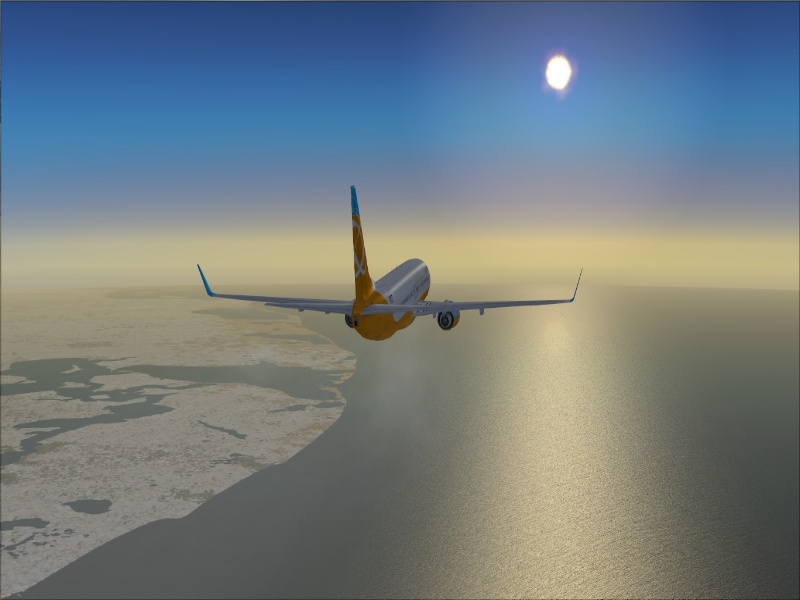
Well, here's my first screenshot on these forums. Please tell me any way to get better, I will appreciate it!

Over.. really, I don't know ;D! Can't remember. I just thought this was nice.
Image

Default 737, haven't got around to get any other liveries for it yet.

Hope you like!

Last edited by FlyingPerson on Fri Jan 02, 2009 5:59 pm, edited 1 time in total.
Specs
Intel M C2D P8400 2.26 GhZ
nVidia GeForce 9600M GT
4 GB DDR3
320 GB HD
Windows Vista Home Premium SP1 32

Image


Flown: B
User avatar
FlyingPerson
Captain
Captain
 
Posts: 573
Joined: Sun Nov 09, 2008 3:54 pm
Location: Near Oslo, Norway

Re: My first screenshot here..

Postby a1 » Fri Jan 02, 2009 6:20 pm

Just go down to The StudioV and witht he tutorials you will become a pro. ;)


Very nice screenshot to start off.

http://www.simviation.com/cgi-bin/yabb2 ... 1189097948
Image
790i : QX9650 : 4Gb DDR3 : GeForce 8800 GTX : 1 WD Raptor : 1 WD VelociRaptor 150
User avatar
a1
Lieutenant Colonel
Lieutenant Colonel
 
Posts: 7608
Joined: Thu Jan 04, 2007 9:16 pm

Re: My first screenshot here..

Postby machineman9 » Fri Jan 02, 2009 6:30 pm

Just go down to The StudioV and witht he tutorials you will become a pro. ;

You'll get paid?  ;)


It's a nice shot. I think maybe a bit more activity going on (maybe the water quality could be upped a little, or more air traffic, or something on the ground) could make this shot better. But it is very good for a first one.
User avatar
machineman9
Major
Major
 
Posts: 4816
Joined: Fri Sep 17, 2004 9:05 am

Re: My first screenshot here..

Postby FlyingPerson » Fri Jan 02, 2009 6:39 pm

machineman: My water setting is on full (As high as FSX will get it), and air traffic.. hm.. good idea. I'll think over it. My system isn't of the strongest ones that exist but this was a good job from it, at least in my own opinion.

When I think over it, some boats would be good though.. you'll probably see lots of changes (hopefully for the better ;D) in my next screenshot(s)!

See you all tomorrow (It's over midnight here now and school starts in a few days ::) )
Specs
Intel M C2D P8400 2.26 GhZ
nVidia GeForce 9600M GT
4 GB DDR3
320 GB HD
Windows Vista Home Premium SP1 32

Image


Flown: B
User avatar
FlyingPerson
Captain
Captain
 
Posts: 573
Joined: Sun Nov 09, 2008 3:54 pm
Location: Near Oslo, Norway

Re: My first screenshot here..

Postby Wii » Fri Jan 02, 2009 6:52 pm

The over all quality of the shot is good, it's just missing a few things.

Good and realistic addon traffic:
http://www.world-of-ai.com/

Water Config:
http://www.fswaterconfigurator.com/

You may want to look into getting REX, my favorite payware addon yet:
http://www.realenvironmentxtreme.com/

FSWC is a must though because FSX default water is blehh. ;)
User avatar
Wii
Major
Major
 
Posts: 2727
Joined: Wed Jun 13, 2007 2:33 pm
Location: Space

Re: My first screenshot here..

Postby lunitic_8 » Fri Jan 02, 2009 9:15 pm

use clouds and cloud layers ;)
Image

I7-7700HQ | GTX 1060 | 16GB DDR4-2400MHz | 1TB HDD + 256GB SSD
User avatar
lunitic_8
Major
Major
 
Posts: 3163
Joined: Sun Sep 28, 2008 8:05 pm
Location: Houston, Texas (KHOU)

Re: My first screenshot here..

Postby Brando14100 » Fri Jan 02, 2009 10:13 pm

What are you using to resize your images?

8-)
Brando14100
 

Re: My first screenshot here..

Postby FlyingPerson » Sat Jan 03, 2009 6:33 am

I used Paint.net to resize this one. I can both resize screenies to 800x600 and reduce their size with it.

for example, if a screenshot is 188 kb, you can turn down on a "Quality" slider (not too far though, or it will look like.. ::)) to make it a bit less quality, but way smaller in size. I like this option.

Lunitic: Thanks, i'll include some clouds next time. Only thing is even 1/8 clouds put clouds all over my water, and what I really meant with this one was to show off the nice water reflection. Some clouds over may have been nice though! ;D

Wii: Thank you for those links! I'll check them a little later, need to eat breakfast now.

For the AI, i'm not really sure, it should be at least a little FPS friendly too, 'cause I have MyTrafficX (which i'm not going to use again.. error after error after error and bad looking models in my honest opinion) and lets say.. the FPS was dipping down to 10 and 8 on my old machine, even with both sliders on 40.

The water will most likely be included in my FSX very soon, i'll try to include waves, but last time I turned on the "Waves and Fireworks"-slider, let's say my FPS got shot :-X

As for REX, i'll try getting it as soon as I can ;)
Specs
Intel M C2D P8400 2.26 GhZ
nVidia GeForce 9600M GT
4 GB DDR3
320 GB HD
Windows Vista Home Premium SP1 32

Image


Flown: B
User avatar
FlyingPerson
Captain
Captain
 
Posts: 573
Joined: Sun Nov 09, 2008 3:54 pm
Location: Near Oslo, Norway

Re: My first screenshot here..

Postby Anxyous » Sat Jan 03, 2009 6:44 am

I can recommend FSWC as well, free, and makes water beautiful...

The fact, that you're not using clouds in this shots works out well IMO, but I'd crop out the bottom 1/4 of the pic of so.

But it looks like you've squished the image?

I recommend using IrfanView or Photoshop for resizing. I personally use the latter.

But IrfanView is free, so that's a good start.

:)
Image
User avatar
Anxyous
Major
Major
 
Posts: 2593
Joined: Mon Dec 25, 2006 4:04 pm

Re: My first screenshot here..

Postby FlyingPerson » Sat Jan 03, 2009 6:55 am

Thanks Anxyous, i'll check it out.

Yea, I thought so too, I think it is the angle that makes the 737 look veery small, I don't know why.

I love your avatar by the way ;D
Specs
Intel M C2D P8400 2.26 GhZ
nVidia GeForce 9600M GT
4 GB DDR3
320 GB HD
Windows Vista Home Premium SP1 32

Image


Flown: B
User avatar
FlyingPerson
Captain
Captain
 
Posts: 573
Joined: Sun Nov 09, 2008 3:54 pm
Location: Near Oslo, Norway

Re: My first screenshot here..

Postby Anxyous » Sat Jan 03, 2009 8:01 am


I love your avatar by the way ;D


Thanks  :D
Image
User avatar
Anxyous
Major
Major
 
Posts: 2593
Joined: Mon Dec 25, 2006 4:04 pm

Re: My first screenshot here..

Postby JSpahn » Sat Jan 03, 2009 9:48 am

Ill agree and say that for your first SS you have done a great job...Try some cloud layers for a bit more interest in your shots...are you using a widescreen monitor? the shot looks horizontally squished...if you resize to 800pix wide constrain the proportions....if you are using a widescreen it should come out 800X500 ;)
Image
User avatar
JSpahn
Major
Major
 
Posts: 1768
Joined: Wed Apr 04, 2007 9:12 pm
Location: Philadelphia,PA

Re: My first screenshot here..

Postby FlyingPerson » Sat Jan 03, 2009 10:50 am

Nah, i'm not using a widescreen.. it just got like that when I resized it :-?

Btw, I got FSWC and WoAI will soon be up and running in my FSX! Thanks everyone for the great advice! REX is next on my "to buy" list, so soon, you can expect alot of screenies and (hopefully) a lot of quality from me :)

~(A happy) FlyingPerson
Last edited by FlyingPerson on Sat Jan 03, 2009 11:30 am, edited 1 time in total.
Specs
Intel M C2D P8400 2.26 GhZ
nVidia GeForce 9600M GT
4 GB DDR3
320 GB HD
Windows Vista Home Premium SP1 32

Image


Flown: B
User avatar
FlyingPerson
Captain
Captain
 
Posts: 573
Joined: Sun Nov 09, 2008 3:54 pm
Location: Near Oslo, Norway

Re: My first screenshot here..

Postby haroldkip » Sat Jan 03, 2009 5:25 pm

Not bad at all for a first! You should see one of my firsts ;D ::)

TIP: When resizing keep an aspect ratio of 1,25.
User avatar
haroldkip
Lieutenant Colonel
Lieutenant Colonel
 
Posts: 5906
Joined: Wed Apr 12, 2006 5:13 am
Location: Amsterdam, The Netherlands

Re: My first screenshot here..

Postby Brando14100 » Sat Jan 03, 2009 10:58 pm

I thought it looked squished too, that's why I asked. I would give Ifranview a try, as said before. I use that. It's a good program, and it's easy to use.

8-)
Brando14100
 

Next

Return to Simulation Screenshots Showcase

Who is online

Users browsing this forum: No registered users and 610 guests