
What an angel...

Flight Simulation Screenshots displaying your Flight Simulation Experience. MSFS, FSX, Prepar3D, XPlane and other Flight Simulators. Focus is your Flight Simulator Experience. Please upload to Simviation (Button at top right)

What an angel...

Postby Brando14100 » Sun Apr 20, 2008 7:22 pm

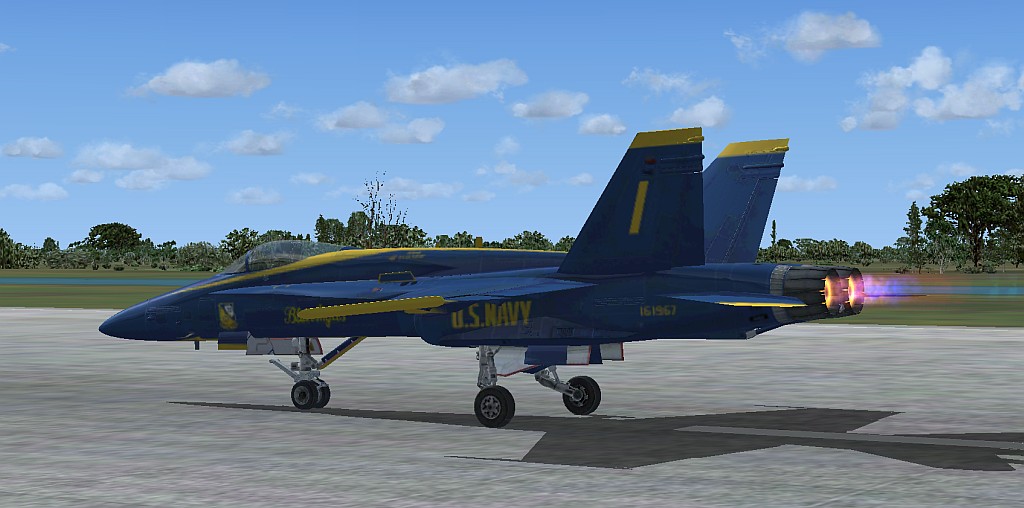
...A Blue Angel:

Image
Brando14100
 

Re: What an angel...

Postby Leigh » Mon Apr 21, 2008 5:38 am

...A Blue Angel:


Sure is

good shot
Image
User avatar
Leigh
Major
Major
 
Posts: 1384
Joined: Sun Jan 20, 2008 6:19 am
Location: somewhere over the rainbow

Re: What an angel...

Postby haroldkip » Mon Apr 21, 2008 4:09 pm

good shot

That is pretty subjective but to be honest I don't think it is that good ...

I find the livery too blurry. Wait a bit longer for the textures to load or try this. The shot lacks anti-aliasing. Try jacking up your AA in the control panel of your video card. Anti aliasing is explained here.

The angle could be more creative. You could try experimenting with a tool such as the Recorder Module. The Flight1 View Module is also a very handy too which can get you some pretty amazing angles ... Alonso wrote a very good tutorial about it in the studio a while ago. Read it here.

The background scenery and skies which I find not very imaginary at all. If you want to shoot an aircraft at the ground give it a bit more perspective by adding some nice scenery in the background. In this shot I would shoot it with a military environment in the background such as a Naval Aviation Station or an Air Force base. Here is a nice tutorial to read about backgrounds.

For great skeis I would ultimately recommend Flight Environment and Active Sky. But there are also some very nice freeware alternatives to that such as Real Environment Professional and FS Sky World and its DXT3 clouds alternatives.

The Blue Angels are the US Navy's demo team so try work with that theme. Just a static shot doesn't do that model a lot of justice. Try shooting the shot in a more dynamic environment, such as an aerobatic manouvre ...

Also experiment with lighting in differt angles. Read this. Also Eno wrote something about lighting last year. You can read it here.

Take some time to browse trough Studio V's Tutorial Library ... it is an amazing collection of the best Flight Simulator screenshot tips available on the Internet.

After all the above the shot is way too compressed. Try this if you use either Photoshop or Paint Shop Pro. If you use Paint.NET read Jakes excellent tutorial here.


Man ... that was a lot of typing and looking up URL's ;D

I sure hope that this is usefull ;)
User avatar
haroldkip
Lieutenant Colonel
Lieutenant Colonel
 
Posts: 5906
Joined: Wed Apr 12, 2006 5:13 am
Location: Amsterdam, The Netherlands

Re: What an angel...

Postby Brando14100 » Mon Apr 21, 2008 4:56 pm

Thanks for being honest. I will keep all this in mind and take a new shot.
Brando14100
 

Re: What an angel...

Postby Brando14100 » Mon Apr 21, 2008 5:00 pm

I can't mess with my video card. Can't be tinkered with according to my father. AA is checked in the sim, so I guess that's all I can do for that.
Brando14100
 

Re: What an angel...

Postby haroldkip » Mon Apr 21, 2008 5:12 pm

I can't mess with my video card. Can't be tinkered with according to my father. AA is checked in the sim, so I guess that's all I can do for that.

Can't or doesn't your father allow you to tinker with it? But if it is not 'your' computer then always listen to him before you try anything.

Which card do you have? Is it one that is integrated in the machine's mainboard or do you have an add-on card such as an ATI or Nvidia card?

If you have an add-on card then uncheck AA in the sim and set AA on the card ;)
Last edited by haroldkip on Mon Apr 21, 2008 5:12 pm, edited 1 time in total.
User avatar
haroldkip
Lieutenant Colonel
Lieutenant Colonel
 
Posts: 5906
Joined: Wed Apr 12, 2006 5:13 am
Location: Amsterdam, The Netherlands

Re: What an angel...

Postby Brando14100 » Mon Apr 21, 2008 5:19 pm

It isn't my computer, but I do have enough money to get my own, and most likey will soon. My father says there is no way to mess with it, not that he doesn't know how. I would tell you what the card is, but I'm not sure. Is there a way to check in the system? It's Vista by the way.

Edit: This is what I am concidering getting. An 15 inch Inspiron. Would it run FSX good?

Midnight Blue
PROCESSOR Intel
Last edited by Brando14100 on Mon Apr 21, 2008 5:40 pm, edited 1 time in total.
Brando14100
 

Re: What an angel...

Postby haroldkip » Mon Apr 21, 2008 5:38 pm

Is there a way to check in the system? It's Vista by the way.

Sure ... right click on the 'My Computer' icon on your desktop. Select PROPERTIES. A new window will open. In the menu on the left you should see an entry called DEVICE MANAGER. Click it. Another window will open in which you can see all the hardware that your system has. Click on the [+] next to the entry called DISPLAY ADAPTERS.

This should list your video card ;)

Would it run FSX good?


I would ask that question in the HARDWARE forum, but I suggest you read Nick Needham's suggestions for a machine capable of running FSX first.

Laptops are nice but if you want to install Flight Simulator on it I would go for a PC instead of a laptop ...

BTW: here are some links you might find interesting to read up front:

Flight Simulator X FAQ

Flight Simulator 2004 FAQ

Clean FSX, Acceleration, SP1 & SP2 Install
Last edited by haroldkip on Mon Apr 21, 2008 5:47 pm, edited 1 time in total.
User avatar
haroldkip
Lieutenant Colonel
Lieutenant Colonel
 
Posts: 5906
Joined: Wed Apr 12, 2006 5:13 am
Location: Amsterdam, The Netherlands

Re: What an angel...

Postby Brando14100 » Mon Apr 21, 2008 5:47 pm

It says: ATI Mobility Radeon X1400

Re-posting last post in the Hardaware section.
Last edited by Brando14100 on Mon Apr 21, 2008 5:48 pm, edited 1 time in total.
Brando14100
 

Re: What an angel...

Postby haroldkip » Mon Apr 21, 2008 5:57 pm

ATI Mobility Radeon X1400

Well, it is not a high end video card but you could do much worse ;)

You should have an entry in your start menu called ATI or something like that. See if you have that.

My machine doesn't run Vista but my wife's PC does. However, she has an Nvidia card in it so I can't give you any pointers on how to configure an ATI card ...

Again, you may want to ask in the HARDWARE forum ;)
User avatar
haroldkip
Lieutenant Colonel
Lieutenant Colonel
 
Posts: 5906
Joined: Wed Apr 12, 2006 5:13 am
Location: Amsterdam, The Netherlands

Re: What an angel...

Postby Brando14100 » Mon Apr 21, 2008 6:06 pm

I'm a little scared to post this in the hardware section after reading that as I don't know my current system specs. :-/ Also, I'm basically asking exactly what he told me not to. :-/
Last edited by Brando14100 on Mon Apr 21, 2008 6:06 pm, edited 1 time in total.
Brando14100
 

Re: What an angel...

Postby haroldkip » Mon Apr 21, 2008 6:39 pm

I'm a little scared to post this in the hardware section after reading that as I don't know my current system specs. :-/ Also, I'm basically asking exactly what he told me not to. :-/


It's OK. Never do anything your father told you not to do!

However, if you'd like to learn a bit more about the configuration of your system, you can download and install the free Belarc Advisor.

But again, ask your father before doing so. You might want to tell him that you want to learn this kind of stuff. Being a father myself I don't see any harm in that ...

If you need anything, please don't be affraid to ask. That is what we are here for. And you can always shoot me a PM ...
Last edited by haroldkip on Mon Apr 21, 2008 6:39 pm, edited 1 time in total.
User avatar
haroldkip
Lieutenant Colonel
Lieutenant Colonel
 
Posts: 5906
Joined: Wed Apr 12, 2006 5:13 am
Location: Amsterdam, The Netherlands

Re: What an angel...

Postby Brando14100 » Mon Apr 21, 2008 6:57 pm

I meant NickN, not my father.
Brando14100
 

Re: What an angel...

Postby haroldkip » Mon Apr 21, 2008 7:10 pm

;D
User avatar
haroldkip
Lieutenant Colonel
Lieutenant Colonel
 
Posts: 5906
Joined: Wed Apr 12, 2006 5:13 am
Location: Amsterdam, The Netherlands

Re: What an angel...

Postby JSpahn » Mon Apr 21, 2008 8:58 pm

oh man now thats a riot ;D ;D
Image
User avatar
JSpahn
Major
Major
 
Posts: 1768
Joined: Wed Apr 04, 2007 9:12 pm
Location: Philadelphia,PA


Return to Simulation Screenshots Showcase

Who is online

Users browsing this forum: No registered users and 484 guests