
My entry

Flight Simulation Screenshots displaying your Flight Simulation Experience. MSFS, FSX, Prepar3D, XPlane and other Flight Simulators. Focus is your Flight Simulator Experience. Please upload to Simviation (Button at top right)

My entry

Postby jobrober » Fri Dec 21, 2007 8:27 pm

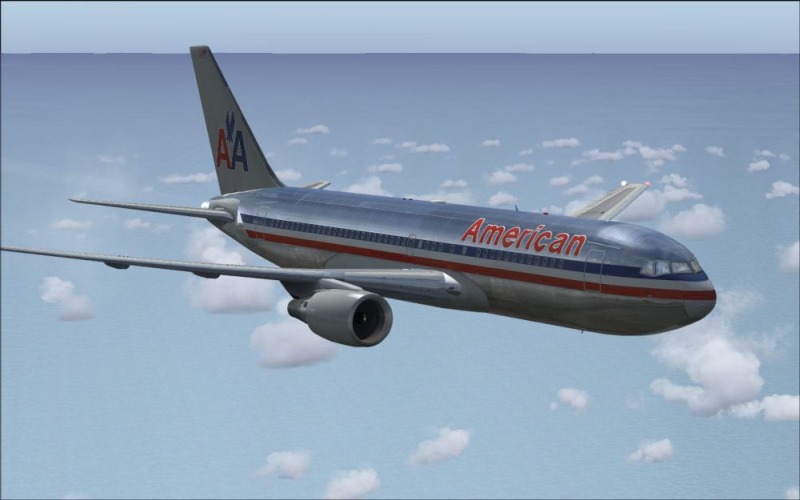
My first try, an Opensky 767-200

Image
Last edited by Clipper on Sun Dec 23, 2007 10:24 pm, edited 1 time in total.
jobrober
Ground hog
Ground hog
 
Posts: 40
Joined: Sun Oct 21, 2007 7:45 pm
Location: Texas

Re: My entry

Postby Anark » Fri Dec 21, 2007 8:29 pm

Good shot and good luck mate!
Image

Intel Core2 Quad @2.40GHz, Vista Ultimate, NVIDIA 8500GT, 500GB internal HDD and 250GB external.

[center]My [url=http://www.myaviation.net/sear
User avatar
Anark
Captain
Captain
 
Posts: 986
Joined: Sun Oct 09, 2005 8:12 am
Location: Yorkshire

Re: My entry

Postby jobrober » Fri Dec 21, 2007 8:33 pm

Thanks!
jobrober
Ground hog
Ground hog
 
Posts: 40
Joined: Sun Oct 21, 2007 7:45 pm
Location: Texas

Re: My entry

Postby firemonte007 » Fri Dec 21, 2007 8:37 pm

good looking shot...welcome to simV....however you need to make the shot smaller, they need to be 800 wide and you have your shot 1000 wide.
Image
User avatar
firemonte007
Major
Major
 
Posts: 2288
Joined: Mon Aug 20, 2007 8:24 pm
Location: northern IL, USA

Re: My entry

Postby jobrober » Fri Dec 21, 2007 8:40 pm

I was unsure about that. Thanks for the info.
jobrober
Ground hog
Ground hog
 
Posts: 40
Joined: Sun Oct 21, 2007 7:45 pm
Location: Texas

Re: My entry

Postby jobrober » Fri Dec 21, 2007 8:43 pm

Any images over 100 kb in weight, and being smaller than 800 wide will not be VALID! ....I thought that meant 800 or bigger. Maybe a Mod could clarify this for us.
jobrober
Ground hog
Ground hog
 
Posts: 40
Joined: Sun Oct 21, 2007 7:45 pm
Location: Texas

Re: My entry

Postby StACAttack » Sat Dec 22, 2007 9:00 pm

Nice shot! I've got the Air New Zealand one, a lot of POSky aircraft don't have sound but my one does, and its brilliant! sounds just like the real thing!

BTW I cant upload a screenshot because it says "This attachment causes the attachments directory to exceed it maximum capacity by approximately 11913 kilobytes and cannot be uploaded." My image is only 54kb?!

Please tell me if you know what the problem is.

Thanks, Dan.

P.S. Thats what I'd want for Christmas too!
StACAttack
Ground hog
Ground hog
 
Posts: 10
Joined: Sat Oct 13, 2007 4:46 pm

Re: My entry

Postby spitfire boy » Sun Dec 23, 2007 9:07 am

I cant upload a screenshot because it says "This attachment causes the attachments directory to exceed it maximum capacity by approximately 11913 kilobytes and cannot be uploaded." My image is only 54kb?!

Please tell me if you know what the problem is.


I don't know what the problem is, but that message has been popping up alot - several members have complained about it. The funny thing is it's all the same '11913' number.

What procedure are you attempting to use to put your shots up? Are you trying to attach the file from the 'create new topic' screen? If so, that could be the problem because what you're meant to do is go to the uploads page - here - and scroll to the bottom, click the 'browse' button next to one of the boxes that are at the bottom. You then browse through your files until you find your shot, select it and it should then pop up in the box I previously referred to. Then click 'upload' and the page should change to a table, with a piece of what should look like the path for your image with little (img)(/img) tags on either side (with the '(' brackets replaced by the '[' brackets). Copy this text into the create new topic view, into the text box you type in when creating your message. If you then click 'preview' your shot should show up.

This may solve the problem but to be honest I don't know. I'm only guessing that you're not following 'correct procedure'.

EDIT; I tested a couple of things, including trying to attach a not-previously-uploaded-but-within-limits-file, and doing so produced a very similar message to the one you complain of. Looks like the problem lies there.

Hope I've helped!! :D

Any images over 100 kb in weight, and being smaller than 800 wide will not be VALID! ....I thought that meant 800 or bigger. Maybe a Mod could clarify this for us.



Whilst I'm not a mod, I can help here; it means it HAS to be 800 wide; no more, no less. ;)
Last edited by spitfire boy on Sun Dec 23, 2007 9:20 am, edited 1 time in total.
Image


[center]
User avatar
spitfire boy
Major
Major
 
Posts: 2587
Joined: Mon May 21, 2007 4:46 pm
Location: Wherever you think I'm not

Re: My entry

Postby jankees » Sun Dec 23, 2007 12:39 pm

Nice, but somebody should clean those windows...
Image
jankees
Major
Major
 
Posts: 2799
Joined: Fri Aug 11, 2006 3:19 am
Location: Brussels, Belgium

Re: My entry

Postby jobrober » Sun Dec 23, 2007 9:45 pm

I was trying to attach a file in the start topic screen. I uploaded the file the message board and inserted the image instead.
jobrober
Ground hog
Ground hog
 
Posts: 40
Joined: Sun Oct 21, 2007 7:45 pm
Location: Texas

Re: My entry

Postby Clipper » Sun Dec 23, 2007 10:27 pm

I've re-sized the pic for you, please read the rules carefully before your next image post. If you have difficulty in uploading or re-sizing, visit StudioV and ask for advice. I'm sure you'll get all the help you need (in addition to the help you've already received from everyone in this thread).  ;)
Image
User avatar
Clipper
Global Moderator
Global Moderator
 
Posts: 8420
Joined: Tue Aug 23, 2005 5:40 am

Re: My entry

Postby jobrober » Tue Dec 25, 2007 2:35 am

thanks for all the help guys,  maybe my second shot will be better
jobrober
Ground hog
Ground hog
 
Posts: 40
Joined: Sun Oct 21, 2007 7:45 pm
Location: Texas

Re: My entry

Postby spitfire boy » Tue Dec 25, 2007 4:09 am

[quote]thanks for all the help guys,
Image


[center]
User avatar
spitfire boy
Major
Major
 
Posts: 2587
Joined: Mon May 21, 2007 4:46 pm
Location: Wherever you think I'm not

Re: My entry

Postby jobrober » Tue Dec 25, 2007 2:54 pm

I turned off Active Sky for the shot, but i was wondering if it is allowed?
jobrober
Ground hog
Ground hog
 
Posts: 40
Joined: Sun Oct 21, 2007 7:45 pm
Location: Texas

Re: My entry

Postby spitfire boy » Wed Dec 26, 2007 3:13 pm

I turned off Active Sky for the shot, but i was wondering if it is allowed?


Not familiar with active sky but I can provide this rule of thumb; if its payware, it's not legal. The ONLY exception to this is acceleration; any other payware is not allowed. ;)
Image


[center]
User avatar
spitfire boy
Major
Major
 
Posts: 2587
Joined: Mon May 21, 2007 4:46 pm
Location: Wherever you think I'm not

Next

Return to Simulation Screenshots Showcase

Who is online

Users browsing this forum: No registered users and 619 guests