My first posted screenie....

Flight Simulation Screenshots displaying your Flight Simulation Experience. MSFS, FSX, Prepar3D, XPlane and other Flight Simulators. Focus is your Flight Simulator Experience. Please upload to Simviation (Button at top right)

My first posted screenie....

Postby cspyro21 » Tue Aug 30, 2005 5:21 am

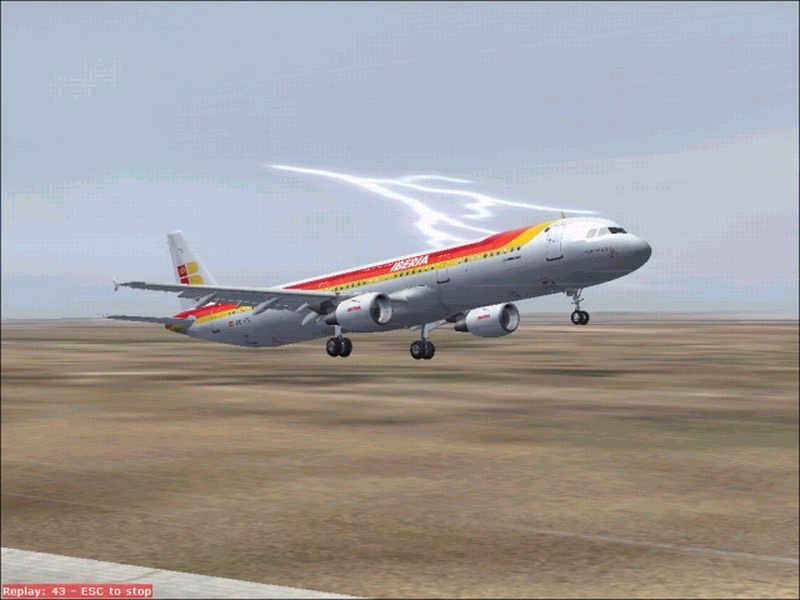
I doubt that this will be half as good as any of yuor screenies (quality is poor in this one) but hey, I'm new to this posting screenshot business.
[img]URL[http://www.simviation.com/yabbuploads/a321%20daring%20approach]
The Iberia a321 had taken off from Madrid in a strong storm, and upon reaching 5,000ft engine 2 failed and the equipment began to fail.
    In an emergency the pilots went to touch down at a small airport outside of Madrid but crashed on touchdown. (The flare is huge I know but thats because a strong tailwind forced me to do so :)
   cspyro21
User avatar
cspyro21
Major
Major
 
Posts: 4987
Joined: Sun Aug 28, 2005 6:11 am

Re: My first posted screenie....

Postby cspyro21 » Tue Aug 30, 2005 5:21 am

Hey does anyone know why this pic isn't showing?
User avatar
cspyro21
Major
Major
 
Posts: 4987
Joined: Sun Aug 28, 2005 6:11 am

Re: My first posted screenie....

Postby Omag 2.0 » Tue Aug 30, 2005 5:44 am

It's like this. Push the quote button and see how I've entered the line.

Image

basically you need the url in between the (img)http://yaddiyadda-upload-thingie(/img) but with [ ] instead of ()

Hope this helps!
Last edited by Omag 2.0 on Tue Aug 30, 2005 5:46 am, edited 1 time in total.
[center]
Image

Check my aviation-photo's at www.airliners.be

Or go straight to Omag's Album[/cent
User avatar
Omag 2.0
Lieutenant Colonel
Lieutenant Colonel
 
Posts: 9490
Joined: Tue Aug 05, 2003 6:43 am
Location: Somewhere, Belgium

Re: My first posted screenie....

Postby Sytse » Tue Aug 30, 2005 5:52 am

Image


Here you go...
Put the link to the pic BETWEEN the [i.mg] and [/i.mg] (the dots shouldn't be in there) and use spaces instead of %20. And please put the .jpg extention in there. You posted a 1.37 Mb .bmp
I changed it to a .jpg for you. You can get a free program to do that called 'irfanview' by following the link in the 'how to post screenshots' topic. Or following the link when uploading.
I don't know if you know this, but any image you upload should be smaller than 100 Kb in size.

As for the screenie: I like the lightning in the background. Is that hard to catch?
User avatar
Sytse
Major
Major
 
Posts: 3397
Joined: Fri Jun 24, 2005 5:26 am
Location: The Netherlands

Re: My first posted screenie....

Postby Sytse » Tue Aug 30, 2005 5:53 am

Damn you Omag!  ;D :P
User avatar
Sytse
Major
Major
 
Posts: 3397
Joined: Fri Jun 24, 2005 5:26 am
Location: The Netherlands

Re: My first posted screenie....

Postby Omag 2.0 » Tue Aug 30, 2005 5:58 am

Lol Pigeon! Shows how helpfull we are... I didn't notice the bmp situation though! Nice catch there!

Now post like your life depends on it cspyro21! Just one tip... try to turn AA on on your video-card! makes the edges smoother!  ;)
[center]
Image

Check my aviation-photo's at www.airliners.be

Or go straight to Omag's Album[/cent
User avatar
Omag 2.0
Lieutenant Colonel
Lieutenant Colonel
 
Posts: 9490
Joined: Tue Aug 05, 2003 6:43 am
Location: Somewhere, Belgium

Re: My first posted screenie....

Postby Hai Perso Coyone? » Tue Aug 30, 2005 6:02 am

Nice shot Cspyro ;) ;)
User avatar
Hai Perso Coyone?
Ground hog
Ground hog
 
Posts: 0
Joined: Fri Jan 12, 2007 7:31 pm
Location: Rome, Italy

Re: My first posted screenie....

Postby Hagar » Tue Aug 30, 2005 6:09 am

cspyro. You didn't add the .jpg file extension to the path so I can't check the file size from right-click Properties. This made me suspicious so I downloaded your image to check it out. I found it's in BMP format @ 1.37 Kb which is above the forum limit. It's not difficult to use a graphics editor like IrfanView to convert BMP images to the correct size & format.

Open the BMP in IrfanView & resize as necessary.
Then File/Save As in JPEG - JPG format. Choose a file name without spaces that is unique to you.
Use dashes or underscores to separate words if you wish.
Adjust the file size with the 'Save quality' slider & check the file size before uploading your images.

I've done this one for you. Saved from IrfanView in JPG format at 95% Save quality it comes out at 96.6 Kb. The file name is da-a321-1.jpg The exact path is http://www.simviation.com/yabbuploads/da-a321-1.jpg
Image

Hope this helps. It's a nice shot.
Last edited by Hagar on Tue Aug 30, 2005 6:20 am, edited 1 time in total.
Image

Founder & Sole Member - Grumpy's Over the Hill Club for Veteran Virtual Aviators
Member of the Fox Four Group
My Google Photos albums
My Flickr albums
User avatar
Hagar
Colonel
Colonel
 
Posts: 30869
Joined: Wed Jun 19, 2002 7:15 am
Location: Costa Geriatrica

Re: My first posted screenie....

Postby Sytse » Tue Aug 30, 2005 6:16 am

LOL
Another simultanious post!
How much more?
Last edited by Sytse on Tue Aug 30, 2005 6:18 am, edited 1 time in total.
User avatar
Sytse
Major
Major
 
Posts: 3397
Joined: Fri Jun 24, 2005 5:26 am
Location: The Netherlands

Re: My first posted screenie....

Postby Hagar » Tue Aug 30, 2005 6:24 am

[quote]LOL
Another simultanious post!
How much more?
Last edited by Hagar on Tue Aug 30, 2005 6:26 am, edited 1 time in total.
Image

Founder & Sole Member - Grumpy's Over the Hill Club for Veteran Virtual Aviators
Member of the Fox Four Group
My Google Photos albums
My Flickr albums
User avatar
Hagar
Colonel
Colonel
 
Posts: 30869
Joined: Wed Jun 19, 2002 7:15 am
Location: Costa Geriatrica

Re: My first posted screenie....

Postby Sytse » Tue Aug 30, 2005 6:46 am

I think you're missing the point. cspyro21's original image is in BMP format which is strictly against the rules. It's also above the file size limit & will be deleted.

Have you even read my post?

Not saying it won't work. If you must use long file names dashes/underscores separating words makes it easier.

What in earth could be easier than pressing the spacebar?
User avatar
Sytse
Major
Major
 
Posts: 3397
Joined: Fri Jun 24, 2005 5:26 am
Location: The Netherlands

Re: My first posted screenie....

Postby Hai Perso Coyone? » Tue Aug 30, 2005 7:06 am

What in earth could be easier than pressing the spacebar?


Well now that you ask it...not pushing it would save a whole bunch of calories... ::)
User avatar
Hai Perso Coyone?
Ground hog
Ground hog
 
Posts: 0
Joined: Fri Jan 12, 2007 7:31 pm
Location: Rome, Italy

Re: My first posted screenie....

Postby Hagar » Tue Aug 30, 2005 7:42 am

Have you even read my post?

Oops. Sorry, I missed it. :-[
What in earth could be easier than pressing the spacebar?

Over the last few years I've seen more problems caused by spaces in the file name than anything else - except the case of the .jpg .JPG file extension.

PS. I don't think the original image is actually in BMP format. The browser treats images without a file extension as BMPs.
Last edited by Hagar on Tue Aug 30, 2005 1:36 pm, edited 1 time in total.
Image

Founder & Sole Member - Grumpy's Over the Hill Club for Veteran Virtual Aviators
Member of the Fox Four Group
My Google Photos albums
My Flickr albums
User avatar
Hagar
Colonel
Colonel
 
Posts: 30869
Joined: Wed Jun 19, 2002 7:15 am
Location: Costa Geriatrica

Re: My first posted screenie....

Postby lemoncat » Tue Aug 30, 2005 10:41 am

well after all that..nice shot for your first try cspyro21... wherever you are ;) ;D
User avatar
lemoncat
Major
Major
 
Posts: 4286
Joined: Fri Jan 02, 2004 6:41 pm
Location: earth

Re: My first posted screenie....

Postby cspyro21 » Tue Aug 30, 2005 1:57 pm

A few things:-
    a) Yes pigeon, the lightning is real hard to capture but this one was caught by chance
     b)Irfanview said it was 45kb I will have to fine-tune it :)
    c)Omag a question:- Whats the 'AA' on my video card?
    d)and finally, thanks for all those helpful comments!
    cspyro21
User avatar
cspyro21
Major
Major
 
Posts: 4987
Joined: Sun Aug 28, 2005 6:11 am

Next

Return to Simulation Screenshots Showcase

Who is online

Users browsing this forum: No registered users and 458 guests