C172 (new graphics card)

Flight Simulation Screenshots displaying your Flight Simulation Experience. MSFS, FSX, Prepar3D, XPlane and other Flight Simulators. Focus is your Flight Simulator Experience. Please upload to Simviation (Button at top right)

C172 (new graphics card)

Postby JW49 » Tue Aug 31, 2004 2:19 pm

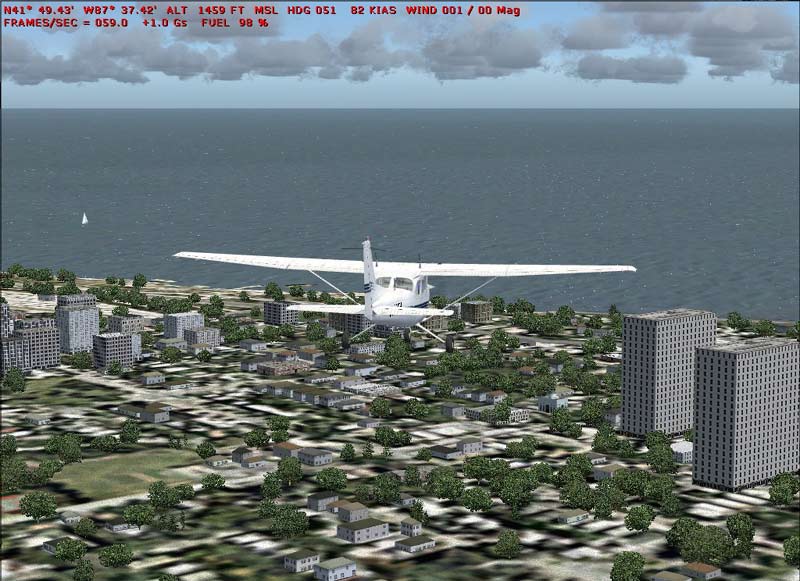
After just getting FS2004 after being on 2002 for so long, I took jordonjs' advice and installed a GeForce 6800 overclocked to replace my Intel Integrated and realized that my power supply of 165w wasn't gonna cut it.  So I installed a new 400w power supply and WOW, a whole new simulator.  Check out the framerate!
Great card!  ;D  Thanks for the advice.  Now to tweak alittle bit.
Image
User avatar
JW49
1st Lieutenant
1st Lieutenant
 
Posts: 348
Joined: Thu Jul 29, 2004 1:45 pm

Re: C172 (new graphics card)

Postby jordonj » Tue Aug 31, 2004 2:23 pm

My face is green with envy!
My first flight in a 172 on August 20, 2004
Image

Doing the right thing is more important than doing the thing right. (P. Drucker)

When all think alike, then no one i
User avatar
jordonj
Lieutenant Colonel
Lieutenant Colonel
 
Posts: 5314
Joined: Mon Jun 14, 2004 11:40 pm
Location: Michigan

Re: C172 (new graphics card)

Postby chomp_rock » Tue Aug 31, 2004 2:28 pm

Very nice, I wish I had framerates like that. Are all of your sliders maxed? what are your system specs?
AMD Athlon 64 3700+
GeForce FX5200 256Mb
1GB DDR400 DC
Seagate 500Gb SATA-300 HDD
Windows XP Professional X64 Edition


That's right, I'm now using an AMD! I decided to give them another try and they
User avatar
chomp_rock
Major
Major
 
Posts: 2411
Joined: Wed Jul 10, 2002 2:23 pm

Re: C172 (new graphics card)

Postby JW49 » Tue Aug 31, 2004 3:02 pm

I hope these are ok on this screenshot forum.
Last edited by JW49 on Thu Sep 09, 2004 2:29 pm, edited 1 time in total.
User avatar
JW49
1st Lieutenant
1st Lieutenant
 
Posts: 348
Joined: Thu Jul 29, 2004 1:45 pm

Re: C172 (new graphics card)

Postby Omag 2.0 » Tue Aug 31, 2004 3:15 pm

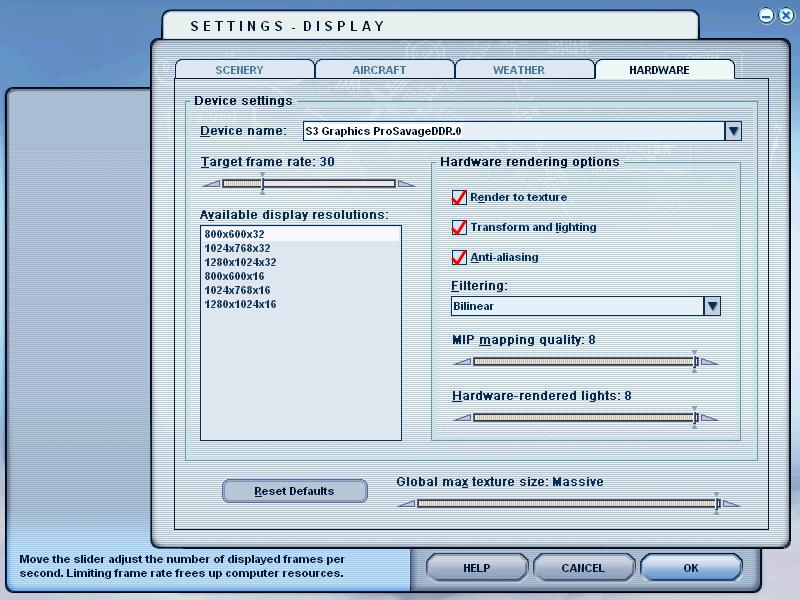
That's quite a serious presentation of your settings...  ;D

Nice to see the sim running so smooth!
[center]
Image

Check my aviation-photo's at www.airliners.be

Or go straight to Omag's Album[/cent
User avatar
Omag 2.0
Lieutenant Colonel
Lieutenant Colonel
 
Posts: 9490
Joined: Tue Aug 05, 2003 6:43 am
Location: Somewhere, Belgium

Re: C172 (new graphics card)

Postby jordonj » Tue Aug 31, 2004 6:20 pm

Grrr...now I am really green with envy!
My first flight in a 172 on August 20, 2004
Image

Doing the right thing is more important than doing the thing right. (P. Drucker)

When all think alike, then no one i
User avatar
jordonj
Lieutenant Colonel
Lieutenant Colonel
 
Posts: 5314
Joined: Mon Jun 14, 2004 11:40 pm
Location: Michigan

Re: C172 (new graphics card)

Postby Silver1SWA » Thu Sep 09, 2004 4:04 am

Thats crazy...I can only get a steady 30 frames MOST of the time with my setup...and there is still plenty in FS9 that can bring my system down.

Something is not right...I have a bottleneck somewhere but I can't figure out what it is...
P4 3.20Ghz 800Mhz FSB
1 GB PC3200 400Mhz DDR RAM (Dual Channel)
Nvidia GeForce 6800GT 256MB 8X AGP
SB Audigy MP3+
Win XP Pro
Silver1SWA
Captain
Captain
 
Posts: 690
Joined: Sat Aug 09, 2003 10:06 pm
Location: Morgan Hill, Ca. (SF Bay Area)

Re: C172 (new graphics card)

Postby jordonj » Thu Sep 09, 2004 7:47 am

Try using FSAutostart.  Also, I find that I cannot notice the difference betwen 30 and over 30 FPS...
My first flight in a 172 on August 20, 2004
Image

Doing the right thing is more important than doing the thing right. (P. Drucker)

When all think alike, then no one i
User avatar
jordonj
Lieutenant Colonel
Lieutenant Colonel
 
Posts: 5314
Joined: Mon Jun 14, 2004 11:40 pm
Location: Michigan

Re: C172 (new graphics card)

Postby Silver1SWA » Thu Sep 09, 2004 8:10 am

Well that is true that anything over 30 really is not noticeable.  But sometimes even though I get the 30 FPS, its not a smooth 30 FPS.  I get some small stutters.  And the benefit of getting higher than 30 FPS averages is there is more room for deductions when using a lot of traffic or weather.  In other words, if I could get FPS averages as high as this screen shot shows, then adding a lot more traffic and especially weather would reduce that number to somewhere in the 30s.  That would be PEREFECT.  Right now, it's like I cannot get averages anywhere over 30 on the most basic configuration...for example clear skies.
P4 3.20Ghz 800Mhz FSB
1 GB PC3200 400Mhz DDR RAM (Dual Channel)
Nvidia GeForce 6800GT 256MB 8X AGP
SB Audigy MP3+
Win XP Pro
Silver1SWA
Captain
Captain
 
Posts: 690
Joined: Sat Aug 09, 2003 10:06 pm
Location: Morgan Hill, Ca. (SF Bay Area)

Re: C172 (new graphics card)

Postby JBaymore » Thu Sep 09, 2004 8:15 am

MCairjockey,

I was wondering why you have anti aliasing and trilinear filtering being done in the sim itself?
Last edited by JBaymore on Thu Sep 09, 2004 8:17 am, edited 1 time in total.
Image ImageIntel i7 960 quad 3.2G LGA 1366, Asus P6X58D Premium, 750W Corsair, 6 gig 1600 DDR3, Spinpoint 1TB 720

User avatar
JBaymore
Global Moderator
Global Moderator
 
Posts: 10020
Joined: Sat May 24, 2003 9:15 am
Location: New Hampshire

Re: C172 (new graphics card)

Postby jordonj » Thu Sep 09, 2004 8:19 am

Well, at the risk of sounding redundant, I'd start with FSAutostart to shut down the stuff running in the background...

How many Icons do you have running in your system tray, by the way?

I also modified the FS9.cfg file so that the fast-food restaurants aren't there.  This really helped my framerates.

Quoting from the main fourm...

Heya HSV,

A common issue with FS 2004 are all of the restaurant signs clogging the memory (especially in urban areas).  This over a period of time can cause frame rates to drop.

Two things that you may do to avoid this:

1. In the main FS2004 folder you will find a subfolder called Autogen.  In that folder there is a single file named Default.xml .  I renamed this file to default.BAK.

2. Find the line in the [Graphics] section of FS9.cfg file that reads TERRAIN_USE_VECTOR_OBJECTS=1 and change the 1 to a 0 so that the new line reads TERRAIN_USE_VECTOR_OBJECTS=0 .

You'll be missing some fastfood restaurant signs, however, you should see both an end to the poor FPS when returning to the airport to land and an increase in framerates when flying in the city.


Personally, I didn't notice the Fast Food reastaurants being gone very much, but I did notice the difference in framerates!

I also have gotten rid of the default AI and replaced it with Project AI.  I have the traffic set at 72%...which gets me great framerates even with the LET when landing at O'Hare...
My first flight in a 172 on August 20, 2004
Image

Doing the right thing is more important than doing the thing right. (P. Drucker)

When all think alike, then no one i
User avatar
jordonj
Lieutenant Colonel
Lieutenant Colonel
 
Posts: 5314
Joined: Mon Jun 14, 2004 11:40 pm
Location: Michigan

Re: C172 (new graphics card)

Postby coolamon » Thu Sep 09, 2004 9:41 am

Image       look at my dumb graphics card
=.=
coolamon
Ground hog
Ground hog
 
Posts: 30
Joined: Mon Sep 06, 2004 11:02 pm

Re: C172 (new graphics card)

Postby 4_Series_Scania » Thu Sep 09, 2004 11:53 am

Thats crazy...I can only get a steady 30 frames MOST of the time with my setup...and there is still plenty in FS9 that can bring my system down.

Something is not right...I have a bottleneck somewhere but I can't figure out what it is...


Your Graphics Card probably Silver1SWA, believe it or not!

MCAirjockey's 6800 compared to your 9800 is a little like comparing a B-17 to a B-52 - Both do similar jobs, both pack a considerable punch, alas, the B52 is simply leagues ahead in both technology & payload.
The principle is similar when you look at the 6800GT's performance compared to the old 9800 / FX5950's et al.

I feel for anybody who's recently paid
Last edited by 4_Series_Scania on Thu Sep 09, 2004 12:03 pm, edited 1 time in total.
Posting drivel here since Jan 31st, 2002. - That long!
"He who laughs last, thinks slowest."
User avatar
4_Series_Scania
Major
Major
 
Posts: 3194
Joined: Thu Jan 31, 2002 4:34 pm
Location: Newport Shropshire U.K.

Re: C172 (new graphics card)

Postby JW49 » Thu Sep 09, 2004 2:39 pm

John, On my card I have AA and AF set to "application controlled" and Mip mapping to off.  But, I'm still tinkering.  And no, I don't have any ground shimmer at all.  I also updated some facts about my system, further up in the thread, that I had forgotten to mention before.  I always shut down whats running in my system tray.  I've been down for a day re-installing my operating system and everything else thanks to some blunders I made while using FSAutoStart.  I couldn't even get system restore to work!  I think I'll leave application shutdown programs alone until I learn a whole lot more about them. ???
User avatar
JW49
1st Lieutenant
1st Lieutenant
 
Posts: 348
Joined: Thu Jul 29, 2004 1:45 pm

Re: C172 (new graphics card)

Postby Silver1SWA » Thu Sep 09, 2004 7:03 pm

[quote]Well, at the risk of sounding redundant, I'd start with FSAutostart to shut down the stuff running in the background...

How many Icons do you have running in your system tray, by the way?

I also modified the FS9.cfg file so that the fast-food restaurants aren't there.
P4 3.20Ghz 800Mhz FSB
1 GB PC3200 400Mhz DDR RAM (Dual Channel)
Nvidia GeForce 6800GT 256MB 8X AGP
SB Audigy MP3+
Win XP Pro
Silver1SWA
Captain
Captain
 
Posts: 690
Joined: Sat Aug 09, 2003 10:06 pm
Location: Morgan Hill, Ca. (SF Bay Area)

Next

Return to Simulation Screenshots Showcase

Who is online

Users browsing this forum: No registered users and 130 guests