
Simviation Forums
Flight Simulator and other chat
Flight Simulator and other chat
 by lunitic_8 » Fri May 29, 2009 9:13 am



by patchz » Fri May 29, 2009 12:32 pm
Sorry for the jaggies compression killed it




by ShaneG_old » Fri May 29, 2009 2:36 pm
(I think most of the older Paint Shop Pro programs are available for free now. I'm using PSP9 and it does everything I need it to, and a bunch of stuff I still don't know how to use.  )
)

by Mictheslik » Fri May 29, 2009 2:45 pm

by lunitic_8 » Fri May 29, 2009 3:42 pm
(I think most of the older Paint Shop Pro programs are available for free now. I'm using PSP9 and it does everythingby Mictheslik » Fri May 29, 2009 3:44 pm
by lunitic_8 » Fri May 29, 2009 4:31 pm
You don't need the lasso tool...just use the pen
.mic
by ShaneG_old » Fri May 29, 2009 4:41 pm
You don't need the lasso tool...just use the pen
.mic
im not understanding how to use this, pen/lasso thing its not working right for me

by lunitic_8 » Fri May 29, 2009 4:54 pm
You don't need the lasso tool...just use the pen
.mic
im not understanding how to use this, pen/lasso thing its not working right for me
I could never figure it out myself.
I just duplicate the layer and erase around the plane, zooming in to single pixles to get the detail stuff. Pain in the butt, and it takes forever, but the end result looks good.
Sometimes I can get away with using the magic wand tool, but I still need to work on it's settings to get it to select the way I need it to. :-/
by gtirob01 » Fri May 29, 2009 6:28 pm


by lunitic_8 » Fri May 29, 2009 6:31 pm
That is a great looking sky, and a great aircraft. But as Mic said, the cutout needs work, and the lighting isnt right. I do like the idea though.
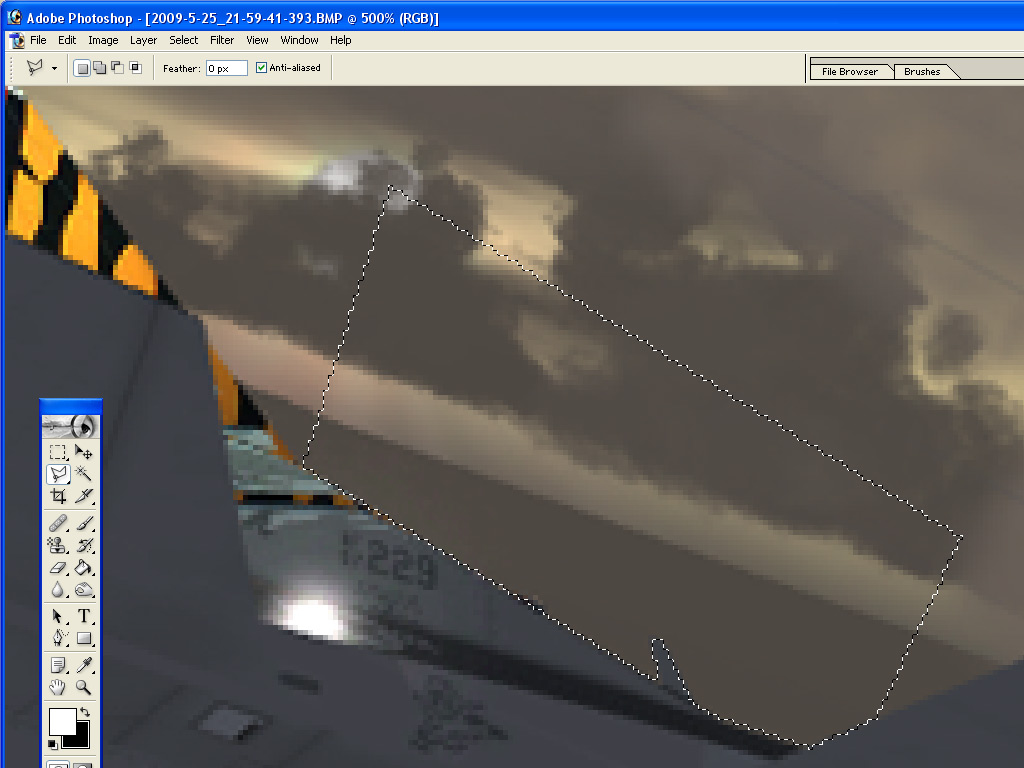
As for the lasso tool, when doing a composite I use the polygon lasso tool. zoom in to the aircraft you are cutting out, and slowly work your way around the aircraft 1 section at a time. go along the lines of the aircraft, then out away from it to clear some space, and back around to close the "box". I zoom to 4-500% and work my way around the aircraft that way, pressing backspace to clear the selected area.
here is an example.
do this on your duplicate background copy
but i dont have access to photoshop anymore :'(by gtirob01 » Fri May 29, 2009 6:32 pm
That is a great looking sky, and a great aircraft. But as Mic said, the cutout needs work, and the lighting isnt right. I do like the idea though.
As for the lasso tool, when doing a composite I use the polygon lasso tool. zoom in to the aircraft you are cutting out, and slowly work your way around the aircraft 1 section at a time. go along the lines of the aircraft, then out away from it to clear some space, and back around to close the "box". I zoom to 4-500% and work my way around the aircraft that way, pressing backspace to clear the selected area.
here is an example.
do this on your duplicate background copy
but i dont have access to photoshop anymoreby skoker » Fri May 29, 2009 6:51 pm


by charlesed » Fri May 29, 2009 7:15 pm

Users browsing this forum: No registered users and 200 guests