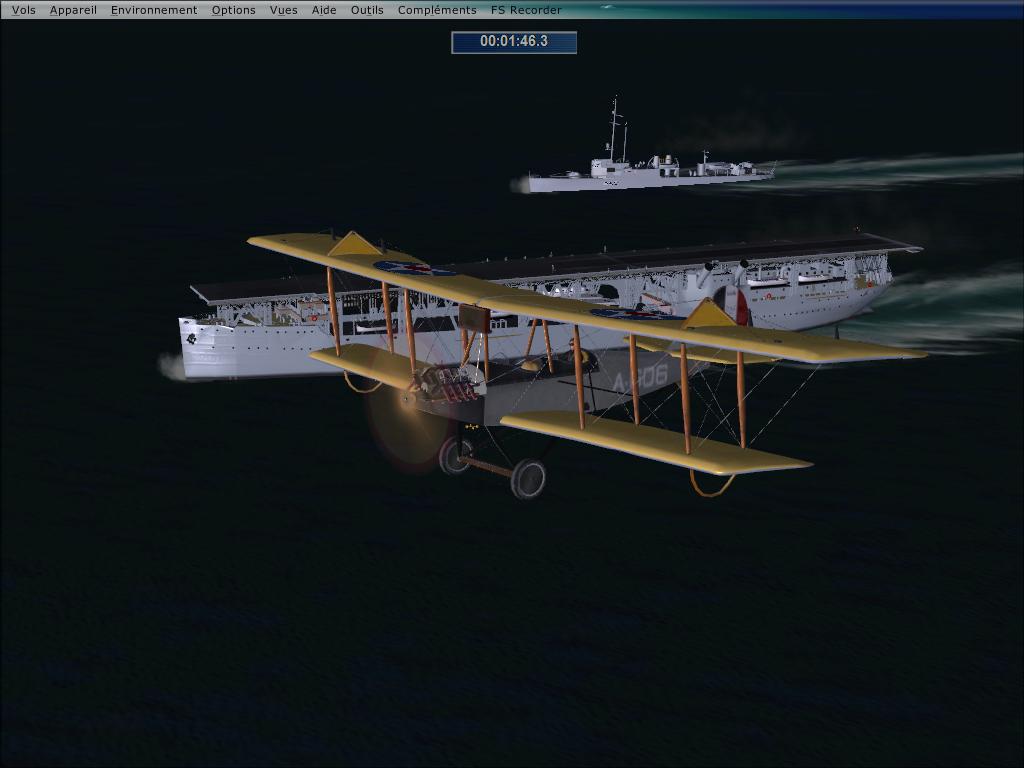
USS Langley CV1 aircraft carrier, Aeromarine 39B V3.20 and USS Langley CV1 mission released

FSX including FSX Steam version.

USS Langley CV1 aircraft carrier, Aeromarine 39B V3.20 and USS Langley CV1 mission released

Postby Woodylepic » Tue Jan 22, 2013 2:21 pm

Image
USS Langley CV1 aircraft carrier, Aeromarine 39B V3.20 and mission USS Langley CV1 released at simviation to day
http://simviation.com/1/browse-Missions ... 2911#42911
Let the fun begin  8-)!


Good flight !

There is a 100pixle wide, and 10kb large, size limits on Avatars.

Thank you for doing your part to make this a better place for all who visit by observing these guidelines. :)
User avatar
Woodylepic
1st Lieutenant
1st Lieutenant
 
Posts: 345
Joined: Wed Oct 29, 2003 5:06 pm
Location: Quebec Canada

Re: USS Langley CV1 aircraft carrier, Aeromarine 39B V3.20 and USS Langley CV1 mission released

Postby skybolt66 » Thu Jan 24, 2013 5:21 am

:)Yeah--this missions are recommanded to empathize in first Carrier-starts+
landings in 1922. Not easy to find the USS Langley at night whithout
any light. 8-)
skybolt66
2nd Lieutenant
2nd Lieutenant
 
Posts: 51
Joined: Wed Dec 07, 2005 6:31 am

Re: USS Langley CV1 aircraft carrier, Aeromarine 39B V3.20 and USS Langley CV1 mission released

Postby pete » Thu Jan 24, 2013 10:10 am

Looks really fun! :)
Simplicity is the ultimate sophistication. – Leonardo da Vinci
User avatar
pete
Administrator
Administrator
 
Posts: 10243
Joined: Mon Jan 01, 2001 2:01 am
Location: Cloud Cuckoo Land

Re: USS Langley CV1 aircraft carrier, Aeromarine 39B V3.20 and USS Langley CV1 mission released

Postby skybolt66 » Fri Jan 25, 2013 3:47 am

....... :) and enjoyable---it's the 1st FSX-mission after long time !
Hope for more ;D
skybolt66
2nd Lieutenant
2nd Lieutenant
 
Posts: 51
Joined: Wed Dec 07, 2005 6:31 am

Re: USS Langley CV1 aircraft carrier, Aeromarine 39B V3.20 and USS Langley CV1 mission released

Postby Formula_1 » Fri Jan 25, 2013 7:49 am

Thanks :)

There just aren't enough missions being made.

Some that are out were really a lot of fun. I'd love to see a lot more coming in the future.
Explore Everything, Then Decide
User avatar
Formula_1
1st Lieutenant
1st Lieutenant
 
Posts: 331
Joined: Fri Oct 21, 2005 1:17 pm
Location: New Port Richey, Florida

Re: USS Langley CV1 aircraft carrier, Aeromarine 39B V3.20 and USS Langley CV1 mission released

Postby technogeo » Sun Jan 27, 2013 3:28 pm

I have downloaded, unzipped and installed the three files. The two planes work perfectly in FSX but I can't find the USS Langley mission. Did I miss a step?
technogeo
Ground hog
Ground hog
 
Posts: 6
Joined: Sat Jan 12, 2013 3:56 pm

Re: USS Langley CV1 aircraft carrier, Aeromarine 39B V3.20 and USS Langley CV1 mission released

Postby skybolt66 » Mon Jan 28, 2013 5:40 am

The mission-name is "USS Langley"---3 or 4 steps to folders in folders---
look for the correct one, it must appear in FSX-missionslist after copy.
If a mission only starts as freeflight, mostly FSX needs any addon.
skybolt66
2nd Lieutenant
2nd Lieutenant
 
Posts: 51
Joined: Wed Dec 07, 2005 6:31 am

Re: USS Langley CV1 aircraft carrier, Aeromarine 39B V3.20 and USS Langley CV1 mission released

Postby technogeo » Mon Jan 28, 2013 8:30 am

Thanks, skybolt66, but I'm still lost at sea (blasted newbies!) Can you tell me where to install the folder "Pilotable-Carrier-Langley" (which contains a folder called "USS Langley")? Does it go in the Missions folder or SimObjects>Misc or SimObjects>Boats? or somewhere else? I've tried just about every combination. Thanks in advance for your help!
technogeo
Ground hog
Ground hog
 
Posts: 6
Joined: Sat Jan 12, 2013 3:56 pm

Re: USS Langley CV1 aircraft carrier, Aeromarine 39B V3.20 and USS Langley CV1 mission released

Postby Twohundredweight » Tue Jan 29, 2013 10:13 am

Good day to one and all
I can not get the mission.exe to work on any of the USS Langley files to work. Always get a request to make sure I am the administrator of the PC (I am).Never had this problem before with other exe files.
Using Windows7.
Is it possible to get the files in a manual load format?
Am I missing a trick somewhere?    [smiley=embarassed.gif]
Twohundredweight
Ground hog
Ground hog
 
Posts: 1
Joined: Tue Jan 29, 2013 10:46 am

Re: USS Langley CV1 aircraft carrier, Aeromarine 39B V3.20 and USS Langley CV1 mission released

Postby skybolt66 » Wed Jan 30, 2013 3:52 am

Easyest way is running the installer---ALL goes to right places. Manuell install
needs giving different path--not FSX (maybe "store" or so). Sev. folders appear---so mission=> FSX-missions, RWD=> rewards,
USS langley (separate DLD)=> ships...aso.
skybolt66
2nd Lieutenant
2nd Lieutenant
 
Posts: 51
Joined: Wed Dec 07, 2005 6:31 am

Re: USS Langley CV1 aircraft carrier, Aeromarine 39B V3.20 and USS Langley CV1 mission released

Postby technogeo » Wed Jan 30, 2013 9:04 am

Twohundredweight - I got the same administrator message with Windows 7. You can bypass it if you left-click and choose "run as administrator." It installs, but it still doesn't show up under "missions."
technogeo
Ground hog
Ground hog
 
Posts: 6
Joined: Sat Jan 12, 2013 3:56 pm

Re: USS Langley CV1 aircraft carrier, Aeromarine 39B V3.20 and USS Langley CV1 mission released

Postby technogeo » Wed Jan 30, 2013 9:07 am

Quick question: the installation instructions for the Langley mission say: 1. Install my folder "Pilotable-Carrier-Langley" with my panel, sound, aircraft.cfg and airfile first. WHERE do we install this folder? Under SimObjects>Airplanes?
technogeo
Ground hog
Ground hog
 
Posts: 6
Joined: Sat Jan 12, 2013 3:56 pm


Return to Flight Simulator X (FSX) and Steam

Who is online

Users browsing this forum: No registered users and 1070 guests
