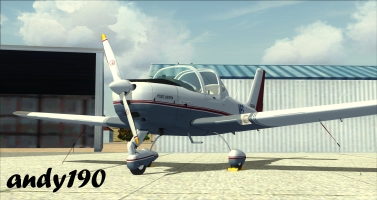
POSKY Aircraft light effect problem, please help.

FSX including FSX Steam version.

Re: POSKY Aircraft light effect problem, please help.

Postby alrot » Thu May 10, 2012 4:59 pm

Im so orry Something came up (JOB) and I did have to shutdown my pc and interrupt the download, hang in there I just started again  :(
Image

Venezuela
User avatar
alrot
Lieutenant Colonel
Lieutenant Colonel
 
Posts: 8961
Joined: Wed Oct 08, 2003 10:47 am

Re: POSKY Aircraft light effect problem, please help.

Postby alrot » Thu May 10, 2012 7:03 pm

,I don't see the problem ,Nav and strobe .and all lights ON ,

Image

https://www.simviation.com/phpupload/upl ... 774805.jpg

https://www.simviation.com/phpupload/upl ... 716837.jpg

It can be in you FSX.cfg ,or It can be some other airplane that change something in the Effect folder
Last edited by alrot on Thu May 10, 2012 7:09 pm, edited 1 time in total.
Image

Venezuela
User avatar
alrot
Lieutenant Colonel
Lieutenant Colonel
 
Posts: 8961
Joined: Wed Oct 08, 2003 10:47 am

Re: POSKY Aircraft light effect problem, please help.

Postby alrot » Thu May 10, 2012 7:09 pm

Just in case this is in Wing Tip Model

Image


Image
Image

Venezuela
User avatar
alrot
Lieutenant Colonel
Lieutenant Colonel
 
Posts: 8961
Joined: Wed Oct 08, 2003 10:47 am

Re: POSKY Aircraft light effect problem, please help.

Postby andy190 » Thu May 10, 2012 7:36 pm

I don't have the plane but as Xpand said it's probably a missing fx Texture.

When you installed the plane did you copy the effects to the FSX Effects folder & the Effect Textures to The FSX Effects\Texture folder?
Image

Intel Core i5-2310 CPU @ 2.90GHz, 6GB RAM, AMD Radeon HD 6450, Windows 7 Professional 64 bit, Logitech Extreme 3D Pro
User avatar
andy190
Major
Major
 
Posts: 1376
Joined: Wed Nov 16, 2011 3:16 am
Location: Havelock North, NZ

Re: POSKY Aircraft light effect problem, please help.

Postby alrot » Thu May 10, 2012 8:09 pm

No Andy ,It doesn't comes with any FX at all , I think could be a missing FX that FSX uses to strobes or Nav lights
Last edited by alrot on Fri May 11, 2012 8:29 am, edited 1 time in total.
Image

Venezuela
User avatar
alrot
Lieutenant Colonel
Lieutenant Colonel
 
Posts: 8961
Joined: Wed Oct 08, 2003 10:47 am

Re: POSKY Aircraft light effect problem, please help.

Postby andy190 » Thu May 10, 2012 9:40 pm

also any FX files is not a texture its a description of how certain thing will work


What I mean by fx Texture is the texture that some fx files use.

For example "fx_alrot_smoke"

[ParticleAttributes.0]
Blend Mode=1
[glow=yellow,2,300]Texture=fx_1.bmp[/glow]
Bounce=0.00
Color Start=50, 50, 50, 18
Color End=50, 50, 50, 0
Jitter Distance=0.00
Jitter Time=1.00
TempK=107.00
TempRate=0.01
uv1=0.50, 0.75
uv2=0.75, 1.00
X Scale Goal=4.00
Y Scale Goal=4.00
Z Scale Goal=4.00
Extrude Length=3.00
Extrude Pitch Max=0.00
Extrude Heading Max=0.00
Image

Intel Core i5-2310 CPU @ 2.90GHz, 6GB RAM, AMD Radeon HD 6450, Windows 7 Professional 64 bit, Logitech Extreme 3D Pro
User avatar
andy190
Major
Major
 
Posts: 1376
Joined: Wed Nov 16, 2011 3:16 am
Location: Havelock North, NZ

Re: POSKY Aircraft light effect problem, please help.

Postby dave3cu » Thu May 10, 2012 9:57 pm

Alrot,

Light .fx do use a texture. If used, the texture is called
Last edited by dave3cu on Fri May 11, 2012 8:30 am, edited 1 time in total.
At that time [1909] the chief engineer was almost always the chief test pilot as well. That had the fortunate result of eliminating poor engineering early in aviation.
dave3cu
Major
Major
 
Posts: 3141
Joined: Sun May 19, 2002 9:55 am
Location: 3CU, Northern Wisconsin, USA

Re: POSKY Aircraft light effect problem, please help.

Postby Evan Popchock » Thu May 10, 2012 10:56 pm

by the way, I just looked in the effects folder and noticed that somehow, the fx files were modified on 04/22/12.  I don't know how this could have happened, but maybe when I installed another aircraft requiring these files, I must have replaced the existing ones that were there without knowing it.  I mean, there is no way this problem could have happened by itself. :)
Evan Popchock
2nd Lieutenant
2nd Lieutenant
 
Posts: 209
Joined: Tue Dec 28, 2010 2:12 am
Location: Pittsburgh, Pennsylvania

Re: POSKY Aircraft light effect problem, please help.

Postby Bass » Fri May 11, 2012 6:52 am

I just tried to use Simviation image uploader, but it won't let me upload the image I want to post on here because it says the image is too large. >:(


Xpand, we are just trying to help too!
"Just try to be YOU"!............ Kurt 

System. GA-X58A-UD3R, i7-950QC, Corsair XMS3 18GB 2000, GTX 780 tf 3GB, Corsair CMPSU-850, 24 BenQ 120, TM Hotas cougar, win7 pro.
User avatar
Bass
Major
Major
 
Posts: 3043
Joined: Wed Feb 15, 2012 9:32 am
Location: Scandinavia

Re: POSKY Aircraft light effect problem, please help.

Postby Xpand » Fri May 11, 2012 7:37 am


Xpand, we are just trying to help too!

Ahaha, no worries!
Last edited by Xpand on Fri May 11, 2012 7:39 am, edited 1 time in total.
Xpand
1st Lieutenant
1st Lieutenant
 
Posts: 381
Joined: Fri Feb 22, 2008 6:55 pm

Re: POSKY Aircraft light effect problem, please help.

Postby Bass » Fri May 11, 2012 7:50 am

[quote]by the way, I just looked in the effects folder and noticed that somehow, the fx files were modified on 04/22/12.
"Just try to be YOU"!............ Kurt 

System. GA-X58A-UD3R, i7-950QC, Corsair XMS3 18GB 2000, GTX 780 tf 3GB, Corsair CMPSU-850, 24 BenQ 120, TM Hotas cougar, win7 pro.
User avatar
Bass
Major
Major
 
Posts: 3043
Joined: Wed Feb 15, 2012 9:32 am
Location: Scandinavia

Re: POSKY Aircraft light effect problem, please help.

Postby alrot » Fri May 11, 2012 8:28 am

also any FX files is not a texture its a description of how certain thing will work


What I mean by fx Texture is the texture that some fx files use.

For example "fx_alrot_smoke"

[ParticleAttributes.0]
Blend Mode=1
[glow=yellow,2,300]Texture=fx_1.bmp[/glow]
Bounce=0.00
Color Start=50, 50, 50, 18
Color End=50, 50, 50, 0
Jitter Distance=0.00
Jitter Time=1.00
TempK=107.00
TempRate=0.01
uv1=0.50, 0.75
uv2=0.75, 1.00
X Scale Goal=4.00
Y Scale Goal=4.00
Z Scale Goal=4.00
Extrude Length=3.00
Extrude Pitch Max=0.00
Extrude Heading Max=0.00


[quote]Alrot,

Light .fx do use a texture. If used, the texture is called
Last edited by alrot on Fri May 11, 2012 11:54 am, edited 1 time in total.
Image

Venezuela
User avatar
alrot
Lieutenant Colonel
Lieutenant Colonel
 
Posts: 8961
Joined: Wed Oct 08, 2003 10:47 am

Previous

Return to Flight Simulator X (FSX) and Steam

Who is online

Users browsing this forum: No registered users and 962 guests