Screenshots . . . .

FSX including FSX Steam version.

Screenshots . . . .

Postby fourbee » Fri Sep 23, 2011 6:04 pm

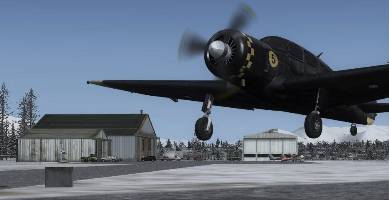
Right i'm wondering is there a way to take screen shots in FSX (internally) without the BMP -> JPG blurriness??? This seems to be one failing of mine in my setup. what i have to do is open the picture in paint and save as JPG however this tends to loose some nice detail and creates a image rather like loosing your glasses. Does anyone have a solution except from running an external program? (my pc struggles enough with FSX to worry about other programs running at the same time!!)
Image
fourbee
2nd Lieutenant
2nd Lieutenant
 
Posts: 164
Joined: Sat Nov 20, 2010 6:35 am
Location: Ireland

Re: Screenshots . . . .

Postby Capt.Propwash » Sat Sep 24, 2011 12:21 am

quit using paint. get IRFANVIEW, Paint.net, GIMP, PHOTSHOP or any other photoediting software (first 3 listed are free, just google for them)  Irfanview and Paint.net will allow you to keep almost all of the quality while you compress the picture from 3mb down to 155kb for the forum
The thoughts and expressions contained in the post above are solely my own, and not necessarily those of Simviation.com, its Moderators, its Staff, its Members, or other guests. They can not, are not, and will not be held liable for any thoughts, or expre
User avatar
Capt.Propwash
Major
Major
 
Posts: 1947
Joined: Tue Feb 20, 2007 12:34 am
Location: KCHS, Charleston, SC, USA

Re: Screenshots . . . .

Postby Hagar » Sat Sep 24, 2011 3:24 am

Right i'm wondering is there a way to take screen shots in FSX (internally) without the BMP -> JPG blurriness??? This seems to be one failing of mine in my setup. what i have to do is open the picture in paint and save as JPG however this tends to loose some nice detail and creates a image rather like loosing your glasses. Does anyone have a solution except from running an external program? (my pc struggles enough with FSX to worry about other programs running at the same time!!)

Take the shots first by pressing the V key. This is an internal FSX feature so no other software is necessary. You can take as many shots as you wish during a session & the images will be automatically saved in high quality BMP format.*

Then after you've finished with FSX open the images you wish to post in a separate graphics editor for resizing & saving in JPEG format. You might find my resizing tutes helpful. Reply #2 here ---> http://205.252.250.26/cgi-bin/yabb25/YaBB.pl?num=1289831860

*The location will depend on your OS.
For WinXP look in C:\Documents and Settings\<--User Name-->\My Documents\My Pictures\Flight Simulator X Files

In Vista/Win7 it's C:\Users\<--User Name-->\Pictures\Flight Simulator X Files
Last edited by Hagar on Sat Sep 24, 2011 4:07 am, edited 1 time in total.
Image

Founder & Sole Member - Grumpy's Over the Hill Club for Veteran Virtual Aviators
Member of the Fox Four Group
My Google Photos albums
My Flickr albums
User avatar
Hagar
Colonel
Colonel
 
Posts: 30868
Joined: Wed Jun 19, 2002 7:15 am
Location: Costa Geriatrica

Re: Screenshots . . . .

Postby Slotback » Sat Sep 24, 2011 10:42 am

[quote]quit using paint. get IRFANVIEW, Paint.net, GIMP, PHOTSHOP or any other photoediting software (first 3 listed are free, just google for them)
Slotback
 

Re: Screenshots . . . .

Postby CHUCK79 » Sat Sep 24, 2011 10:54 am

I use BDSizer.
It's free and really easy to use. Just enter 1024 wide, 155kb and it does all the work. I don't notice
Last edited by CHUCK79 on Sat Sep 24, 2011 10:56 am, edited 1 time in total.
User avatar
CHUCK79
Global Moderator
Global Moderator
 
Posts: 6168
Joined: Fri Mar 26, 2010 10:13 am
Location: KOMK

Re: Screenshots . . . .

Postby fourbee » Sun Sep 25, 2011 4:40 am

cheers guys!
Image
fourbee
2nd Lieutenant
2nd Lieutenant
 
Posts: 164
Joined: Sat Nov 20, 2010 6:35 am
Location: Ireland


Return to Flight Simulator X (FSX) and Steam

Who is online

Users browsing this forum: No registered users and 465 guests