777-200

FSX including FSX Steam version.

777-200

Postby Utaro » Tue Aug 09, 2011 11:44 am

ummm why is that my "front" landing gear doesnt make the "animation" whenever i turn my plane left & right?

like it only stays in the middle :-/

im new to this game so please bear with me >.<
Utaro
Ground hog
Ground hog
 
Posts: 14
Joined: Thu May 12, 2011 12:13 pm
Location: Tokyo, Japan

Re: 777-200

Postby BrandonF » Tue Aug 09, 2011 12:02 pm

Would help to know who made this 777 and where you got it. (possibly a download link so that others can see the problem for themselves and try to help.  ;))
BrandonF
Major
Major
 
Posts: 2288
Joined: Wed Apr 22, 2009 11:37 pm

Re: 777-200

Postby Utaro » Tue Aug 09, 2011 12:15 pm

Last edited by pete on Tue Aug 09, 2011 12:24 pm, edited 1 time in total.
im new to this game so please bear with me >.<
Utaro
Ground hog
Ground hog
 
Posts: 14
Joined: Thu May 12, 2011 12:13 pm
Location: Tokyo, Japan

Re: 777-200

Postby Utaro » Wed Aug 10, 2011 9:26 am

BUMP  :-[


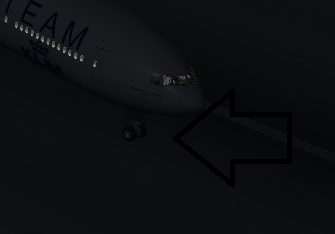
my 777-300ER nose gear.

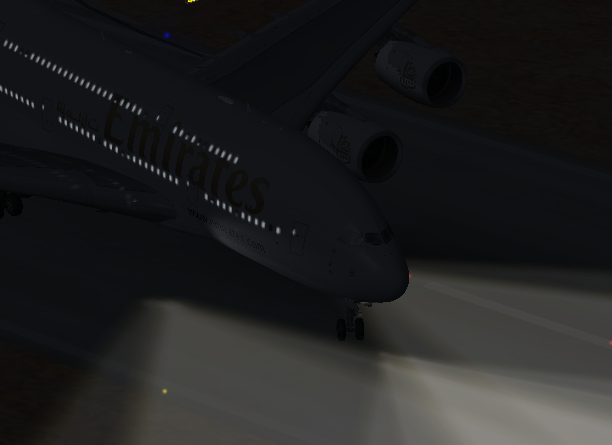
whenever i turn my plane left & right, the nose gear doesn't "tilt", like it only stays in the middle.

Image
im turning this plane to the right but as you can see it doesn't move at all...


like this: (a380)
Image


anyone knows how to fix this?
im new to this game so please bear with me >.<
Utaro
Ground hog
Ground hog
 
Posts: 14
Joined: Thu May 12, 2011 12:13 pm
Location: Tokyo, Japan

Re: 777-200

Postby alrot » Wed Aug 10, 2011 10:13 am

Hi Utaro and welcome ,I'm downloading the airplane to check it out for you

question : are you saying that the airplane doesn't turn ? or are just the center wheel that does not make its animation but the airplanes turn ??
Image

Venezuela
User avatar
alrot
Lieutenant Colonel
Lieutenant Colonel
 
Posts: 8961
Joined: Wed Oct 08, 2003 10:47 am

Re: 777-200

Postby dave3cu » Wed Aug 10, 2011 10:29 am

Just installed the KLM version from your link.

The nose gear is animated, but does not turn unless the aircraft is rolling. On the other hand, the rudder does not respond when the aircraft is rolling at taxi speeds.

My guess this is to simulate that taxi steering is done with the seperate 'tiller', not the rudder pedals.
Last edited by dave3cu on Wed Aug 10, 2011 10:49 am, edited 1 time in total.
At that time [1909] the chief engineer was almost always the chief test pilot as well. That had the fortunate result of eliminating poor engineering early in aviation.
dave3cu
Major
Major
 
Posts: 3141
Joined: Sun May 19, 2002 9:55 am
Location: 3CU, Northern Wisconsin, USA

Re: 777-200

Postby alrot » Wed Aug 10, 2011 10:39 am

All animations are fine ,as Dave said you have to be rolling a little bit

just check it

Image

If you still are getting this problem you may have to download the airplane again (In Simviation site)

and BTW this is a great model ,nice VC
Last edited by alrot on Wed Aug 10, 2011 10:42 am, edited 1 time in total.
Image

Venezuela
User avatar
alrot
Lieutenant Colonel
Lieutenant Colonel
 
Posts: 8961
Joined: Wed Oct 08, 2003 10:47 am

Re: 777-200

Postby Utaro » Thu Aug 11, 2011 12:27 am

@alrot: what did u use in taxi'ing that 777? mouse "yoke" or keyboard?


i changed my "rudder" yaw keys and  :) to say the wheels make its animation while the airplane is turning left & right..

:( part is that.. are there any possibility that i can do that with my mouse?

"nose gear makes the animation while im turning the plane"

coz other planes can. like my a380, i use my mouse to taxi and its way easier move.


:-[ sorry for my bad English.
im new to this game so please bear with me >.<
Utaro
Ground hog
Ground hog
 
Posts: 14
Joined: Thu May 12, 2011 12:13 pm
Location: Tokyo, Japan

Re: 777-200

Postby dave3cu » Thu Aug 11, 2011 9:56 am

Ultaro,

@alrot: what did u use in taxi'ing that 777? mouse "yoke" or keyboard?


I was using a joystick with rudder axis. I did not realize you were using keyboard and mouse.

I experimented with the 'mouse yoke' controls using my standard wheel mouse.

This aircraft appears to require a rudder input for the nose wheel animation to work. It won't animate when using 'auto rudder' like most other aircraft will.

The only way I could get the steering animations to work with the mouse was to assign (by rotating) 'mouse wheel up' and 'mouse wheel down' to the rudder left and right events.

The default assignments for the mouse wheel up/down are throttle increase and decrease.

Dave
Last edited by dave3cu on Thu Aug 11, 2011 4:30 pm, edited 1 time in total.
At that time [1909] the chief engineer was almost always the chief test pilot as well. That had the fortunate result of eliminating poor engineering early in aviation.
dave3cu
Major
Major
 
Posts: 3141
Joined: Sun May 19, 2002 9:55 am
Location: 3CU, Northern Wisconsin, USA

Re: 777-200

Postby alrot » Thu Aug 11, 2011 10:30 am

I was using a joystick with rudder axis. I did not realize you were using keyboard and mouse


me neither ........my advise , C'mon you are from Japan, you guys are genius  :D  ,go get at least a cheap joystick Utaro, One that has and extra slider control so you assing your pedals

see what I did once using cables ,trash , wood and some paint a while ago

Image

Image

Image

Image
Last edited by alrot on Thu Aug 11, 2011 10:32 am, edited 1 time in total.
Image

Venezuela
User avatar
alrot
Lieutenant Colonel
Lieutenant Colonel
 
Posts: 8961
Joined: Wed Oct 08, 2003 10:47 am

Re: 777-200

Postby Utaro » Fri Aug 12, 2011 1:34 am

yeah i was thinking of buying a joystick soon...


only played this game in days so yeah  ;D


anyways thanks for the help guys...
im new to this game so please bear with me >.<
Utaro
Ground hog
Ground hog
 
Posts: 14
Joined: Thu May 12, 2011 12:13 pm
Location: Tokyo, Japan


Return to Flight Simulator X (FSX) and Steam

Who is online

Users browsing this forum: No registered users and 561 guests