Another way to improve fps in FS-X

FSX including FSX Steam version.

Re: Another way to improve fps in FS-X

Postby Arnimon » Mon Oct 16, 2006 1:18 pm

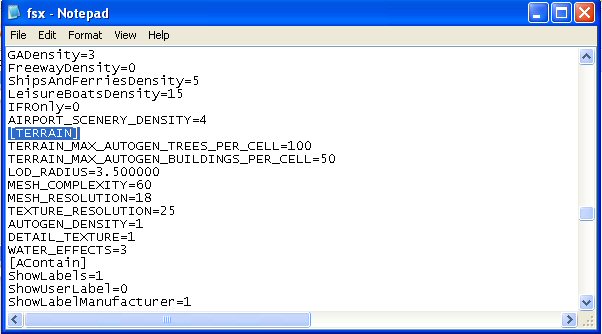
[quote]Open the file in Notepad, the go to Edit/Find and type in 'Terrain.'
It looks like chicken,smells like chicken,tastes like chicken,but when Chuck Norris says its Beef...then damnit...its Beef!!!
User avatar
Arnimon
1st Lieutenant
1st Lieutenant
 
Posts: 323
Joined: Thu Jul 13, 2006 11:24 am
Location: Germany

Re: Another way to improve fps in FS-X

Postby KDSM » Mon Oct 16, 2006 3:53 pm


I did so...nothing was found!A popup Window was showing "Notepad has finished the search"! ??? ???


Image
Image
User avatar
KDSM
Major
Major
 
Posts: 1326
Joined: Mon Jul 07, 2003 8:29 pm

Re: Another way to improve fps in FS-X

Postby Felix/FFDS » Mon Oct 16, 2006 8:11 pm


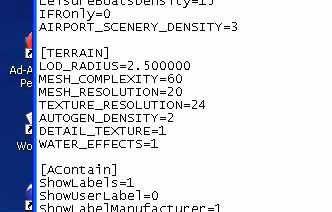
..mm...well the Demo at least just has this in the Terrain section.........

Image

..........no lines like this to be seen..........

TERRAIN_MAX_AUTOGEN_TREES_PER_CELL=4500

TERRAIN_MAX_AUTOGEN_BUILDINGS_PER_CELL=3000

...must be different from the "real thing"............commoner :D


C - you ADD them.  THey're not there at first, but you'll see their effects thereafter
Felix/FFDS
User avatar
Felix/FFDS
Administrator
Administrator
 
Posts: 16776435
Joined: Wed Jan 31, 2001 9:42 am
Location: Orlando, FL

Re: Another way to improve fps in FS-X

Postby commoner » Tue Oct 17, 2006 1:50 am


C - you ADD them.  THey're not there at first, but you'll see their effects thereafter


........LOL........Now why didn't I read your first post properly?..........Silly me!................commoner :P ;D
Last edited by commoner on Tue Oct 17, 2006 1:55 am, edited 1 time in total.
Image"In theory, there is no difference between theory and practice. But, in practice, there is."
User avatar
commoner
Major
Major
 
Posts: 3221
Joined: Sat Aug 28, 2004 2:26 am
Location: Yorkshire. England. UK.

Re: Another way to improve fps in FS-X

Postby Arnimon » Tue Oct 17, 2006 2:22 am

Don
It looks like chicken,smells like chicken,tastes like chicken,but when Chuck Norris says its Beef...then damnit...its Beef!!!
User avatar
Arnimon
1st Lieutenant
1st Lieutenant
 
Posts: 323
Joined: Thu Jul 13, 2006 11:24 am
Location: Germany

Re: Another way to improve fps in FS-X

Postby gavinprice02 » Tue Oct 17, 2006 1:02 pm

can't find application data in my username on documents and settings, is it maybe because I'm just a user on my computer and not the 'administrator'?
My specs
I7920 4ghz
Asus P6T Deluxe V2
6gb Corsair DDR3 1600
BFG GTX285OCX
Windows 7 64bit
gavinprice02
2nd Lieutenant
2nd Lieutenant
 
Posts: 209
Joined: Tue Jul 29, 2003 7:34 am
Location: England

Re: Another way to improve fps in FS-X

Postby gavinprice02 » Tue Oct 17, 2006 1:13 pm

Sorry, shouldn't have posted that before lookin at other posts. I found how to show hiiden files now
My specs
I7920 4ghz
Asus P6T Deluxe V2
6gb Corsair DDR3 1600
BFG GTX285OCX
Windows 7 64bit
gavinprice02
2nd Lieutenant
2nd Lieutenant
 
Posts: 209
Joined: Tue Jul 29, 2003 7:34 am
Location: England

Re: Another way to improve fps in FS-X

Postby garymbuska » Thu Oct 19, 2006 7:40 am


..mm...well the Demo at least just has this in the Terrain section.........

Image

..........no lines like this to be seen..........

TERRAIN_MAX_AUTOGEN_TREES_PER_CELL=4500

TERRAIN_MAX_AUTOGEN_BUILDINGS_PER_CELL=3000

...must be different from the "real thing"............commoner :D


Commoner Those lines were added and are not a part of the orignal cfg file. 8)
Gary M Buska
SYSTEM Specs ASUS P8Z68 V/GEN 3 mother board: INTELL I7 2600k 3.48 ghz Quad core CPU with Sandy bridge: 12 Gigs of 1800hz ram:
GTX 950 OVER CLOCKED: 2 Gigs Ram Windows 10 Home 64 bit Operating system. 750W Dedicated modular power supply. Two Internal 1TB hard drives 1 External 1TB 3.2 USB hard drive. SAITEK Cessna flight Yoke with throttles.
CH Rudder Peddles 27 inch Wide screen Monitor
User avatar
garymbuska
Major
Major
 
Posts: 4415
Joined: Tue Dec 30, 2003 11:10 am
Location: Jacksonville, Florida

Re: Another way to improve fps in FS-X

Postby commoner » Thu Oct 19, 2006 9:05 am


Commoner Those lines were added and are not a part of the orignal cfg file. 8)


..... ::) YES Gaz,so Felix told me about seven posts back.Thanks anyway.............commoner ;D
Image"In theory, there is no difference between theory and practice. But, in practice, there is."
User avatar
commoner
Major
Major
 
Posts: 3221
Joined: Sat Aug 28, 2004 2:26 am
Location: Yorkshire. England. UK.

Re: Another way to improve fps in FS-X

Postby MOUSY » Sat Dec 09, 2006 9:46 am

Any thing similar which can be done for FS9?... If any one knows?...
Last edited by MOUSY on Sat Dec 09, 2006 9:47 am, edited 1 time in total.
[align=center][img]http://www.simviation.com/phpupload/uploads/1379790172.png[/img]
Current Work in Progress: CaribSky: GrenadaX
[url]www.facebook.com/richersimulations[/url][/align]
User avatar
MOUSY
Major
Major
 
Posts: 2110
Joined: Thu Jan 19, 2006 8:47 pm
Location: Commonwealth of Dominica

Re: Another way to improve fps in FS-X

Postby jieitai » Sun Jul 22, 2007 12:14 am

:-?

I don't have an FSX.cfg file. I did a full search on my harddrive for "application data", "FSX", and "cfg", and absolutely none came up with an answer. I don't even have an Application Data folder in My Documents and Settings.

And yes, I have the full version.
Image
jieitai
2nd Lieutenant
2nd Lieutenant
 
Posts: 138
Joined: Sun Jun 10, 2007 11:24 pm

Re: Another way to improve fps in FS-X

Postby MOUSY » Sun Jul 22, 2007 1:56 am

Jieitai: You need to show hidden files and folders. Tools Menu -> Folder Options -> View. Click the Show Hidden Files and Folders radio button in the list.
[align=center][img]http://www.simviation.com/phpupload/uploads/1379790172.png[/img]
Current Work in Progress: CaribSky: GrenadaX
[url]www.facebook.com/richersimulations[/url][/align]
User avatar
MOUSY
Major
Major
 
Posts: 2110
Joined: Thu Jan 19, 2006 8:47 pm
Location: Commonwealth of Dominica

Re: Another way to improve fps in FS-X

Postby macca22au » Sun Jul 22, 2007 7:44 am

Then type in the search box 'fsx.cfg'.  You will get a list of every place on your computer where those words are used - but look for the one that has the notepad symbol, the word 'fsx' only beside it, and in the right hand column a string saying application data.

Then put a shortcut on your desktop.  We all are now hooked on tweaking that file, so have it so you don't have to search for it again.

And one of the most familiar actions we take is to add the two autogen lines into the file -in the [TERRRAIN] section - in order to set numbers per cell of trees and buildings to considerably less than the default - I would suggest around a thousand each unless you have a monster system.

Trees, water and AI are amongst the biggest enemies of smooth in the game.

Read the posts from Miltestpilot, Bjorn and specially NickN to understand what else to add.  

Also Phil Taylor's blog in FSInsider is a must.

Good luck, and tell us how you get on.
macca22au
Captain
Captain
 
Posts: 889
Joined: Sat Oct 11, 2003 8:00 am
Location: Melbourne, Australia

Re: Another way to improve fps in FS-X

Postby uncleyuk » Sun Jul 22, 2007 11:09 am

:D  I do believe you have to type them in.  Exactly as demonstrated.
Image
uncleyuk
2nd Lieutenant
2nd Lieutenant
 
Posts: 212
Joined: Mon Feb 12, 2007 6:21 am

Re: Another way to improve fps in FS-X

Postby jieitai » Sun Jul 22, 2007 1:41 pm

I'm trying to find NickN's, Miltestpilot's, and Bjorn's posts, but the search function isn't letting me search for users.
Image
jieitai
2nd Lieutenant
2nd Lieutenant
 
Posts: 138
Joined: Sun Jun 10, 2007 11:24 pm

PreviousNext

Return to Flight Simulator X (FSX) and Steam

Who is online

Users browsing this forum: No registered users and 386 guests