FaceTrackNoIR

FSX including FSX Steam version.

Re: FaceTrackNoIR

Postby Daube » Mon Dec 20, 2010 10:42 am

Well, I suppose it mainly depends on the quality of your webcam.
I have only one light in my room, and it's sitting at 8 o'clock high, so behind me and on the side. Nevertheless, the software can recognize my face quite easilly as long as I'm not sitting too far from the camera, which is on top of my screen.

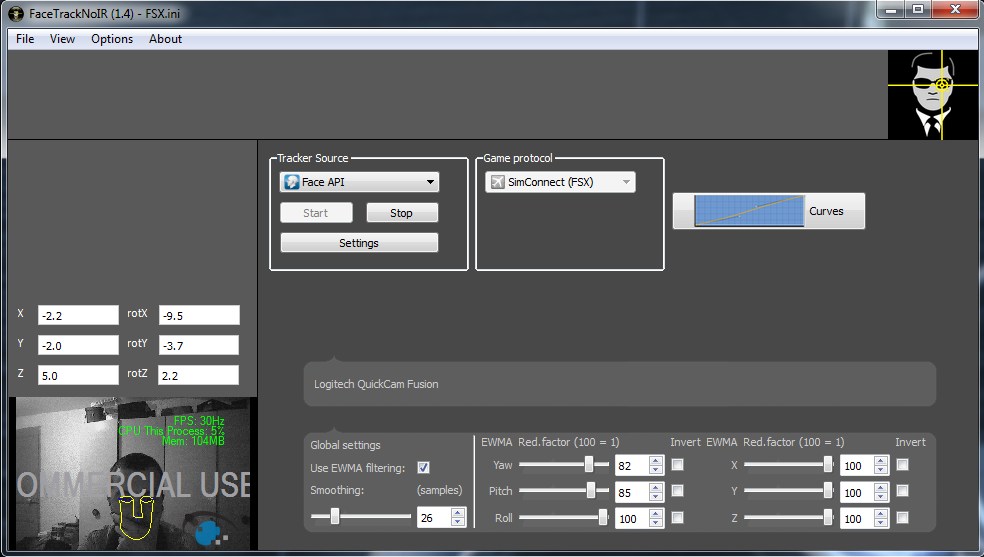
Here is how the tool looks like when I'm using it:
Image

The yellow drawing on my face is the sign that the camera has recognized my face.
However, even though I'm facing it, you can see that the software thinks my head is a little bit on the side. I suppose this is due to the position of the light in my room. Probably, if I would put a light source just in front of me, the recognition would be more efficient...
Last edited by Daube on Mon Dec 20, 2010 10:44 am, edited 1 time in total.
User avatar
Daube
Lieutenant Colonel
Lieutenant Colonel
 
Posts: 6611
Joined: Wed Oct 05, 2005 8:34 am
Location: Nice (FR)

Re: FaceTrackNoIR

Postby Bazza » Mon Dec 20, 2010 3:33 pm

Hi Daube,

Thanks for posting your set-up, I'm having trouble getting this to work.    The only difference I can see between what you have displayed and mine, is that I have no settings in the 6 boxes above your head, mine all show N/A.     I also do not have the yellow lines shown on your face.    Can you point me in the right direction, must have missed a step somewhere...? ::)
Image
Where's the throttle...?
User avatar
Bazza
Captain
Captain
 
Posts: 646
Joined: Wed Apr 20, 2005 7:39 am

Re: FaceTrackNoIR

Postby Daube » Mon Dec 20, 2010 4:11 pm

If you don't have the yellow lines, that means that the software hasn't "seen" you yet.
Get a bit closer to the cam, look to it into the eye  ;D
I mean, put your face closer, like 50 cms away from the cam, and get your face still for 2 seconds. When you see the yellow lines, the numbers will appear as well.
User avatar
Daube
Lieutenant Colonel
Lieutenant Colonel
 
Posts: 6611
Joined: Wed Oct 05, 2005 8:34 am
Location: Nice (FR)

Re: FaceTrackNoIR

Postby Daube » Mon Dec 20, 2010 4:16 pm

I'm posting here my current settings, that is, the custom INI file that contains the settings as I tweaked them :)
You just need to put this into a *.INI file in the folder:
C:\Program Files (x86)\Abbequerque Inc\FaceTrackNoIR\Settings
(Win 7 64 bits)
On WinXP, this will probably be something like:
C:\Program Files\Abbequerque Inc\FaceTrackNoIR\Settings

Then, when you launch the tool, go to File-Open, and choose your new INI file ;)

NB: with those settings, the "center" function is set to SHIFT+ALT+F1, and the start/stop function is set to SHIFT+ALT+F2.

[Tracking]
Smooth=26
sensYaw=152
sensPitch=58
sensRoll=148
sensX=110
sensY=177
sensZ=242
NeutralZone=3
invertYaw=false
invertPitch=false
invertRoll=false
invertX=false
invertY=false
invertZ=false
useEWMA=true
redYaw=82
redPitch=85
redRoll=100
redX=100
redY=100
redZ=100

[KB_Shortcuts]
Keycode_Center=59
Shift_Center=true
Ctrl_Center=false
Alt_Center=true
Keycode_StartStop=60
Shift_StartStop=true
Ctrl_StartStop=false
Alt_StartStop=true
Keycode_Inhibit=0
Shift_Inhibit=false
Ctrl_Inhibit=false
Alt_Inhibit=false
Inhibit_Pitch=false
Inhibit_Yaw=false
Inhibit_Roll=false
Inhibit_X=false
Inhibit_Y=false
Inhibit_Z=false

[Curves]
Yaw_point1=@Variant(\0\0\0\x1a\0\0\0\0\0\0\0\0\0\0\0\0\0\0\0\0)
Yaw_point2=@Variant(\0\0\0\x1a@?\0\0\0\0\0\0\0\0\0\0\0\0\0\0)
Yaw_point3=@Variant(\0\0\0\x1a@S\xc0\0\0\0\0\0@\x14\0\0\0\0\0\0)
Yaw_point4=@Variant(\0\0\0\x1a@^\x80\0\0\0\0\0@I\0\0\0\0\0\0)
Pitch_point1=@Variant(\0\0\0\x1a\0\0\0\0\0\0\0\0?\xf0\0\0\0\0\0\0)
Pitch_point2=@Variant(\0\0\0\x1a@D\x80\0\0\0\0\0?\xf0\0\0\0\0\0\0)
Pitch_point3=@Variant(\0\0\0\x1a@T\xc0\0\0\0\0\0@"\0\0\0\0\0\0)
Pitch_point4=@Variant(\0\0\0\x1a@a`\0\0\0\0\0@I\0\0\0\0\0\0)
Roll_point1=@Variant(\0\0\0\x1a\0\0\0\0\0\0\0\0\0\0\0\0\0\0\0\0)
Roll_point2=@Variant(\0\0\0\x1a@6\0\0\0\0\0\0\0\0\0\0\0\0\0\0)
Roll_point3=@Variant(\0\0\0\x1a@?\0\0\0\0\0\0\0\0\0\0\0\0\0\0)
Roll_point4=@Variant(\0\0\0\x1a@A\x80\0\0\0\0\0@I\0\0\0\0\0\0)
X_point1=@Variant(\0\0\0\x1a\0\0\0\0\0\0\0\0@\b\0\0\0\0\0\0)
X_point2="@Variant(\0\0\0\x1a@;\0\0\0\0\0\0@\x14\0\0\0\0\0\0)"
X_point3="@Variant(\0\0\0\x1a@N\x80\0\0\0\0\0@,\0\0\0\0\0\0)"
X_point4=@Variant(\0\0\0\x1a@_ \0\0\0\0\0@I\0\0\0\0\0\0)
Y_point1=@Variant(\0\0\0\x1a\0\0\0\0\0\0\0\0@\x18\0\0\0\0\0\0)
Y_point2="@Variant(\0\0\0\x1a@=\0\0\0\0\0\0@1\0\0\0\0\0\0)"
Y_point3=@Variant(\0\0\0\x1a@M\x80\0\0\0\0\0@@\x80\0\0\0\0\0)
Y_point4=@Variant(\0\0\0\x1a@V@\0\0\0\0\0@I\0\0\0\0\0\0)
Z_point1=@Variant(\0\0\0\x1a\0\0\0\0\0\0\0\0@\x14\0\0\0\0\0\0)
Z_point2=@Variant(\0\0\0\x1a@E\0\0\0\0\0\0@\x14\0\0\0\0\0\0)
Z_point3=@Variant(\0\0\0\x1a@U@\0\0\0\0\0@9\0\0\0\0\0\0)
Z_point4=@Variant(\0\0\0\x1a@^@\0\0\0\0\0@I\0\0\0\0\0\0)

[GameProtocol]
Selection=5

Last edited by Daube on Mon Dec 20, 2010 4:18 pm, edited 1 time in total.
User avatar
Daube
Lieutenant Colonel
Lieutenant Colonel
 
Posts: 6611
Joined: Wed Oct 05, 2005 8:34 am
Location: Nice (FR)

Re: FaceTrackNoIR

Postby Bazza » Mon Dec 20, 2010 6:12 pm

Well, I've managed to get it going as far as the yellow lines etc but about 20 seconds into loading FSX it reports an error and stops.

Might have to put this aside till the New Year when I've a lot more time for fiddling - pity. :(
Image
Where's the throttle...?
User avatar
Bazza
Captain
Captain
 
Posts: 646
Joined: Wed Apr 20, 2005 7:39 am

Re: FaceTrackNoIR

Postby Bazza » Tue Dec 21, 2010 8:08 pm

Well, finally managed to get this up and running, after a fashion..

My thoughts :

I won't be bothering further with it.     I spent ages on the various settings but it is far too erratic to make flying enjoyable, on my system anyway.     The movements are too jumpy and lack precision, I suspect this is partly caused by a frame-rate loss.    My system is border-line acceptable for FSX and I think this add-on is challenging it.

I like the concept and may revisit it in the future however, for now, it's a failed experiment.
Image
Where's the throttle...?
User avatar
Bazza
Captain
Captain
 
Posts: 646
Joined: Wed Apr 20, 2005 7:39 am

Re: FaceTrackNoIR

Postby patchz » Thu Dec 23, 2010 6:59 pm

@ Thai09:
Thank you for posting this, as it got me to thinking about TrackIR again. As I said, I have no web cam and did not want one, so I chose to purchase TrackIR. For those that already have a decent web cam, FaceTrackNoIR may be their best bet and based on Daube's results probably works about as well, depending on your system and the camera quality. Either one definitely improves flying from the VC. :)
Last edited by patchz on Thu Dec 23, 2010 7:00 pm, edited 1 time in total.
Image
If God intended aircraft engines to have horizontally opposed engines, Pratt and Whitney would have made them that way.
User avatar
patchz
Colonel
Colonel
 
Posts: 10424
Joined: Wed Mar 11, 2009 7:33 pm
Location: IN THE FUNNY PAPERS

Re: FaceTrackNoIR

Postby Daube » Sat Apr 16, 2011 12:44 pm

I'm upping this topic just to notify you that there is a new update for FaceTrackNoIR, now in version 1.5.

This new version brings some improvements and bug-solving for FSX. The head-detection seems a bit more precise and reactive, and just like in previous version, it still works better if you smile  :)

Also, and contrary to version 1.40, if you use the key combo to stop FTNIR, you now have full control of the view just like before. With version 1.4, if you stopped FTNIR in flight, your view would remain centered, very annoying. Now you can safely deactivate FTNIR when you need precise view control to adjust switches or take screenshots, and switch it back to active for normal flying  :D
User avatar
Daube
Lieutenant Colonel
Lieutenant Colonel
 
Posts: 6611
Joined: Wed Oct 05, 2005 8:34 am
Location: Nice (FR)

Previous

Return to Flight Simulator X (FSX) and Steam

Who is online

Users browsing this forum: No registered users and 580 guests