Query re Piper Apache

FSX including FSX Steam version.

Query re Piper Apache

Postby whitley » Wed Mar 23, 2011 8:40 am

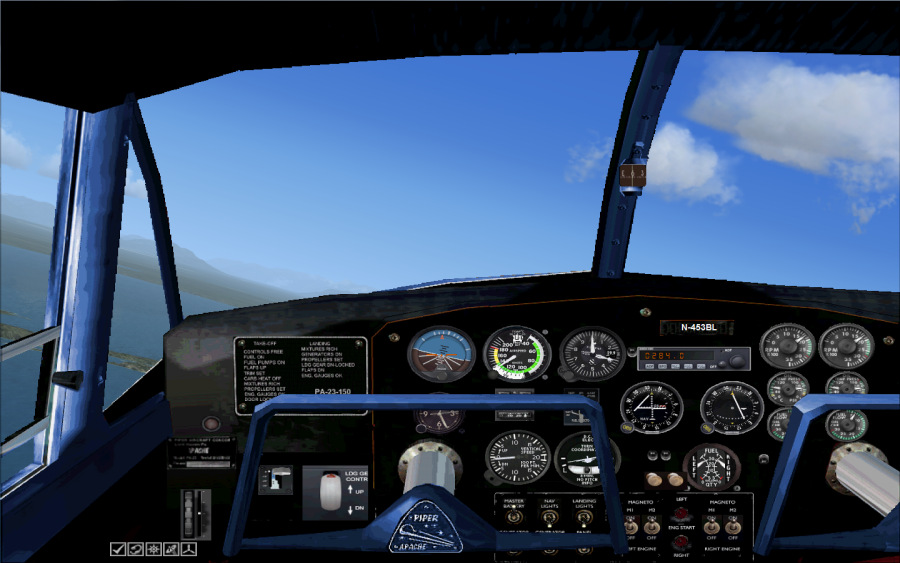
I had the Lyons Piper Apache in FS2004 and loved the thing, perhaps because I had my first 'go' in a twin in an Apache. Anyway when I installed FSZ I tried to install it, but although it worked, no gauges showed up.

Then I found an update by Nor Cal Prop which was supposed to work in FSX, but I still don't have any gauges. Anyone have any suggestions as what I can do?

I have Windows 7 64bit with FSX Gold + Acceleration c/w SP1 & 2.

While I am on the subject of gauges and panels, is it possible to use an old 2d panel bmp and change the gauges to ones that will work in FSX, if so how is it done? I prefer 2D panels because I have difficulty in panning as my hands are not too good

User avatar
whitley
2nd Lieutenant
2nd Lieutenant
 
Posts: 72
Joined: Tue Mar 01, 2011 9:32 am
Location: Buckinghamshire UK

Re: Query re Piper Apache

Postby Hagar » Wed Mar 23, 2011 9:00 am

Very interesting. I found two separate "FSX updates" for the original FS9 Apache package. According to the file description the Apache at the bottom of this page has been updated for FSX/SP2. http://simviation.com/1/search?submit=1&keywords=piper+apache&categoryId=

I assume this will include compatible gauges for the 2D panel. I'm downloading the file now to check it out. Report back in a few minutes.

Note the original file is 4.5 MB. I can't imagine what could possibly increase it to 93 MB or even 32 MB.
Last edited by Hagar on Wed Mar 23, 2011 9:01 am, edited 1 time in total.
Image

Founder & Sole Member - Grumpy's Over the Hill Club for Veteran Virtual Aviators
Member of the Fox Four Group
My Google Photos albums
My Flickr albums
User avatar
Hagar
Colonel
Colonel
 
Posts: 30868
Joined: Wed Jun 19, 2002 7:15 am
Location: Costa Geriatrica

Re: Query re Piper Apache

Postby Hagar » Wed Mar 23, 2011 9:39 am

Just checked out FSXSp2Piperpa23.zip in FSX. VC works fine but the 2D panels are a bit of a mess. Incorrectly named BMPs & missing gauges on the only one that works. I'll have a proper look at this later.

While I am on the subject of gauges and panels, is it possible to use an old 2d panel bmp and change the gauges to ones that will work in FSX, if so how is it done? I prefer 2D panels because I have difficulty in panning as my hands are not too good

Yes, it's possible. The best method would be to substitute incompatible gauges with similar FSX defaults. If you wish to know more about panel design you could do worse than download the trial version of FS Panel Studio. http://www.fspanelstudio.com/demoversion.htm
Last edited by Hagar on Wed Mar 23, 2011 9:41 am, edited 1 time in total.
Image

Founder & Sole Member - Grumpy's Over the Hill Club for Veteran Virtual Aviators
Member of the Fox Four Group
My Google Photos albums
My Flickr albums
User avatar
Hagar
Colonel
Colonel
 
Posts: 30868
Joined: Wed Jun 19, 2002 7:15 am
Location: Costa Geriatrica

Re: Query re Piper Apache

Postby whitley » Wed Mar 23, 2011 10:07 am

[quote]Very interesting. I found two separate "FSX updates" for the original FS9 Apache package. According to the file description the Apache at the bottom of this page has been updated for FSX/SP2. http://simviation.com/1/search?submit=1&keywords=piper+apache&categoryId=

I assume this will include compatible gauges for the 2D panel. I'm downloading the file now to check it out. Report back in a few minutes.

Note the original file is 4.5 MB. I can't imagine what could possibly increase it to 93 MB or even 32 MB.
User avatar
whitley
2nd Lieutenant
2nd Lieutenant
 
Posts: 72
Joined: Tue Mar 01, 2011 9:32 am
Location: Buckinghamshire UK

Re: Query re Piper Apache

Postby Hagar » Wed Mar 23, 2011 11:59 am

[quote]I have downloaded the 93mb file and one of the reasons why is each panel and there are four of them, has an identical set of gauges so each panel folder is about 24mb
Last edited by Hagar on Wed Mar 23, 2011 12:04 pm, edited 1 time in total.
Image

Founder & Sole Member - Grumpy's Over the Hill Club for Veteran Virtual Aviators
Member of the Fox Four Group
My Google Photos albums
My Flickr albums
User avatar
Hagar
Colonel
Colonel
 
Posts: 30868
Joined: Wed Jun 19, 2002 7:15 am
Location: Costa Geriatrica

Re: Query re Piper Apache

Postby whitley » Wed Mar 23, 2011 2:35 pm

I have sort of got the thing working. The ASI, altimeter and artificial horizon are all overlapping in the 2D panel, but they work and I can have a fiddle and see if I can improve it.
I copied a set of gauges from one of the panel folders into the gauges folder, I am going to delete the gauges from the panel folder to see what happens as it seems  like overkill having five copies of the same gauges.

I downloaded the smaller (30+mb) file last night and it was that one that didn't work, I think it is a case of mislabelling the uploaded file as the 93mb file had a different set of gauges in it.

Now I will have a go at tampering with a panel bmp to see if I can add some FSX compatible gauges.

Thanks for the help Hagar.
User avatar
whitley
2nd Lieutenant
2nd Lieutenant
 
Posts: 72
Joined: Tue Mar 01, 2011 9:32 am
Location: Buckinghamshire UK

Re: Query re Piper Apache

Postby Hagar » Wed Mar 23, 2011 2:55 pm

It might be a better idea to paste the gauges into FSX\Gauges. DON'T overwrite existing files if prompted.

The gauge size is controlled by the last number in the line. (If there's 4 sets of digits the last two are width & height.) This is what I've done so far on the original panel. I used the default Cessna.dll.

gauge00=Cessna!Attitude,462,443,80
gauge01=Cessna!Airspeed,  548,443,80
gauge02=Cessna!Altimeter,  633,443,80

Now I will have a go at tampering with a panel bmp to see if I can add some FSX compatible gauges.

Some of the FSX default gauges are in the Panel folders of their corresponding aircraft. For example; look in the Panel folder of the default Douglas_DC3. It's a good idea to paste copies of these gauges into FSX\Gauges for use on other panels. Also, if you still have FS9 the default gauges should all be compatible with FSX. You can paste those in there too.
Image

Founder & Sole Member - Grumpy's Over the Hill Club for Veteran Virtual Aviators
Member of the Fox Four Group
My Google Photos albums
My Flickr albums
User avatar
Hagar
Colonel
Colonel
 
Posts: 30868
Joined: Wed Jun 19, 2002 7:15 am
Location: Costa Geriatrica

Re: Query re Piper Apache

Postby whitley » Wed Mar 23, 2011 3:17 pm

[quote]It might be a better idea to paste the gauges into FSX\Gauges. DON'T overwrite existing files if prompted.

The gauge size is controlled by the last number in the line. (If there's 4 sets of digits the last two are width & height.) This is what I've done so far on the original panel. I used the default Cessna.dll.

gauge00=Cessna!Attitude,462,443,80
gauge01=Cessna!Airspeed,
User avatar
whitley
2nd Lieutenant
2nd Lieutenant
 
Posts: 72
Joined: Tue Mar 01, 2011 9:32 am
Location: Buckinghamshire UK

Re: Query re Piper Apache

Postby Hagar » Wed Mar 23, 2011 3:26 pm

This is what I've done so far, all with default gauges. A couple of gauges are still missing & some aren't quite suitable..

Image

I have had a quick play with the FS Panel Studio and found it simple to use and I am debating whether the amount it would be used is worth the cost. I haven't worked out the exchange rate, but all the reviews I have red have been enthusiastic.

It's definitely a first-class tool. Depends how much of this sort of thing you want to get involved with. Must admit that I did the above by manually editing Panel.cfg in Notepad. I used the FS Panel Studio Demo for reference. About time I purchased the full version.
Image

Founder & Sole Member - Grumpy's Over the Hill Club for Veteran Virtual Aviators
Member of the Fox Four Group
My Google Photos albums
My Flickr albums
User avatar
Hagar
Colonel
Colonel
 
Posts: 30868
Joined: Wed Jun 19, 2002 7:15 am
Location: Costa Geriatrica

Re: Query re Piper Apache

Postby whitley » Wed Mar 23, 2011 4:19 pm

Well I tried that modification to the panel cfg and it worked quite well. I only modified one panel just to check it out and then the funny stuff happened.

I tried to compare the before and after, but every other 2D panel was totally blacked out. I can't see any difference in the CFG's.

Still it is all good education and even at my age, I still like learning
User avatar
whitley
2nd Lieutenant
2nd Lieutenant
 
Posts: 72
Joined: Tue Mar 01, 2011 9:32 am
Location: Buckinghamshire UK

Re: Query re Piper Apache

Postby Hagar » Wed Mar 23, 2011 4:25 pm

Well I tried that modification to the panel cfg and it worked quite well. I only modified one panel just to check it out and then the funny stuff happened.

I tried to compare the before and after, but every other 2D panel was totally blacked out. I can't see any difference in the CFG's.

Check out the main panel BMP file name in Panel.cfg. In the update I downloaded they somehow got mixed up.

Still it is all good education and even at my age, I still like learning

You have a few years to go to catch me. :P
Image

Founder & Sole Member - Grumpy's Over the Hill Club for Veteran Virtual Aviators
Member of the Fox Four Group
My Google Photos albums
My Flickr albums
User avatar
Hagar
Colonel
Colonel
 
Posts: 30868
Joined: Wed Jun 19, 2002 7:15 am
Location: Costa Geriatrica

Re: Query re Piper Apache

Postby whitley » Wed Mar 23, 2011 5:01 pm

I was once told by an elderly sage, well the local drunk if I am being honest, that you're only as old as the woman you feel, so that makes me at least 150  :P

Many thanks for the help, I knew my way round FS9 quite well, but FSX is taking a while to get used to, but I was still building and developing FS9 when I lost a lot of it when the hard drive decided to fail. I have since managed to recover most of the files, but as a program it is unusable
User avatar
whitley
2nd Lieutenant
2nd Lieutenant
 
Posts: 72
Joined: Tue Mar 01, 2011 9:32 am
Location: Buckinghamshire UK


Return to Flight Simulator X (FSX) and Steam

Who is online

Users browsing this forum: No registered users and 640 guests