Blank textures

FSX including FSX Steam version.

Blank textures

Postby AdamG » Wed Sep 09, 2009 1:02 pm

I have a fast computer, 4GB RAM plus ReadyBoost, a quadcore processor, and an nvidia 8800 gts 512 video card but when I try to use some add on airplanes like the Surclaro C130, the aircraft has no textures, it is either completely see thru or just all grey. I've seen people say this is because of a slow computer but in my case it isn't possible so does anyone have any ideas on what causes this? Thanks.
AdamG
Ground hog
Ground hog
 
Posts: 2
Joined: Wed Sep 09, 2009 1:58 pm

Re: Blank textures

Postby pete » Thu Sep 10, 2009 12:56 am

[movedhere] Flight Simulator X [move by] pete.
Simplicity is the ultimate sophistication. – Leonardo da Vinci
User avatar
pete
Administrator
Administrator
 
Posts: 10243
Joined: Mon Jan 01, 2001 2:01 am
Location: Cloud Cuckoo Land

Re: Blank textures

Postby pete » Thu Sep 10, 2009 12:59 am

Hi and welcome to the forums.
Your problem sounds like a display setting.
If you can be specific about an aircraft in which you are having trouble we can help you.

Please note we do not support addons from other sites because we have no idea on how they control the quality of their content.
Maybe you can try an aircraft from this site and report any problem someone will help.
Simplicity is the ultimate sophistication. – Leonardo da Vinci
User avatar
pete
Administrator
Administrator
 
Posts: 10243
Joined: Mon Jan 01, 2001 2:01 am
Location: Cloud Cuckoo Land

Re: Blank textures

Postby Daube » Thu Sep 10, 2009 4:24 am

Also, be informed that planes that are coming from FS9 are not compatible with the DirectX10 preview option. You'll have to disable the DirectX10 preview option in your FSX display options to see the textures of FS9 planes.
User avatar
Daube
Lieutenant Colonel
Lieutenant Colonel
 
Posts: 6611
Joined: Wed Oct 05, 2005 8:34 am
Location: Nice (FR)

Re: Blank textures

Postby AdamG » Fri Sep 11, 2009 12:38 pm

Thank you, all I had to do was disable to DirectX 10 preview setting.

Pretty amazing that one button does the trick haha, thanks again.

Adam
AdamG
Ground hog
Ground hog
 
Posts: 2
Joined: Wed Sep 09, 2009 1:58 pm

Re: Blank textures

Postby PJ » Fri Oct 02, 2009 6:10 pm

Guys,

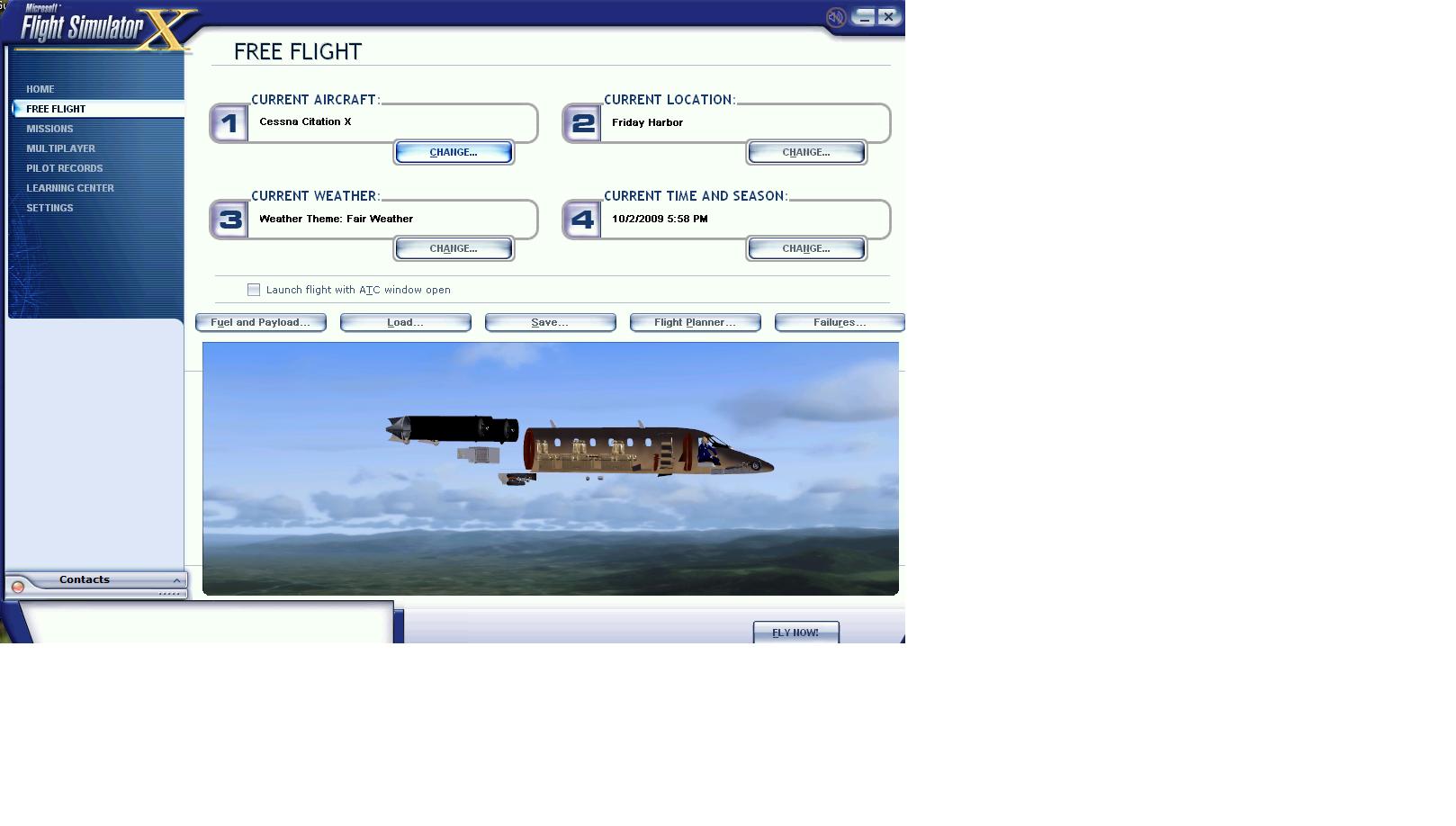
I am having a similar problem with blank textures.  It happens with  Alejandro Rojas Lucena's Citation X.  I do not have a Direct X preview flag.  Any help would be appreciated.
see screenshot:
Image
Dell Inspiron 530
Q9300 Core Quad @ 2.5GHz
6GB RAM
750GB HD
BFG Nvidia 275 GTX
PJ
Ground hog
Ground hog
 
Posts: 7
Joined: Sun Jul 05, 2009 8:23 pm

Re: Blank textures

Postby skoker » Fri Oct 02, 2009 6:15 pm

Did you attempt to edit the textures at all?
Image
User avatar
skoker
Major
Major
 
Posts: 4260
Joined: Wed Feb 27, 2008 8:19 pm
Location: 1G3

Re: Blank textures

Postby PJ » Fri Oct 02, 2009 6:16 pm

no i did not.
Dell Inspiron 530
Q9300 Core Quad @ 2.5GHz
6GB RAM
750GB HD
BFG Nvidia 275 GTX
PJ
Ground hog
Ground hog
 
Posts: 7
Joined: Sun Jul 05, 2009 8:23 pm

Re: Blank textures

Postby ASRattrapp » Thu Mar 04, 2010 9:20 am

On the site less than 60 sec and got my problem sorted.Like the man said disable DX10 in FSX and your gray aircraft is no more nice one thank's
ASRattrapp
Ground hog
Ground hog
 
Posts: 1
Joined: Thu Mar 04, 2010 10:00 am

Re: Blank textures

Postby Boikat » Thu Mar 04, 2010 11:16 am

no i did not.


The "invisible" part may be due to your graphics card.  Some of the newer FSX add-on use 2048 scaled DDS or BMP fromats for their texture maps instead of 1024 scale textures. If you have a older graphics card, it may not have the "horsepower" to handle them. 

But one possible *temporary* fix, that may work, is to go into the FSX.cfg (Make a back-up copy first), and look for the line "TEXTURE_MAX_LOAD=1024", in the section under, [GRAPHICS].  Change the "1024" to "2048", and see if that helps.

Another way to fix the "invisable" testures (not the same as the "grey texture") is to resize the texture down to 1024 using DXTBmp or ImageTool and a graphics editor.
Image
"I reject your reality, and substitute my own" Adam Savage, Mythbusters
User avatar
Boikat
Major
Major
 
Posts: 2974
Joined: Thu Mar 20, 2008 8:23 pm
Location: NW Loueezianner

Re: Blank textures

Postby Alejandro Rhodes » Thu Mar 04, 2010 11:28 am

[quote]Guys,

I am having a similar problem with blank textures.
Last edited by Alejandro Rhodes on Thu Mar 04, 2010 11:48 am, edited 1 time in total.
Alejandro Rhodes
Ground hog
Ground hog
 
Posts: 0
Joined: Sun Jan 27, 2013 6:33 am

Re: Blank textures

Postby sniper2481 » Sun Nov 14, 2010 6:24 pm

hello everyone. i need know if someone can help me .i download the folder TOM_330 when i try to save the texture in notepad,notepad say was denied. please i need help. thanks you... :(
sniper2481
Ground hog
Ground hog
 
Posts: 2
Joined: Fri Nov 12, 2010 12:26 am

Re: Blank textures

Postby BrandonF » Sun Nov 14, 2010 8:03 pm

hello everyone. i need know if someone can help me .i download the folder TOM_330 when i try to save the texture in notepad,notepad say was denied. please i need help. thanks you... :(


It's a setting in your control panel for permissions, although I can't remember exactly which one. What OS are you using? Would be really helpful to know.

8-)
BrandonF
Major
Major
 
Posts: 2288
Joined: Wed Apr 22, 2009 11:37 pm

Re: Blank textures

Postby sniper2481 » Sun Nov 14, 2010 9:48 pm

my windows 7.
sniper2481
Ground hog
Ground hog
 
Posts: 2
Joined: Fri Nov 12, 2010 12:26 am

Re: Blank textures

Postby alrot » Sun Nov 14, 2010 10:05 pm

this post its from September 2009 what is going on?
Image

Venezuela
User avatar
alrot
Lieutenant Colonel
Lieutenant Colonel
 
Posts: 8961
Joined: Wed Oct 08, 2003 10:47 am

Next

Return to Flight Simulator X (FSX) and Steam

Who is online

Users browsing this forum: No registered users and 423 guests