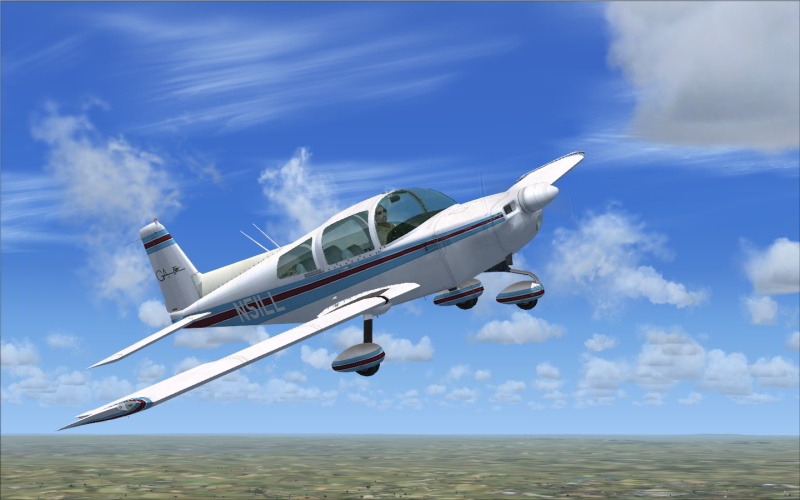
Textures not showing up in add-on planes

FSX including FSX Steam version.

Textures not showing up in add-on planes

Postby JLK69 » Sat Jan 01, 2011 4:30 am

The textures for several add-on planes do not show in preview or in game. Win XP SP3, FSX w/Acceleration, nVidia 7950GT AGP video card. Pentium 4 3.2 Ghz, 2GB ram. There is no DirectX 10 preview button.

JLK69
Ground hog
Ground hog
 
Posts: 5
Joined: Sat Jan 01, 2011 3:22 am
Location: Chula Vista, CA

Re: Textures not showing up in add-on planes

Postby Hagar » Sat Jan 01, 2011 4:45 am

If you give an example of a problem aircraft with a link to the page it's posted on perhaps someone can check it out for you.

There is no DirectX 10 preview button.

FSX doesn't have that option on XP.
Last edited by Hagar on Sat Jan 01, 2011 4:46 am, edited 1 time in total.
Image

Founder & Sole Member - Grumpy's Over the Hill Club for Veteran Virtual Aviators
Member of the Fox Four Group
My Google Photos albums
My Flickr albums
User avatar
Hagar
Colonel
Colonel
 
Posts: 30868
Joined: Wed Jun 19, 2002 7:15 am
Location: Costa Geriatrica

Re: Textures not showing up in add-on planes

Postby JLK69 » Sat Jan 01, 2011 10:18 pm

Last edited by JLK69 on Sat Jan 01, 2011 10:33 pm, edited 1 time in total.
JLK69
Ground hog
Ground hog
 
Posts: 5
Joined: Sat Jan 01, 2011 3:22 am
Location: Chula Vista, CA

Re: Textures not showing up in add-on planes

Postby Boikat » Sun Jan 02, 2011 3:40 am

Can't say about the BD-5J, but the texture for the Grumman is 2048X2048.  Usually they are 1024X1024.

Someone posted an easy fix for that, but I don't recall what it was.

The PITB (Pain in the butt) fix is to change the "max load" in the fsx.cfg "Graphics" from "1024" to "2048", but every time you change settings, like the weather, you have to re-do the "max load".
Image
"I reject your reality, and substitute my own" Adam Savage, Mythbusters
User avatar
Boikat
Major
Major
 
Posts: 2974
Joined: Thu Mar 20, 2008 8:23 pm
Location: NW Loueezianner

Re: Textures not showing up in add-on planes

Postby Hagar » Sun Jan 02, 2011 4:05 am

I was just going to say the same thing as Boikat. The shots you posted are very helpful. I've had this happen with some aircraft on my previous machine.

I can't comment on the BD-5 as I believe it's payware so I can't download it without paying for it. There are two alternatives to try on the Grumman Tiger if you know how to do it.

1. Reduce the size of the 2 main textures from 2048 x 2048 to 1024 x 1024. Save in the original Extended BMP format.

OR

2. Convert the 2 main textures to DDS format. (Flip Image and Alpha before saving.) Remove the corresponding BMP textures from the Texture folder.

Both require DXTBmp.
Last edited by Hagar on Sun Jan 02, 2011 4:30 am, edited 1 time in total.
Image

Founder & Sole Member - Grumpy's Over the Hill Club for Veteran Virtual Aviators
Member of the Fox Four Group
My Google Photos albums
My Flickr albums
User avatar
Hagar
Colonel
Colonel
 
Posts: 30868
Joined: Wed Jun 19, 2002 7:15 am
Location: Costa Geriatrica

Re: Textures not showing up in add-on planes

Postby JLK69 » Sun Jan 02, 2011 4:32 am

SkyUnlimited Productions P-38J Lightning http://picasaweb.google.com/jcrazyjon19 ... 6206651538
JLK69
Ground hog
Ground hog
 
Posts: 5
Joined: Sat Jan 01, 2011 3:22 am
Location: Chula Vista, CA

Re: Textures not showing up in add-on planes

Postby Hagar » Sun Jan 02, 2011 4:36 am

SkyUnlimited Productions P-38J Lightning http://picasaweb.google.com/jcrazyjon19 ... 6206651538

If you have problems with Payware I suggest you contact the distributors.
Last edited by Hagar on Sun Jan 02, 2011 12:03 pm, edited 1 time in total.
Image

Founder & Sole Member - Grumpy's Over the Hill Club for Veteran Virtual Aviators
Member of the Fox Four Group
My Google Photos albums
My Flickr albums
User avatar
Hagar
Colonel
Colonel
 
Posts: 30868
Joined: Wed Jun 19, 2002 7:15 am
Location: Costa Geriatrica

Re: Textures not showing up in add-on planes

Postby JLK69 » Sun Jan 02, 2011 3:11 pm

Also Granville Brothers Gee Bee R1 http://picasaweb.google.com/jcrazyjon19 ... 2322020002 I tried to resize the texture bmp files from the Grumman in DXTBmp using Adobe Photoshop as the editor to 1024 x 1024. This did not work when tried in FSX. Can you could point me to a tutorial on exactly how to do this correctly?
JLK69
Ground hog
Ground hog
 
Posts: 5
Joined: Sat Jan 01, 2011 3:22 am
Location: Chula Vista, CA

Re: Textures not showing up in add-on planes

Postby Hagar » Sun Jan 02, 2011 3:22 pm

Also Granville Brothers Gee Bee R1 http://picasaweb.google.com/jcrazyjon19 ... 2322020002

If I knew where to download it I would check it out for you.

I tried to resize the texture bmp files from the Grumman in DXTBmp using Adobe Photoshop as the editor to 1024 x 1024. This did not work when tried in FSX. Can you could point me to a tutorial on exactly how to do this correctly?

This should be quite straightforward.
Open the texture in DXTBmp & send it to your editor - in this case Photoshop.
Resize the image to 1024 x 1024 pixels & click File > Save. (This is a temp file named norm.bmp. Overwrite it if prompted.)
Back in DXTBmp click Image > Reload after Edit.
Then click File> Save As > Extended BMP & save the file in the original format. Overwrite the original when prompted.
Last edited by Hagar on Sun Jan 02, 2011 4:05 pm, edited 1 time in total.
Image

Founder & Sole Member - Grumpy's Over the Hill Club for Veteran Virtual Aviators
Member of the Fox Four Group
My Google Photos albums
My Flickr albums
User avatar
Hagar
Colonel
Colonel
 
Posts: 30868
Joined: Wed Jun 19, 2002 7:15 am
Location: Costa Geriatrica

Re: Textures not showing up in add-on planes

Postby alrot » Sun Jan 02, 2011 4:22 pm

No way in hell !!
Last edited by alrot on Sun Jan 02, 2011 4:26 pm, edited 1 time in total.
Image

Venezuela
User avatar
alrot
Lieutenant Colonel
Lieutenant Colonel
 
Posts: 8961
Joined: Wed Oct 08, 2003 10:47 am

Re: Textures not showing up in add-on planes

Postby Hagar » Sun Jan 02, 2011 4:31 pm

[quote]No way in hell !!
Last edited by Hagar on Sun Jan 02, 2011 4:32 pm, edited 1 time in total.
Image

Founder & Sole Member - Grumpy's Over the Hill Club for Veteran Virtual Aviators
Member of the Fox Four Group
My Google Photos albums
My Flickr albums
User avatar
Hagar
Colonel
Colonel
 
Posts: 30868
Joined: Wed Jun 19, 2002 7:15 am
Location: Costa Geriatrica

Re: Textures not showing up in add-on planes

Postby alrot » Sun Jan 02, 2011 4:37 pm

DTXBmp doesn't work to compress DDS for FSX ,Doug ,this its well known issue , he can still use the old Bmp which FSX will flip all the images ,ill take couple more seconds to load ,but at the end its the same.

I took a while in my machine  to load this plane ,in the years before FSx (FS9,FS2002,0) images can be only at 1024x1024 and by that timer some developers could not compress images
From what I see the images are huge at 2048 x2048 Uncompressed , we use 2048 because we can achieve better details in bigger drawings ,
but I saw the image and are simple ,I can't understand that size ,neither why he didn't compress them at all and leaving them at 8mb per images
Last edited by alrot on Sun Jan 02, 2011 4:41 pm, edited 1 time in total.
Image

Venezuela
User avatar
alrot
Lieutenant Colonel
Lieutenant Colonel
 
Posts: 8961
Joined: Wed Oct 08, 2003 10:47 am

Re: Textures not showing up in add-on planes

Postby Hagar » Sun Jan 02, 2011 4:42 pm


DTXBmp doesn't work to compress DDS for FSX ,Doug ,this its well known issue , he can still use the old Bmp which FSX will flip all the images ,ill take couple more seconds to load ,but at the end its the same.

You're out of date Alex. The current version of DXTBmp has worked fine with DDS format in FSX for a long time. Bill Leaming will confirm this if you don't believe me.

Get the latest DXTBmp here --> http://www.btinternet.com/~mnwright/programs/dxtbmp.htm
Last edited by Hagar on Sun Jan 02, 2011 4:43 pm, edited 1 time in total.
Image

Founder & Sole Member - Grumpy's Over the Hill Club for Veteran Virtual Aviators
Member of the Fox Four Group
My Google Photos albums
My Flickr albums
User avatar
Hagar
Colonel
Colonel
 
Posts: 30868
Joined: Wed Jun 19, 2002 7:15 am
Location: Costa Geriatrica

Re: Textures not showing up in add-on planes

Postby Hagar » Sun Jan 02, 2011 5:43 pm

To save a lot of messing about try Piglet's original FSX Grumman Tiger here. http://simviation.com/1/search?submit=1&keywords=FSX%2FSP2+Grumman+American+AA1-5B+Tiger&categoryId=

The textures are already in DXT5 Extended BMP format.

Image

JLK69. Are you sure you have Acceleration installed?
Last edited by Hagar on Sun Jan 02, 2011 5:55 pm, edited 1 time in total.
Image

Founder & Sole Member - Grumpy's Over the Hill Club for Veteran Virtual Aviators
Member of the Fox Four Group
My Google Photos albums
My Flickr albums
User avatar
Hagar
Colonel
Colonel
 
Posts: 30868
Joined: Wed Jun 19, 2002 7:15 am
Location: Costa Geriatrica

Re: Textures not showing up in add-on planes

Postby JLK69 » Mon Jan 03, 2011 5:43 am

Yeah, I already got that other Grumman last night and it works fine. There are at least two more add-on planes that have the same or similar problems with their
Last edited by JLK69 on Mon Jan 03, 2011 5:53 am, edited 1 time in total.
JLK69
Ground hog
Ground hog
 
Posts: 5
Joined: Sat Jan 01, 2011 3:22 am
Location: Chula Vista, CA

Next

Return to Flight Simulator X (FSX) and Steam

Who is online

Users browsing this forum: No registered users and 386 guests