Virtual Cockpit problems

FSX including FSX Steam version.

Virtual Cockpit problems

Postby warand » Sat Nov 20, 2010 2:08 pm

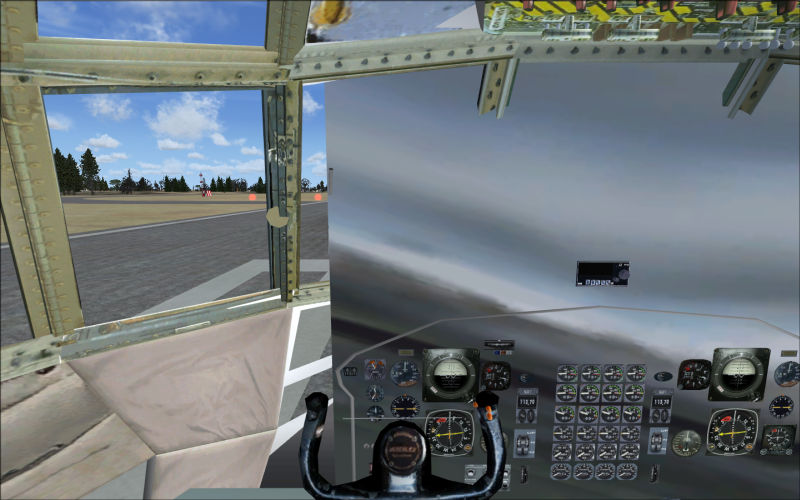
I have recently downloaded Lockeed IRIAF.  The VC shwos the guages, howevr there is a silver colored block extending half way across the page in forward view only.  As you pan the silver block disapears.

Any suggestion on how to fix this.  It has happended with a few other downloads as well. :-/

warand
Ground hog
Ground hog
 
Posts: 8
Joined: Sat Nov 20, 2010 2:50 pm

Re: Virtual Cockpit problems

Postby Hagar » Sat Nov 20, 2010 3:07 pm

Hi there. It's difficult to hazard a guess without further information.  If you tell us the file name with a link to the page it's posted on perhaps someone can check it out for you.
Image

Founder & Sole Member - Grumpy's Over the Hill Club for Veteran Virtual Aviators
Member of the Fox Four Group
My Google Photos albums
My Flickr albums
User avatar
Hagar
Colonel
Colonel
 
Posts: 30868
Joined: Wed Jun 19, 2002 7:15 am
Location: Costa Geriatrica

Re: Virtual Cockpit problems

Postby Steve M » Sat Nov 20, 2010 4:06 pm

One download I got of a different craft had the camera view just behind the seats.  I had to zoom the view through the left seat to see the full panel. Just a thought.
Last edited by Steve M on Sat Nov 20, 2010 4:09 pm, edited 1 time in total.
Image
User avatar
Steve M
Major
Major
 
Posts: 4765
Joined: Sun Aug 31, 2008 1:02 pm
Location: Cambridge On.

Re: Virtual Cockpit problems

Postby Hagar » Sat Nov 20, 2010 4:21 pm

Think I found the culprit. It's an "updated" FS9 aircraft not fully compatible with FSX.

Not sure there's anything can be done to fix this.
Image
Image

Founder & Sole Member - Grumpy's Over the Hill Club for Veteran Virtual Aviators
Member of the Fox Four Group
My Google Photos albums
My Flickr albums
User avatar
Hagar
Colonel
Colonel
 
Posts: 30868
Joined: Wed Jun 19, 2002 7:15 am
Location: Costa Geriatrica

Re: Virtual Cockpit problems

Postby Bumkin » Sun Nov 21, 2010 7:28 am

I have this same issue which presents itself exactly the same as is in Hagar's C-130 screenshot and happens only during the day.
Don't ask an aviator if he flys fighters.
User avatar
Bumkin
2nd Lieutenant
2nd Lieutenant
 
Posts: 126
Joined: Wed Jun 11, 2008 4:39 pm
Location: Pensacola, FL

Re: Virtual Cockpit problems

Postby Ben252 » Mon Nov 22, 2010 10:48 am

Sorry to spoil the party guys but yet again I'm having to say that this is NOT a native FSX aircraft and that is the root of this problem.  It is in fact my FS9 C-130 that has been published as an FSX work.  If I had been asked I would have supplied that into but I guess once you release something as freeware some people see it as theirs.

I hope to get round to an FSX native version next year.

Brian Franklin - Simshed
User avatar
Ben252
2nd Lieutenant
2nd Lieutenant
 
Posts: 61
Joined: Thu Jan 31, 2002 12:17 pm
Location: Chester UK

Re: Virtual Cockpit problems

Postby alrot » Mon Nov 22, 2010 11:23 am

Its graving the GlobalEnv_AC_Chrome_32.dds or _64 from the main texure folder

you can cheat this by adding this texture in 0,0,0 and name it like this GlobalEnv_AC_Chrome_32.dds in the aircraft texture so when it load ill load first the one on the aircraft folder texture

in theory should work

Or you can give me a link to try then tell you

Alex
Image

Venezuela
User avatar
alrot
Lieutenant Colonel
Lieutenant Colonel
 
Posts: 8961
Joined: Wed Oct 08, 2003 10:47 am

Re: Virtual Cockpit problems

Postby Daube » Mon Nov 22, 2010 11:27 am

Sorry to spoil the party guys but yet again I'm having to say that this is NOT a native FSX aircraft and that is the root of this problem.

As a big FS9-portovers fanboy, I would like to gove some precisions: the problem doesn't really come from the fact that it's not native. It comes from the way the virtual cockpit was modelled.
There are tons of FS9 planes that display perfectly in FSX, and I love them, that's why I wanted to bring some precisions here ;)

I hope to get round to an FSX native version next year.

Brian Franklin - Simshed

Great news ! I loved flying your C-130 back in my FS9 days :)
User avatar
Daube
Lieutenant Colonel
Lieutenant Colonel
 
Posts: 6611
Joined: Wed Oct 05, 2005 8:34 am
Location: Nice (FR)

Re: Virtual Cockpit problems

Postby Daube » Mon Nov 22, 2010 11:29 am

Its graving the GlobalEnv_AC_Chrome_32.dds or _64 from the main texure folder

you can cheat this by adding this texture in 0,0,0 and name it like this GlobalEnv_AC_Chrome_32.dds in the aircraft texture so when it load ill load first the one on the aircraft folder texture

in theory should work

Or you can give me a link to try then tell you

Alex

Interesting... very interesting, Alejandro.
There are a lot of FS9 planes suffering this exact kind of virtual cockpit problem, and I always thought there were no solutions for this...
User avatar
Daube
Lieutenant Colonel
Lieutenant Colonel
 
Posts: 6611
Joined: Wed Oct 05, 2005 8:34 am
Location: Nice (FR)

Re: Virtual Cockpit problems

Postby alrot » Mon Nov 22, 2010 11:52 am

Its graving the GlobalEnv_AC_Chrome_32.dds or _64 from the main texure folder

you can cheat this by adding this texture in 0,0,0 and name it like this GlobalEnv_AC_Chrome_32.dds in the aircraft texture so when it load ill load first the one on the aircraft folder texture

in theory should work

Or you can give me a link to try then tell you

Alex

Interesting... very interesting, Alejandro.
There are a lot of FS9 planes suffering this exact kind of virtual cockpit problem, and I always thought there were no solutions for this...


s'il te pla
Image

Venezuela
User avatar
alrot
Lieutenant Colonel
Lieutenant Colonel
 
Posts: 8961
Joined: Wed Oct 08, 2003 10:47 am

Re: Virtual Cockpit problems

Postby Daube » Mon Nov 22, 2010 1:49 pm

Hehehe  ;D
Estoy mirando, un momento por favor  :D
User avatar
Daube
Lieutenant Colonel
Lieutenant Colonel
 
Posts: 6611
Joined: Wed Oct 05, 2005 8:34 am
Location: Nice (FR)

Re: Virtual Cockpit problems

Postby Bumkin » Mon Nov 22, 2010 2:52 pm

Ben252 - sorry for the phrasing of my statement.  I did not intend for it to come out as the aircraft was produced by Hagar.  The intent was to refer to the aircraft in Hagar's photo.
Don't ask an aviator if he flys fighters.
User avatar
Bumkin
2nd Lieutenant
2nd Lieutenant
 
Posts: 126
Joined: Wed Jun 11, 2008 4:39 pm
Location: Pensacola, FL

Re: Virtual Cockpit problems

Postby Ben252 » Mon Nov 22, 2010 7:53 pm

Not a problem Bumkin. I wasn't referring to your post.  What I was referring to is the number of times in the last year I've had to answer emailed requests for help about 'my FSX C-130'.  Wears a little thin after a while when it's not my published article.   :-[   :-[
User avatar
Ben252
2nd Lieutenant
2nd Lieutenant
 
Posts: 61
Joined: Thu Jan 31, 2002 12:17 pm
Location: Chester UK

Re: Virtual Cockpit problems

Postby alrot » Tue Nov 23, 2010 8:26 am

[quote]Sorry to spoil the party guys but yet again I'm having to say that this is NOT a native FSX aircraft and that is the root of this problem.
Last edited by alrot on Tue Nov 23, 2010 8:34 am, edited 1 time in total.
Image

Venezuela
User avatar
alrot
Lieutenant Colonel
Lieutenant Colonel
 
Posts: 8961
Joined: Wed Oct 08, 2003 10:47 am

Re: Virtual Cockpit problems

Postby warand » Tue Nov 23, 2010 7:53 pm

Thanks for everyone's input.

I really appreciate the help.

Wayne
warand
Ground hog
Ground hog
 
Posts: 8
Joined: Sat Nov 20, 2010 2:50 pm


Return to Flight Simulator X (FSX) and Steam

Who is online

Users browsing this forum: No registered users and 278 guests