Cessna 172 vc lighting

FSX including FSX Steam version.

Cessna 172 vc lighting

Postby Ragapot12 » Mon Aug 23, 2010 10:06 pm

Does anyone know how to dim the lights in the vc at night? I think they are way to bright and was wondering if there was a way to dim them a little? :-?
Asus P5N-E Sli
Core 2 Duo E6850 @ 3.6Ghz
Evga 8800gt
Corsair Xms2 2x1gb ddr2 4-4-4-12 @ 800Mhz
WDC 500gb hd
WDC 160gb hd
Vizio 42"-1920x1080
User avatar
Ragapot12
Ground hog
Ground hog
 
Posts: 26
Joined: Wed Nov 19, 2008 10:04 pm

Re: Cessna 172 vc lighting

Postby Ragapot12 » Mon Aug 30, 2010 12:57 am

No one? Am I the only one who thinks the light is to bright in the c172 vc? :D
Asus P5N-E Sli
Core 2 Duo E6850 @ 3.6Ghz
Evga 8800gt
Corsair Xms2 2x1gb ddr2 4-4-4-12 @ 800Mhz
WDC 500gb hd
WDC 160gb hd
Vizio 42"-1920x1080
User avatar
Ragapot12
Ground hog
Ground hog
 
Posts: 26
Joined: Wed Nov 19, 2008 10:04 pm

Re: Cessna 172 vc lighting

Postby cx826 » Mon Aug 30, 2010 4:59 pm

Lol Im used to it,
may be try adjusting the lighting for your monitor?
cx826
Ground hog
Ground hog
 
Posts: 32
Joined: Sun Jun 06, 2010 8:02 pm

Re: Cessna 172 vc lighting

Postby DenisH » Wed Sep 01, 2010 11:27 am

Annoys me too but nothing can dim the little baby spot used to light the panel.  That I know of.
DenisH
2nd Lieutenant
2nd Lieutenant
 
Posts: 287
Joined: Wed Apr 22, 2009 6:28 pm
Location: ca, usa

Re: Cessna 172 vc lighting

Postby Fr. Bill » Fri Sep 03, 2010 12:29 pm

[quote]Annoys me too but nothing can dim the little baby spot used to light the panel.
BillImage Gauge Programming - 3d Modeling Eaglesoft Development Group Intel Core 2 Quad Q6600-4GB DDR2 Crucial PC6400-800 GB SATA-ATI Radeon HD2400 Pro 256MB DX10 [i
Fr. Bill
Captain
Captain
 
Posts: 961
Joined: Sun Apr 27, 2003 1:31 pm
Location: Hammond, IN

Re: Cessna 172 vc lighting

Postby DenisH » Sat Sep 04, 2010 1:39 pm

Bill: You're addressing the dummy that "computers for dummies" was written for.  :o
DenisH
2nd Lieutenant
2nd Lieutenant
 
Posts: 287
Joined: Wed Apr 22, 2009 6:28 pm
Location: ca, usa

Re: Cessna 172 vc lighting

Postby Ragapot12 » Sat Sep 04, 2010 11:45 pm

Thanks Bill, I knew there had to be some way to do it. ;D
Asus P5N-E Sli
Core 2 Duo E6850 @ 3.6Ghz
Evga 8800gt
Corsair Xms2 2x1gb ddr2 4-4-4-12 @ 800Mhz
WDC 500gb hd
WDC 160gb hd
Vizio 42"-1920x1080
User avatar
Ragapot12
Ground hog
Ground hog
 
Posts: 26
Joined: Wed Nov 19, 2008 10:04 pm

Re: Cessna 172 vc lighting

Postby Ang2dogs » Sun Sep 05, 2010 9:10 pm

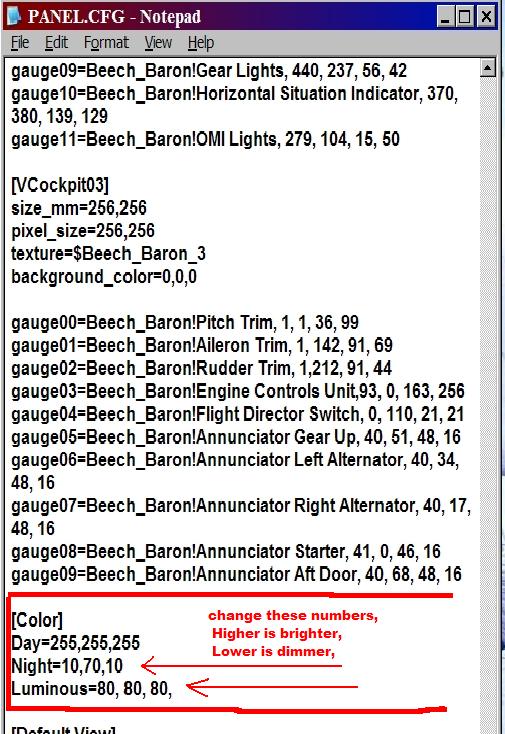
You can also go into your aircrafts PANEL.CFG

and change these numbers,


Image

P.S.   don't get discouraged if you don't get a response right away, alot of us are probaly just winding down from a nice vacation. ;D
User avatar
Ang2dogs
Captain
Captain
 
Posts: 862
Joined: Sun Aug 19, 2007 12:38 am
Location: black mountain hills of Dakota

Re: Cessna 172 vc lighting

Postby Fr. Bill » Mon Sep 06, 2010 11:02 am

You can also go into your aircrafts PANEL.CFG


Those numbers only affect the 2d panel. They are completely ignored by the Virtual Cockpit...
BillImage Gauge Programming - 3d Modeling Eaglesoft Development Group Intel Core 2 Quad Q6600-4GB DDR2 Crucial PC6400-800 GB SATA-ATI Radeon HD2400 Pro 256MB DX10 [i
Fr. Bill
Captain
Captain
 
Posts: 961
Joined: Sun Apr 27, 2003 1:31 pm
Location: Hammond, IN


Return to Flight Simulator X (FSX) and Steam

Who is online

Users browsing this forum: No registered users and 511 guests