F-18 ILS Carrier Landing.

FSX including FSX Steam version.

F-18 ILS Carrier Landing.

Postby Knick » Thu Aug 12, 2010 9:09 pm

Does anybody know how to set up an ILS landing for a carrier? I know how to setup ils landings for normal planes, and with airports,  I don't know what I am doing wrong.

I put the frequency in, switch it to NAV1 active, setup proper speed and proper height to catch the glide slope, I click approach and yet the f18 just flies over the carrier.


I am using the realistic f18 HUD  found here  http://www.simviation.com/simviation/in ... =67&page=4


Also does anyone know of any tutorial vids? I can't seem to find any on the f18 ils FOR CARRIER landings with this hud.

Knick
1st Lieutenant
1st Lieutenant
 
Posts: 334
Joined: Wed Dec 12, 2007 10:28 pm
Location: Toronto, Ontario, Canada

Re: F-18 ILS Carrier Landing.

Postby Daube » Fri Aug 13, 2010 4:05 am

If you are using the new realistic HUD replacement for the F-18 (and you can install it for the F-14 by Dino as well), then you just have to set your NAV1 frequency to 112.0.
The ILS will activate as soon as you get close to the Nimitz that you placed with AI Carrier.
User avatar
Daube
Lieutenant Colonel
Lieutenant Colonel
 
Posts: 6611
Joined: Wed Oct 05, 2005 8:34 am
Location: Nice (FR)

Re: F-18 ILS Carrier Landing.

Postby Knick » Fri Aug 13, 2010 1:25 pm

If you are using the new realistic HUD replacement for the F-18 (and you can install it for the F-14 by Dino as well), then you just have to set your NAV1 frequency to 112.0.
The ILS will activate as soon as you get close to the Nimitz that you placed with AI Carrier.


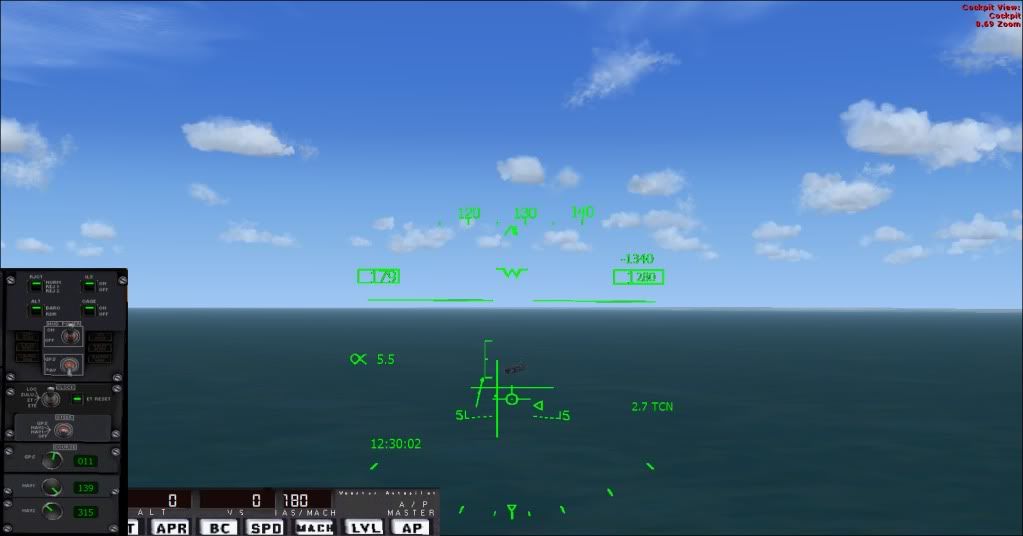
Cool, I got that going now, but for some reason the ILS lines, that appear for helping with carrier landings, don't line up with the carrier, thus I cannot properly land on the carrier using the meatball gauge for reference (red arrow, amber donut, green arrow.


This pic is what I mean, the ILS lines which represent the ILS needles don't line up with the carrier.

Image
Knick
1st Lieutenant
1st Lieutenant
 
Posts: 334
Joined: Wed Dec 12, 2007 10:28 pm
Location: Toronto, Ontario, Canada

Re: F-18 ILS Carrier Landing.

Postby Lima-Victor-Mike » Sat Aug 14, 2010 1:24 am

That looks all right to me. The lines won't point at the carrier, they just give an indication where you are in relation to the glideslope, and in that screen, it's too low and too right. Try keeping them centered all the way untill you call the ball. In my experience, it'll make the approach a lot easier.

Also, you were talking about a meatball gauge? In your cockpit? I've never heard of that...
Call me Leen, it's way shorter :)
Image
User avatar
Lima-Victor-Mike
2nd Lieutenant
2nd Lieutenant
 
Posts: 64
Joined: Mon Dec 14, 2009 2:57 pm
Location: EHWO/EHSE

Re: F-18 ILS Carrier Landing.

Postby EVVFCX » Sat Aug 14, 2010 6:42 am

Hi,

Lima: I think Knick is meaning the AoA
Last edited by EVVFCX on Sat Aug 14, 2010 7:03 am, edited 1 time in total.
May the Mynd be with you.
So far my number of landings either passenger or pilot equal my number of takeoffs.

FSX Gold Acc, P3D V4, FS2020
User avatar
EVVFCX
Captain
Captain
 
Posts: 751
Joined: Tue Nov 27, 2007 8:32 am
Location: Pontefract, West Yorkshire

Re: F-18 ILS Carrier Landing.

Postby Knick » Sat Aug 14, 2010 10:36 am

That looks all right to me. The lines won't point at the carrier, they just give an indication where you are in relation to the glideslope, and in that screen, it's too low and too right. Try keeping them centered all the way untill you call the ball. In my experience, it'll make the approach a lot easier.

Also, you were talking about a meatball gauge? In your cockpit? I've never heard of that...


Ok thanks for clearing that up!
Knick
1st Lieutenant
1st Lieutenant
 
Posts: 334
Joined: Wed Dec 12, 2007 10:28 pm
Location: Toronto, Ontario, Canada

Re: F-18 ILS Carrier Landing.

Postby Knick » Sat Aug 14, 2010 10:38 am

[quote]Hi,

Lima: I think Knick is meaning the AoA
Last edited by Knick on Sat Aug 14, 2010 10:41 am, edited 1 time in total.
Knick
1st Lieutenant
1st Lieutenant
 
Posts: 334
Joined: Wed Dec 12, 2007 10:28 pm
Location: Toronto, Ontario, Canada

Re: F-18 ILS Carrier Landing.

Postby EVVFCX » Sun Aug 15, 2010 6:43 am

Sorry Knick, that should have been his updated F18 HUD not his F18 :-[
Knick, it's this one:
http://www.simviation.com/yabbuploads/AOA bracket and indexer (see README).gif

Copy and paste the above path into your browser,  it's too big to display here


regards

Steve
Last edited by EVVFCX on Sun Aug 15, 2010 7:01 am, edited 1 time in total.
May the Mynd be with you.
So far my number of landings either passenger or pilot equal my number of takeoffs.

FSX Gold Acc, P3D V4, FS2020
User avatar
EVVFCX
Captain
Captain
 
Posts: 751
Joined: Tue Nov 27, 2007 8:32 am
Location: Pontefract, West Yorkshire

Re: F-18 ILS Carrier Landing.

Postby cheeselover227 » Sun Aug 15, 2010 7:04 pm

well i dont know how to help u out  :( but my lips are sealed till further notice :-X
cheeselover227
Ground hog
Ground hog
 
Posts: 2
Joined: Wed Jul 21, 2010 12:50 pm

Re: F-18 ILS Carrier Landing.

Postby Knick » Sun Aug 15, 2010 11:37 pm

Got it working yall!

Thanks for the tips and tricks and the lessons haha.
Knick
1st Lieutenant
1st Lieutenant
 
Posts: 334
Joined: Wed Dec 12, 2007 10:28 pm
Location: Toronto, Ontario, Canada


Return to Flight Simulator X (FSX) and Steam

Who is online

Users browsing this forum: No registered users and 555 guests