
Trying to install and execute...

FSX including FSX Steam version.

Trying to install and execute...

Postby hhomebrewer » Fri Jul 09, 2010 11:24 pm

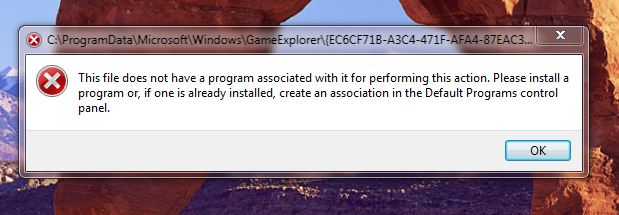
So after I spend what seems like hours installing FSX, I get the window below telling me I can't open/execute the program because I have not done something right. What do I need to do to get an icon on my Desktop so I can execute the program?

Image
Last edited by hhomebrewer on Fri Jul 09, 2010 11:24 pm, edited 1 time in total.
I am homebrewer. I had 633 posts when for some unknown reason, my account disappeared...
AMD Phenom II X4 940 (Deneb), Asus M3N72-D motherboard, 2 x nVidia 8800GTS @640MB RAM, 1 x Seagate Barracuda 500Gb HDD (storage), 1 x Western Digital Black 250Gb
User avatar
hhomebrewer
Captain
Captain
 
Posts: 600
Joined: Sat Aug 22, 2009 8:44 pm
Location: United States of Good Beer

Re: Trying to install and execute...

Postby Boikat » Fri Jul 09, 2010 11:40 pm

Are you trying to start FSX from that location?
Last edited by Boikat on Fri Jul 09, 2010 11:41 pm, edited 1 time in total.
Image
"I reject your reality, and substitute my own" Adam Savage, Mythbusters
User avatar
Boikat
Major
Major
 
Posts: 2974
Joined: Thu Mar 20, 2008 8:23 pm
Location: NW Loueezianner

Re: Trying to install and execute...

Postby hhomebrewer » Fri Jul 09, 2010 11:58 pm

I don't think I want all that much. All I want is to install the program and have an icon appear on the Desktop. Why is it so difficult?

I have no Microsoft Games folder. I find it in Program Files (x86) or something like that...
Last edited by hhomebrewer on Sat Jul 10, 2010 12:01 am, edited 1 time in total.
I am homebrewer. I had 633 posts when for some unknown reason, my account disappeared...
AMD Phenom II X4 940 (Deneb), Asus M3N72-D motherboard, 2 x nVidia 8800GTS @640MB RAM, 1 x Seagate Barracuda 500Gb HDD (storage), 1 x Western Digital Black 250Gb
User avatar
hhomebrewer
Captain
Captain
 
Posts: 600
Joined: Sat Aug 22, 2009 8:44 pm
Location: United States of Good Beer

Re: Trying to install and execute...

Postby Boikat » Sat Jul 10, 2010 12:22 am

Try this, if Windows 7 is anything like Vista (and it should be almost identical, from what I understand), open your Windows Explorer and click on the "Program File"folder.  Then in the upper right, there should be a "search" field.  Enter "FSX.exe" (no quote marks) in the search field, and it should show a little blue square with a shite aircraft in it called "fsx".  You should be able to "right click" that icon and either "send to" the desktop or simply "copy/paste" it to your desktop.
Image
"I reject your reality, and substitute my own" Adam Savage, Mythbusters
User avatar
Boikat
Major
Major
 
Posts: 2974
Joined: Thu Mar 20, 2008 8:23 pm
Location: NW Loueezianner

Re: Trying to install and execute...

Postby hhomebrewer » Sat Jul 10, 2010 12:33 am

I'll try that...
I am homebrewer. I had 633 posts when for some unknown reason, my account disappeared...
AMD Phenom II X4 940 (Deneb), Asus M3N72-D motherboard, 2 x nVidia 8800GTS @640MB RAM, 1 x Seagate Barracuda 500Gb HDD (storage), 1 x Western Digital Black 250Gb
User avatar
hhomebrewer
Captain
Captain
 
Posts: 600
Joined: Sat Aug 22, 2009 8:44 pm
Location: United States of Good Beer

Re: Trying to install and execute...

Postby hhomebrewer » Sat Jul 10, 2010 12:37 am

Doesn't work. I saw something called Games Explorer, and there it is.  I tried to copy and paste the icon. I got the Copy part OK, but there is no Paste function. It has a "Paste shortcut" function. So I tried that. I get the same window we see at the top of this thread. I guess FSX is entirely incompatible with Windows 7...
I am homebrewer. I had 633 posts when for some unknown reason, my account disappeared...
AMD Phenom II X4 940 (Deneb), Asus M3N72-D motherboard, 2 x nVidia 8800GTS @640MB RAM, 1 x Seagate Barracuda 500Gb HDD (storage), 1 x Western Digital Black 250Gb
User avatar
hhomebrewer
Captain
Captain
 
Posts: 600
Joined: Sat Aug 22, 2009 8:44 pm
Location: United States of Good Beer

Re: Trying to install and execute...

Postby Hagar » Sat Jul 10, 2010 1:42 am

I'm sure FSX will run on Windows 7. From what you're saying I presume you have the 64 bit version. The default location for 32 bit software like FSX is C:\Program Files (x86). Installing it to this location can cause problems if you wish to edit or modify files. From advice I've seen on this forum it's a much better idea to install it to a different location like C:\FSX.

This Microsoft Knowledge Base article explains how to create a desktop shortcut in Windows 7. http://support.microsoft.com/kb/936828
Image

Founder & Sole Member - Grumpy's Over the Hill Club for Veteran Virtual Aviators
Member of the Fox Four Group
My Google Photos albums
My Flickr albums
User avatar
Hagar
Colonel
Colonel
 
Posts: 30868
Joined: Wed Jun 19, 2002 7:15 am
Location: Costa Geriatrica

Re: Trying to install and execute...

Postby Boikat » Sat Jul 10, 2010 1:47 am

Other people are using Windows 7 and FSX with no problem. 

The FSX.exe is not in game explorer, it's in the FSX root directory.

It almost sounds like you're running as a "user", and not as "Administrator".  That might be the next thing you should check, since there should be no reason that you cannot paste the FSX.exe icon to your desktop.

If your running as "admin", the next thing I would do is try un-installing, then create an FSX folder on the "C" drive (right click "C", create.. new folder, rename new folder FSX), and re-install, but direct the install wizard to install FSX in "C:\FSX" instead of the default directory.
Image
"I reject your reality, and substitute my own" Adam Savage, Mythbusters
User avatar
Boikat
Major
Major
 
Posts: 2974
Joined: Thu Mar 20, 2008 8:23 pm
Location: NW Loueezianner

Re: Trying to install and execute...

Postby Hagar » Sat Jul 10, 2010 1:51 am

The FSX.exe is not in game explorer, it's in the FSX root directory

Boikat. Please read the article I linked to.

"Create a game shortcut on your desktop

To create a shortcut, select the game in Games Explorer for which you want to create a shortcut. Drag the game to your desktop. The shortcut will be created on your desktop."
Image

Founder & Sole Member - Grumpy's Over the Hill Club for Veteran Virtual Aviators
Member of the Fox Four Group
My Google Photos albums
My Flickr albums
User avatar
Hagar
Colonel
Colonel
 
Posts: 30868
Joined: Wed Jun 19, 2002 7:15 am
Location: Costa Geriatrica

Re: Trying to install and execute...

Postby Boikat » Sat Jul 10, 2010 1:57 am

The FSX.exe is not in game explorer, it's in the FSX root directory

Boikat. Please read the article I linked to.

"Create a game shortcut on your desktop

To create a shortcut, select the game in Games Explorer for which you want to create a shortcut. Drag the game to your desktop. The shortcut will be created on your desktop."


I would have, but I was composing at the time you posted. :P
Image
"I reject your reality, and substitute my own" Adam Savage, Mythbusters
User avatar
Boikat
Major
Major
 
Posts: 2974
Joined: Thu Mar 20, 2008 8:23 pm
Location: NW Loueezianner

Re: Trying to install and execute...

Postby Hagar » Sat Jul 10, 2010 2:00 am

[smiley=smiley_up.gif] I guessed as much. :)

I haven't got Windows 7 myself but I assume the chaps at MS know what they're talking about.
Image

Founder & Sole Member - Grumpy's Over the Hill Club for Veteran Virtual Aviators
Member of the Fox Four Group
My Google Photos albums
My Flickr albums
User avatar
Hagar
Colonel
Colonel
 
Posts: 30868
Joined: Wed Jun 19, 2002 7:15 am
Location: Costa Geriatrica

Re: Trying to install and execute...

Postby patchz » Sat Jul 10, 2010 2:14 am

[color=#000000]FSX runs fine in Windows 7. I'm too tired to think straight and it's been a while, my memory is m.i.a. But you have to turn off
Last edited by patchz on Sat Jul 10, 2010 2:25 am, edited 1 time in total.
Image
If God intended aircraft engines to have horizontally opposed engines, Pratt and Whitney would have made them that way.
User avatar
patchz
Colonel
Colonel
 
Posts: 10424
Joined: Wed Mar 11, 2009 7:33 pm
Location: IN THE FUNNY PAPERS

Re: Trying to install and execute...

Postby hhomebrewer » Sat Jul 10, 2010 2:59 am

I have it on my Desktop and executing now, thanks to the input of all the gentlemen who responded. Rather than having FSX in the Program Files folder, it installed into the Program Files(x86) folder. I just created the shortcut there per the instructions provided, and it works. How do I move FSX to the Program Files folder? Do I need to do that, now that it executes?
I am homebrewer. I had 633 posts when for some unknown reason, my account disappeared...
AMD Phenom II X4 940 (Deneb), Asus M3N72-D motherboard, 2 x nVidia 8800GTS @640MB RAM, 1 x Seagate Barracuda 500Gb HDD (storage), 1 x Western Digital Black 250Gb
User avatar
hhomebrewer
Captain
Captain
 
Posts: 600
Joined: Sat Aug 22, 2009 8:44 pm
Location: United States of Good Beer

Re: Trying to install and execute...

Postby Hagar » Sat Jul 10, 2010 3:04 am

Glad you finally got it working. Please don't try moving anything. Leave it exactly where it is.*

*If you ever need to reinstall FSX you might consider changing the location to somewhere like C:\FSX as suggested. This could save you lots of bother when trying to install addons.
Last edited by Hagar on Sat Jul 10, 2010 3:05 am, edited 1 time in total.
Image

Founder & Sole Member - Grumpy's Over the Hill Club for Veteran Virtual Aviators
Member of the Fox Four Group
My Google Photos albums
My Flickr albums
User avatar
Hagar
Colonel
Colonel
 
Posts: 30868
Joined: Wed Jun 19, 2002 7:15 am
Location: Costa Geriatrica

Re: Trying to install and execute...

Postby hhomebrewer » Sat Jul 10, 2010 3:32 am

If you ever need to reinstall FSX you might consider changing the location to somewhere like C:\FSX as suggested.

How do I do that? My technical expertise is limited to putting the CDs in the drive and clicking on that which it tells me to click at the appropriate time. I'm very reluctant to do things "outside the envelope." This computer has given me nothin' but fits ever since I upgraded the motherboard and chip. I cannot even physically touch the chassis without a spark blowing away the BIOS settings. I have to push the little button that opens the CD drive with the tip of a pencil and handle the CDs wearing surgical gloves, lest a finger touch the case. I am not kidding. I have had to reset the BIOS twice in the last two weeks. Once, I inadvertently touched the chrome trim, the second was when I put a USB plug into the receptacle on the top. The machine shut off and would not boot again. I had to take it to my computer guru and set everything back to where it was--twice. Very frustrating. before the board and chip upgrade, I never had this type of problem. My apologies for raving on, but it has been an extremely maddening night...
I am homebrewer. I had 633 posts when for some unknown reason, my account disappeared...
AMD Phenom II X4 940 (Deneb), Asus M3N72-D motherboard, 2 x nVidia 8800GTS @640MB RAM, 1 x Seagate Barracuda 500Gb HDD (storage), 1 x Western Digital Black 250Gb
User avatar
hhomebrewer
Captain
Captain
 
Posts: 600
Joined: Sat Aug 22, 2009 8:44 pm
Location: United States of Good Beer

Next

Return to Flight Simulator X (FSX) and Steam

Who is online

Users browsing this forum: No registered users and 474 guests



