FSX, the default boat traffic, and the various FS9 AI liner traffic...

FSX including FSX Steam version.

FSX, the default boat traffic, and the various FS9 AI liner traffic...

Postby Daube » Sun Jun 27, 2010 7:54 am

Hi all,

Recently I've been doing some experiences with my AI traffic in FSX.
As you know, the default FSX liners traffic is quite bad, and the best freeware alternatives are FS9 AI traffic makers like World of AI, or Project AI, etc...
And as you may know as well, the installation of FS9 traffic files in your FSX will automatically disable all of the default AI boat traffic, even if you don't disable any file. FS9 traffic cause the FSX AI engine to ignore the boat traffic, that's a fact.

The defaut FSX AI boat traffic does not include the small boats that appear next to shorelines or in lakes. It includes some leisure giant boats, some military aircraft carriers and some tankers, that follow some routes on the main oceans all across the globe, as well as some little ferries that would go from an harbor to another.

Since I wanted to see some boats on my FSX waters again, I downloaded and installed a small freeware utility nammed AI Flight Planner. This program allows you to display the contents of the various BGL traffic files in your Scenery\world\scenery folder, and it also allows you to detect FS9 traffic files and convert them to FSX format.

Once all of the FS9 traffic files were converted to FSX format (including the traffic files that are part of sceneries in the various Addon Scenery\ subfolders), the boat traffic appeared again  8-)

Unfortunately, I could only see the ferries. I could not see any leisure boats, aircraft carriers or tankers, nothing like that  :-/

I opened the "trafficboats.BGL" file with AI Flight Planner to see what could be wrong, but the program took several minutes to open it. Once opened, I had a popup window showing one error message per route !! (meaning that ALL of the "flightplans" were problematic). The error was that the referenced AI vehicules could not be found.

So in the end, I have no Boat traffic in my FSX. I wonder what is the problem: is my BGL file damaged ? Is there something missing in my folders ? Really strange...

User avatar
Daube
Lieutenant Colonel
Lieutenant Colonel
 
Posts: 6611
Joined: Wed Oct 05, 2005 8:34 am
Location: Nice (FR)

Re: FSX, the default boat traffic, and the various FS9 AI liner traffic...

Postby ShaneG_old » Sun Jun 27, 2010 9:17 am

I don't run any traffic in my FSX, so I only use TTools for my FS9 AI traffic files, so I'm not familiar with the AI flight planner tool.

Do you have to specify the path to the AI boats?

If they are in the SimObjects/Boats folder, try placing them in the Airplanes folder and see if it finds them there.
ShaneG_old
Lieutenant Colonel
Lieutenant Colonel
 
Posts: 9700
Joined: Tue Mar 11, 2008 11:52 am

Re: FSX, the default boat traffic, and the various FS9 AI liner traffic...

Postby Daube » Sun Jun 27, 2010 10:43 am

I don't run any traffic in my FSX, so I only use TTools for my FS9 AI traffic files, so I'm not familiar with the AI flight planner tool.

Do you have to specify the path to the AI boats?

If they are in the SimObjects/Boats folder, try placing them in the Airplanes folder and see if it finds them there.


Normally AI Flight Planner knows already everything it needs.
For example, all of my AI planes are in the Simobjects\Misc subfolder, but it finds them anyway.
I fear there's been an inconsistency in my trafficboats.bgl :/
User avatar
Daube
Lieutenant Colonel
Lieutenant Colonel
 
Posts: 6611
Joined: Wed Oct 05, 2005 8:34 am
Location: Nice (FR)

Re: FSX, the default boat traffic, and the various FS9 AI liner traffic...

Postby kagazi » Sun Jun 27, 2010 11:43 pm

I'm not sure if this will solve your issue but it's good reading nonetheless.

http://lc0277.nerim.net/boat/
kagazi
2nd Lieutenant
2nd Lieutenant
 
Posts: 90
Joined: Tue May 29, 2007 5:22 pm

Re: FSX, the default boat traffic, and the various FS9 AI liner traffic...

Postby basys » Mon Jun 28, 2010 2:25 am

Hi Folks

Daube -
FSX vessel traffic uses a different mechanism and data structure
from that used by FSX aircraft traffic.

I don't think AIFP is capable of handling vessel traffic files.

To regain your vessel traffic,
you'll probably have to repair FSX.

HTH
ATB
Paul
[url=http://secure.simmarket.com/product_info.php?products_id=2795"]Image[/url]
User avatar
basys
2nd Lieutenant
2nd Lieutenant
 
Posts: 109
Joined: Sat Jan 22, 2005 11:43 am
Location: EGNL, Barrow-in-Furness, Cumbria, UK

Re: FSX, the default boat traffic, and the various FS9 AI liner traffic...

Postby Daube » Mon Jun 28, 2010 3:58 am

Thanks Basys and Kagazi for those informations.
I'll have a deeper look into that.
My FSX is heavily tweaked and I have absolutely no trust in the repair functionnality, so I will avoid this possibility as much as possible ;)
User avatar
Daube
Lieutenant Colonel
Lieutenant Colonel
 
Posts: 6611
Joined: Wed Oct 05, 2005 8:34 am
Location: Nice (FR)

Re: FSX, the default boat traffic, and the various FS9 AI liner traffic...

Postby Daube » Sun Jul 11, 2010 2:49 pm

I'm bumping this topic because my problem is solved.

In fact, my boat traffic was OK.

I used the program that Kagazi above, which allows the edition of the boat traffic files. There's even an export functionnality that allows you to view all of the routes in Google Earth. In that way, I could see that the normal ferry traffic is in fact part of the normal boat traffc, so that fact that I could see those "medium" boats in the sim was a proof that my boat traffic was working properly :)

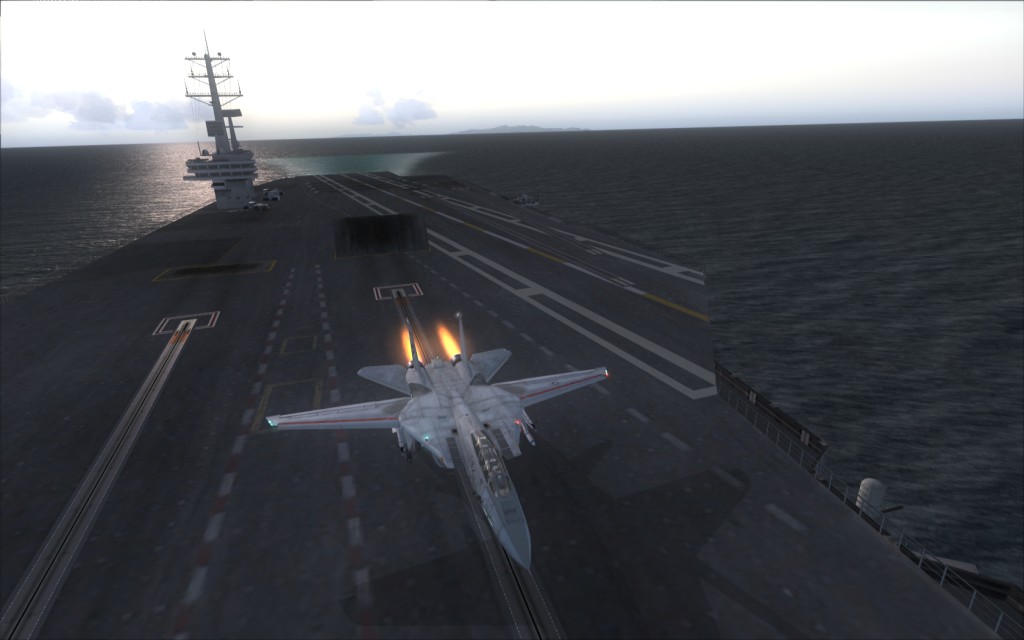
Since I wanted to spot some carriers, I watched in Google Earth and I saw a nice re line crossing the pacific directly to Hawai islands. I started a flight there and I was lucky, I could immediately spot the carrier (from FSX Acceleration) that had left Pearl Harbor not so long ago, and was cruising toward East, in order to return to northern America.

I could even land on it, and launch again, as you can see in the screenshot below (Pearl Harbor is in the island that you can see in the background). So everything's fine and I'm happy  8-)


Image
User avatar
Daube
Lieutenant Colonel
Lieutenant Colonel
 
Posts: 6611
Joined: Wed Oct 05, 2005 8:34 am
Location: Nice (FR)


Return to Flight Simulator X (FSX) and Steam

Who is online

Users browsing this forum: No registered users and 443 guests