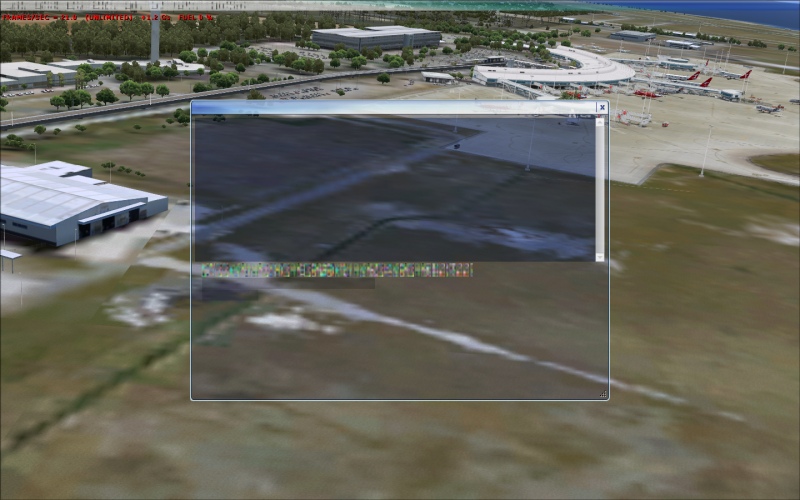
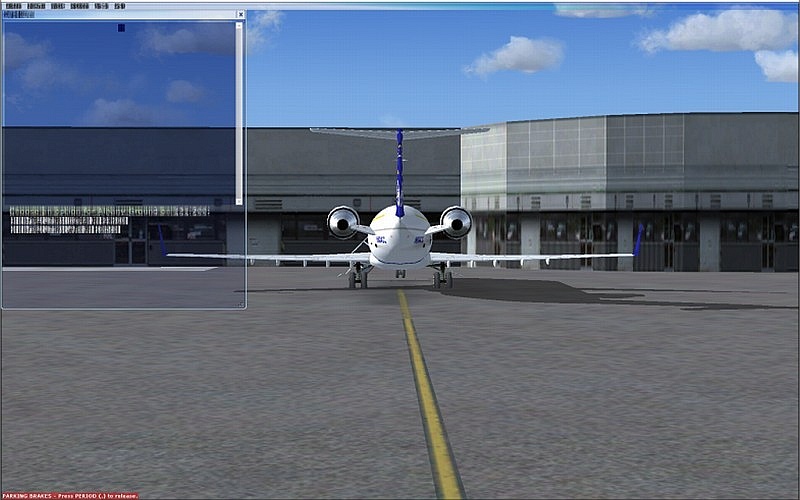
Thank for the responses so far. I should've mentioned, but forgot, that this problem only occurs around my high detailed addon scenery, default airports are fine. The other thing I should've mentioned is that when I load the flight, all the textures start out absolutely fine, nice and crisp, its after a few seconds (30 odd) then all the textures go nuts and blur. If I go into a menu or hit Esc, but then return to the flight the textures start out crisp and then suddenly blur again.
I occasionally get this too. I've seen fixes for it but i've been a bit lazy. Is that ORBX Brisbane? If so its pretty taxing on any pc, do you only get it around there?
It is Orbx YBBN, I don't think the problem is its taxing because my FPS say otherwise? But then again, why does it only happen on high detailed scenery? :-/
Mitch, try playing a little bit with the NHAncer settings for your video card. This kind of problem occured to me in the past, when I've been a little bit too optimistic with the settings, mainly for the AA and texture filtering.
I believe there're also a couple of other settings involved, but I can't remember which one.
PS: Also, check if your video card is cooled correctly, if it wouldn't need a little cleaning because of accumulated dust, or stuff like that.
Thanks Daube, to be honest I wasn't running Nhancer. But I installed it and followed all the instructions found here:
http://www.simforums.com/forums/forum_posts.asp?TID=29041&PN=1I did notice an improvement overall with FPS, so thanks. But the problem still exists at my High detailed sceneries, ableit it takes much longer before the textures will blur. Before it took around 30 sec, after nhancer its around 2-3min. However, as a pre-curse to the blurring I now get horrible jaggies?
Video card is fine.

Do you find that if you wait a little while, the texture catches up with the complicated processes it is having to carry out in complex ground scenes.
I often get the effect for a second or two when changing Cockpit views, left and right, when in a new area. The computer has to display the new scene suddenly, so it starts off blurry, and then becomes clear.
The more detailed the scenery settings, the bigger the problem!
Traversing the ground at high speed, and at low level, in fast Military jets aggravates the problem!
(..or using; "Speed Acceleration" in the Menu).
Paul...G-BPLF...FS 2004...FS Nav...20FPS locked Frame Rate...

...!
Thanks Paul, but this is a different type of blur, see even the text goes blurry. No amount of waiting will fix it. Its like the computer or video card is shitting itself and refuses to display clear textures.

I had this issue. I had to go to my graphics card and turn up the mipmap settings to solve it, but I have an ATI card and you have a Nvidia card so I don't know if it would help or not.
8-)
Thanks Brandon, are you sure its the exact same problem I am describing. Did you also get the slurred text, like in the pic? If so maybe you have some more valuable information.
Thanks again guys, I've never had any major FSX problem before this, so I'm new at this.