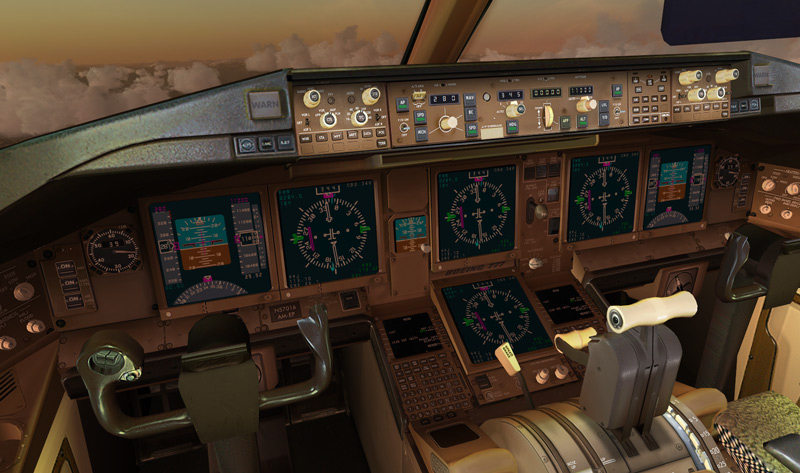
How to get your Posky 777 VC gauges working

FSX including FSX Steam version.

Re: How to get your Posky 777 VC gauges working

Postby USMC_BEANS » Mon Jan 05, 2009 1:09 pm

Just as an FYI, I added the Boeing777-300.gau to the gauges folder and it still didn't work for me.  So I downloaded msvcr70.dll and put it in my root FSX folder and everything worked perfect.  The only thing I changed in my panel.cfg was to remove the dirty glass texture.  Thanks guys, I have my 777 now! ;D
User avatar
USMC_BEANS
2nd Lieutenant
2nd Lieutenant
 
Posts: 163
Joined: Sat Mar 19, 2005 3:01 pm

Re: How to get your Posky 777 VC gauges working

Postby steve chavin » Mon Jan 19, 2009 6:49 pm

please help.
steve chavin
Ground hog
Ground hog
 
Posts: 3
Joined: Mon Jan 19, 2009 7:12 pm

Re: How to get your Posky 777 VC gauges working

Postby steve chavin » Mon Jan 19, 2009 8:05 pm

rob and others:

i have an addendum to my initial post.  i reviewed my installation and still cannot find any errors.  i then opened fsx with the ms boeing 737, and switched to the os 722 via alt/aircraft;  now the vc appeared but still without gauges.

i closed the sim, shifted the fs9 777 gauge into the 772 panel folder, and opened the sim again.  this time, when i directly started with the 772, the vc was there and ooked great.  all the lighting worked well (using keyboard comandL), thew throttle moves appropriately, and the ac looks and sounds great.  but still no gauges visible.  i did found 1 clickable spot (the apu switch 0n the overhead panel).  no other clickables.

does this make the problem any easier?

still hoping for some magic solution!

steve chavin
steve chavin
Ground hog
Ground hog
 
Posts: 3
Joined: Mon Jan 19, 2009 7:12 pm

Re: How to get your Posky 777 VC gauges working

Postby RC1977 » Tue Jan 20, 2009 8:25 am

after spendind 4 hours trying to get this stupid vc gauges to work and no results i quit with this plane!! >:(
P.O like to complicate thinks for the looks of it,i try this ,i try that and 4 hours later of doing so many tweeks and downloads and dont even know what m i doing anymore and its pissing me off!!
i just keep flying with my 747 and 738 for the looks of it. :-[
RC1977
2nd Lieutenant
2nd Lieutenant
 
Posts: 89
Joined: Fri Sep 12, 2008 9:43 pm
Location: Canada

Re: Posky 777 VC gauges working- further progress

Postby steve chavin » Tue Jan 20, 2009 9:19 pm

as suggested earlier, i copied the fs9 file 'msvcr70.dll' from my installation discs, put it into the root folder of fsx,and the missing gauges appeared.   there are still a few size issues with the main displays, and not all of the panel controls are mouse-clickable.  and i have not yet tried to fly the 777.

the vc looks great, but what a palaver to get there!

thanks to everyone for all the various suggestions.

steve chavin
steve chavin
Ground hog
Ground hog
 
Posts: 3
Joined: Mon Jan 19, 2009 7:12 pm

Re: How to get your Posky 777 VC gauges working

Postby USMC_BEANS » Fri Jan 23, 2009 5:59 pm

When I get home from work I will post my panel.cfg.  Everything works in my VC.  I hope I can help you guys get it working.  I can't believe that they didn't include the 777 in FSX.  Oh and just to make you 777 fans a little jealous, I will be out flying on the real 777F. ;)
User avatar
USMC_BEANS
2nd Lieutenant
2nd Lieutenant
 
Posts: 163
Joined: Sat Mar 19, 2005 3:01 pm

Re: How to get your Posky 777 VC gauges working

Postby aiman60 » Sat Jan 24, 2009 7:53 am

hai rob i already al of the things that you say but my gauges is still not working
aiman60
Ground hog
Ground hog
 
Posts: 1
Joined: Fri Jan 23, 2009 12:24 pm

Re: How to get your Posky 777 VC gauges working

Postby USMC_BEANS » Tue Jan 27, 2009 5:25 pm

Hey Steve, glad you got it working.  RC, if you are still having problems, PM me.
User avatar
USMC_BEANS
2nd Lieutenant
2nd Lieutenant
 
Posts: 163
Joined: Sat Mar 19, 2005 3:01 pm

Re: How to get your Posky 777 VC gauges working

Postby USMC_BEANS » Thu Jan 29, 2009 12:32 pm

aiman60 or steve chavin
 Did you ever get it working?
User avatar
USMC_BEANS
2nd Lieutenant
2nd Lieutenant
 
Posts: 163
Joined: Sat Mar 19, 2005 3:01 pm

Re: How to get your Posky 777 VC gauges working

Postby RC1977 » Thu Jan 29, 2009 2:12 pm

got mine working finnaly thanks to Usmc_ Beans ;)
RC1977
2nd Lieutenant
2nd Lieutenant
 
Posts: 89
Joined: Fri Sep 12, 2008 9:43 pm
Location: Canada

Re: How to get your Posky 777 VC gauges working

Postby USMC_BEANS » Thu Jan 29, 2009 2:16 pm

Glad to help! :)
User avatar
USMC_BEANS
2nd Lieutenant
2nd Lieutenant
 
Posts: 163
Joined: Sat Mar 19, 2005 3:01 pm

Re: How to get your Posky 777 VC gauges working

Postby philc » Fri Feb 06, 2009 10:34 am

The msvcr70.dll fix worked for me also.
I know little of the "guts" of the FS9, FSX progam, would love to know how some found that solution.

philc
Ground hog
Ground hog
 
Posts: 1
Joined: Thu Feb 05, 2009 11:15 pm

Re: How to get your Posky 777 VC gauges working

Postby Hagar » Fri Feb 06, 2009 10:51 am

The msvcr70.dll fix worked for me also.
I know little of the "guts" of the FS9, FSX progam, would love to know how some found that solution.

If memory serves me right this fix was discovered soon after FSX was released. msvcr70.dll is a default FS9 module that was not included with FSX.* Someone found that pasting a copy of it into the FSX root directory fixed a bug with FS9 default GAU files. Most people had both sims at the time.

You could probably find more about it on a search of the forum.

PS. Found it. http://www.simviation.com/cgi-bin/yabb2/YaBB.pl?num=1174614327

*I could be wrong but thought this was put right in SP1 or SP2.
Last edited by Hagar on Fri Feb 06, 2009 11:06 am, edited 1 time in total.
Image

Founder & Sole Member - Grumpy's Over the Hill Club for Veteran Virtual Aviators
Member of the Fox Four Group
My Google Photos albums
My Flickr albums
User avatar
Hagar
Colonel
Colonel
 
Posts: 30868
Joined: Wed Jun 19, 2002 7:15 am
Location: Costa Geriatrica

Re: How to get your Posky 777 VC gauges working

Postby SubZer0 » Sun Mar 01, 2009 5:52 pm

My gauges weren't working even after putting the FS9 777.gau file in the FSX gauge folder. So I downloaded the mrsv70.dll, put it in my FSX root folder, and the gauges appeared with everything clickable. My only issue now is that the EICAS isn't showing...


Image
[center][img]http://www.simviation.com/phpupload/uploads/1369006030.jpg[/img][/center]
User avatar
SubZer0
Major
Major
 
Posts: 3722
Joined: Fri May 04, 2007 9:29 pm
Location: KLNA

Re: How to get your Posky 777 VC gauges working

Postby N. Chapman » Sun Mar 01, 2009 6:26 pm

see the POSKY knowledge base on how to change the screens ;)
Image
Click for Computer info overload!
User avatar
N. Chapman
Captain
Captain
 
Posts: 971
Joined: Sat Oct 13, 2007 7:19 pm
Location: Fremont, CA

PreviousNext

Return to Flight Simulator X (FSX) and Steam

Who is online

Users browsing this forum: No registered users and 587 guests