How to get your Posky 777 VC gauges working

FSX including FSX Steam version.

Re: How to get your Posky 777 VC working

Postby N. Chapman » Sat Aug 16, 2008 10:19 pm

they generally want to give people a choice of which model they want to use. some like wing views and some like the VC
Image
Click for Computer info overload!
User avatar
N. Chapman
Captain
Captain
 
Posts: 971
Joined: Sat Oct 13, 2007 7:19 pm
Location: Fremont, CA

Re: How to get your Posky 777 VC working

Postby usapatriot » Sun Aug 17, 2008 7:29 am

They should just make one super model with various liveries. It would make things a lot simpler.
Antec 902 - i7 920 @ 4.0GHz - G.Skill 6GB DDR3 - Radeon 5870 1GB - Win 7 x64
usapatriot
2nd Lieutenant
2nd Lieutenant
 
Posts: 270
Joined: Sat Feb 16, 2008 10:53 am
Location: Miami, FL

Re: How to get your Posky 777 VC working

Postby ryanman » Tue Aug 19, 2008 1:48 pm

hello,
i have a problem.
i downloaded this:
FSX/FS2004 Boeing 777-200 - British Airways Landor

and followed the instructions , and it worked on my FSX demo version, but the problem was:
1- No 3D VC (just a 2D cockpit)
2- No sound

about the codes in cfg thing in the first post, how do i enter them? and where? can you guys please help me before my summer is over?
thanks alot
ryanman
Ground hog
Ground hog
 
Posts: 8
Joined: Tue Aug 19, 2008 2:36 pm

Re: How to get your Posky 777 VC working

Postby N. Chapman » Tue Aug 19, 2008 7:24 pm

1: did you download the VC model for your plane?

2: download a 777 sound package from here or AVSIM ;)
Image
Click for Computer info overload!
User avatar
N. Chapman
Captain
Captain
 
Posts: 971
Joined: Sat Oct 13, 2007 7:19 pm
Location: Fremont, CA

Re: How to get your Posky 777 VC working

Postby ryanman » Tue Aug 19, 2008 8:20 pm

1: did you download the VC model for your plane?

2: download a 777 sound package from here or AVSIM ;)

VC model of my plane? where? how? please tell me in details, because i dont know much of what you guys are talking about. all i did was i installed this package: FSX/FS2004 Boeing 777-200 - British Airways Landor
and by copy and pasting into simobjects and effects, thats all i did.

ryanman
Ground hog
Ground hog
 
Posts: 8
Joined: Tue Aug 19, 2008 2:36 pm

Re: How to get your Posky 777 VC working

Postby gtirob01 » Tue Aug 19, 2008 9:38 pm

1: did you download the VC model for your plane?

2: download a 777 sound package from here or AVSIM ;)

VC model of my plane? where? how? please tell me in details, because i dont know much of what you guys are talking about. all i did was i installed this package: FSX/FS2004 Boeing 777-200 - British Airways Landor
and by copy and pasting into simobjects and effects, thats all i did.


These are some basic instructions I helped another guy with. But all the instructions are in the readme files included with the downloads.

Well, first of all, decide which one you want. Wheather it be the british airways model, or the continental model. You decide.

Next, you will need to download one of the models. they are listed in sort of a confusing way so you will need to pay attention. I know you want the vc, so you will need to choose a model that has vc at the end of the title.

this is the one I used; OS772V2_GE90--L_VC model

THen, go to the panel section and download the vc panel sp1, and either of the texture files. THe 32 bit is if you have a pretty good computer with a good graphics card.

One you have all those, start arranging them into one main folder just like the default planes. You should have one folder that says the plane, like "posky 777 continental" This will have all the basics in it. Start putting the other parts in that folder like the panel. It will ask you to overwrite the original, say yes. And just do that for the other things. If you need reference, just look in the folder of a default plane to get an idea where things go. Once you get that sorted, give it a try and see if it shows in the sim. If it does, cool. Go and follow my instructions on getting the vc gauges working, and you will be all set.

Oh, and to top it off... I also download a realistic soundset for my planes. There are several good ones over at avsim for the GE90 for example. Just adds a bit more realism.
My specs... A hard drive, motherboard, graphics card, some memory, a keyboard, mouse, and monitor - in other words, nothing special.

Image

My Posky
User avatar
gtirob01
Major
Major
 
Posts: 3605
Joined: Fri Jul 20, 2007 11:10 pm
Location: Ft. Walton Beach, FL

Re: How to get your Posky 777 VC working

Postby ryanman » Tue Aug 19, 2008 9:59 pm

1- i couldnt find OS772V2_GE90--L_VC model

2- i couldnt find a vc panel in the panel section, the only thing i found was:
FSX Airbus A320 Panel. All gauges work with P.A. flight model anda are only FSX default gauges. This panel may be used as alternate panel for default A-321 with working virtual cockpit. By Marco Spada. 2.9MB
ryanman
Ground hog
Ground hog
 
Posts: 8
Joined: Tue Aug 19, 2008 2:36 pm

Re: How to get your Posky 777 VC working

Postby gtirob01 » Tue Aug 19, 2008 10:07 pm

1- i couldnt find OS772V2_GE90--L_VC model

2- i couldnt find a vc panel in the panel section, the only thing i found was:
FSX Airbus A320 Panel. All gauges work with P.A. flight model anda are only FSX default gauges. This panel may be used as alternate panel for default A-321 with working virtual cockpit. By Marco Spada. 2.9MB


Where are you downloading from? Its all there.

1. http://www.projectopensky.com/downloads ... delpackage about midway down

2. http://www.projectopensky.com/downloads ... nelpackage panel & textures
My specs... A hard drive, motherboard, graphics card, some memory, a keyboard, mouse, and monitor - in other words, nothing special.

Image

My Posky
User avatar
gtirob01
Major
Major
 
Posts: 3605
Joined: Fri Jul 20, 2007 11:10 pm
Location: Ft. Walton Beach, FL

Re: How to get your Posky 777 VC working

Postby ryanman » Tue Aug 19, 2008 10:09 pm

oh thank you  :) , i was looking in the simviation site  :-[
ryanman
Ground hog
Ground hog
 
Posts: 8
Joined: Tue Aug 19, 2008 2:36 pm

Re: How to get your Posky 777 VC working

Postby ryanman » Tue Aug 19, 2008 10:53 pm
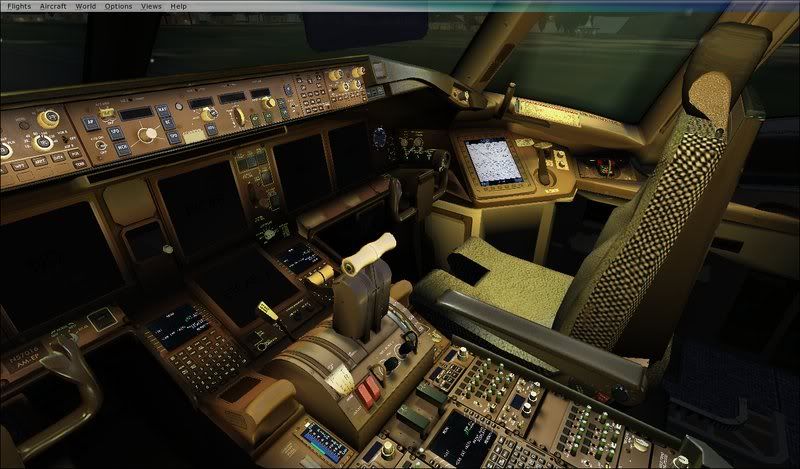
ok i still have a problem, look, thats what i got:

1- the screens/gauges (whatever they are called) are not working :(
2- most of the stuff are NOT functional, you can NOT press any of those buttons for ex. you cant press with the button the autopilot and all that stuff :(

how do i fix these stuff?


Image
Last edited by ryanman on Tue Aug 19, 2008 10:56 pm, edited 1 time in total.
ryanman
Ground hog
Ground hog
 
Posts: 8
Joined: Tue Aug 19, 2008 2:36 pm

Re: How to get your Posky 777 VC working

Postby gtirob01 » Tue Aug 19, 2008 11:03 pm

follow the directions in the very 1st post of this thread.
My specs... A hard drive, motherboard, graphics card, some memory, a keyboard, mouse, and monitor - in other words, nothing special.

Image

My Posky
User avatar
gtirob01
Major
Major
 
Posts: 3605
Joined: Fri Jul 20, 2007 11:10 pm
Location: Ft. Walton Beach, FL

Re: How to get your Posky 777 VC working

Postby ryanman » Tue Aug 19, 2008 11:07 pm

follow the directions in the very 1st post of this thread.

that is the problem, how do you put these codes in ? and how do u save it as .cfg? i can read it fine with the notepad but it cant save it.
ryanman
Ground hog
Ground hog
 
Posts: 8
Joined: Tue Aug 19, 2008 2:36 pm

Re: How to get your Posky 777 VC working

Postby ShaneG_old » Wed Aug 20, 2008 4:24 am

copy & paste the .cfg info in first post to the panel.cfg you downloaded.
ShaneG_old
Lieutenant Colonel
Lieutenant Colonel
 
Posts: 9700
Joined: Tue Mar 11, 2008 11:52 am

Re: How to get your Posky 777 VC working

Postby ryanman » Wed Aug 20, 2008 10:38 am

There are several good ones over at avsim for the GE90 for example. Just adds a bit more realism.

where did u get that from? i cant find any sound files, not in the simviation site and not in the projectopensky site :o :-?
ryanman
Ground hog
Ground hog
 
Posts: 8
Joined: Tue Aug 19, 2008 2:36 pm

Re: How to get your Posky 777 VC working

Postby ShaneG_old » Wed Aug 20, 2008 10:48 am

sound is here: http://www.avsim.com/

search library sub catagory fs2004 sound for:                              
'777-GE-90 "the real deal" version 2'
author:Christoffer Petersen
;)
ShaneG_old
Lieutenant Colonel
Lieutenant Colonel
 
Posts: 9700
Joined: Tue Mar 11, 2008 11:52 am

PreviousNext

Return to Flight Simulator X (FSX) and Steam

Who is online

Users browsing this forum: Major Blackstone and 297 guests