How to get your Posky 777 VC gauges working

FSX including FSX Steam version.

How to get your Posky 777 VC gauges working

Postby gtirob01 » Sat Aug 09, 2008 11:10 pm

**ADDITIONAL NOTE**
Look in your FSX root directory folder for a module named msvcr70.dll. You might need it for some FS9 default gauges to display properly. A quick search on Google should find it if you need it. - Courtesy of Hagar

**NOTE**
The Posky 777 if downloaded from SimV, not all of them include the files necessary to get the VC working. While it does include the entire aircraft package, you will still need to go to the Posky website to get all the necessary VC files. Once you have those, then follow the instructions below.

Also note, I have tested these instructions over and over again with FSX SP2/Acceleration on an XP based machine and a DX9 graphics card.

**UPDATE AGAIN**

Got an easier way to set this all up to get your vc gauges working. Quite simple actually. First, go here;

http://www.simviation.com/simviation/st ... 60&page=24

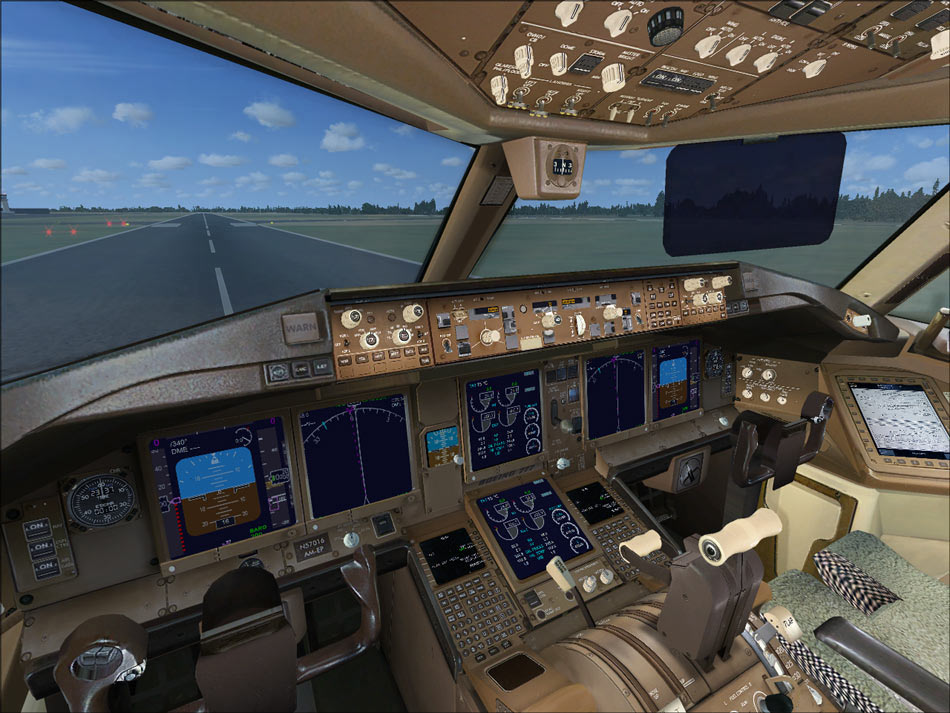
Download the 777 package (2nd from the top). This is the default FS9 777. Once downloaded, open the panel folder. You will see a single gauge file titled, "Boeing 777-300.gau". Take that and put it in your main FSX gauge folder. And thats it! Your vc should have all the gauges and buttons working. You wont need anything else from the download, so do what you'd like with it. You can then modify the config if you'd like to... but keep in mind, its not at all necessary. I just made my own changes to spice things up a bit. Only real necessity is the "//" in front of "gauge00=Pky_glassdirt!Pky_glassdirt" below the Vcockpit03 section of the panel.cfg

This is what you will get

Image

Only real change I made in the config from before is to keep one of the eicas panels as the default 777, and had the other one from the 737-800, as well as changed back the pfd screen to the 777.

I have posted my latest panel.cfg below. This reflects the latest panel on Posky's site, and a few changes I have made. All changes are in red text.

--------------------------------------------------------------------------------


Alot of people have the Posky 777, but cant get their gauges for the vc working. This is how I got mine to work.

Click on pictures for larger view;
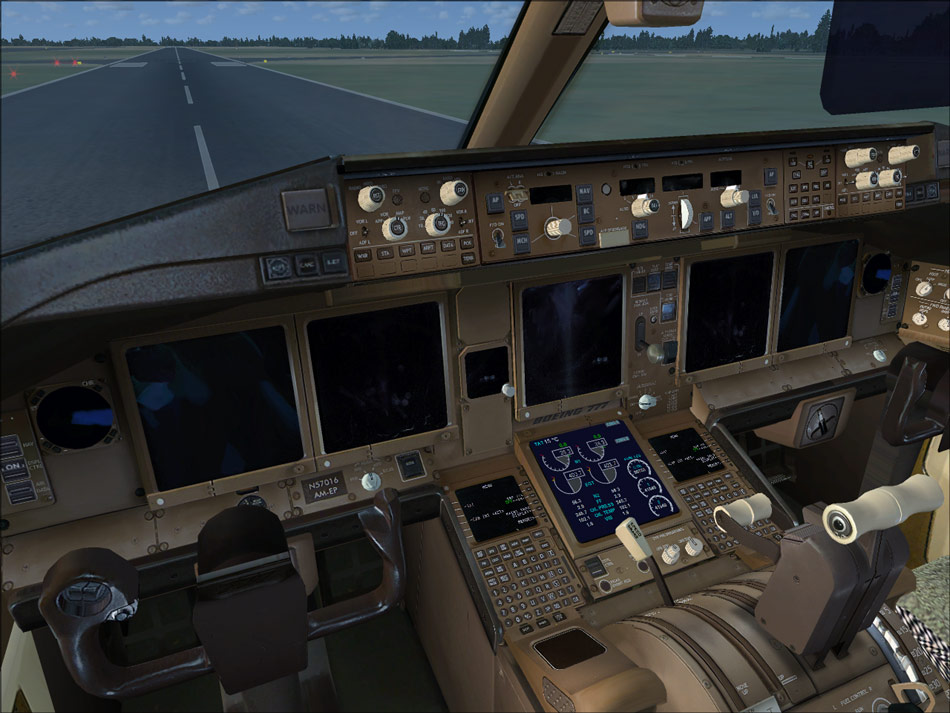
Image Image

Basically I just used the gauges from the default 737-800. Much of the credit goes to Daube for figuring that out. I just chose a few different gauges to look more realistic. And looking at an actual 777 cockpit, this is pretty close. Here is the panel.cfg that I use. You can either make any changes accordingly, or just copy mine. Make sure to have a backup of the original just in case! Keep in mind, this is only for the vc, and not the 2d panel view.

//Project Opensky 777v2 Virtual Cockpit Panel cfg
//Built Friday, June 27, 2008 at 16:09 Jacob Kubique
//Fix by H.Igami 16AUG 2008

[Window Titles]
Window00=Main Panel
Window01=Radio Stack
Window02=GPS
Window03=Throttle Quadrant
Window04=Compass
Window05=Mini Panel
Window06=Posky_Debug
Window07=Posky_Util


//--------------------------------------------------------
[Window00]
file=Forward_640.bmp
file_1024=Forward_1024.bmp
size_mm=640
position=7
visible=1
ident=MAIN_PANEL

gauge00=Boeing777-300!Anti_Ice_Switch,

Last edited by gtirob01 on Mon Mar 02, 2009 8:55 pm, edited 1 time in total.
My specs... A hard drive, motherboard, graphics card, some memory, a keyboard, mouse, and monitor - in other words, nothing special.

Image

My Posky
User avatar
gtirob01
Major
Major
 
Posts: 3605
Joined: Fri Jul 20, 2007 11:10 pm
Location: Ft. Walton Beach, FL

Re: How to get your Posky 777 VC working

Postby Ferrari308guy » Mon Aug 11, 2008 1:13 pm

Cool post Rob. I just copied my default 777.gauge file from FS9 into FSX, and now I've got the 777 gauges in there.

Just a question: did you have a problems with the dirt on the gauge windows? When I loaded my aircraft up, my gauges flickered between the actual gauge and the bitmap image of the dirt. I didn't know if you had this issue. Anyway...I have a temporary fix...but it's not really where I want it.
Image
| Intel Q6600 2.9 Ghz | EVGA GTX260 896MB | 4GB 1066 Mhz DDR2 RAM | Nvidia 780i Mobo |
User avatar
Ferrari308guy
Captain
Captain
 
Posts: 574
Joined: Sat Aug 04, 2007 7:09 pm

Re: How to get your Posky 777 VC working

Postby sonic » Mon Aug 11, 2008 3:29 pm

How do you get the VC to work with a third party panel. I would ask over there but they would just make a snappy comment and lock the thread. ;D
Specs
E6300, 3 gigs 800 Ram, 8800GT oc, 400gig Sata drive, Windows XP Pro 64 Bit..
sonic
Captain
Captain
 
Posts: 835
Joined: Wed Feb 02, 2005 8:52 pm

Re: How to get your Posky 777 VC working

Postby Hagar » Mon Aug 11, 2008 3:51 pm

How do you get the VC to work with a third party panel.

Copy the [VcockpitXX] entries & paste them into the Panel.cfg of the new panel.
Image

Founder & Sole Member - Grumpy's Over the Hill Club for Veteran Virtual Aviators
Member of the Fox Four Group
My Google Photos albums
My Flickr albums
User avatar
Hagar
Colonel
Colonel
 
Posts: 30868
Joined: Wed Jun 19, 2002 7:15 am
Location: Costa Geriatrica

Re: How to get your Posky 777 VC working

Postby gtirob01 » Mon Aug 11, 2008 4:42 pm

Cool post Rob. I just copied my default 777.gauge file from FS9 into FSX, and now I've got the 777 gauges in there.

Just a question: did you have a problems with the dirt on the gauge windows? When I loaded my aircraft up, my gauges flickered between the actual gauge and the bitmap image of the dirt. I didn't know if you had this issue. Anyway...I have a temporary fix...but it's not really where I want it.


Hmm, nope.... mine came right up and were just fine. Maybe it has something to do with the gauges being from the FS9 777? Im not really sure. The gauges I replaced were done with the 737-800 that is default in FSX. But no, didnt have any issues with the dirt on the gauges. Did you put the // in front of the dirt gauge on the bottom of the .cfg?

I would ask over there but they would just make a snappy comment and lock the thread. ;D


I know what you mean, I was over there gathering info, and noticed that those guys are just crude, mean, ...... eh, I better not say anymore. Lets just say they arent nice.  ;D
Last edited by gtirob01 on Mon Aug 11, 2008 4:46 pm, edited 1 time in total.
My specs... A hard drive, motherboard, graphics card, some memory, a keyboard, mouse, and monitor - in other words, nothing special.

Image

My Posky
User avatar
gtirob01
Major
Major
 
Posts: 3605
Joined: Fri Jul 20, 2007 11:10 pm
Location: Ft. Walton Beach, FL

Re: How to get your Posky 777 VC working

Postby Ferrari308guy » Mon Aug 11, 2008 6:32 pm

Thanks for the help Rob, I suspect it's the FS9 gauges in FSX as well.

I also agree that Posky forum mods (and some of the members) are downright mean and unhelpful....wouldn't ever want to become a member there. (I will try to resist going on a rampage about them   :P)
Image
| Intel Q6600 2.9 Ghz | EVGA GTX260 896MB | 4GB 1066 Mhz DDR2 RAM | Nvidia 780i Mobo |
User avatar
Ferrari308guy
Captain
Captain
 
Posts: 574
Joined: Sat Aug 04, 2007 7:09 pm

Re: How to get your Posky 777 VC working

Postby N. Chapman » Mon Aug 11, 2008 7:14 pm

we aren't that mean over there ;)

it just get tiring after 5000000 people ask the same question. like why is my VC black? that would be due to lack of textures for the VC in the texture folder.

or for the 747 (this one was very common) why is my gear all turned and tipped on the ground? Your XML code is not installed properly. (and question answered 5000 times before that ::) )

how can i get this to merge with the PSS or wilco panel? POSKY doesn't support merges

so really there is frustration behind the posts of the moderators due to people not searching on their own ;) not only does it get to the mods but it also gets to the members as well. the people that post there that aren't members usually mean the best when they say "your question has already been answered in the knowledge base."
Image
Click for Computer info overload!
User avatar
N. Chapman
Captain
Captain
 
Posts: 971
Joined: Sat Oct 13, 2007 7:19 pm
Location: Fremont, CA

Re: How to get your Posky 777 VC working

Postby gtirob01 » Mon Aug 11, 2008 8:09 pm

we aren't that mean over there ;)

it just get tiring after 5000000 people ask the same question. like why is my VC black? that would be due to lack of textures for the VC in the texture folder.

or for the 747 (this one was very common) why is my gear all turned and tipped on the ground? Your XML code is not installed properly. (and question answered 5000 times before that ::) )

how can i get this to merge with the PSS or wilco panel? POSKY doesn't support merges

so really there is frustration behind the posts of the moderators due to people not searching on their own ;) not only does it get to the mods but it also gets to the members as well. the people that post there that aren't members usually mean the best when they say "your question has already been answered in the knowledge base."


I can certainly understand the same question being asked over and over again to get real old, real fast. I have to deal with that in my line of work as well. But when they get to the point where they are calling people names, and telling them to go away and dont use their products... thats a bit much if you ask me.
My specs... A hard drive, motherboard, graphics card, some memory, a keyboard, mouse, and monitor - in other words, nothing special.

Image

My Posky
User avatar
gtirob01
Major
Major
 
Posts: 3605
Joined: Fri Jul 20, 2007 11:10 pm
Location: Ft. Walton Beach, FL

Re: How to get your Posky 777 VC working

Postby Ferrari308guy » Mon Aug 11, 2008 9:31 pm

I'm not really talking about those issues....I've seen other things that I highly disapprove of. But, I'm not going to get into it. Plus, I want to attempt to stay on the topic of this post  :)
Image
| Intel Q6600 2.9 Ghz | EVGA GTX260 896MB | 4GB 1066 Mhz DDR2 RAM | Nvidia 780i Mobo |
User avatar
Ferrari308guy
Captain
Captain
 
Posts: 574
Joined: Sat Aug 04, 2007 7:09 pm

Re: How to get your Posky 777 VC working

Postby gtirob01 » Mon Aug 11, 2008 9:58 pm

Agreed. Ok now... back on the topic at hand.
My specs... A hard drive, motherboard, graphics card, some memory, a keyboard, mouse, and monitor - in other words, nothing special.

Image

My Posky
User avatar
gtirob01
Major
Major
 
Posts: 3605
Joined: Fri Jul 20, 2007 11:10 pm
Location: Ft. Walton Beach, FL

Re: How to get your Posky 777 VC working

Postby chobot » Tue Aug 12, 2008 6:28 am

yo thanx this helps alot but i cant read the speed how do u shrink it a bit
chobot
Ground hog
Ground hog
 
Posts: 8
Joined: Tue Aug 12, 2008 7:24 am
Location: east elmhurst,new york

Re: How to get your Posky 777 VC working

Postby gtirob01 » Tue Aug 12, 2008 6:21 pm

yo thanx this helps alot but i cant read the speed how do u shrink it a bit


Im no designer, but I dont think you can adjust the size of any gauge once it has been made. Just have to make due with what is available. Remember, this plane wasnt designed for FSX.
My specs... A hard drive, motherboard, graphics card, some memory, a keyboard, mouse, and monitor - in other words, nothing special.

Image

My Posky
User avatar
gtirob01
Major
Major
 
Posts: 3605
Joined: Fri Jul 20, 2007 11:10 pm
Location: Ft. Walton Beach, FL

Re: How to get your Posky 777 VC working

Postby gtirob01 » Wed Aug 13, 2008 10:33 pm

Guess this was good enough for Posky to put up in their knowledge base section!

http://forum.projectopensky.com/index.p ... opic=33234

Keep in mind, I have yet to test this config with the SP1 vc panel.
My specs... A hard drive, motherboard, graphics card, some memory, a keyboard, mouse, and monitor - in other words, nothing special.

Image

My Posky
User avatar
gtirob01
Major
Major
 
Posts: 3605
Joined: Fri Jul 20, 2007 11:10 pm
Location: Ft. Walton Beach, FL

Re: How to get your Posky 777 VC working

Postby N. Chapman » Wed Aug 13, 2008 10:58 pm

yup it made it there 'cause who knows how many times this may/will be asked :)

should work the same ;) the SP1 model just addresses some animation issues with the exterior model :)
Last edited by N. Chapman on Wed Aug 13, 2008 10:59 pm, edited 1 time in total.
Image
Click for Computer info overload!
User avatar
N. Chapman
Captain
Captain
 
Posts: 971
Joined: Sat Oct 13, 2007 7:19 pm
Location: Fremont, CA

Re: How to get your Posky 777 VC working

Postby AMDDDA » Sat Aug 16, 2008 6:47 pm

Is there anything stopping them from just including the VC in the newer repaints/releases?
User avatar
AMDDDA
Captain
Captain
 
Posts: 975
Joined: Wed Oct 31, 2007 6:56 pm

Next

Return to Flight Simulator X (FSX) and Steam

Who is online

Users browsing this forum: No registered users and 334 guests