OK This is it.

FSX including FSX Steam version.

OK This is it.

Postby captjim » Tue May 11, 2010 8:42 am

Hello again fellow simmers, captjim here again.  I reeeeeley need some expert help.  I hate to admit it, but a head of cabbage probably understands how to download and insert aircraft better than I.  I have tried to follow all the past suggestions to include Grumpys.  I an currently running Windows 7.  Back when I had XP and then VISTA, I actually was able to download and insert successfully.  Thats not the case now.  What I would like is for some sympathic simmer to e-mail me some very basic (and I mean basic) instructions on how to do this.  Please don't assume that I know how to cut & paste etc.  I realize that the proceedure is probably very simple, however it is not simple for me.  (JimCLehman@aol.com) Thanks in advance.
captjim
2nd Lieutenant
2nd Lieutenant
 
Posts: 172
Joined: Fri Oct 15, 2004 2:28 pm

Re: OK This is it.

Postby Boikat » Tue May 11, 2010 9:22 am

The procedures should be exatly the same for Win7 as it was for Vista.

Could you give a "step by step" on how you are attempting to install the add-ons?  Where does it all go "poof"?
Image
"I reject your reality, and substitute my own" Adam Savage, Mythbusters
User avatar
Boikat
Major
Major
 
Posts: 2974
Joined: Thu Mar 20, 2008 8:23 pm
Location: NW Loueezianner

Re: OK This is it.

Postby captjim » Tue May 11, 2010 4:09 pm

Hi Boicat, sorry it took so long to get back to you.  I download the aircraft into my desktop.  It also appeares in my folder named "Jim".  In both cases it appears in a Zip file called Izarc, used by Windows 7.  Click on the Izarc icon and up pops a small window with two sides.  In the address line (C:\program files\microsoft games\fsx aircraft) appeares.  I extract all files and "POOF".  I open FSX and no aircraft.  I get the same result in FS9.  captjim :'(
captjim
2nd Lieutenant
2nd Lieutenant
 
Posts: 172
Joined: Fri Oct 15, 2004 2:28 pm

Re: OK This is it.

Postby Ang2dogs » Tue May 11, 2010 8:49 pm

[quote]
User avatar
Ang2dogs
Captain
Captain
 
Posts: 862
Joined: Sun Aug 19, 2007 12:38 am
Location: black mountain hills of Dakota

Re: OK This is it.

Postby matthewdev » Tue May 11, 2010 9:03 pm

[quote][quote]
User avatar
matthewdev
1st Lieutenant
1st Lieutenant
 
Posts: 310
Joined: Wed Dec 03, 2008 1:08 am
Location: Hobart

Re: OK This is it.

Postby Capt.Propwash » Tue May 11, 2010 9:55 pm

also, keep in mind that if your FSX is "NOT" in the default location ... like on an external drive like mine is, that your File path will not be the same as above.  It might be something like...

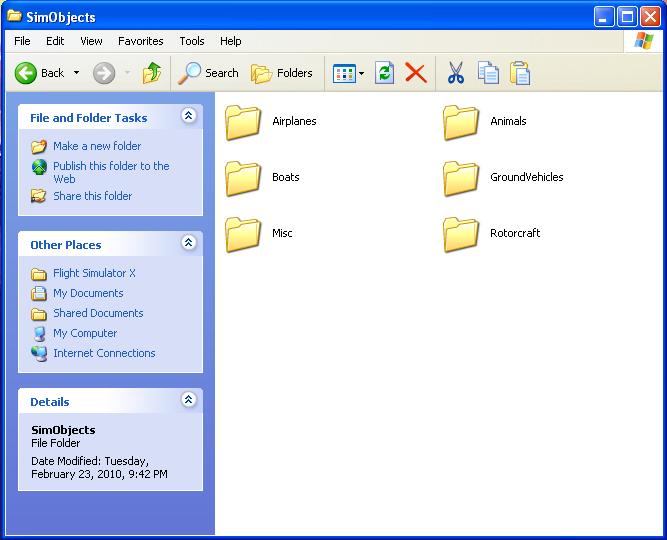
E:/Microsoft Games/Flight Simulator X/Sim Objects


also, it depends on what kind of "craft" it is that you are trying to install.  Helicopter, Car/truck, Airplane, Animal, Boat, Misc.  that each type will need to go to their respective folder, and not just all be placed in the ..Sim Objects/Airplanes folder.
Image


as stated above, whereever you have your FSX installed, all Gauges will go to the Gauges folder, Effects to the Effects, Modules to Modules, Addon Scenery to Addon Scenery (make sure to activate in the sim after installation), Missions to Missions. ... All of these things are the exact same, it does not matter what OS you are running unless it is a 64BIT OS... like WINDOWS VISTA 64.  Then your path (if default) I believe would be:

C:/Program Files x86/Microsoft Games/Flight Simulator X/(destination folder here)


If I am wrong, would someone with a 64bit system please correct me.
The thoughts and expressions contained in the post above are solely my own, and not necessarily those of Simviation.com, its Moderators, its Staff, its Members, or other guests. They can not, are not, and will not be held liable for any thoughts, or expre

User avatar
Capt.Propwash
Major
Major
 
Posts: 1947
Joined: Tue Feb 20, 2007 12:34 am
Location: KCHS, Charleston, SC, USA

Re: OK This is it.

Postby captjim » Wed May 12, 2010 1:51 pm

I really appreciate the fine response.  I will try and follow your instructions and see if I can get things to work.  I am really into this flight sim thing and there are a lot of aircraft I hope to get.  Thanks again fellow simmers, captjim. ;)
captjim
2nd Lieutenant
2nd Lieutenant
 
Posts: 172
Joined: Fri Oct 15, 2004 2:28 pm


Return to Flight Simulator X (FSX) and Steam

Who is online

Users browsing this forum: No registered users and 642 guests