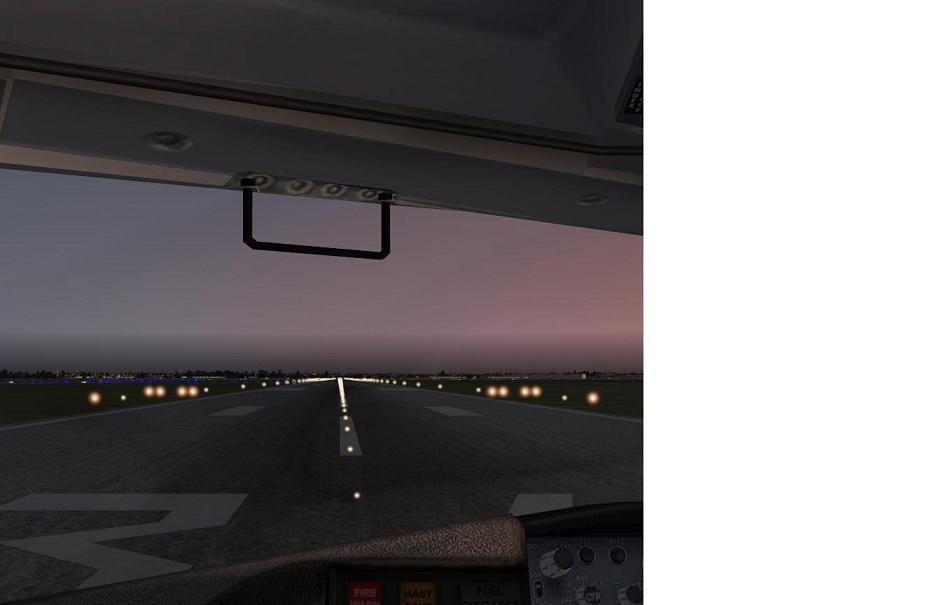
Fuzzy runway lights

FSX including FSX Steam version.

Fuzzy runway lights

Postby michaleen » Sat May 01, 2010 8:46 pm

Hi there,
I am sure this has been asked before but cant find any reference.
My runway lights are fuzzy and blured like they are out of focus, have tried Nicks tips but no difference.
Any help would be most appreciated.

michaleen
2nd Lieutenant
2nd Lieutenant
 
Posts: 69
Joined: Wed Sep 16, 2009 2:20 am

Re: Fuzzy runway lights

Postby Tai-2 » Sat May 01, 2010 8:51 pm

Hi there,
I am sure this has been asked before but cant find any reference.
My runway lights are fuzzy and blured like they are out of focus, have tried Nicks tips but no difference.
Any help would be most appreciated.


1st.
When did you notice this? After what add on?
Also a screen shot would help us figure problem out better, might be a graphic problem that updating a driver can fix.

Tho not really sure
User avatar
Tai-2
Captain
Captain
 
Posts: 699
Joined: Thu Apr 23, 2009 10:57 pm
Location: Georgia

Re: Fuzzy runway lights

Postby SeanTK » Sat May 01, 2010 9:50 pm

Yep a screenshot is going to help the most here, although the lights are supposed to look a little fuzzy to begin with.
:)

Also, don't feed them after midnight, and sometimes the humidity can really get to them as well.  ;D
Last edited by SeanTK on Sat May 01, 2010 9:51 pm, edited 1 time in total.
SeanTK
 

Re: Fuzzy runway lights

Postby michaleen » Sun May 02, 2010 3:05 am

I think it started after I installed Orbix FTX pacific northwest.
Could you run me through how to take a screenshot.
Thanks for the help.
michaleen
2nd Lieutenant
2nd Lieutenant
 
Posts: 69
Joined: Wed Sep 16, 2009 2:20 am

Re: Fuzzy runway lights

Postby Meck » Sun May 02, 2010 7:36 am

Just press 'V' to get a screenshot saved in your pictures folder or hit 'Print Screen' (somewhere next to F12) then open MS Paint (or any other graphic software), hit 'ctrl + v' and save...  ;)
Image

excuse bad grammar; "I' bin Bayer..."
User avatar
Meck
Major
Major
 
Posts: 1656
Joined: Sat Apr 21, 2007 12:07 pm
Location: Bavaria

Re: Fuzzy runway lights

Postby olderndirt » Sun May 02, 2010 11:18 am

I think it started after I installed Orbix FTX pacific northwest.
In the FTX Central configurator, there's an area where you can select your size and style of lights - check that.
[img]http://www.simviation.com/yabbuploads/oldrt18.jpg
User avatar
olderndirt
Major
Major
 
Posts: 3495
Joined: Sat Dec 20, 2008 3:07 pm
Location: Rochester, WA

Re: Fuzzy runway lights

Postby michaleen » Sun May 02, 2010 4:16 pm

Have tried changing light in FSX configurator but no difference,
Standby for screen shot!
michaleen
2nd Lieutenant
2nd Lieutenant
 
Posts: 69
Joined: Wed Sep 16, 2009 2:20 am

Re: Fuzzy runway lights

Postby michaleen » Sun May 02, 2010 5:12 pm

I am having trouble posting the screen shot on this page.
Not sure how to do it.
I have got it saved.
michaleen
2nd Lieutenant
2nd Lieutenant
 
Posts: 69
Joined: Wed Sep 16, 2009 2:20 am

Re: Fuzzy runway lights

Postby SeanTK » Sun May 02, 2010 6:34 pm

http://www.simviation.com/yabbupload.html

After uploading, just copy the line it gives you into the message area of your post, and it should work.
Last edited by SeanTK on Sun May 02, 2010 6:35 pm, edited 1 time in total.
SeanTK
 

Re: Fuzzy runway lights

Postby olderndirt » Sun May 02, 2010 8:18 pm

Click on 'reply'.
[img]http://www.simviation.com/yabbuploads/oldrt18.jpg
User avatar
olderndirt
Major
Major
 
Posts: 3495
Joined: Sat Dec 20, 2008 3:07 pm
Location: Rochester, WA

Re: Fuzzy runway lights

Postby michaleen » Sun May 02, 2010 9:59 pm

Image
michaleen
2nd Lieutenant
2nd Lieutenant
 
Posts: 69
Joined: Wed Sep 16, 2009 2:20 am


Return to Flight Simulator X (FSX) and Steam

Who is online

Users browsing this forum: No registered users and 556 guests